
Vue小案例 之 商品管理------删除商品与提示
实现删除商品功能
根据索引来进行删除商品:
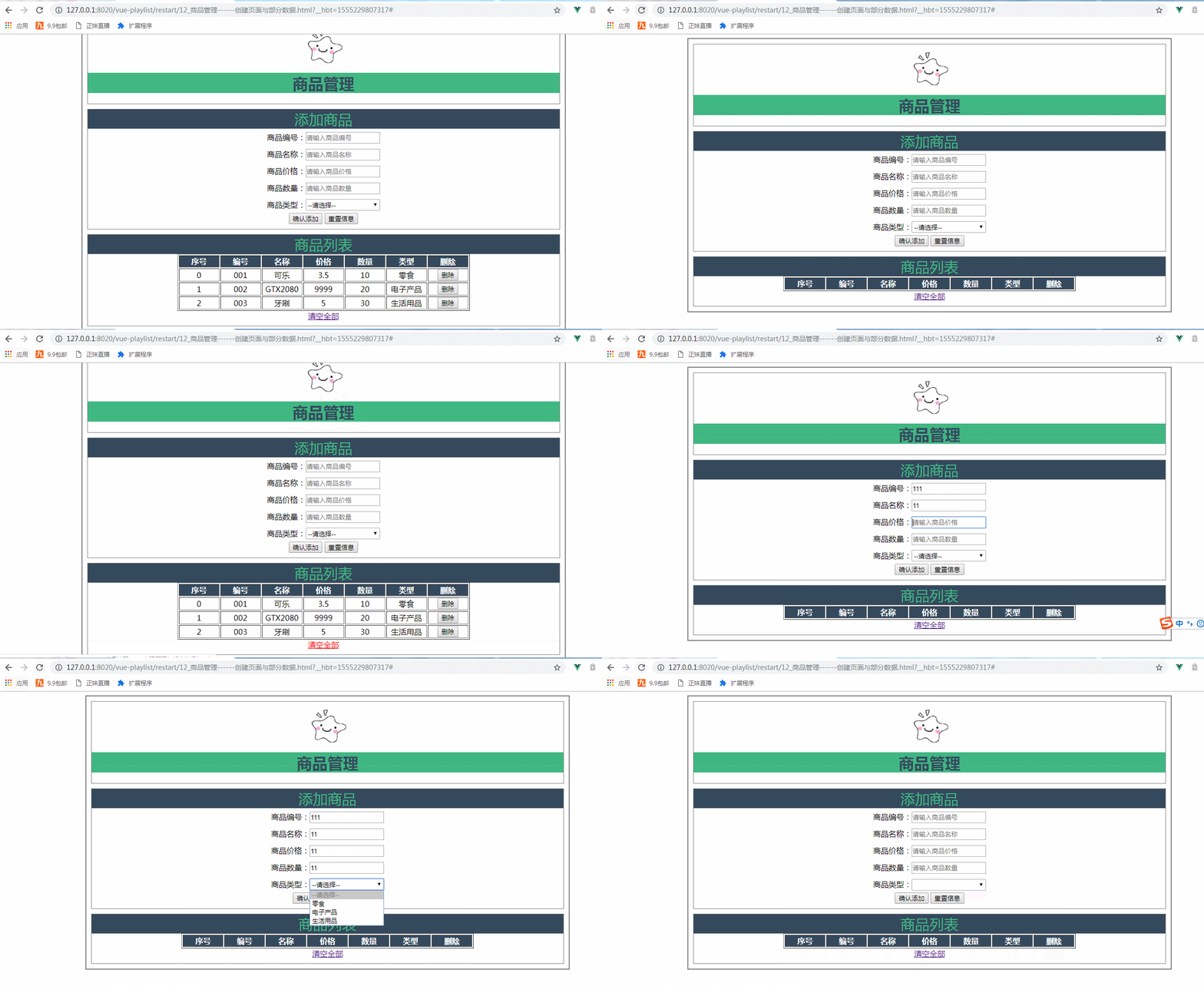
实现删除商品的HTML:
<!--显示表格-->

    <div class="table-warp">

        <div class="sub_title">商品列表</div>

        <table border="" align="center">

            <tr>

                <th>序号</th>

                <th>编号</th>

                <th>名称</th>

                <th>价格</th>

                <th>数量</th>

                <th>类型</th>

                <th>删除</th>

            </tr>

            <tr v-for="(item,index) in goodsArry" :key="item.id">

                <td>{{index}}</td>

                <td>{{item.id}}</td>

                <td>{{item.name}}</td>

                <td>{{item.price}}</td>

                <td>{{item.num}}</td>

                <td>{{item.type}}</td>

                <td>

                    <button  @click="delGoods(index)">删除</button>

                </td>

            </tr>

        </table>

        <div class="clear-btn">

          <a href="#" @click="clearGoodsArry" >清空全部</a>

      </div>

      </div>
实现删除商品的vue:
methods:{

                    addGoods(){

                        this.goodsArry.push(this.goods);

                        this.goods={};

                    },

                    delGoods(index){

                        this.goodsArry.splice(index,);

                    },

                    clearGoodsArry(){

                     this.goodsArry=[];

                     },

                }

            });

            }
实现删除商品后提示信息的显示:
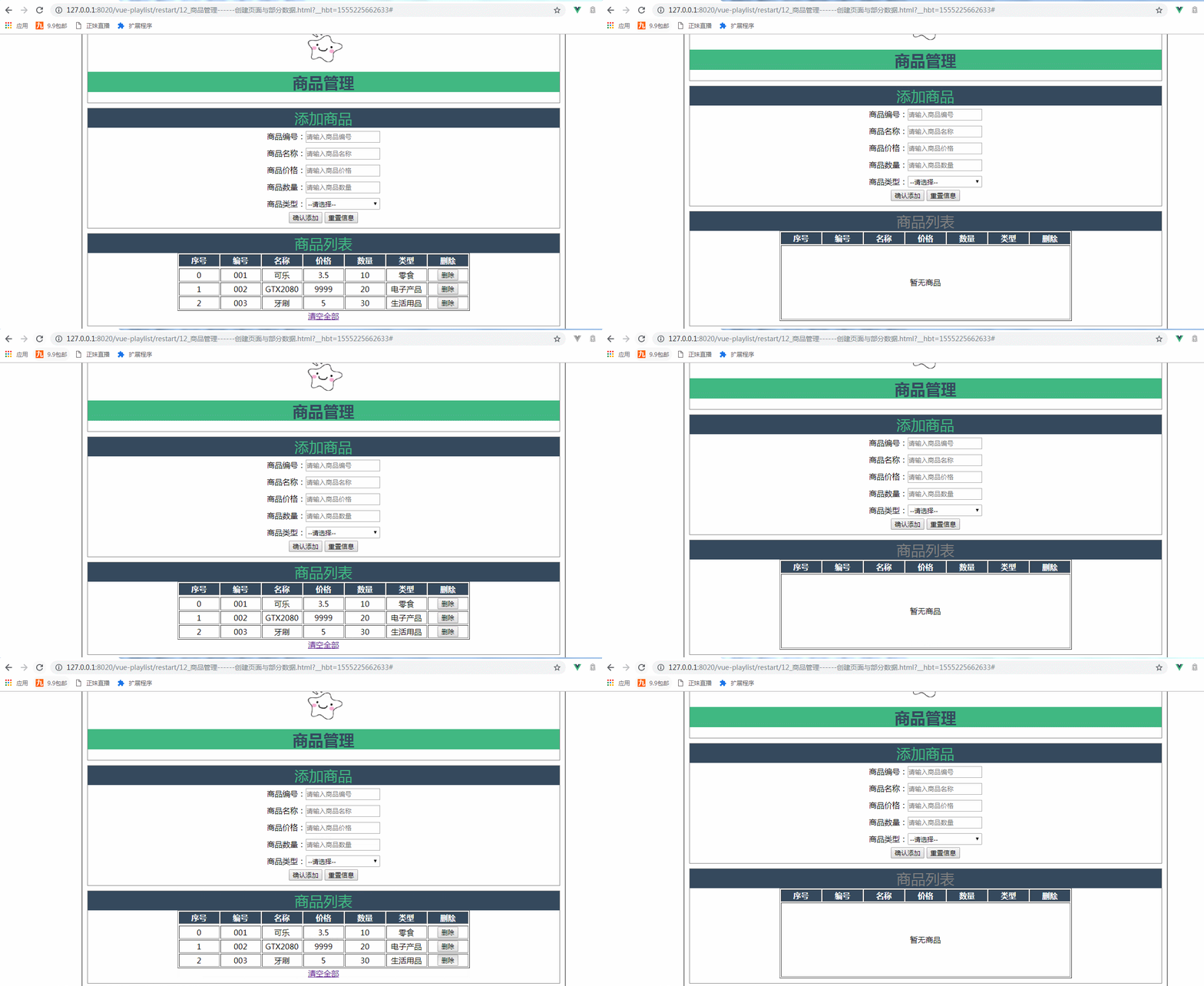
实现提示信息的HTML:
<!--显示表格-->

    <div class="table-warp">

        <div :class="{fontColor:goodsArry.length<=0}"   class="sub_title">商品列表</div>

        <table border="" align="center">

            <tr>

                <th>序号</th>

                <th>编号</th>

                <th>名称</th>

                <th>价格</th>

                <th>数量</th>

                <th>类型</th>

                <th>删除</th>

            </tr>

            <td :colspan="colNum" height="150px" v-show="goodsArry.length<=0">

                暂无商品

            </td>

            <tr v-for="(item,index) in goodsArry" :key="item.id">

                <td>{{index}}</td>

                <td>{{item.id}}</td>

                <td>{{item.name}}</td>

                <td>{{item.price}}</td>

                <td>{{item.num}}</td>

                <td>{{item.type}}</td>

                <td>

                    <button  @click="delGoods(index)">删除</button>

                </td>

            </tr>

        </table>

        <div class="clear-btn">

          <a href="#" @click="clearGoodsArry" v-show="goodsArry.length>0" >清空全部</a>

      </div>

      </div>
商品列表中如果没有商品“商品列表”四个字就会由绿色变为灰色,通过v-bind绑定样式来通过json方式实现:
<div :class="{fontColor:goodsArry.length<=0}" class="sub_title">商品列表</div>
其fontColor的css:
.fontColor{

    color: gray;

    text-align: center;

}
如果商品列表中无数据的话,就会合并7列,并且显示暂无商品的提示,该数量7在vue代码中进行定义变量属性值,使用时在HTML通过v-bind来进行绑定该属性:
 <td :colspan="colNum" height="150px" v-show="goodsArry.length<=0">

                暂无商品

            </td>
在vue中定义的变量colNum:
data:{

                    imgUrl:'../res/images/',

                    imgName:'lovely.ico',

                    goods:{

                        id:'',

                        name:'',

                        price:'',

                        num:'',

                        type:''

                    },

                    goodsType:['零食','电子产品','生活用品'],

                    goodsArry:[

                    {id:'',name:'可乐',price:3.5,num:,type:'零食'},

                    {id:'',name:'GTX2080',price:,num:,type:'电子产品'},

                    {id:'',name:'牙刷',price:,num:,type:'生活用品'}

                    ],

                    colNum:

                },
a标签中的清空全部,如果商品列表中没有数据就不显示这几个字,如果有数据则会显示出来:
<a href="#" @click="clearGoodsArry" v-show="goodsArry.length>0" >清空全部</a>
实现删除商品与提示信息的总代码:
 <!DOCTYPE html>

 <html>

     <head>

         <meta charset="UTF-8">

         <title>商品管理------创建页面与部分数据</title>

         <script src="../js/vue.js"></script>

         <script>

             window .onload= () =>{

                 new Vue({

                 el:"#container",

                 data:{

                     imgUrl:'../res/images/',

                     imgName:'lovely.ico',

                     goods:{

                         id:'',

                         name:'',

                         price:'',

                         num:'',

                         type:''

                     },

                     goodsType:['零食','电子产品','生活用品'],

                     goodsArry:[

                     {id:'',name:'可乐',price:3.5,num:,type:'零食'},

                     {id:'',name:'GTX2080',price:,num:,type:'电子产品'},

                     {id:'',name:'牙刷',price:,num:,type:'生活用品'}

                     ],

                     colNum:

                 },

                 methods:{

                     addGoods(){

                         this.goodsArry.push(this.goods);

                         this.goods={};

                     },

                     delGoods(index){

                         this.goodsArry.splice(index,);

                     },

                     clearGoodsArry(){

                      this.goodsArry=[];

                      },

                 }

             });

             }

         </script>

         <style>

             #container{

                 margin:  auto;

                 text-align: center;

                 width: 1000px;

                 border:2px solid gray;

             }

           .header{

          margin: 10px;

          border: 1px solid gray;

           }

       .header .title{

       color: rgb(,,);

     background: rgb(,,);

        }

      .sub_title{

       background:rgb(,,);

      color: rgb(,,);

      font-size: 30px;

      }

 .form-warp{

    margin: 10px;

    padding-bottom: 10px;

   border: 1px solid gray;

 }

 .form-warp .content{

   line-height: 35px;

 }

 .form-warp input{

   width: 150px;

   height: 18px;

 }

         .form-warp select{

     width: 154px;

     height: 24px;

 }

    .table-warp{

     padding-bottom: 10px;

     margin: 10px;

      border: 1px solid gray;

 }

 .table-warp th{

   width: 80px;

   color: #ffff;

   background: rgb(,,);

 }

 .logo

 {

   position: relative;

   top: 12px;

 }

 .fontColor{

     color: gray;

     text-align: center;

 }

         </style>

     </head>

     <body>

         <div id="container">

             <!--logo title-->

             <div class="header">

                 <img :src="imgUrl+imgName" class="logo"  height="80px"  width="100px"   />

                 <h1 class="title">商品管理</h1>

             </div>

             <!--输入部分input-->

             <div  class="form-warp">

                 <div class="sub_title">添加商品</div>

                 <div class="content">

                     商品编号:<input type="text" placeholder="请输入商品编号"  v-model="goods.id"/><br />

                     商品名称:<input type="text" placeholder="请输入商品名称"  v-model="goods.name"/><br />

                     商品价格:<input type="text" placeholder="请输入商品价格"  v-model="goods.price"/><br />

                     商品数量:<input type="text" placeholder="请输入商品数量" v-model="goods.num"/><br />

                     商品类型:<select v-model="goods.type">

                         <option value="" disabled="disabled">--请选择--</option>

                         <option v-for="type in goodsType">{{type}}</option>

                     </select>

             </div>

             <div class="form-btn">

                 <button @click="addGoods">确认添加</button>

                 <button @click="goods= { } ">重置信息</button>

             </div>

     </div>

     <!--显示表格-->

     <div class="table-warp">

         <div :class="{fontColor:goodsArry.length<=0}"   class="sub_title">商品列表</div>

         <table border="" align="center">

             <tr>

                 <th>序号</th>

                 <th>编号</th>

                 <th>名称</th>

                 <th>价格</th>

                 <th>数量</th>

                 <th>类型</th>

                 <th>删除</th>

             </tr>

             <td :colspan="colNum" height="150px" v-show="goodsArry.length<=0">

                 暂无商品

             </td>

             <tr v-for="(item,index) in goodsArry" :key="item.id">

                 <td>{{index}}</td>

                 <td>{{item.id}}</td>

                 <td>{{item.name}}</td>

                 <td>{{item.price}}</td>

                 <td>{{item.num}}</td>

                 <td>{{item.type}}</td>

                 <td>

                     <button  @click="delGoods(index)">删除</button>

                 </td>

             </tr>

         </table>

         <div class="clear-btn">

           <a href="#" @click="clearGoodsArry" v-show="goodsArry.length>0" >清空全部</a>

       </div>

       </div>

             </div>

     </body>

 </html>
实现删除商品与提示信息
Vue小案例 之 商品管理------删除商品与提示的更多相关文章
- Cookie小案例-----记住浏览过的商品记录
Cookie小案例------记住浏览过的商品记录 我们知道,这个功能在电商项目中非经常见.这里处理请求和页面显示都是由servlet实现,主要是为了体现cookie的作用, 实现功能例如以下: 1, ...
- Vue小案例 之 商品管理------批量删除与商品数量的调整
通过索引进行删除,进行测试,是否获取其索引: 测试效果: 测试代码,在vue中定义一个空的数组,以便后面进行数据的绑定: data:{ imgUrl:'../res/images/', imgName ...
- Vue小案例 之 商品管理------学习过滤器 使用过滤器处理日期的格式
代码学习过滤器 过滤器介绍:过滤模型数据,在数据显示前做预处理操作: 内置过滤器:在1.x中,Vue提供了内置过滤器,但是在2.x中已经完全废除: 解决办法: (1)使用第三方库来替代1.x中的内置过 ...
- Vue小案例 之 商品管理------修改商品数量以及增加入库日期属性
实现修改商品的数量: 加入的代码: css: .clear-btn{ text-align: right; padding-right: 10px; } .table-warp a{ text-dec ...
- Vue小案例 之 商品管理------为之前的页面修改样式
最终修改的页面效果: 修改的css: <style> #container{ margin: auto; text-align: center; width: 1000px; border ...
- Vue小案例 之 商品管理------添加商品
进行添加button,以及商品列表的创建 html: <div class="form-btn"> <button>确认添加</button> ...
- Vue小案例 之 商品管理------创建页面与部分数据
logo的路径: 页面的初始布局: 初始的HTML: <div id="container"> <!--logo title--> <div clas ...
- Vue(小案例_vue+axios仿手机app)_Vuex优化购物车功能
一.前言 1.用vuex实现加入购物车操作 2.购物车详情页面 3.点击删除按钮,删除购物详情页面里的对应商品 二.主要内容 1.用vuex加入购物车 (1)在src ...
- Vue(小案例_vue+axios仿手机app)_购物车(二模拟淘宝购物车页面,点击加减做出相应变化)
一.前言 在上篇购物车中,如果用户刷新了当前的页面,底部导航中的数据又会恢复为原来的: 1.解决刷新,购物车上数值不变 ...
随机推荐
- fill和memset的区别
https://blog.csdn.net/xs18952904/article/details/75195412 memset只能初始化成为0或者-1,其他都要用fill来完成. #include& ...
- 深入理解Java虚拟机2-chap3-斗之气9段
一.GC需要完成三件事 哪些内存需要回收:找出不需要使用的对象 什么时候回收:JVM空闲/堆内存紧张 如何回收:回收垃圾的策略 二.寻找已死对象:第一件事 判断对象是否存活算法 1.引用计数算法 原理 ...
- cocos2d-x C++ iOS工程集成第三方支付宝支付功能
一.在支付宝开放平台下载支付宝SDK(https://doc.open.alipay.com/doc2/detail.htm?spm=a219a.7629140.0.0.WWgVz8&tr ...
- php 提取多维数组指定列
前言:有时候在开发中会遇到这样的问题,我们需要把有规律的多维数组按照纵向(列)取出,有下面的方法可用: 我们将拿下面的数组来处理: 1 $arr = array( 2 '0' => array( ...
- node.js初识09
1.node_module文件夹 如果你的require中没有写./,那么Node.js将该文件视为node_modules目录下的一个文件. 2.package.json文件 如果使用文件夹来统筹管 ...
- Linux系统安装nodejs
参考文档 官网连接 镜像连接 安装方法有三种: 1. 源码安装(耗时) 2. apt-get / yum 安装(版本比较低) 3. 解压后创建软连接(推荐) 方法一. 1 ) 指定目录下下载源码包 $ ...
- Nginx查看并发链接数
一.通过界面查看通过web界面查看时Nginx需要开启status模块,也就是安装Nginx时加上 --with-http_stub_status_module 一.通过界面查看 通过web界面查看时 ...
- vm虚拟机出现Disk启动失败
https://jingyan.baidu.com/article/a501d80c0e45b8ec630f5ed6.html
- JavaScript(四):运算符&数据类型转换
+:算符的加法:连接字符串 加法会将其它类型的值,自动转为字符串,然后再进行连接运算! var a=1+2; console.log('first: '+a); var a=1+2+'3';//先计算 ...
- Introduction to debugging neural networks
http://russellsstewart.com/notes/0.html The following advice is targeted at beginners to neural netw ...