
Vue小案例 之 商品管理------批量删除与商品数量的调整
通过索引进行删除,进行测试,是否获取其索引:
测试效果:
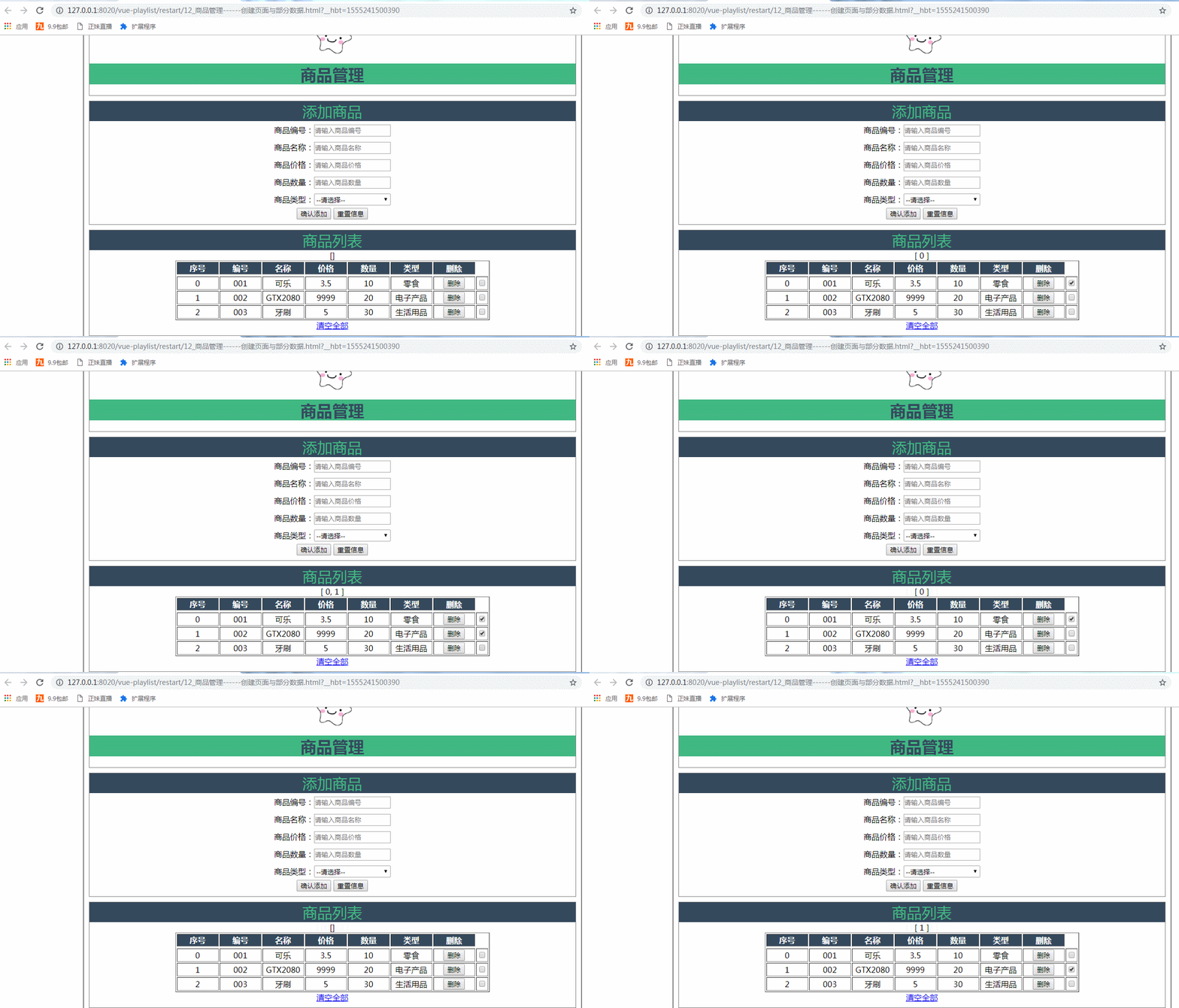
测试代码,在vue中定义一个空的数组,以便后面进行数据的绑定:
data:{

                    imgUrl:'../res/images/',

                    imgName:'lovely.ico',

                    goods:{

                        id:'',

                        name:'',

                        price:'',

                        num:'',

                        type:''

                    },

                    goodsType:['零食','电子产品','生活用品'],

                    goodsArry:[

                    {id:'',name:'可乐',price:3.5,num:,type:'零食'},

                    {id:'',name:'GTX2080',price:,num:,type:'电子产品'},

                    {id:'',name:'牙刷',price:,num:,type:'生活用品'}

                    ],

                    colNum:,

                    delArray:[]

                },
测试的HTML代码:
            <tr v-for="(item,index) in goodsArry" :key="item.id">

                <td>{{index}}</td>

                <td>{{item.id}}</td>

                <td>{{item.name}}</td>

                <td>{{item.price}}</td>

                <td>{{item.num}}</td>

                <td>{{item.type}}</td>

                <td>

                    <button  @click="delGoods(index)">删除</button>

                </td>

                <td>

                    <input type="checkbox" :value="index" v-model="delArray"/>

                </td>

            </tr>

            {{delArray}}
实现选择删除商品功能,通过遍历索引数组:

为了保证数据列表从小排到大:
测试使其列表从小排到大

测试代码:
 delSelected(){

                         this.delArray.sort((a,b)=>{

                             return a-b;

                         });

                         console.log(this.delArray);

                         for(var i=;i<this.delArray.length;i++)

                         {

                             this.goodsArry.splice(this.delArray[i]-i,);

                         }

                         this.delArray=[];

                     }

                }
最终实现该功能的总代码:
 <!DOCTYPE html>

 <html>

     <head>

         <meta charset="UTF-8">

         <title>商品管理------创建页面与部分数据</title>

         <script src="../js/vue.js"></script>

         <script>

             window .onload= () =>{

                 new Vue({

                 el:"#container",

                 data:{

                     imgUrl:'../res/images/',

                     imgName:'lovely.ico',

                     goods:{

                         id:'',

                         name:'',

                         price:'',

                         num:'',

                         type:''

                     },

                     goodsType:['零食','电子产品','生活用品'],

                     goodsArry:[

                     {id:'',name:'可乐',price:3.5,num:,type:'零食'},

                     {id:'',name:'GTX2080',price:,num:,type:'电子产品'},

                     {id:'',name:'牙刷',price:,num:,type:'生活用品'}

                     ],

                     colNum:,

                     delArray:[]//删除选中的索引

                 },

                 methods:{

                     addGoods(){

                         this.goodsArry.push(this.goods);

                         this.goods={};

                     },

                     delGoods(index){

                         this.goodsArry.splice(index,);

                     },

                     clearGoodsArry(){

                      this.goodsArry=[];

                      },

                      delSelected(){

                          this.delArray.sort((a,b)=>{

                              return a-b;

                          });

                          console.log(this.delArray);

                          for(var i=;i<this.delArray.length;i++)

                          {

                              this.goodsArry.splice(this.delArray[i]-i,);

                          }

                          this.delArray=[];

                      }

                 }

             });

             }

         </script>

         <style>

             #container{

                 margin:  auto;

                 text-align: center;

                 width: 1000px;

                 border:2px solid gray;

             }

           .header{

          margin: 10px;

          border: 1px solid gray;

           }

       .header .title{

       color: rgb(,,);

     background: rgb(,,);

        }

      .sub_title{

       background:rgb(,,);

      color: rgb(,,);

      font-size: 30px;

      }

 .form-warp{

    margin: 10px;

    padding-bottom: 10px;

   border: 1px solid gray;

 }

 .form-warp .content{

   line-height: 35px;

 }

 .form-warp input{

   width: 150px;

   height: 18px;

 }

         .form-warp select{

     width: 154px;

     height: 24px;

 }

    .table-warp{

     padding-bottom: 10px;

     margin: 10px;

      border: 1px solid gray;

 }

 .table-warp th{

   width: 80px;

   color: #ffff;

   background: rgb(,,);

 }

 .logo

 {

   position: relative;

   top: 12px;

 }

 .fontColor{

     color: gray;

     text-align: center;

 }

         </style>

     </head>

     <body>

         <div id="container">

             <!--logo title-->

             <div class="header">

                 <img :src="imgUrl+imgName" class="logo"  height="80px"  width="100px"   />

                 <h1 class="title">商品管理</h1>

             </div>

             <!--输入部分input-->

             <div  class="form-warp">

                 <div class="sub_title">添加商品</div>

                 <div class="content">

                     商品编号:<input type="text" placeholder="请输入商品编号"  v-model="goods.id"/><br />

                     商品名称:<input type="text" placeholder="请输入商品名称"  v-model="goods.name"/><br />

                     商品价格:<input type="text" placeholder="请输入商品价格"  v-model="goods.price"/><br />

                     商品数量:<input type="text" placeholder="请输入商品数量" v-model="goods.num"/><br />

                     商品类型:<select v-model="goods.type">

                         <option value="" disabled="disabled">--请选择--</option>

                         <option v-for="type in goodsType">{{type}}</option>

                     </select>

             </div>

             <div class="form-btn">

                 <button @click="addGoods">确认添加</button>

                 <button @click="goods= { } ">重置信息</button>

             </div>

     </div>

     <!--显示表格-->

     <div class="table-warp">

         <div :class="{fontColor:goodsArry.length<=0}"   class="sub_title">商品列表</div>

         <table border="" align="center">

             <tr>

                 <th>序号</th>

                 <th>编号</th>

                 <th>名称</th>

                 <th>价格</th>

                 <th>数量</th>

                 <th>类型</th>

                 <th>删除</th>

                 <th>选择</th>

             </tr>

             <td :colspan="colNum" height="150px" v-show="goodsArry.length<=0">

                 暂无商品

             </td>

             <tr v-for="(item,index) in goodsArry" :key="item.id">

                 <td>{{index}}</td>

                 <td>{{item.id}}</td>

                 <td>{{item.name}}</td>

                 <td>{{item.price}}</td>

                 <td>{{item.num}}</td>

                 <td>{{item.type}}</td>

                 <td>

                     <button  @click="delGoods(index)">删除</button>

                 </td>

                 <td>

                     <input type="checkbox" :value="index" v-model="delArray"/>

                 </td>

             </tr>

         {{delArray}}

         </table>

         <div class="clear-btn">

           <a href="#" @click="delSelected" v-show="delArray.length>0" >删除选中</a>

           <a href="#" @click="clearGoodsArry" v-show="goodsArry.length>0" >清空全部</a>

       </div>

       </div>

             </div>

     </body>

 </html>
实现批量删除功能代码
Vue小案例 之 商品管理------批量删除与商品数量的调整的更多相关文章
- python3 - 商品管理的程序,商品信息都存在一个json串里面
商品管理的程序,商品信息都存在一个json串里面 1.查询商品信息 #校验商品是否存在 2.新增商品 # #校验商品是否存在 #校验价格是否合法 3.修改商品信息 ##校验商品是否存在 if chic ...
- Vue小案例 之 商品管理------删除商品与提示
实现删除商品功能 根据索引来进行删除商品: 实现删除商品的HTML: <!--显示表格--> <div class="table-warp"> <di ...
- Vue小案例 之 商品管理------学习过滤器 使用过滤器处理日期的格式
代码学习过滤器 过滤器介绍:过滤模型数据,在数据显示前做预处理操作: 内置过滤器:在1.x中,Vue提供了内置过滤器,但是在2.x中已经完全废除: 解决办法: (1)使用第三方库来替代1.x中的内置过 ...
- Vue小案例 之 商品管理------修改商品数量以及增加入库日期属性
实现修改商品的数量: 加入的代码: css: .clear-btn{ text-align: right; padding-right: 10px; } .table-warp a{ text-dec ...
- Vue小案例 之 商品管理------为之前的页面修改样式
最终修改的页面效果: 修改的css: <style> #container{ margin: auto; text-align: center; width: 1000px; border ...
- Vue小案例 之 商品管理------添加商品
进行添加button,以及商品列表的创建 html: <div class="form-btn"> <button>确认添加</button> ...
- Vue小案例 之 商品管理------创建页面与部分数据
logo的路径: 页面的初始布局: 初始的HTML: <div id="container"> <!--logo title--> <div clas ...
- Vue小案例(一)
案例需求: 创建一个品牌展示表格,表头有编号(id),品牌名称(name),创建时间(time)和操作,需要实现的功能是对数据的增删操作,和时间的格式化. 思路分析:在开发之前需要想清楚要用到Vue中 ...
- vue小案例--简易评论区
一.小案例(评论区) 1.流程 (1)分析静态页面.(vue项目创建参考https://www.cnblogs.com/l-y-h/p/11241503.html)(2)拆分静态页面,变成一个个组件. ...
随机推荐
- docker 在宿主机上根据进程PID查找归属容器ID
在使用docker时经常出现一台docker主机上跑了多个容器,可能其中一个容器里的进程导致了整个宿主机load很高,其实一条命令就可以找出罪魁祸首 #查找容器ID docker inspect -f ...
- cocosStudio制作ScrollView并在cocos2dx 3.0中使用。
使用cocosStudio制作界面基本已成为基础了,之前都是拖动一些 Image.Button的小控件,再用到层容器和滚动层的时候,习惯性的用拖动来改变控件的大小.但是你在把其他的控件拖动到上面的时候 ...
- Xception网络结构理解
Xception网络是由inception结构加上depthwise separable convlution,再加上残差网络结构改进而来/ 常规卷积是直接通过一个卷积核把空间信息和通道信息直接提取出 ...
- 监控Tomcat
监控Tomcat 无论是使用Zabbix.还是jconsole等其他工具,当需要监控Tomcat时,需对Tomcat进行jmx配置.此处以Linux系统为例,配置Tomcat. 注意: 下文中出现的: ...
- MySQL.ERROR 1133 (42000): Can't find any matching row in the user table
ERROR 1133 (42000): Can't find any matching row in the user table 今天在执行 grant all privileges on cac ...
- ubuntu 安装/卸载nginx及常用命令
安装命令 sudo apt-get update #更新apt sudo apt-get install nginx #安装nginx 启动/重启/停止命令 一. /etc/init.d/nginx ...
- input 滑块功能range javascript方法使用
<script> var rangelist=document.querySelectorAll('[type="range"]'); for(var i=0; i&l ...
- 第一章 HTML基本标签
1.HTML:HTML:超文本标签语言(标签又称标记.元素).浏览器:“解释和执行”HTML源码的工具 (运行网页的工具APP).客户端:享受服务的计算机服务器:提供服务的计算机 2.基本框架(网页最 ...
- linux中使用另一用户打开拥有图形界面的程序
在archlinux中使用oracle用户执行oui无法显示图形界面的问题.结果没解决,后来发现执行 xhost +si:localuser:oracle, 然后再使用oracle用户执行oui即可. ...
- Oralce安装、使用过程中出现的问题
OracleDBControl启动失败Unable to determine local host from URL REPOSITORY_URL=http://your-url.co 解决方法 打开 ...