
.Net商品管理(注释,百度,提问,对比,总结)
管理控制器
using System;

using System.Collections.Generic;

using System.Linq;

using System.Web;

using System.Web.Mvc;

using SportsStore.Domain.Entities;

using SportsStore.Domain.Abstract;

namespace SportsStore.WebUI.Controllers

{

    public class AdminController : Controller

    {

        private IProductRepository repository;

        public AdminController(IProductRepository repo)

        {

            repository = repo;

        }

        public ViewResult Index()

        {

            return View(repository.Products);

        }

        public ViewResult Edit(int productId)

        {

            Product product = repository.Products

                .FirstOrDefault(p => p.ProductID == productId);

            return View(product);

        }

        // 专门接受post请求处理的

        [HttpPost]

        public ActionResult Edit(Product product)

        {

            if (ModelState.IsValid) // 检测数据是否合法

            {

                repository.SaveProduct(product); // 调用保存数据的方法

                TempData["message"] = string.Format("{0} has been saved", product.Name);

                return RedirectToAction("Index"); // 跳转到Index页面

            }

            else

            {

                return View(product);

            }

        }

        public ViewResult Create()

        {

            return View("Edit", new Product());

        }

    }

}
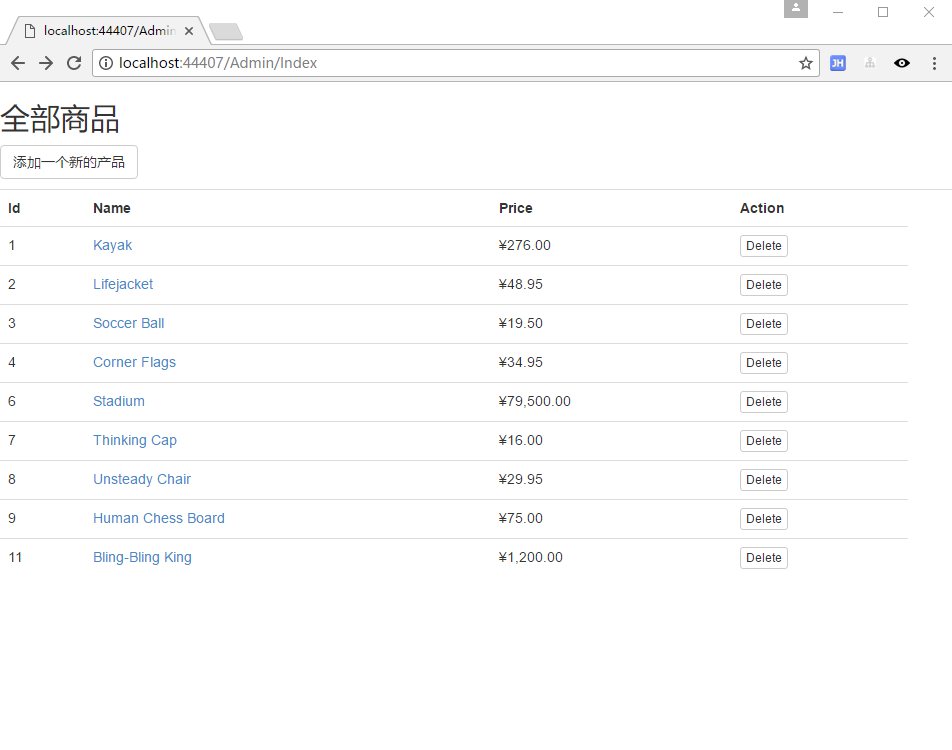
列表页面
@model IEnumerable<SportsStore.Domain.Entities.Product>

@{

    ViewBag.Title = "Index";

    Layout = "~/Views/Shared/_AdminLayout.cshtml";

}

<h2>全部商品</h2>

<p>

    @Html.ActionLink("添加一个新的产品", "Create",null,new {@class = "btn btn-default" })

</p>

<table class="table">

    <tr>

        <th>

            Id

        </th>

        <th>

            Name

        </th>

        <th>

            Price

        </th>

        <th>

            Action

        </th>

        <th></th>

    </tr>

@foreach (var item in Model) {

    <tr>

        <td>

            @item.ProductID

        </td>

        <td>

            @Html.ActionLink(item.Name, "Edit", new { item.ProductID })

            @*默认就是ProductID*@

            @*超链接*@

        </td>

        <td>

            @item.Price.ToString("c")

        </td>

        <td>

            @using (Html.BeginForm("Delete","Admin"))

            {

                @Html.Hidden("ProductId", item.ProductID)

                //创建传参的隐藏元素

                <input type="submit" class="btn btn-default btn-xs" value="Delete">

            }

            @*@Html.ActionLink("Delete", "Delete", new { id=item.ProductID })*@

        </td>

    </tr>

}

</table>
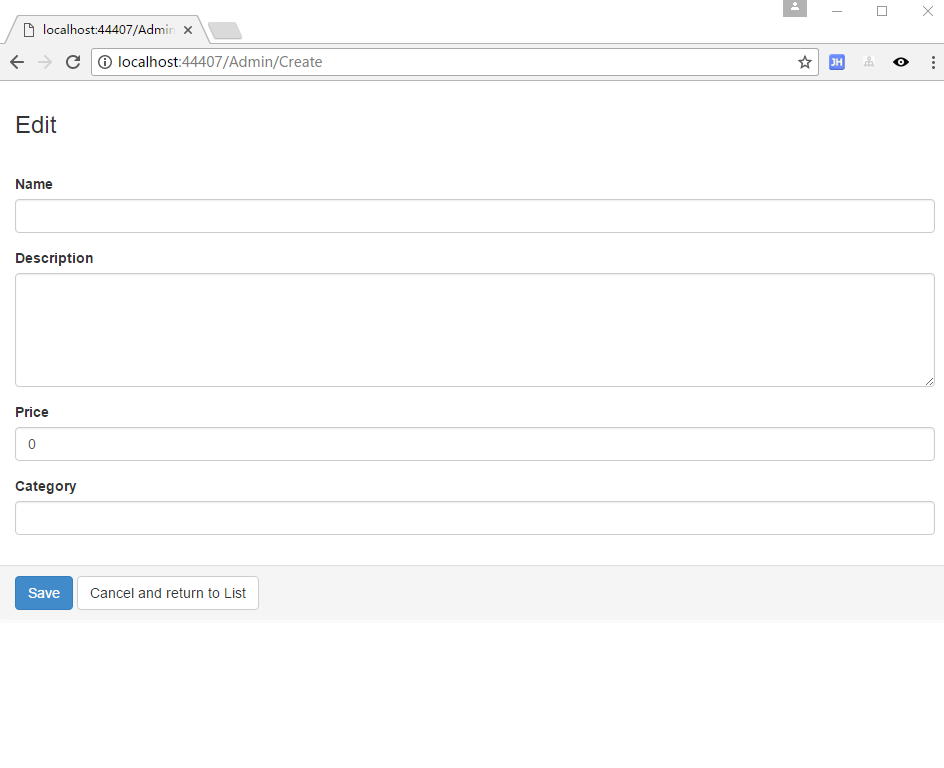
修改页面
@model SportsStore.Domain.Entities.Product

@{

    ViewBag.Title = "Admin: Edit " + @Model.Name;

    Layout = "~/Views/Shared/_AdminLayout.cshtml";

    HtmlHelper.ClientValidationEnabled = false;

    HtmlHelper.UnobtrusiveJavaScriptEnabled = false;

}

<div class="panel">

    <div class="panel-heading">

        <h3>Edit @Model.Name</h3>

    </div>

    @*@using (Html.BeginForm())*@

    @*设置固定的跳转目录*@

    @using (Html.BeginForm("Edit", "Admin"))

    {

        <div class="panel-body">

            @Html.HiddenFor(m => m.ProductID)

            @foreach (var property in ViewData.ModelMetadata.Properties)

            {

                if (property.PropertyName != "ProductID")

                {

                    <div class="form-group">

                        <label>@(property.DisplayName ?? property.PropertyName)</label>

                        @if (property.PropertyName == "Description")

                        {

                            @Html.TextArea(property.PropertyName, null,

          new { @class = "form-control", rows = 5 })

                        }

                        else

                        {

                            @Html.TextBox(property.PropertyName, null,

          new { @class = "form-control" })

                        }

                        @*提示错误的验证消息*@

                        @Html.ValidationMessage(property.PropertyName)

                    </div>

                }

            }

        </div>

        <div class="panel-footer">

            <input type="submit" value="Save" class="btn btn-primary" />

            @Html.ActionLink("Cancel and return to List", "Index", null, new

       {

           @class = "btn btn-default"

       })

        </div>

    }

</div>
产品模型修饰
using System;

using System.Collections.Generic;

using System.Linq;

using System.Text;

using System.Threading.Tasks;

using System.ComponentModel.DataAnnotations;

using System.Web.Mvc;

namespace SportsStore.Domain.Entities

{

    public class Product

    {

        [HiddenInput(DisplayValue = false)]

        // 隐藏起来,不显示在编辑选项中

        public int ProductID { get; set; }

        [Required(ErrorMessage = "Please enter a product name")]

        // 必填项

        public string Name { get; set; }

        [DataType(DataType.MultilineText)]

        [Required(ErrorMessage = "Please enter a description")]

        // 设置多行显示文本

        public string Description { get; set; }

        [Required]

        [Range(0.01, double.MaxValue, ErrorMessage = "Please enter a positive price")]

        public decimal Price { get; set; }

        [Required(ErrorMessage = "Please specify a category")]

        public string Category { get; set; }

    }

}
接口定义修改方法
using System;

using System.Collections.Generic;

using System.Linq;

using System.Text;

using System.Threading.Tasks;

using SportsStore.Domain.Entities;

namespace SportsStore.Domain.Abstract

{

    public interface IProductRepository

    {

        IEnumerable<Product> Products { get; }

        // 定义保存商品的方法

        void SaveProduct(Product product);

    }

}
实现修改方法
using System;

using System.Collections.Generic;

using System.Linq;

using System.Text;

using System.Threading.Tasks;

using SportsStore.Domain.Abstract;

using SportsStore.Domain.Entities;

namespace SportsStore.Domain.Concrete

{

    public class EFProductRepository : IProductRepository

    {

        private EFDbContext context = new EFDbContext();

        public IEnumerable<Product> Products

        {

            get { return context.Products; }

        }

        // 继承接口,就要实现它的方法

        public void SaveProduct(Product product)

        {

            if (product.ProductID == 0)

            {

                context.Products.Add(product);

            }

            else

            {

                Product dbEntry = context.Products.Find(product.ProductID); // 找到商品

                if (dbEntry != null)

                {

                    dbEntry.Name = product.Name;

                    dbEntry.Description = product.Description;

                    dbEntry.Price = product.Price;

                    dbEntry.Category = product.Category;

                }

            }

            context.SaveChanges(); // 保存

        }

    }

}


方法论:理解之后,再写个博客总结一下。不然写完博客,一样不理解。注释,百度,提问,对比,总结是一个很好的学习方法和过程。
.Net商品管理(注释,百度,提问,对比,总结)的更多相关文章
- 「超市管理系统——商品管理」 · Java Swing + MySQL JDBC开发
项目下载:https://download.csdn.net/download/weixin_44893902/13715024 1.9元付费赞助下载:https://download.csdn.ne ...
- C#开发微信门户及应用(23)-微信小店商品管理接口的封装和测试
在上篇<C#开发微信门户及应用(22)-微信小店的开发和使用>里面介绍了一些微信小店的基础知识,以及对应的对象模型,本篇继续微信小店的主题,介绍其中API接口的封装和测试使用.微信小店的相 ...
- SQL Server 【附】创建"商品管理数据库"、"学生选课数据库"的SQL语句
附:(创建“商品管理数据库”的SQL语句) --建立"商品管理数据库"数据库-- create database 商品管理数据库 on(name='商品管理数据库_m', file ...
- GZFramwork快速开发框架演练之会员系统(四)添加商品管理
1.1:创建表结构 新建三张商品关联的表,表模型如下: 创建SQL语句略 1.2:生成表Model(生成方法见上一节) 1.3:生成tb_ProductType的单结构界面然后添加到项目中 1.4:修 ...
- oldboy s21day12.设计商城系统,主要提供两个功能:商品管理、会员管理。
#!/usr/bin/env python# -*- coding:utf-8 -*- # 1.写出三元运算的基本格式及作用?'''a if a>b else b''' # 2.什么是匿名函数? ...
- Vue小案例 之 商品管理------学习过滤器 使用过滤器处理日期的格式
代码学习过滤器 过滤器介绍:过滤模型数据,在数据显示前做预处理操作: 内置过滤器:在1.x中,Vue提供了内置过滤器,但是在2.x中已经完全废除: 解决办法: (1)使用第三方库来替代1.x中的内置过 ...
- Vue小案例 之 商品管理------修改商品数量以及增加入库日期属性
实现修改商品的数量: 加入的代码: css: .clear-btn{ text-align: right; padding-right: 10px; } .table-warp a{ text-dec ...
- Vue小案例 之 商品管理------批量删除与商品数量的调整
通过索引进行删除,进行测试,是否获取其索引: 测试效果: 测试代码,在vue中定义一个空的数组,以便后面进行数据的绑定: data:{ imgUrl:'../res/images/', imgName ...
- Vue小案例 之 商品管理------删除商品与提示
实现删除商品功能 根据索引来进行删除商品: 实现删除商品的HTML: <!--显示表格--> <div class="table-warp"> <di ...
随机推荐
- 《鸟哥的Linux私房菜》读书笔记--第0章 计算机概论 硬件部分
一个下午看了不少硬件层面的知识,看得太多太快容易忘记.于是在博客上写下读书笔记. 有关硬件 个人计算机架构&接口设备 主板芯片组为“南北桥”的统称,南北桥用于控制所有组件之间的通信. 北桥连接 ...
- 入门python:《Python编程快速上手让繁琐工作自动化》中英文PDF+代码
入门推荐学习<python编程快速上手>前6章是python的基础知识,通俗易懂地讲解基础,初学者容易犯错的地方,都会指出来.从第三章开始,每章都有一个实践项目,用来巩固前面所学的知识. ...
- lvm硬盘管理及LVM扩容
1,创建分区 [root@host-10-158-172-44 ~]# fdisk /dev/vda Welcome to fdisk (util-linux 2.23.2). Changes wil ...
- 洛谷 P2734 游戏 A Game
P2734 游戏 A Game 题目背景 有如下一个双人游戏:N(2 <= N <= 100)个正整数的序列放在一个游戏平台上,游戏由玩家1开始,两人轮流从序列的任意一端取一个数,取数后该 ...
- [Mobx] Using mobx to isolate a React component state
React is great for diffing between Virtual-DOM and rendering it to the dom. It also offers a naïve s ...
- C++ Primer笔记13_运算符重载_总结
总结: 1.不能重载的运算符: . 和 .* 和 ?: 和 :: 和 sizeof 和 typeid 2.重载运算符有两种基本选择: 类的成员函数或者友元函数, 建议规则例如以下: 运算符 建议使用 ...
- C++的IO操作
#include <iostream> using namespace std; int main() { char name[20]; char gend ...
- mac鼠标滚动方向自然问题
mac使用鼠标的时候滚轮方向和Windows是相反的.假设不勾选滚动方向自然,那么触摸板使用不爽. 解决的方法: 1.打开http://pilotmoon.com/scrollreverser/,下载 ...
- Android Stuido 好卡怎么办?不要急,兄弟来教你
近期使用Android studio 开发app,编译的时候特别卡,常常卡死.我的机器 i3 + 8G,按道理来说流畅的跑个androidstudio还是绰绰有余的... 于是在各大论坛寻找解决方式, ...
- Struts2标签库整理【完整】
转自:https://blog.csdn.net/chen_zw/article/details/8161230 Struts2标签库提供了主题.模板支持,极大地简化了视图页面的编写,而且,str ...