
【原创】大数据基础之Benchmark(2)TPC-DS
tpc

官方:http://www.tpc.org/
一 简介
The TPC is a non-profit corporation founded to define transaction processing and database benchmarks and to disseminate objective, verifiable TPC performance data to the industry.
TPC(The Transaction Processing Performance Council)是一个非盈利公司,致力于定义事务处理和数据库benchmark,同时向业界发布客观的可验证的tpc性能数据;
The term transaction is often applied to a wide variety of business and computer functions. Looked at as a computer function, a transaction could refer to a set of operations including disk read/writes, operating system calls, or some form of data transfer from one subsystem to another.
While TPC benchmarks certainly involve the measurement and evaluation of computer functions and operations, the TPC regards a transaction as it is commonly understood in the business world: a commercial exchange of goods, services, or money. A typical transaction, as defined by the TPC, would include the updating to a database system for such things as inventory control (goods), airline reservations (services), or banking (money).
In these environments, a number of customers or service representatives input and manage their transactions via a terminal or desktop computer connected to a database. Typically, the TPC produces benchmarks that measure transaction processing (TP) and database (DB) performance in terms of how many transactions a given system and database can perform per unit of time, e.g., transactions per second or transactions per minute.
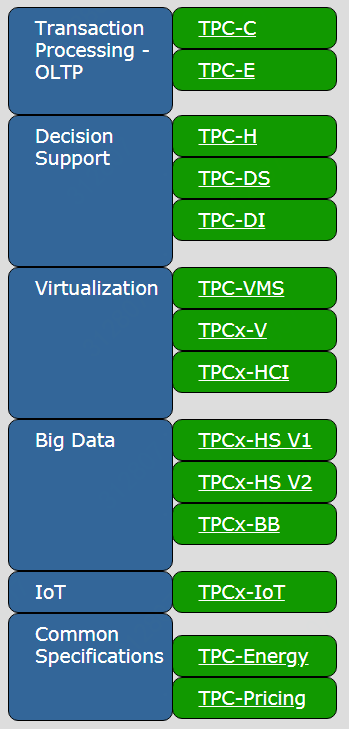
TPC-DS is a Decision Support Benchmark
官方:http://www.tpc.org/tpcds/default.asp
文档:http://www.tpc.org/tpc_documents_current_versions/pdf/tpc-ds_v2.10.1.pdf
A simple schema for decision support systems or data warehouses is the star schema, where events are collected in large fact tables, while smaller supporting tables (dimensions) are used to describe the data.
The TPC-DS is an example of such a schema. It models a typical retail warehouse where the events are sales and typical dimensions are date of sale, time of sale, or demographic of the purchasing party.
决策支持系统的schema中,event被存放在大的事实表(fact table)中,而小的维度表(dimension table)用来描述数据;
数据库界最具挑战的一个测试基准TPC-DS,它模拟了一个典型的零售行业的数据仓库;
The TPC Benchmark DS (TPC-DS) is a decision support benchmark that models several generally applicable aspects of a decision support system, including queries and data maintenance. The benchmark provides a representative evaluation of performance as a general purpose decision support system. A benchmark result measures query response time in single user mode, query throughput in multi user mode and data maintenance performance for a given hardware, operating system, and data processing system configuration under a controlled, complex, multi-user decision support workload. The purpose of TPC benchmarks is to provide relevant, objective performance data to industry users. TPC-DS Version 2 enables emerging technologies, such as Big Data systems, to execute the benchmark.
二 使用
1 下载
http://www.tpc.org/tpc_documents_current_versions/current_specifications.asp
2 安装
# unzip TPC-DS_Tools_v2.10.1.zip
# cd v2.10.1rc3/tools
# make
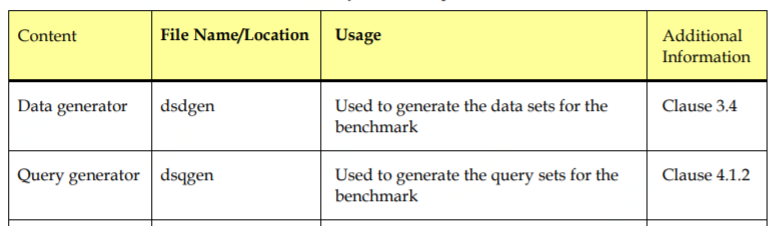
生成两个工具:
dsdgen
dsqgen
3 初始化表结构sql脚本
tpcds.sql
tpcds_ri.sql
tpcds_source.sql
可能需要根据具体的db修改一些诸如字段类型;
4 生成测试数据
# mkdir /tmp/tpcdsdata
# ./dsdgen -SCALE 1GB -DIR /tmp/tpcdsdata -parallel 4 -child 4
其中 -SCALE 用于指定生成的数据规模,可以修改比如10GB,1TB
5 生成查询脚本
# ./dsqgen -input ../query_templates/templates.lst -directory ../query_templates -dialect oracle -scale 1GB -OUTPUT_DIR /tmp/tpcdsdata/query_oracle
默认支持dialect如下:
db2.tpl
netezza.tpl
oracle.tpl
sqlserver.tpl
可见默认都是针对传统的关系型数据库,下面看怎样应用于大数据场景;
三 测试hive
官方:https://github.com/hortonworks/hive-testbench
1 下载安装
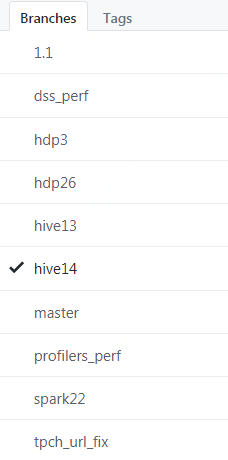
$ wget https://github.com/hortonworks/hive-testbench/archive/hive14.zip
$ unzip hive14.zip
$ cd hive-testbench-hive14/
$ ./tpcds-build.sh
2 生成测试数据和查询脚本
$ export FORMAT=parquet
$ ./tpcds-setup.sh 1000
单位为G,修改FORMAT,比如orc、parquet等
生成日志
TPC-DS text data generation complete.
Loading text data into external tables.
Optimizing table date_dim (1/24).
Optimizing table time_dim (2/24).
Optimizing table item (3/24).
Optimizing table customer (4/24).
Optimizing table customer_demographics (5/24).
Optimizing table household_demographics (6/24).
Optimizing table customer_address (7/24).
Optimizing table store (8/24).
Optimizing table promotion (9/24).
Optimizing table warehouse (10/24).
Optimizing table ship_mode (11/24).
Optimizing table reason (12/24).
Optimizing table income_band (13/24).
Optimizing table call_center (14/24).
Optimizing table catalog_page (16/24).
Optimizing table web_page (15/24).
Optimizing table web_site (17/24).
Optimizing table store_sales (18/24).
Optimizing table store_returns (19/24).
Optimizing table web_sales (20/24).
Optimizing table web_returns (21/24).
Optimizing table catalog_sales (22/24).
Optimizing table inventory (24/24).
Optimizing table catalog_returns (23/24).
Data loaded into database tpcds_bin_partitioned_parquet_10.
生成结果
hive> use tpcds_bin_partitioned_parquet_10;
OK
Time taken: 0.025 seconds
hive> show tables;
OK
call_center
catalog_page
catalog_returns
catalog_sales
customer
customer_address
customer_demographics
date_dim
household_demographics
income_band
inventory
item
promotion
reason
ship_mode
store
store_returns
store_sales
time_dim
warehouse
web_page
web_returns
web_sales
web_site
Time taken: 0.049 seconds, Fetched: 24 row(s)
3 运行测试
测试sql脚本目录:sample-queries-tpcds
$ cd sample-queries-tpcds
hive> use tpcds_bin_partitioned_parquet_10;
hive> source query12.sql;
4 批量测试
根据需要修改hive配置:sample-queries-tpcds/testbench.settings
根据需要修改测试脚本(perl):runSuite.pl
$ perl runSuiteCommon.pl
ERROR: one or more parameters not definedUsage:
perl runSuiteCommon.pl [tpcds|tpch] [scale]Description:
This script runs the sample queries and outputs a CSV file of the time it took each query to run. Also, all hive output is kept as a log file named 'queryXX.sql.log' for each query file of the form 'queryXX.sql'. Defaults to scale of 2.
核心代码:
my $suite = shift;

my $scale = shift || ;

dieWithUsage("suite name required") unless $suite eq "tpcds" or $suite eq "tpch";

chdir $SCRIPT_PATH;

if( $suite eq 'tpcds' ) {

        chdir "sample-queries-tpcds";

} else {

        chdir 'sample-queries-tpch';

} # end if

my @queries = glob '*.sql';

my $db = {

        'tpcds' => "tpcds_bin_partitioned_orc_$scale",

        'tpch' => "tpch_flat_orc_$scale"

};

print "filename,status,time,rows\n";

for my $query ( @queries ) {

        my $logname = "$query.log";

        my $cmd="echo 'use $db->{${suite}}; source $query;' | hive -i testbench.settings 2>&1  | tee $query.log";
这个脚本有两个参数:suite scale,比如tpcds 10
可以修改的更通用,一个是数据库硬编码orc,一个是硬编码hive命令,一个是打印正在执行的cmd,一个是启动命令有初始化环境的时间成本,直接使用beeline连接server的耗时更真实;修改之后可以用于其他测试,比如spark-sql、impala、drill等;
修改之后是这样:
#!/usr/bin/perl

use strict;

use warnings;

use POSIX;

use File::Basename;

# PROTOTYPES

sub dieWithUsage(;$);

# GLOBALS

my $SCRIPT_NAME = basename( __FILE__ );

my $SCRIPT_PATH = dirname( __FILE__ );

# MAIN

dieWithUsage("one or more parameters not defined") unless @ARGV >= ;

my $suite = shift;

my $scale = shift || ;

my $format = shift || ;

my $engineCmd = shift || ;

dieWithUsage("suite name required") unless $suite eq "tpcds" or $suite eq "tpch";

print "params: $suite, $scale, $format, $engineCmd;";

chdir $SCRIPT_PATH;

if( $suite eq 'tpcds' ) {

        chdir "sample-queries-tpcds";

} else {

        chdir 'sample-queries-tpch';

} # end if

my @queries = glob '*.sql';

my $db = {

        'tpcds' => "tpcds_bin_partitioned_${format}_$scale",

        'tpch' => "tpch_flat_${format}_$scale"

};

print "filename,status,time,rows\n";

for my $query ( @queries ) {

        my $logname = "$query.log";

        my $cmd="${engineCmd}/$db->{${suite}} -i conf.settings -f $query 2>&1  | tee $query.log";

#       my $cmd="cat $query.log";

        #print $cmd ; exit;

        my $currentTime = strftime("%Y-%m-%d %H:%M:%S", localtime(time));

        print "$currentTime : ";

        print "$cmd \n";

        my $hiveStart = time();

        my @hiveoutput=`$cmd`;

        die "${SCRIPT_NAME}:: ERROR:  hive command unexpectedly exited \$? = '$?', \$! = '$!'" if $?;

        my $hiveEnd = time();

        my $hiveTime = $hiveEnd - $hiveStart;

        my $is_success = ;

        foreach my $line ( @hiveoutput ) {

                if( $line =~ /[(\d+|No)]\s+row[s]? selected \(([\d\.]+) seconds\)/ ) {

                        $is_success = ;

                        print "$query,success,$hiveTime,$1\n";

                } # end if

        } # end while

        if( $is_success == ) {

                print "$query,failed,$hiveTime\n";

        }

} # end for

sub dieWithUsage(;$) {

        my $err = shift || '';

        if( $err ne '' ) {

                chomp $err;

                $err = "ERROR: $err\n\n";

        } # end if

        print STDERR <<USAGE;

${err}Usage:

        perl ${SCRIPT_NAME} [tpcds|tpch] [scale] [format] [engineCmd]

Description:

        This script runs the sample queries and outputs a CSV file of the time it took each query to run.  Also, all hive output is kept as a log file named 'queryXX.sql.log' for each query file of the form 'queryXX.sql'. Defaults to scale of .

USAGE

        exit ;

}
执行:
# beeline to hiveserver2
$ perl runSuite.pl tpcds 10 parquet "$HIVE_HOME/bin/beeline -u jdbc:hive2://localhost:10000"
# beeline to spark thrift server
$ perl runSuite.pl tpcds 10 parquet "$SPARK_HOME/bin/beeline -u jdbc:hive2://localhost:11111"
# beeline to impala
perl runSuite.pl tpcds 10 parquet "$HIVE_HOME/bin/beeline -d com.cloudera.impala.jdbc4.Driver -u jdbc:impala://localhost:21050"
批量测试脚本
#!/bin/sh

current_dir=`pwd`

scale="$1"

format="$2"

if [ -z "$scale" ]; then

        scale=10

fi

if [ -z "$format" ]; then

        format="parquet"

fi

#echo "$current_dir $component $scale $test_dir"

echo "mkdir merge"

echo ""

component="hive"

test_dir="test_$component"

echo "# test $component"

echo "mkdir $test_dir"

echo "cp -R sample-queries-tpcds $test_dir"

echo "ln -s $current_dir/runSuiteCommon.pl $test_dir/runSuite.pl"

echo "cd $test_dir"

echo "perl runSuite.pl tpcds ${scale} $format \"$HIVE_HOME/bin/beeline -i conf.settings -n hadoop -u jdbc:hive2://localhost:10000\" 2>&1| tee ${component}_${scale}_${format}.log"

echo "cd .."

echo "grep -e '^query' $test_dir/${component}_${scale}_${format}.log|sort > merge/${component}_${scale}_${format}.log"

echo "wc -l merge/${component}_${scale}_${format}.log"

echo ""

component="spark"

test_dir="test_$component"

echo "# test $component"

echo "mkdir $test_dir"

echo "cp -R sample-queries-tpcds $test_dir"

echo "ln -s $current_dir/runSuiteCommon.pl $test_dir/runSuite.pl"

echo "cd $test_dir"

echo "perl runSuite.pl tpcds ${scale} $format \"$SPARK_HOME/bin/beeline -i conf.settings -u jdbc:hive2://localhost:11111\" 2>&1| tee ${component}_${scale}_${format}.log"

echo "cd .."

echo "grep -e '^query' $test_dir/${component}_${scale}_${format}.log|sort > merge/${component}_${scale}_${format}.log"

echo "wc -l merge/${component}_${scale}_${format}.log"

echo ""

component="impala"

test_dir="test_$component"

echo "# test $component"

echo "mkdir $test_dir"

echo "cp -R sample-queries-tpcds $test_dir"

echo "ln -s $current_dir/runSuiteCommon.pl $test_dir/runSuite.pl"

echo "cd $test_dir"

echo "perl runSuite.pl tpcds ${scale} $format \"$HIVE_HOME/bin/beeline -i conf.settings -d com.cloudera.impala.jdbc4.Driver -u jdbc:impala://localhost:21050\" 2>&1| tee ${component}_${scale}_${format}.log"

echo "cd .."

echo "grep -e '^query' $test_dir/${component}_${scale}_${format}.log|sort > merge/${component}_${scale}_${format}.log"

echo "wc -l merge/${component}_${scale}_${format}.log"

echo ""

component="presto"

test_dir="test_$component"

echo "# test $component"

echo "mkdir $test_dir"

echo "cp -R sample-queries-tpcds $test_dir"

echo "ln -s $current_dir/runSuiteCommon.pl $test_dir/runSuite.pl"

echo "cd $test_dir"

echo "perl runSuite.pl tpcds ${scale} $format \"$HIVE_HOME/bin/beeline -i conf.settings -d com.facebook.presto.jdbc.PrestoDriver -n hadoop -u jdbc:presto://localhost:8080/hive\" 2>&1| tee ${component}_${scale}_${format}.log"

echo "cd .."

echo "grep -e '^query' $test_dir/${component}_${scale}_${format}.log|sort > merge/${component}_${scale}_${format}.log"

echo "wc -l merge/${component}_${scale}_${format}.log"

echo "awk -F ',' '{if(NF==4){print \$1\",\"\$4}else{print \$1\",0\"}}' merge/hive_${scale}_${format}.log > /tmp/hive_${scale}_${format}.log"

echo "awk -F ',' '{if(NF==4){print \$4}else{print \"0\"}}' merge/spark_${scale}_${format}.log > /tmp/spark_${scale}_${format}.log"

echo "awk -F ',' '{if(NF==4){print \$4}else{print \"0\"}}' merge/impala_${scale}_${format}.log > /tmp/impala_${scale}_${format}.log"

echo "awk -F ',' '{if(NF==4){print \$4}else{print \"0\"}}' merge/presto_${scale}_${format}.log > /tmp/presto_${scale}_${format}.log"

echo "paste -d\",\" /tmp/hive_${scale}_${format}.log /tmp/spark_${scale}_${format}.log /tmp/impala_${scale}_${format}.log /tmp/presto_${scale}_${format}.log > merge/result_${scale}_${format}.csv"

echo "sed -i \"1i sql_${scale}_${format},hive,spark,impala,presto\" merge/result_${scale}_${format}.csv"

echo ""
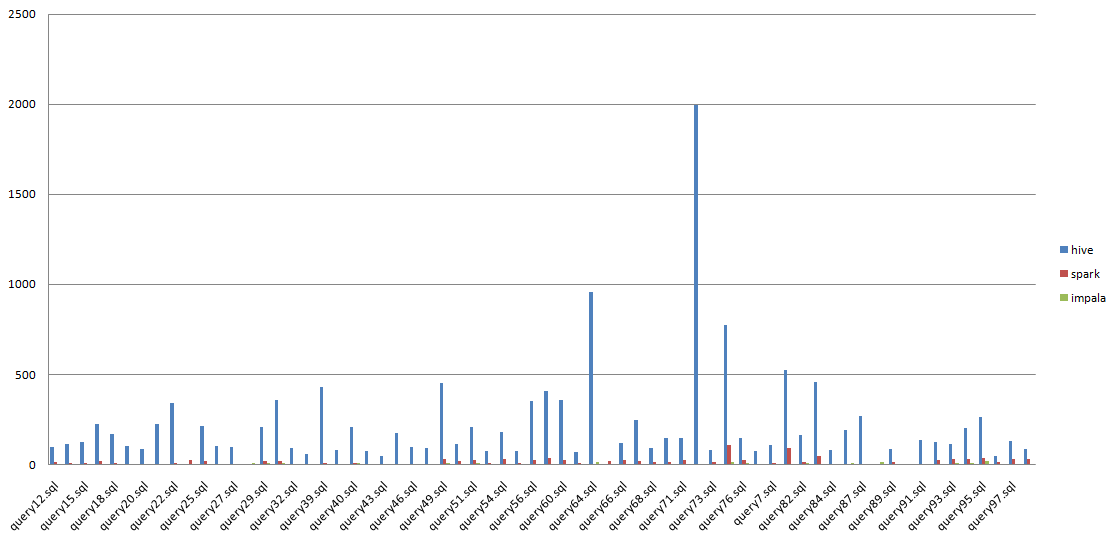
结果合并之后使用excel图形化显示
【原创】大数据基础之Benchmark(2)TPC-DS的更多相关文章
- 【原创】大数据基础之Benchmark(4)TPC-DS测试结果(hive/hive on spark/spark sql/impala/presto)
1 测试集群 内存:256GCPU:32Core (Intel(R) Xeon(R) CPU E5-2640 v3 @ 2.60GHz)Disk(系统盘):300GDisk(数据盘):1.5T*1 2 ...
- 【原创】大数据基础之Benchmark(1)HiBench
HiBench 7官方:https://github.com/intel-hadoop/HiBench 一 简介 HiBench is a big data benchmark suite that ...
- 【原创】大数据基础之Zookeeper(2)源代码解析
核心枚举 public enum ServerState { LOOKING, FOLLOWING, LEADING, OBSERVING; } zookeeper服务器状态:刚启动LOOKING,f ...
- 【原创】大数据基础之词频统计Word Count
对文件进行词频统计,是一个大数据领域的hello word级别的应用,来看下实现有多简单: 1 Linux单机处理 egrep -o "\b[[:alpha:]]+\b" test ...
- 【原创】大数据基础之Impala(1)简介、安装、使用
impala2.12 官方:http://impala.apache.org/ 一 简介 Apache Impala is the open source, native analytic datab ...
- 大数据基础知识:分布式计算、服务器集群[zz]
大数据中的数据量非常巨大,达到了PB级别.而且这庞大的数据之中,不仅仅包括结构化数据(如数字.符号等数据),还包括非结构化数据(如文本.图像.声音.视频等数据).这使得大数据的存储,管理和处理很难利用 ...
- 大数据基础知识问答----spark篇,大数据生态圈
Spark相关知识点 1.Spark基础知识 1.Spark是什么? UCBerkeley AMPlab所开源的类HadoopMapReduce的通用的并行计算框架 dfsSpark基于mapredu ...
- 大数据基础知识问答----hadoop篇
handoop相关知识点 1.Hadoop是什么? Hadoop是一个由Apache基金会所开发的分布式系统基础架构.用户可以在不了解分布式底层细节的情况下,开发分布式程序.充分利用集群的威力进行高速 ...
- hadoop大数据基础框架技术详解
一.什么是大数据 进入本世纪以来,尤其是2010年之后,随着互联网特别是移动互联网的发展,数据的增长呈爆炸趋势,已经很难估计全世界的电子设备中存储的数据到底有多少,描述数据系统的数据量的计量单位从MB ...
随机推荐
- Mcafee(麦咖啡) 无法升级的解决办法(威流验证)
McAfee时会遇到更新失败的情况.为了解决这个问题,你需要做如下设置:1.“运行”>“dcomcnfg.exe”2.双击“组件服务>计算机>我的电脑”3.展开“DCOM配置”,打开 ...
- Xampp PHPStorm XDebug配置
(1)https://xdebug.org/download.php 下载当前Xampp对应的XDebug版本. (2)将该dll放入C:\xampp\php\ext (3)修改Control Pan ...
- SQLite 数据库介绍和基本用法
Ø 简介 SQLite 是一款轻量级的关系型数据库,同时也是一种嵌入式数据库,与 Oracle.MySQL.SQL Server 等数据库不同,它可以内嵌在程序中,是程序中的一个组成部分.所以,经常 ...
- [C++]PAT乙级1003. 我要通过!(17/20)
/* 1003. 我要通过!(20) “答案正确”是自动判题系统给出的最令人欢喜的回复.本题属于PAT的“答案正确”大派送 —— 只要读入的字符串满足下列条件,系统就输出“答案正确”,否则输出“答案错 ...
- [C++]线性链表之顺序表<一>
顺序表中数据元素的存储地址是其序号的线性函数,只要确定了存储顺序表的起始地址(即 基地址),计算任意一个元素的存储地址的时间是相等的,具有这一特点的存储结构称为[随机存储]. 使用的基本数据结构:数组 ...
- MD5加密文件
package cn.net.comsys.ut.util; import java.io.File;import java.io.FileInputStream;import java.io.IOE ...
- XML解析技术-dom4j
- mybatis-plus调用自身的 selectById 方法报错:org.apache.ibatis.binding.BindingException:
mybatis-plus的版本号是 2.0.1,在调用自身的insert(T)的时候没有报错,但是执行update报错,调用selectById.deleteById的时候也报错.也就是涉及到需要主键 ...
- Scrapy快速上手
超详细官方教程解析 https://blog.csdn.net/fly_yr/article/details/51540269 实战过程: 创建一个Scrapy项目 定义提取的Item 编写爬取网站的 ...
- 【CentOS7.0】虚拟机如何实现扩展存储空间
写在前面的一些小废话 有时候,虚拟机随着使用,会导致存储不够,这时就需要给虚拟机扩容. 扩容的前提是,此虚拟机没有快照. 扩容时,需要编辑虚拟机设置.为了形成对比,第一张图片是扩容前,第二张图片是扩容 ...