
Announcing Microsoft Research Open Data – Datasets by Microsoft Research now available in the cloud
The Microsoft Research Outreach team has worked extensively with the external research community to enable adoption of cloud-based research infrastructure over the past few years. Through this process, we experienced the ubiquity of Jim Gray’s fourth paradigm of discovery based on data-intensive science – that is, almost all research projects have a data component to them. This data deluge also demonstrated a clear need for curated and meaningful datasets in the research community, not only in computer science but also in interdisciplinary and domain sciences.
Today we are excited to launch Microsoft Research Open Data – a new data repository in the cloud dedicated to facilitating collaboration across the global research community. Microsoft Research Open Data, in a single, convenient, cloud-hosted location, offers datasets representing many years of data curation and research efforts by Microsoft that were used in published research studies.
Why we are investing in this
The goal is to provide a simple platform to Microsoft researchers and collaborators to share datasets and related research technologies and tools. Microsoft Research Open Data is designed to simplify access to these datasets, facilitate collaboration between researchers using cloud-based resources and enable reproducibility of research. We will continue to shape and grow this repository and add features based on feedback from the community.
We recognize that there are dozens of data repositories already in use by researchers and expect that the capabilities of this repository will augment existing efforts.

Figure 1 – Dataset in Microsoft Research Open Data
“This is a game changer for the big data community. Initiatives like Microsoft Research Open Data reduce barriers to data sharing and encourage reproducibility by leveraging the power of cloud computing”
-Sam Madden, Professor, Massachusetts Institute of Technology
With data growing at an exponential rate, perceived to be over 150 ZB of data available by 2025, it is now recognized that we need to prioritize bringing processing to data versus relying on data movement through Internet bandwidth that is growing at a much slower pace. We believe that there is real utility in providing an option to bring the processing to the data. Therefore, in addition to providing an option to download the data assets, users can also copy datasets directly to an Azure based Data Science virtual machine, as shown in Figure 2.

Figure 2 – Data copied from microsoftopendata.com to an Azure based Linux virtual machine
The Data Science virtual machine comes preloaded with a variety of development tools popular with researchers and practitioners as can been seen in Figure 3.
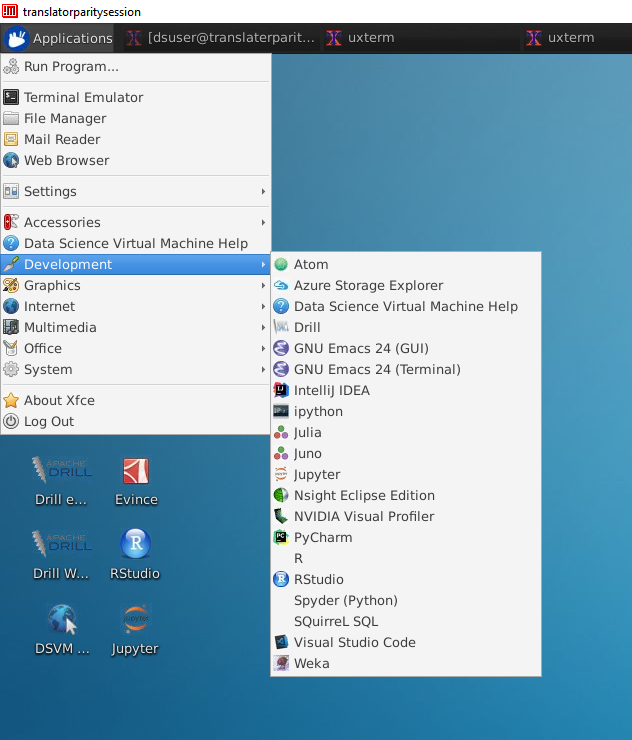
Figure 3 Linux Data Science virtual machine
“I am often asked to share my research data and the public sharing I have done in the past has been popular. Coordinating and cataloging these datasets in one place with Azure will be helpful for both internal and external researchers, giving them easy access, encouraging collaboration, and providing convenient cloud-based access to the wealth of Microsoft Research shared data.”
-John Krumm, Principal Researcher, Microsoft Research AI
Datasets in Microsoft Research Open Data are categorized by their primary research area, as shown in Figure 4. You can find links to research projects or publications with the dataset. You can browse available datasets and download them or copy them directly to an Azure subscription through an automated workflow. To the extent possible, the repository meets the highest standards for data sharing to ensure that datasets are findable, accessible, interoperable and reusable; the entire corpus does not contain personally identifiable information. The site will continue to evolve as we get feedback from users.

Figure 4 – Dataset Categories
Microsoft Research Open Data is an outcome of the Microsoft Research Outreach Data science program and was made possible by a collaboration between many teams at Microsoft, Microsoft researchers, our industry partners, and our academic advisors.
We would love to hear your comments and feedback! Please send us a note via the Feedback feature on the sitehttp://microsoftopendata.com and tell us what you think.
Announcing Microsoft Research Open Data – Datasets by Microsoft Research now available in the cloud的更多相关文章
- 未能加载包“Microsoft SQL Server Data Tools”
直接在vs2013里的App_Data目录创建数据库,在服务器资源管理器中查看时报错: 未能加载包“Microsoft SQL Server Data Tools” 英文: The 'Microsof ...
- Microsoft SQL Server Data Tools - Business Intelligence for Visual Studio 2013 http://www.microsoft.com/en-us/download/details.aspx?id=42313
Microsoft SQL Server Data Tools - Business Intelligence for Visual Studio 2013 http://www.microsoft. ...
- “DataTable”是“System.Data.DataTable”和“Microsoft.Office.Interop.Excel.DataTable”之间的不明确的引用
“DataTable”是“System.Data.DataTable”和“Microsoft.Office.Interop.Excel.DataTable”之间的不明确的引用 造成这个错误的原因是,在 ...
- 解决VS2010在新建实体数据模型出现“在 .NET Framework Data Provider for Microsoft SQL Server Compact 3.5 中发生错误。请与提供程序供应商联系以解决此问题。”的问题
最近想试着学习ASP.NET MVC,在点击 添加--新建项--Visual C#下的数据中的ADO.NET 实体数据模型,到"选择您的数据连接"时,出现错误,"在 .N ...
- 在WebService中使用Microsoft.Practices.EnterpriseLibrary.Data配置数据库
1. 新建WebApplication1项目 1.1 新建—Web—ASP.NET Empty Web Application--WebApplication1 1.2 添加一个WebForm1 2. ...
- Microsoft.Jet.OLEDB.4.0和Microsoft.ACE.OLEDB.12.0的区别
Microsoft.Jet.OLEDB.4.0和Microsoft.ACE.OLEDB.12.0的区别 时间 2012-12-19 20:30:12 CSDN博客原文 http://blog.cs ...
- EF core2.1+MySQL报错'Void Microsoft.EntityFrameworkCore.Storage.Internal.RelationalParameterBuilder..ctor(Microsoft.EntityFrameworkCore.Storage.IRelationalTypeMapper)
一.使用.net core 2.0 EF mysql 运行一直报错如下: An unhandled exception occurred while processing the request. M ...
- win10x64启动vs2010报错:未能加载C:\Windows\Microsoft.NET\Framework\v2.0.50727\microsoft.vsa.tlb
换了新电脑,因为是win10x64系统,可能是兼容性的问题吧. 启动vs2010,在启动画面直接报错:未能加载C:\Windows\Microsoft.NET\Framework\v2.0.50727 ...
- 【Microsoft Azure 的1024种玩法】六、使用Azure Cloud Shell对Linux VirtualMachines 进行生命周期管理
[文章简介] Azure Cloud Shell 是一个用于管理 Azure 资源的.可通过浏览器访问的交互式经验证 shell. 它使用户能够灵活选择最适合自己工作方式的 shell 体验,本篇文章 ...
随机推荐
- Linux系统启动详解
系统启动流程 通过下图认识下Linux系统的总体启动流程. BIOS BIOS一般负责检查硬件和查找启动设备. MBR:Boot Code MBR只是一段引导代码,真正的引导是由引导程序去执行的. G ...
- 史上最全python面试题详解(四)(附带详细答案(关注、持续更新))
python高级进阶-网络编程和并发(?道题详解) 1.简述 OSI 七层协议. OSI是Open System Interconnection的缩写,意为开放式系统互联. OSI七层协议模型主要是: ...
- 深海中的STL—mt19937
mt19937 当你第一眼看到这玩意儿的时候 肯定禁不住吐槽:纳尼?这是什么鬼? 确实,这个东西鲜为人知,但是它却有着卓越的性能 简介 mt19937是c++11中加入的新特性 它是一种随机数算法,用 ...
- java StringBuilder 和 StringBuffer
1, 相对于 String 来说, StringBuilder 和 StringBuffer 均是可变的 2, StringBuilder 线程不安全, StringBuffer 线程安全 3, 运行 ...
- geoserver发布瓦片,geoserver发布arcgis切片和geoserver发布金字塔切片
1 转https://www.jianshu.com/p/cf046ec1efd2,分享使用geoserver发布arcgis切片 2 转 http://www.it610.com/article/1 ...
- python集合使用范例的代码
在代码过程中中,将代码过程中比较好的代码段珍藏起来,如下的代码是关于python集合使用范例的代码,希望能对大伙有用. # sets are unordered collections of uniq ...
- 从零学习Fluter(二):win10上环境搭建以及模拟器和真机调试
今天呢,又继续看了flutter 弗拉特 的东西,绝的这个东西绝对是比ReactNative更高一层次的,在2018年12月5好,flutter的第一个stale1.0发布了,我们在GitHub上可以 ...
- 部署 Prometheus Operator - 每天5分钟玩转 Docker 容器技术(179)
本节在实践时使用的是 Prometheus Operator 版本 v0.14.0.由于项目开发迭代速度很快,部署方法可能会更新,必要时请参考官方文档. 下载最新源码 git clone https: ...
- 虚拟机硬盘vmdk压缩瘦身并挂载到VirtualBox
这个问题其实困扰了挺久的,一直没闲情去解决,网上搜索过很多压缩方法感觉都太麻烦太复杂,因最近在windows上搞docker就一并解决了. 压缩vmdk 首先下载DiskGenius,这工具很牛X,相 ...
- elasticsearch系列一:elasticsearch(ES简介、安装&配置、集成Ikanalyzer)
一.ES简介 1. ES是什么? Elasticsearch 是一个开源的搜索引擎,建立在全文搜索引擎库 Apache Lucene 基础之上 用 Java 编写的,它的内部使用 Lucene 做索引 ...