
anaconda python3.7 安装 tensorflow-gpu 2.0.0 beta1 配置PyCharm
参考tensorflow 公众号《tensorflow2.0 安装指南》
https://mp.weixin.qq.com/s/7rNXFEC5HYe91RJ0-9CKdQ
# 1. NVIDIA驱动程序安装
安装对应的CUDA 和 cudnn (在tensorflow 公众号《tensorflow2.0 安装指南》得知 2.0-beta1对应CUDA 10.0 cudnn 7.6.0)
之前安装tensorflow-gpu 1.14的时候安装了CUDA 10.0 和CUDNN 7.6.1
# 2. anaconda 环境创建与安装
conda create --name tf2.0 python=3.7
activate tf2.0
pip install -i https://pypi.tuna.tsinghua.edu.cn/simple tensorflow-gpu==2.0.0-beta1 ///清华源
# 3.测试
import tensorflow as tf

A = tf.constant([[1, 2], [3, 4]])

B = tf.constant([[5, 6], [7, 8]])

C = tf.matmul(A, B)

print(C)
输出如下,安装成功
tf.Tensor(

[[19 22]

[43 50]], shape=(2, 2), dtype=int32)
中间输出了一些提示信息
(tf2.0) C:\Users\lenovo>python

Python 3.7.6 (default, Jan  8 2020, 20:23:39) [MSC v.1916 64 bit (AMD64)] :: Anaconda, Inc. on win32

Type "help", "copyright", "credits" or "license" for more information.

>>> import tensorflow as tf

F:\Anaconda\envs\tf2.0\lib\site-packages\tensorflow\python\framework\dtypes.py:516: FutureWarning: Passing (type, 1) or '1type' as a synonym of type is deprecated; in a future version of numpy, it will be understood as (type, (1,)) / '(1,)type'.

  _np_qint8 = np.dtype([("qint8", np.int8, 1)])

F:\Anaconda\envs\tf2.0\lib\site-packages\tensorflow\python\framework\dtypes.py:517: FutureWarning: Passing (type, 1) or '1type' as a synonym of type is deprecated; in a future version of numpy, it will be understood as (type, (1,)) / '(1,)type'.

  _np_quint8 = np.dtype([("quint8", np.uint8, 1)])

F:\Anaconda\envs\tf2.0\lib\site-packages\tensorflow\python\framework\dtypes.py:518: FutureWarning: Passing (type, 1) or '1type' as a synonym of type is deprecated; in a future version of numpy, it will be understood as (type, (1,)) / '(1,)type'.

  _np_qint16 = np.dtype([("qint16", np.int16, 1)])

F:\Anaconda\envs\tf2.0\lib\site-packages\tensorflow\python\framework\dtypes.py:519: FutureWarning: Passing (type, 1) or '1type' as a synonym of type is deprecated; in a future version of numpy, it will be understood as (type, (1,)) / '(1,)type'.

  _np_quint16 = np.dtype([("quint16", np.uint16, 1)])

F:\Anaconda\envs\tf2.0\lib\site-packages\tensorflow\python\framework\dtypes.py:520: FutureWarning: Passing (type, 1) or '1type' as a synonym of type is deprecated; in a future version of numpy, it will be understood as (type, (1,)) / '(1,)type'.

  _np_qint32 = np.dtype([("qint32", np.int32, 1)])

F:\Anaconda\envs\tf2.0\lib\site-packages\tensorflow\python\framework\dtypes.py:525: FutureWarning: Passing (type, 1) or '1type' as a synonym of type is deprecated; in a future version of numpy, it will be understood as (type, (1,)) / '(1,)type'.

  np_resource = np.dtype([("resource", np.ubyte, 1)])

F:\Anaconda\envs\tf2.0\lib\site-packages\tensorboard\compat\tensorflow_stub\dtypes.py:541: FutureWarning: Passing (type, 1) or '1type' as a synonym of type is deprecated; in a future version of numpy, it will be understood as (type, (1,)) / '(1,)type'.

  _np_qint8 = np.dtype([("qint8", np.int8, 1)])

F:\Anaconda\envs\tf2.0\lib\site-packages\tensorboard\compat\tensorflow_stub\dtypes.py:542: FutureWarning: Passing (type, 1) or '1type' as a synonym of type is deprecated; in a future version of numpy, it will be understood as (type, (1,)) / '(1,)type'.

  _np_quint8 = np.dtype([("quint8", np.uint8, 1)])

F:\Anaconda\envs\tf2.0\lib\site-packages\tensorboard\compat\tensorflow_stub\dtypes.py:543: FutureWarning: Passing (type, 1) or '1type' as a synonym of type is deprecated; in a future version of numpy, it will be understood as (type, (1,)) / '(1,)type'.

  _np_qint16 = np.dtype([("qint16", np.int16, 1)])

F:\Anaconda\envs\tf2.0\lib\site-packages\tensorboard\compat\tensorflow_stub\dtypes.py:544: FutureWarning: Passing (type, 1) or '1type' as a synonym of type is deprecated; in a future version of numpy, it will be understood as (type, (1,)) / '(1,)type'.

  _np_quint16 = np.dtype([("quint16", np.uint16, 1)])

F:\Anaconda\envs\tf2.0\lib\site-packages\tensorboard\compat\tensorflow_stub\dtypes.py:545: FutureWarning: Passing (type, 1) or '1type' as a synonym of type is deprecated; in a future version of numpy, it will be understood as (type, (1,)) / '(1,)type'.

  _np_qint32 = np.dtype([("qint32", np.int32, 1)])

F:\Anaconda\envs\tf2.0\lib\site-packages\tensorboard\compat\tensorflow_stub\dtypes.py:550: FutureWarning: Passing (type, 1) or '1type' as a synonym of type is deprecated; in a future version of numpy, it will be understood as (type, (1,)) / '(1,)type'.

  np_resource = np.dtype([("resource", np.ubyte, 1)])

>>> A=tf.constant([[1,2],[3,4]])

2020-02-02 16:05:20.597693: I tensorflow/stream_executor/platform/default/dso_loader.cc:42] Successfully opened dynamic library nvcuda.dll

2020-02-02 16:05:23.206508: I tensorflow/core/common_runtime/gpu/gpu_device.cc:1640] Found device 0 with properties:

name: GeForce GTX 1050 major: 6 minor: 1 memoryClockRate(GHz): 1.493

pciBusID: 0000:01:00.0

2020-02-02 16:05:23.215470: I tensorflow/stream_executor/platform/default/dlopen_checker_stub.cc:25] GPU libraries are statically linked, skip dlopen check.

2020-02-02 16:05:23.224739: I tensorflow/core/common_runtime/gpu/gpu_device.cc:1763] Adding visible gpu devices: 0

2020-02-02 16:05:23.231882: I tensorflow/core/platform/cpu_feature_guard.cc:142] Your CPU supports instructions that this TensorFlow binary was not compiled to use: AVX2

2020-02-02 16:05:23.244758: I tensorflow/core/common_runtime/gpu/gpu_device.cc:1640] Found device 0 with properties:

name: GeForce GTX 1050 major: 6 minor: 1 memoryClockRate(GHz): 1.493

pciBusID: 0000:01:00.0

2020-02-02 16:05:23.259879: I tensorflow/stream_executor/platform/default/dlopen_checker_stub.cc:25] GPU libraries are statically linked, skip dlopen check.

2020-02-02 16:05:23.269339: I tensorflow/core/common_runtime/gpu/gpu_device.cc:1763] Adding visible gpu devices: 0

2020-02-02 16:05:24.446747: I tensorflow/core/common_runtime/gpu/gpu_device.cc:1181] Device interconnect StreamExecutor with strength 1 edge matrix:

2020-02-02 16:05:24.456384: I tensorflow/core/common_runtime/gpu/gpu_device.cc:1187]      0

2020-02-02 16:05:24.460137: I tensorflow/core/common_runtime/gpu/gpu_device.cc:1200] 0:   N

2020-02-02 16:05:24.466395: I tensorflow/core/common_runtime/gpu/gpu_device.cc:1326] Created TensorFlow device (/job:localhost/replica:0/task:0/device:GPU:0 with 1347 MB memory) -> physical GPU (device: 0, name: GeForce GTX 1050, pci bus id: 0000:01:00.0, compute capability: 6.1)

>>> B=tf.constant([[1,2],[3,4]])

>>> B=tf.constant([[5,6],[7,8]])

>>> C=tf.matmul(A,B)

>>> print(C)

tf.Tensor(

[[19 22]

 [43 50]], shape=(2, 2), dtype=int32)

>>>
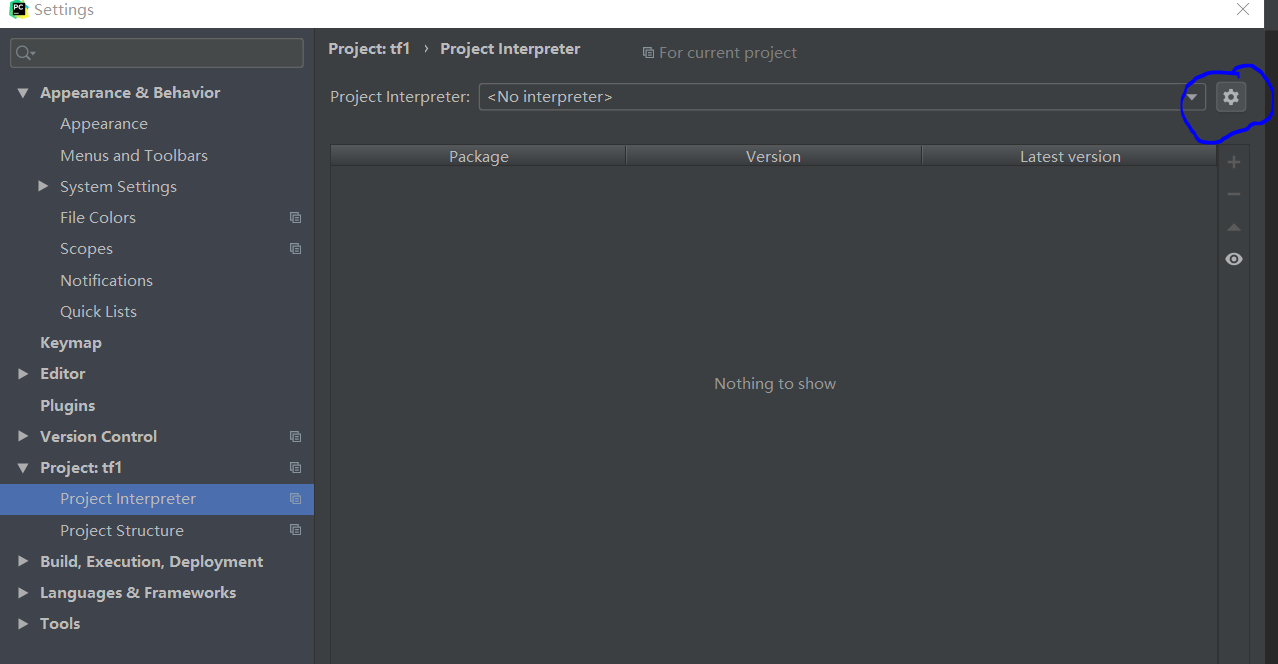
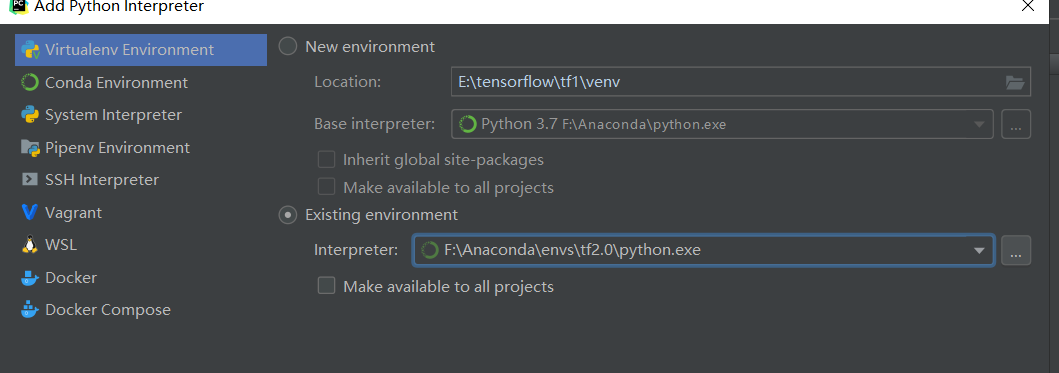
# 4. IDE设置 PyCharm
点击蓝圈处,add,选择对应的环境
# 5 偶尔遇到的问题 no module named tensorflow
有一次 import tensorflow 时报没有这个module,试了好几次也不行,重启终端好了,不知道是什么原因(汗)
anaconda python3.7 安装 tensorflow-gpu 2.0.0 beta1 配置PyCharm的更多相关文章
- 通过Anaconda在Ubuntu16.04上安装 TensorFlow(GPU版本)
一. 安装环境 Ubuntu16.04.3 LST GPU: GeForce GTX1070 Python: 3.5 CUDA Toolkit 8.0 GA1 (Sept 2016) cuDNN v6 ...
- tensor搭建--windows 10 64bit下安装Tensorflow+Keras+VS2015+CUDA8.0 GPU加速
windows 10 64bit下安装Tensorflow+Keras+VS2015+CUDA8.0 GPU加速 原文见于:http://www.jianshu.com/p/c245d46d43f0 ...
- Ubuntu在Anaconda中安装TensorFlow GPU,Keras,Pytorch
安装TensorFlow GPU pip install --ignore-installed --upgrade tensorflow-gpu 安装测试: $ source activate tf ...
- Windows10+anaconda,python3.5, 安装glove-python
Windows10+anaconda,python3.5, 安装glove-python安装glove安装之前 Visual C++ 2015 Build Tools开始安装安装glove最近因为一个 ...
- Python3 离线安装TensorFlow包
Python3 离线安装TensorFlow包 1,下载包 官网地址:https://pypi.org/project/tensorflow/1.1.0rc2/#files 清华镜像:https:// ...
- windows 10 64bit下安装Tensorflow+Keras+VS2015+CUDA8.0 GPU加速
原文地址:http://www.jianshu.com/p/c245d46d43f0 写在前面的话 2016年11月29日,Google Brain 工程师团队宣布在 TensorFlow 0.12 ...
- Anaconda 安装tensorflow(GPU)
1.安装 如果是安装CPU模式的tensorflow,只要输入一下代码就可以了 pip3 install tensorflow #python3pip install tensorflow #pyth ...
- Windows7 64bits下安装TensorFlow GPU版本(图文详解)
不多说,直接上干货! Installing TensorFlow on Windows的官网 https://www.tensorflow.org/install/install_windows 首先 ...
- win10系统下安装TensorFlow GPU版本
首先要说,官网上的指南是最好的指南. https://www.tensorflow.org/install/install_windows 需要FQ看. 想要安装gpu版本的TensorFlow.我们 ...
随机推荐
- h5-video,视频在微信里变形、有黑边
如这种情况: 微信可谓是video标签的重灾区,如果你兼容了安卓的微信,那么在其他浏览器一般也没问题了除了个别(IE:你们看我干吗?). 解决方案: <video src="video ...
- 02--Docker配置阿里云镜像加速器
1.登录阿里云控制台,在产品与服务中收索 "容器镜像服务" 2.点击镜像加速器,CentOS 3.在路径 /etc/docker/daemon.json 下配置加速器地址 4.重新 ...
- Jmeter二次开发——自定义函数
在之前的博文中,Jmeter二次开发--基于Java请求,已介绍了Jmeter二次开发的基础情况,上次分享的是java请求开发,今天来分享下Jmeter中的函数开发.聊到Jmeter的函数,知道Jme ...
- git database 数据库 平面文件 Git 同其他系统的重要区别 Git 只关心文件数据的整体是否发生变化,而大多数其他系统则只关心文件内容的具体差异 Git 的设计哲学
小结: 1.如果要浏览项目的历史更新摘要,Git 不用跑到外面的服务器上去取数据回来 2.注意 git clone 应指定版本,它复制的这个版本的全部历史信息: 各个分支 git init 数据库 ...
- redis中的小秘密和持久化小细节
https://www.jianshu.com/p/36c301ac87df 持久化的情况 https://www.cnblogs.com/wdliu/p/9377278.html 集群搭建 主从 ...
- 为什么要使用 do while(0)?
两点 避免宏定义的花括号对代码的完整性造成影响 可以在指定的代码块中(do{})使用break提前跳出,避免goto.
- udp聊天器
import socket def send_msg(udp_socket): """获取键盘数据,并将其发送给对方""" # 1. 从键盘 ...
- 小步前进之WCF简介
WCF 前言 什么是WCF? 契约 合约 前言 在 .NET Framework2.0 以及前版本中,微软发展了 Web Service..NET Remoting 等通信支持. 如果要进行通信,对于 ...
- LOJ10099矿场搭建
HNOI 2012 煤矿工地可以看成是由隧道连接挖煤点组成的无向图.为安全起见,希望在工地发生事故时所有挖煤点的工人都能有一条出路逃到救援出口处.于是矿主决定在某些挖煤点设立救援出口,使得无论哪一个挖 ...
- MySql(五)SQL优化-优化SQL语句的一般步骤
MySql(五)SQL优化-优化SQL语句的一般步骤 一.优化SQL语句的一般步骤 1.1 通过show status命令了解各种SQL的执行频率 1.2 定位执行效率较低的SQL语句 1.3 通过e ...