
anaconda python3.7 安装 tensorflow-gpu 2.0.0 beta1 配置PyCharm
参考tensorflow 公众号《tensorflow2.0 安装指南》
https://mp.weixin.qq.com/s/7rNXFEC5HYe91RJ0-9CKdQ
# 1. NVIDIA驱动程序安装
安装对应的CUDA 和 cudnn (在tensorflow 公众号《tensorflow2.0 安装指南》得知 2.0-beta1对应CUDA 10.0 cudnn 7.6.0)
之前安装tensorflow-gpu 1.14的时候安装了CUDA 10.0 和CUDNN 7.6.1
# 2. anaconda 环境创建与安装
conda create --name tf2.0 python=3.7
activate tf2.0
pip install -i https://pypi.tuna.tsinghua.edu.cn/simple tensorflow-gpu==2.0.0-beta1 ///清华源
# 3.测试
import tensorflow as tf

A = tf.constant([[1, 2], [3, 4]])

B = tf.constant([[5, 6], [7, 8]])

C = tf.matmul(A, B)

print(C)
输出如下,安装成功
tf.Tensor(

[[19 22]

[43 50]], shape=(2, 2), dtype=int32)
中间输出了一些提示信息
(tf2.0) C:\Users\lenovo>python

Python 3.7.6 (default, Jan  8 2020, 20:23:39) [MSC v.1916 64 bit (AMD64)] :: Anaconda, Inc. on win32

Type "help", "copyright", "credits" or "license" for more information.

>>> import tensorflow as tf

F:\Anaconda\envs\tf2.0\lib\site-packages\tensorflow\python\framework\dtypes.py:516: FutureWarning: Passing (type, 1) or '1type' as a synonym of type is deprecated; in a future version of numpy, it will be understood as (type, (1,)) / '(1,)type'.

  _np_qint8 = np.dtype([("qint8", np.int8, 1)])

F:\Anaconda\envs\tf2.0\lib\site-packages\tensorflow\python\framework\dtypes.py:517: FutureWarning: Passing (type, 1) or '1type' as a synonym of type is deprecated; in a future version of numpy, it will be understood as (type, (1,)) / '(1,)type'.

  _np_quint8 = np.dtype([("quint8", np.uint8, 1)])

F:\Anaconda\envs\tf2.0\lib\site-packages\tensorflow\python\framework\dtypes.py:518: FutureWarning: Passing (type, 1) or '1type' as a synonym of type is deprecated; in a future version of numpy, it will be understood as (type, (1,)) / '(1,)type'.

  _np_qint16 = np.dtype([("qint16", np.int16, 1)])

F:\Anaconda\envs\tf2.0\lib\site-packages\tensorflow\python\framework\dtypes.py:519: FutureWarning: Passing (type, 1) or '1type' as a synonym of type is deprecated; in a future version of numpy, it will be understood as (type, (1,)) / '(1,)type'.

  _np_quint16 = np.dtype([("quint16", np.uint16, 1)])

F:\Anaconda\envs\tf2.0\lib\site-packages\tensorflow\python\framework\dtypes.py:520: FutureWarning: Passing (type, 1) or '1type' as a synonym of type is deprecated; in a future version of numpy, it will be understood as (type, (1,)) / '(1,)type'.

  _np_qint32 = np.dtype([("qint32", np.int32, 1)])

F:\Anaconda\envs\tf2.0\lib\site-packages\tensorflow\python\framework\dtypes.py:525: FutureWarning: Passing (type, 1) or '1type' as a synonym of type is deprecated; in a future version of numpy, it will be understood as (type, (1,)) / '(1,)type'.

  np_resource = np.dtype([("resource", np.ubyte, 1)])

F:\Anaconda\envs\tf2.0\lib\site-packages\tensorboard\compat\tensorflow_stub\dtypes.py:541: FutureWarning: Passing (type, 1) or '1type' as a synonym of type is deprecated; in a future version of numpy, it will be understood as (type, (1,)) / '(1,)type'.

  _np_qint8 = np.dtype([("qint8", np.int8, 1)])

F:\Anaconda\envs\tf2.0\lib\site-packages\tensorboard\compat\tensorflow_stub\dtypes.py:542: FutureWarning: Passing (type, 1) or '1type' as a synonym of type is deprecated; in a future version of numpy, it will be understood as (type, (1,)) / '(1,)type'.

  _np_quint8 = np.dtype([("quint8", np.uint8, 1)])

F:\Anaconda\envs\tf2.0\lib\site-packages\tensorboard\compat\tensorflow_stub\dtypes.py:543: FutureWarning: Passing (type, 1) or '1type' as a synonym of type is deprecated; in a future version of numpy, it will be understood as (type, (1,)) / '(1,)type'.

  _np_qint16 = np.dtype([("qint16", np.int16, 1)])

F:\Anaconda\envs\tf2.0\lib\site-packages\tensorboard\compat\tensorflow_stub\dtypes.py:544: FutureWarning: Passing (type, 1) or '1type' as a synonym of type is deprecated; in a future version of numpy, it will be understood as (type, (1,)) / '(1,)type'.

  _np_quint16 = np.dtype([("quint16", np.uint16, 1)])

F:\Anaconda\envs\tf2.0\lib\site-packages\tensorboard\compat\tensorflow_stub\dtypes.py:545: FutureWarning: Passing (type, 1) or '1type' as a synonym of type is deprecated; in a future version of numpy, it will be understood as (type, (1,)) / '(1,)type'.

  _np_qint32 = np.dtype([("qint32", np.int32, 1)])

F:\Anaconda\envs\tf2.0\lib\site-packages\tensorboard\compat\tensorflow_stub\dtypes.py:550: FutureWarning: Passing (type, 1) or '1type' as a synonym of type is deprecated; in a future version of numpy, it will be understood as (type, (1,)) / '(1,)type'.

  np_resource = np.dtype([("resource", np.ubyte, 1)])

>>> A=tf.constant([[1,2],[3,4]])

2020-02-02 16:05:20.597693: I tensorflow/stream_executor/platform/default/dso_loader.cc:42] Successfully opened dynamic library nvcuda.dll

2020-02-02 16:05:23.206508: I tensorflow/core/common_runtime/gpu/gpu_device.cc:1640] Found device 0 with properties:

name: GeForce GTX 1050 major: 6 minor: 1 memoryClockRate(GHz): 1.493

pciBusID: 0000:01:00.0

2020-02-02 16:05:23.215470: I tensorflow/stream_executor/platform/default/dlopen_checker_stub.cc:25] GPU libraries are statically linked, skip dlopen check.

2020-02-02 16:05:23.224739: I tensorflow/core/common_runtime/gpu/gpu_device.cc:1763] Adding visible gpu devices: 0

2020-02-02 16:05:23.231882: I tensorflow/core/platform/cpu_feature_guard.cc:142] Your CPU supports instructions that this TensorFlow binary was not compiled to use: AVX2

2020-02-02 16:05:23.244758: I tensorflow/core/common_runtime/gpu/gpu_device.cc:1640] Found device 0 with properties:

name: GeForce GTX 1050 major: 6 minor: 1 memoryClockRate(GHz): 1.493

pciBusID: 0000:01:00.0

2020-02-02 16:05:23.259879: I tensorflow/stream_executor/platform/default/dlopen_checker_stub.cc:25] GPU libraries are statically linked, skip dlopen check.

2020-02-02 16:05:23.269339: I tensorflow/core/common_runtime/gpu/gpu_device.cc:1763] Adding visible gpu devices: 0

2020-02-02 16:05:24.446747: I tensorflow/core/common_runtime/gpu/gpu_device.cc:1181] Device interconnect StreamExecutor with strength 1 edge matrix:

2020-02-02 16:05:24.456384: I tensorflow/core/common_runtime/gpu/gpu_device.cc:1187]      0

2020-02-02 16:05:24.460137: I tensorflow/core/common_runtime/gpu/gpu_device.cc:1200] 0:   N

2020-02-02 16:05:24.466395: I tensorflow/core/common_runtime/gpu/gpu_device.cc:1326] Created TensorFlow device (/job:localhost/replica:0/task:0/device:GPU:0 with 1347 MB memory) -> physical GPU (device: 0, name: GeForce GTX 1050, pci bus id: 0000:01:00.0, compute capability: 6.1)

>>> B=tf.constant([[1,2],[3,4]])

>>> B=tf.constant([[5,6],[7,8]])

>>> C=tf.matmul(A,B)

>>> print(C)

tf.Tensor(

[[19 22]

 [43 50]], shape=(2, 2), dtype=int32)

>>>
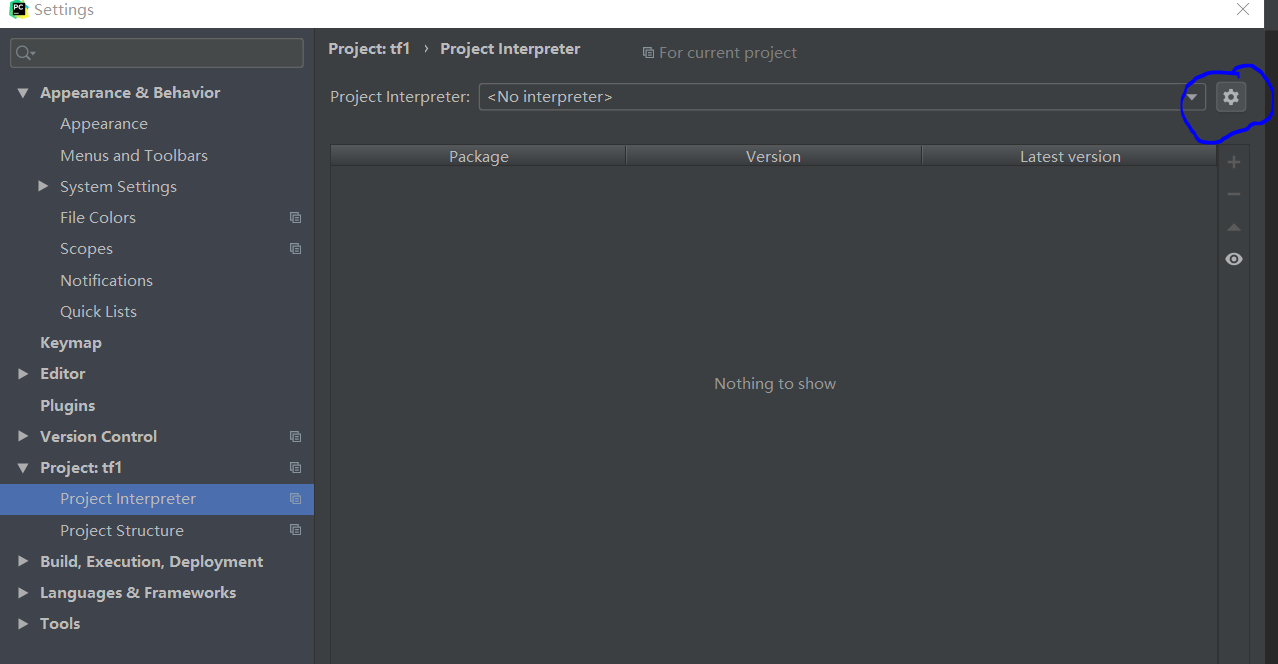
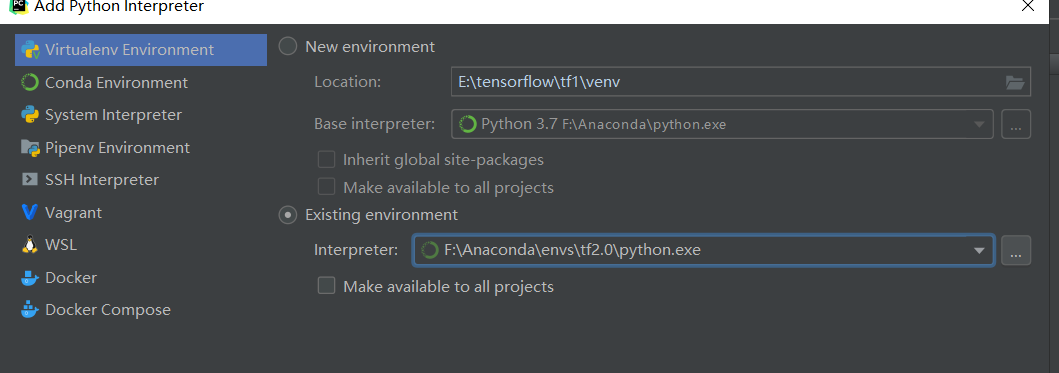
# 4. IDE设置 PyCharm
点击蓝圈处,add,选择对应的环境
# 5 偶尔遇到的问题 no module named tensorflow
有一次 import tensorflow 时报没有这个module,试了好几次也不行,重启终端好了,不知道是什么原因(汗)
anaconda python3.7 安装 tensorflow-gpu 2.0.0 beta1 配置PyCharm的更多相关文章
- 通过Anaconda在Ubuntu16.04上安装 TensorFlow(GPU版本)
一. 安装环境 Ubuntu16.04.3 LST GPU: GeForce GTX1070 Python: 3.5 CUDA Toolkit 8.0 GA1 (Sept 2016) cuDNN v6 ...
- tensor搭建--windows 10 64bit下安装Tensorflow+Keras+VS2015+CUDA8.0 GPU加速
windows 10 64bit下安装Tensorflow+Keras+VS2015+CUDA8.0 GPU加速 原文见于:http://www.jianshu.com/p/c245d46d43f0 ...
- Ubuntu在Anaconda中安装TensorFlow GPU,Keras,Pytorch
安装TensorFlow GPU pip install --ignore-installed --upgrade tensorflow-gpu 安装测试: $ source activate tf ...
- Windows10+anaconda,python3.5, 安装glove-python
Windows10+anaconda,python3.5, 安装glove-python安装glove安装之前 Visual C++ 2015 Build Tools开始安装安装glove最近因为一个 ...
- Python3 离线安装TensorFlow包
Python3 离线安装TensorFlow包 1,下载包 官网地址:https://pypi.org/project/tensorflow/1.1.0rc2/#files 清华镜像:https:// ...
- windows 10 64bit下安装Tensorflow+Keras+VS2015+CUDA8.0 GPU加速
原文地址:http://www.jianshu.com/p/c245d46d43f0 写在前面的话 2016年11月29日,Google Brain 工程师团队宣布在 TensorFlow 0.12 ...
- Anaconda 安装tensorflow(GPU)
1.安装 如果是安装CPU模式的tensorflow,只要输入一下代码就可以了 pip3 install tensorflow #python3pip install tensorflow #pyth ...
- Windows7 64bits下安装TensorFlow GPU版本(图文详解)
不多说,直接上干货! Installing TensorFlow on Windows的官网 https://www.tensorflow.org/install/install_windows 首先 ...
- win10系统下安装TensorFlow GPU版本
首先要说,官网上的指南是最好的指南. https://www.tensorflow.org/install/install_windows 需要FQ看. 想要安装gpu版本的TensorFlow.我们 ...
随机推荐
- oracle释放空间到OS
测试: 建表空间 CREATE TABLESPACE TESTTBS DATAFILE '/oradata01/dfhdb/testtbs01.dbf' SIZE 2G; 在表空间上建表 CREATE ...
- 哈佛商学院MBA管理课程
课程示例:向上管理 课程 什么是向上管理? 了解自己和上司 建立合作关系 与上司进行有效沟通 管理糟糕的上司 向上管理课程内容: 全部课程目录 全部为离线文件(可有偿提供) 包括课程的全部内容,视频. ...
- DDOS攻击方式总结以及免费DDOS攻击测试工具大合集
若有雷同或者不足之处,欢迎指正交流,谢谢! DoS(Denial Of Service)攻击是指故意的攻击网络协议实现的缺陷或直接通过野蛮手段残忍地耗尽被攻击对象的资源,目的是让目标计算机或网络无法提 ...
- linux通过ntpd同步服务器时间,
ntpd得rpm包下载地址:https://pkgs.org/download/ntp 比如我得服务器版本是centos7 x86的,那选择我点击的这一个: 下拉到最下面就有安装包下载了,我选择的是二 ...
- 可视化Go内存管理
小结: 1. Go不需要VM,Go应用程序二进制文件中嵌入了一个小型运行时(Go runtime),可以处理诸如垃圾收集(GC),调度和并发之类的语言功能 Go does not need a VM ...
- 数据备份与恢复 半持久化 全持久化 fork aof rdb Backing up Disaster recovery 备份 容灾
Redis数据备份与恢复 - 流年晕开时光 - 博客园 https://www.cnblogs.com/deny/p/11531355.html Redis数据备份与恢复 Redis所有数据都是保存在 ...
- MySQL 高性能优化规范建议
数据库命令规范 所有数据库对象名称必须使用小写字母并用下划线分割 所有数据库对象名称禁止使用 MySQL 保留关键字(如果表名中包含关键字查询时,需要将其用单引号括起来) 数据库对象的命名要能做到见名 ...
- Redis分布式锁升级版RedLock及SpringBoot实现
分布式锁概览 在多线程的环境下,为了保证一个代码块在同一时间只能由一个线程访问,Java中我们一般可以使用synchronized语法和ReetrantLock去保证,这实际上是本地锁的方式.但是现在 ...
- Java——介绍
Java基础语法: 一个Java程序可以认为是一系列对象的集合,而这些对象通过彼此的方法来协同工作. 对象: 对象是类的一个实例,有状态和行为.例如,一条狗是一个对象,它的状态有:颜色.名字.品种:行 ...
- 用友GRP-u8 SQL注入
POST /Proxy HTTP/1.1 Accept: Accept: */* Content-Type: application/x-www-form-urlencoded User-Agent: ...