
iOS手势处理
iOS手势处理
iOS手势有着如下几种:
- UITapGestureRecognizer
- UIPinchGestureRecognizer
- UIRotationGestureRecognizer
- UISwipeGestureRecognizer
- UIPanGestureRecognizer
- UILongPressGestureRecognizer
上面的手势对应的操作是:
- Tap (点一下)
- Pinch (二指往內或往外拨动,平时经常用到的缩放) 矩阵变换
- Rotation (旋转) 矩阵变换
- Swipe (滑动,快速移动)
- Pan (拖移,慢速移动) 矩阵变换
- LongPress (长按)
注意:以下示例均把手势封装进一个View当中
UITapGestureRecognizer - 点击手势
GestureView.h + GestureView.m
#import <UIKit/UIKit.h>

@interface GestureView : UIView

@end
GestureView.h
#import "GestureView.h"

@interface GestureView ()

@property (nonatomic, strong) UITapGestureRecognizer *tapGesture;

@property (nonatomic, strong) CALayer                *colorLayer;

@end

@implementation GestureView

- (id)initWithFrame:(CGRect)frame {

    self = [super initWithFrame:frame];

    if (self) {

        // 初始化手势,给手势指定响应事件的对象

        _tapGesture = [[UITapGestureRecognizer alloc] initWithTarget:self

                                                              action:@selector(gestureEvent:)];

        _colorLayer = [CALayer layer];

        _colorLayer.frame = self.bounds;

        [self.layer addSublayer:_colorLayer];

        // 将手势与区域绑定

        [self addGestureRecognizer:_tapGesture];

    }

    return self;

}

- (void)gestureEvent:(UIGestureRecognizer *)sender {

    _colorLayer.backgroundColor = [UIColor colorWithRed:arc4random() %  / .f

                                                  green:arc4random() %  / .f

                                                   blue:arc4random() %  / .f

                                                  alpha:1.0f].CGColor;

}

@end
GestureView.m
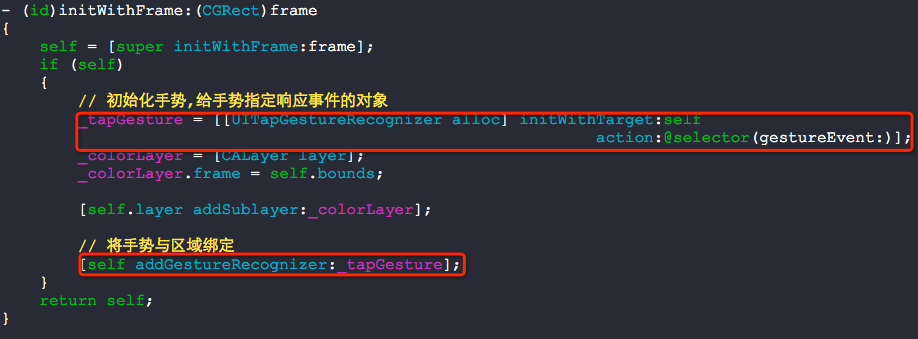
- (void)addGestureRecognizer:(UIGestureRecognizer *)gestureRecognizer
Attaching a gesture recognizer to a view defines the scope of the represented gesture, causing it to receive touches hit-tested to that view and all of its subviews. The view establishes a strong reference to the gesture recognizer.
将手势识别器附着在一个view上,实际上定义了一个手势接收的区域,会将接收到的触摸事件传递给这个view以及这个view的所有的subviews.这个view会对这个手势识别器强引用.
可以总结两点:
1. 手势会传递给这个view中所有的subviews
2. view会强引用手势识别器
使用如下:

点击手势有两个参数可以设置:
numberOfTapsRequired 点击几次触发事件(默认是1)
numberOfTouchesRequired 需要几个手指点击(默认是1)
UIPinchGestureRecognizer - 缩放
GestureView.h + GestureView.m
#import <UIKit/UIKit.h>

@interface GestureView : UIView

@end
GestureView.h
#import "GestureView.h"

@interface GestureView ()

@property (nonatomic, strong) UIPinchGestureRecognizer *pinchGesture;

@end

@implementation GestureView

- (id)initWithFrame:(CGRect)frame

{

    self = [super initWithFrame:frame];

    if (self)

    {

        // 初始化手势,给手势指定响应事件的对象

        _pinchGesture = \

            [[UIPinchGestureRecognizer alloc] initWithTarget:self

                                                      action:@selector(gestureEvent:)];

        // 将手势与区域绑定

        [self addGestureRecognizer:_pinchGesture];

    }

    return self;

}

- (void)gestureEvent:(UIPinchGestureRecognizer *)sender

{

    //

    self.transform = CGAffineTransformScale(self.transform, sender.scale, sender.scale);

    sender.scale = ;

}

@end
GestureView.m
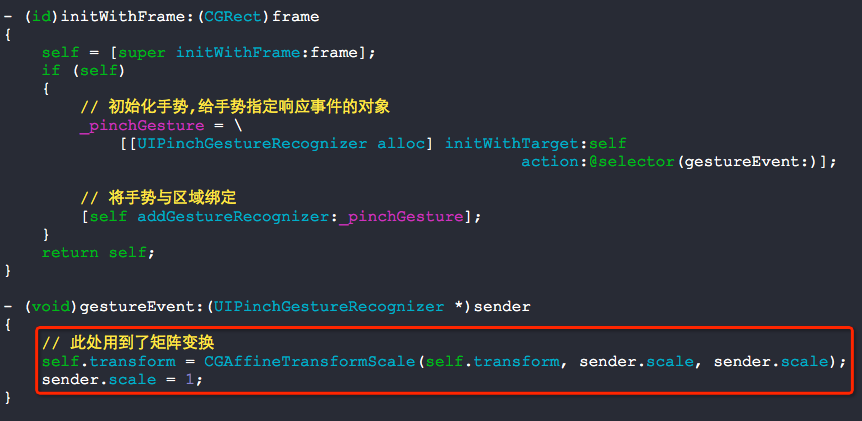
缩放手势会用到矩阵变换.
UIRotationGestureRecognizer - 旋转
GestureView.h + GestureView.m
#import <UIKit/UIKit.h>

@interface GestureView : UIView

@end
GestureView.h
#import "GestureView.h"

@interface GestureView ()

@property (nonatomic, strong) UIRotationGestureRecognizer *rotationGesture;

@end

@implementation GestureView

- (id)initWithFrame:(CGRect)frame

{

    self = [super initWithFrame:frame];

    if (self)

    {

        // 初始化手势,给手势指定响应事件的对象

        _rotationGesture = \

            [[UIRotationGestureRecognizer alloc] initWithTarget:self

                                                         action:@selector(gestureEvent:)];

        // 将手势与区域绑定

        [self addGestureRecognizer:_rotationGesture];

    }

    return self;

}

- (void)gestureEvent:(UIRotationGestureRecognizer *)sender

{

    // 此处用到了矩阵变换

    self.transform = CGAffineTransformRotate(self.transform, sender.rotation);

    sender.rotation = ;

}
GestureView.m

UISwipeGestureRecognizer - 滑动
GestureView.h + GestureView.m
#import <UIKit/UIKit.h>

@interface GestureView : UIView

@end
GestureView.h
#import "GestureView.h"

@interface GestureView ()

@property (nonatomic, strong) UISwipeGestureRecognizer *swipeGesture;

@end

@implementation GestureView

- (id)initWithFrame:(CGRect)frame

{

    self = [super initWithFrame:frame];

    if (self)

    {

        // 初始化手势,给手势指定响应事件的对象

        _swipeGesture = \

            [[UISwipeGestureRecognizer alloc] initWithTarget:self

                                                      action:@selector(gestureEvent:)];

        _swipeGesture.direction = \

            UISwipeGestureRecognizerDirectionLeft | UISwipeGestureRecognizerDirectionRight;

        // 将手势与区域绑定

        [self addGestureRecognizer:_swipeGesture];

    }

    return self;

}

- (void)gestureEvent:(UISwipeGestureRecognizer *)sender

{

    NSLog(@"left or right");

}

@end
GestureView.m

UIPanGestureRecognizer - 平移
GestureView.h + GestureView.m
#import <UIKit/UIKit.h>

@interface GestureView : UIView

@end
GestureView.h
#import "GestureView.h"

@interface GestureView ()

@property (nonatomic, strong) UIPanGestureRecognizer *panGesture;

@end

@implementation GestureView

- (id)initWithFrame:(CGRect)frame

{

    self = [super initWithFrame:frame];

    if (self)

    {

        // 初始化手势,给手势指定响应事件的对象

        _panGesture = \

            [[UIPanGestureRecognizer alloc] initWithTarget:self

                                                    action:@selector(gestureEvent:)];

        // 将手势与区域绑定

        [self addGestureRecognizer:_panGesture];

    }

    return self;

}

- (void)gestureEvent:(UIPanGestureRecognizer *)sender

{

    // 此处用到了矩阵变换

    CGPoint translation = [sender translationInView:self];

    self.center = CGPointMake(self.center.x + translation.x,

                              self.center.y + translation.y);

    [sender setTranslation:CGPointZero

                    inView:self];

}

@end
GestureView.m

UILongPressGestureRecognizer - 长按手势
GestureView.h + GestureView.m
#import <UIKit/UIKit.h>

@interface GestureView : UIView

@end
GestureView.h
#import "GestureView.h"

@interface GestureView ()

@property (nonatomic, strong) UILongPressGestureRecognizer *longPressGesture;

@end

@implementation GestureView

- (id)initWithFrame:(CGRect)frame

{

    self = [super initWithFrame:frame];

    if (self)

    {

        // 初始化手势,给手势指定响应事件的对象

        _longPressGesture = \

            [[UILongPressGestureRecognizer alloc] initWithTarget:self

                                                          action:@selector(gestureEvent:)];

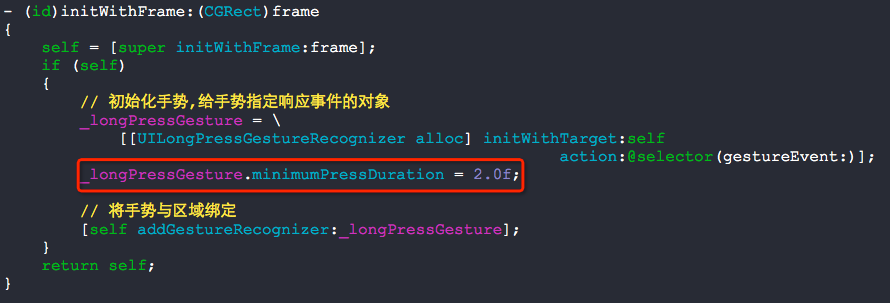
        _longPressGesture.minimumPressDuration = 2.0f;

        // 将手势与区域绑定

        [self addGestureRecognizer:_longPressGesture];

    }

    return self;

}

- (void)gestureEvent:(UILongPressGestureRecognizer *)sender

{

    NSLog(@"触发事件");

}

@end
GestureView.m
问题:如何处理一个view中添加了两个手势,1个是单击的手势,一个是双击的手势呢?
可以使用这个方法requireGestureRecognizerToFail:
#import "GestureView.h"

@interface GestureView ()

@property (nonatomic, strong) UITapGestureRecognizer *tapGesture1;

@property (nonatomic, strong) UITapGestureRecognizer *tapGesture2;

@end

@implementation GestureView

- (id)initWithFrame:(CGRect)frame {

    self = [super initWithFrame:frame];

    if (self) {

        // 单击手势

        _tapGesture1 = \

            [[UITapGestureRecognizer alloc] initWithTarget:self

                                                    action:@selector(gesture1Event:)];

        _tapGesture1.numberOfTapsRequired = ;

        // 双击手势

        _tapGesture2 = \

            [[UITapGestureRecognizer alloc] initWithTarget:self

                                                    action:@selector(gesture2Event:)];

        _tapGesture2.numberOfTapsRequired = ;

        // 注意: 判断双击手势需要时间,也就是说会有延时

        // 有事件触发时,先判断是不是 双击手势,如果不是就执行 单击手势

        [_tapGesture1 requireGestureRecognizerToFail:_tapGesture2];

        // 将手势与区域绑定

        [self addGestureRecognizer:_tapGesture1];

        [self addGestureRecognizer:_tapGesture2];

    }

    return self;

}

- (void)gesture1Event:(UIGestureRecognizer *)sender {

    NSLog(@"");

}

- (void)gesture2Event:(UIGestureRecognizer *)sender {

    NSLog(@"");

}

@end
GestureView.m
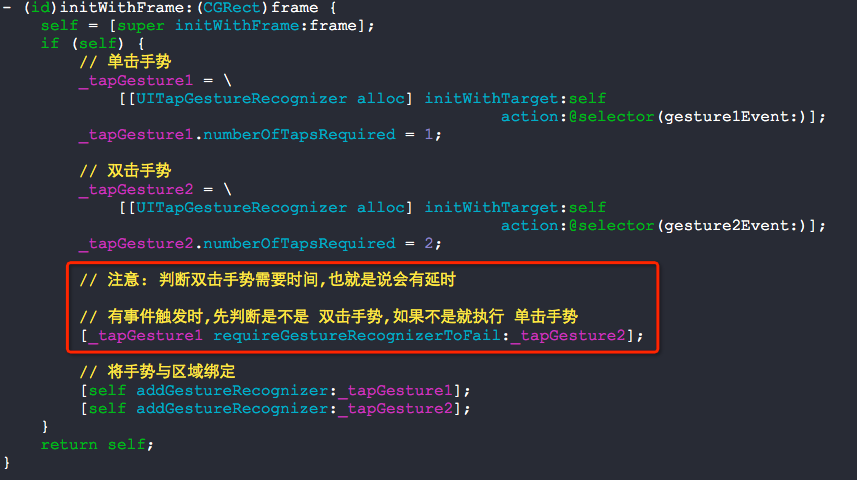
实际上,这种方式会有延时感-_-!!!!
问题:如何将长按手势和拖拽手势合并在一起呢?
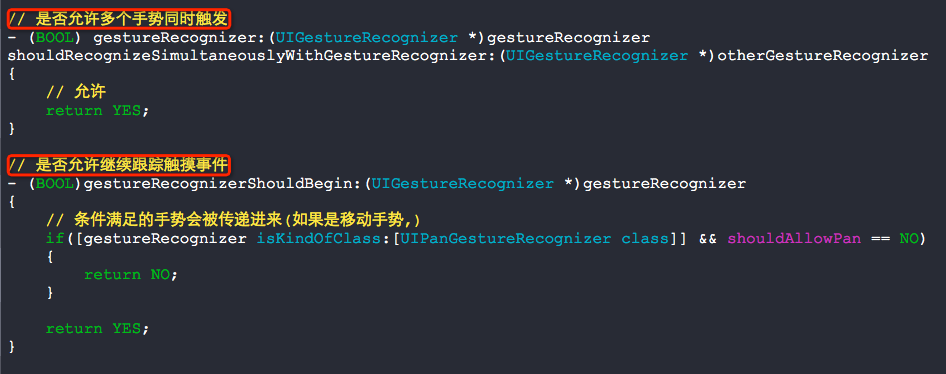
我们需要用代理实现,实现以下的方法:
- (BOOL)gestureRecognizer:(UIGestureRecognizer *)gestureRecognizer shouldRecognizeSimultaneouslyWithGestureRecognizer:(UIGestureRecognizer *)otherGestureRecognizer
Asks the delegate if two gesture recognizers should be allowed to recognize gestures simultaneously.
询问这个代理,是否允许两个手势同时触发.
#import "GestureView.h"

@interface GestureView ()<UIGestureRecognizerDelegate>

{

    BOOL  shouldAllowPan;

}

@property (nonatomic, strong) UIPanGestureRecognizer       *panGesture;

@property (nonatomic, strong) UILongPressGestureRecognizer *longPressGesture;

@end

@implementation GestureView

- (id)initWithFrame:(CGRect)frame {

    self = [super initWithFrame:frame];

    if (self) {

        // 初始化时不允许拖拽

        shouldAllowPan = NO;

        _panGesture = \

        [[UIPanGestureRecognizer alloc] initWithTarget:self

                                                action:@selector(panEvent:)];

        [self addGestureRecognizer:_panGesture];

        _panGesture.delegate = self;

        _longPressGesture = \

        [[UILongPressGestureRecognizer alloc] initWithTarget:self

                                                      action:@selector(longPressEvent:)];

        _longPressGesture.minimumPressDuration = 1.0f;

        [self addGestureRecognizer:_longPressGesture];

        _longPressGesture.delegate = self;

    }

    return self;

}

- (void)panEvent:(UIPanGestureRecognizer *)sender {

    if(shouldAllowPan == YES)

    {

        // 移动的操作

        CGPoint translation = [sender translationInView:self];

        self.center = CGPointMake(self.center.x + translation.x,

                                  self.center.y + translation.y);

        [sender setTranslation:CGPointZero

                        inView:self];

    }

    else if(sender.state == UIGestureRecognizerStateEnded || \

            sender.state == UIGestureRecognizerStateFailed || \

            sender.state == UIGestureRecognizerStateCancelled)

    {

        shouldAllowPan = NO;

    }

}

- (void)longPressEvent:(UIGestureRecognizer *)sender

{

    // 长按开始

    if(UIGestureRecognizerStateBegan == sender.state)

    {

        NSLog(@"长按开始");

        self.backgroundColor = [UIColor redColor];

        shouldAllowPan = NO;

    }

    // 长按进行中

    if(UIGestureRecognizerStateChanged == sender.state)

    {

        NSLog(@"长按进行中");

        shouldAllowPan = YES;

    }

    // 长按结束

    if(UIGestureRecognizerStateEnded == sender.state)

    {

        NSLog(@"长按结束");

        self.backgroundColor = [UIColor blackColor];

        shouldAllowPan = NO;

    }

}

// 是否允许多个手势同时触发

- (BOOL) gestureRecognizer:(UIGestureRecognizer *)gestureRecognizer

shouldRecognizeSimultaneouslyWithGestureRecognizer:(UIGestureRecognizer *)otherGestureRecognizer

{

    // 允许

    return YES;

}

// 是否允许继续跟踪触摸事件

- (BOOL)gestureRecognizerShouldBegin:(UIGestureRecognizer *)gestureRecognizer

{

    // 条件满足的手势会被传递进来(如果是移动手势,)

    if([gestureRecognizer isKindOfClass:[UIPanGestureRecognizer class]] && shouldAllowPan == NO)

    {

        return NO;

    }

    return YES;

}

@end
GestureView.m
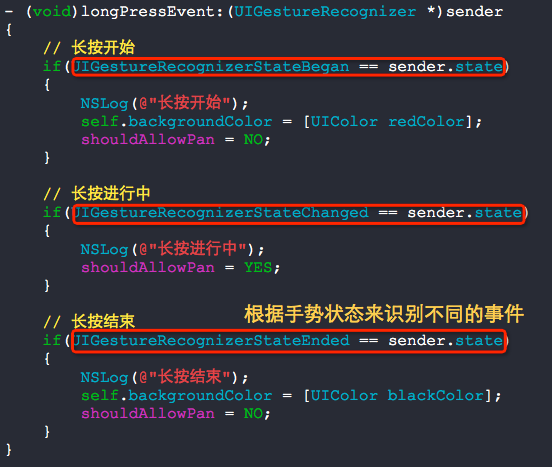
根据手势状态来识别手势触发事件的全称细节是十分重要的.
问题:如何让一个view的部分区域响应拖拽事件呢?
比方说,我们只需要下面红色线指定的区域响应拖拽事件:

#import "GestureView.h"

@interface GestureView ()

{

    BOOL  allowPan;

}

@property (nonatomic, strong) UIPanGestureRecognizer       *panGesture;

@end

@implementation GestureView

- (id)initWithFrame:(CGRect)frame

{

    self = [super initWithFrame:frame];

    if (self)

    {

        // 初始化时不允许拖拽

        allowPan = NO;

        _panGesture = \

        [[UIPanGestureRecognizer alloc] initWithTarget:self

                                                action:@selector(panEvent:)];

        [self addGestureRecognizer:_panGesture];

    }

    return self;

}

- (void)panEvent:(UIPanGestureRecognizer *)sender

{

    // 获取到当前手势在当前视图坐标中触摸的点

    CGPoint point = [sender locationInView:self];

    // 手势开始时置位(手势事件开始过程中仅仅执行一回)

    if (sender.state == UIGestureRecognizerStateBegan)

    {

        // 设定响应的区域

        if (self.bounds.size.height / .f >= point.x && self.bounds.size.width / .f >= point.y)

        {

            allowPan = YES;

        }

    }

    // 手势持续(手势事件开始过程中执行多回)

    if (sender.state == UIGestureRecognizerStateChanged && allowPan == YES)

    {

        // 移动的操作

        CGPoint translation = [sender translationInView:self];

        self.center = CGPointMake(self.center.x + translation.x,

                                  self.center.y + translation.y);

        [sender setTranslation:CGPointZero

                        inView:self];

    }

    // 手势结束后置位(手势事件开始过程中仅仅执行一回)

    if (sender.state == UIGestureRecognizerStateEnded)

    {

        allowPan = NO;

    }

}

@end
GestureView.m
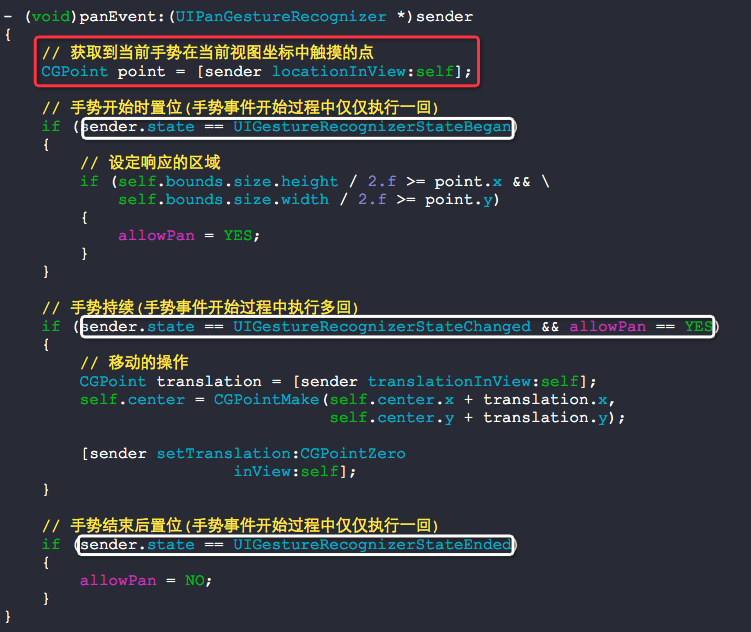
要实现那个效果,以下方法是核心方法,配合手势的状态使用:
// 获取到当前手势在当前视图坐标中触摸的点
CGPoint point = [sender locationInView:self];
问题:如何在ViewController中获取到点击的坐标,让一个view跟随触摸点移动呢?
可以使用这几个最原始的处理触摸事件的方法来达到效果.
- (void)touchesBegan:(NSSet *)touches withEvent:(UIEvent *)event;
- (void)touchesMoved:(NSSet *)touches withEvent:(UIEvent *)event;
- (void)touchesEnded:(NSSet *)touches withEvent:(UIEvent *)event;
#import "RootViewController.h"

@interface RootViewController ()

{

    UIView  *_panPoint;

    CALayer *_redLayer;

}

@end

@implementation RootViewController

- (void)viewDidLoad

{

    [super viewDidLoad];

    // 初始化view

    _panPoint = [[UIView alloc] initWithFrame:CGRectMake(, , , )];

    _panPoint.layer.cornerRadius = .f;

    _panPoint.layer.masksToBounds = YES;

    [self.view addSubview:_panPoint];

    // 初始化一个layer

    _redLayer = [CALayer layer];

    _redLayer.frame = _panPoint.bounds;

    _redLayer.backgroundColor = [UIColor redColor].CGColor;

    _redLayer.opacity = .f;

    [_panPoint.layer addSublayer:_redLayer];

}

// 一次完整的触摸事件中,touchesBegan只执行一回

- (void)touchesBegan:(NSSet *)touches withEvent:(UIEvent *)event

{

    // 获取触摸点坐标

    UITouch *touch = [touches anyObject];

    CGPoint touchPoint = [touch locationInView:self.view];

    _panPoint.center = touchPoint;

    _redLayer.opacity = 1.0f;

}

- (void)touchesMoved:(NSSet *)touches withEvent:(UIEvent *)event

{

    // 获取触摸点坐标

    UITouch *touch = [touches anyObject];

    CGPoint touchPoint = [touch locationInView:self.view];

    _panPoint.center = touchPoint;

}

// 一次完整的触摸事件中,touchesEnded只执行一回

- (void)touchesEnded:(NSSet *)touches withEvent:(UIEvent *)event

{

    // 获取触摸点坐标

    UITouch *touch = [touches anyObject];

    CGPoint touchPoint = [touch locationInView:self.view];

    _panPoint.center = touchPoint;

    _redLayer.opacity = 0.0f;

}

@end
RootViewController.m
也可以直接使用拖拽手势来实现的,不过不完美
#import "RootViewController.h"

@interface RootViewController ()

{

    UIView  *_panPoint;

    CALayer *_redLayer;

}

@end

@implementation RootViewController

- (void)viewDidLoad

{

    [super viewDidLoad];

    // 初始化view

    _panPoint = [[UIView alloc] initWithFrame:CGRectMake(, , , )];

    _panPoint.layer.cornerRadius = .f;

    _panPoint.layer.masksToBounds = YES;

    [self.view addSubview:_panPoint];

    // 初始化一个layer

    _redLayer = [CALayer layer];

    _redLayer.frame = _panPoint.bounds;

    _redLayer.backgroundColor = [UIColor redColor].CGColor;

    _redLayer.opacity = .f;

    [_panPoint.layer addSublayer:_redLayer];

    // 定义手势

    UIPanGestureRecognizer *panGesture = \

        [[UIPanGestureRecognizer alloc] initWithTarget:self

                                                action:@selector(panGestureEvent:)];

    [self.view addGestureRecognizer:panGesture];

}

- (void)panGestureEvent:(UIPanGestureRecognizer *)sender

{

    CGPoint touchPoint = [sender locationInView:self.view];

    if (sender.state == UIGestureRecognizerStateBegan)

    {

        _panPoint.center = touchPoint;

        _redLayer.opacity = 1.0f;

    }

    else if (sender.state == UIGestureRecognizerStateChanged)

    {

        _panPoint.center = touchPoint;

    }

    else if (sender.state == UIGestureRecognizerStateEnded)

    {

        _panPoint.center = touchPoint;

        _redLayer.opacity = 0.0f;

    }

}

@end
RootViewController.m
他们两者的对比关系:
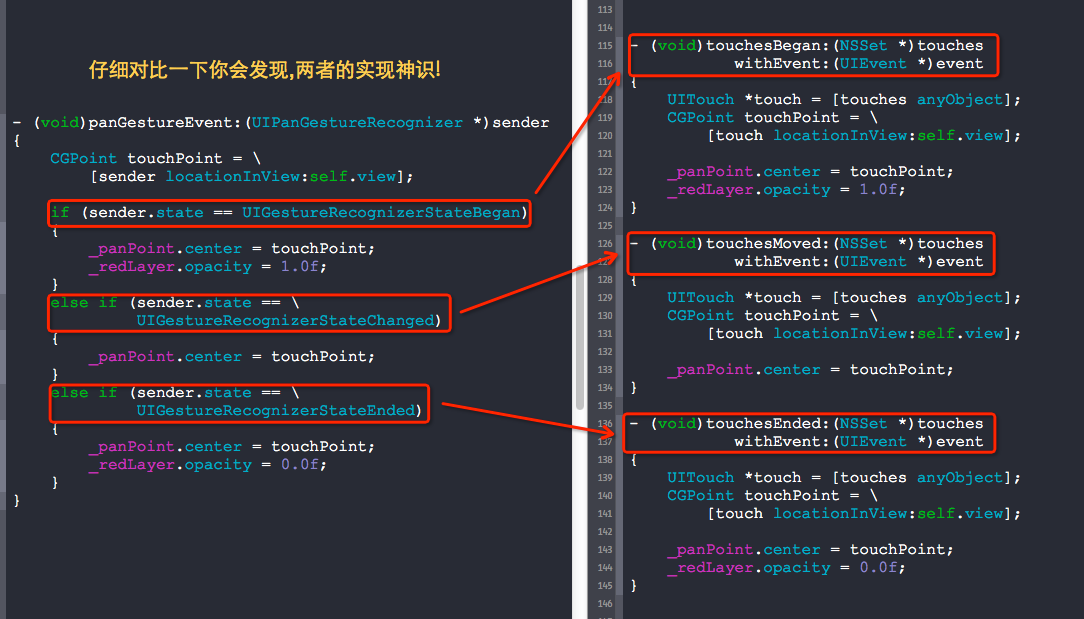
手势处理中核心的地方:
1. UIGestureRecognizerState非常重要,触发事件时可以直接根据这个状态值来判断事件的发生顺序
2. 处理多手势冲突时,可以使用依赖requireGestureRecognizerToFail:来处理,但效果不好
3. 处理多个手势并发响应的时候,需要实现代理并执行方法,请参考上面的事例
4. 仅仅处理一个view上局部的手势事件,需要用到手势的locationInView:方法,并与UIGestureRecognizerState状态值配合使用
附录:
- (BOOL)gestureRecognizer:(UIGestureRecognizer *)gestureRecognizer shouldReceiveTouch:(UITouch *)touch
这是手势的代理方法,在可以不移除手势的情况下关闭手势的响应,此方法涉及到响应链.
iOS手势处理的更多相关文章
- ios手势
iOS 手势操作:拖动.捏合.旋转.点按.长按.轻扫.自定义 大 中 小 1.UIGestureRecognizer 介绍 手势识别在 iOS 中非常重要,他极大地提高了移动设备的使用便捷性. i ...
- iOS手势学习UIGestureRecognizer & cocos2d 手势推荐
iOS手势学习UIGestureRecognizer & cocos2d 手势推荐 手势识别类型: UILongPressGestureRecognizer // 长按UIPanGestur ...
- iOS 手势识别器概述
手势识别器 iOS 手势识别器(UIGestureRecognizer) 点击手势(UITapGestureRecognizer) 滑动手势(UISwipeGestureRecognizer) 旋转手 ...
- swift 实现iOS手势密码、指纹密码、faceID
本博客包含了如何实现iOS手势密码.指纹密码.faceID全步骤,包括了完整的代码. 先附上demo地址https://github.com/Liuyubao/LYBTouchID,支持swift3. ...
- iOS手势解锁、指纹解锁--Swift代码
一.手势密码 1. 1.1.用UIButton组成手势的节点. 1.2.当手指接触屏幕时,调用重写的 touchesBegan:withEvent方法(在touchesBegan里调用setNeeds ...
- IOS 手势-轻点、触摸、手势、事件
1.概念 手势是从你用一个或多个手指接触屏幕时开始,直到手指离开屏幕为止所发生的所有事件.无论手势持续多长时间,只要一个或多个手指仍在屏幕上,这个手势就存在. 触摸是指把手指放到IOS设备的屏幕上,从 ...
- IOS 手势详解
在IOS中手势可以让用户有很好的体验,因此我们有必要去了解一下手势. (在设置手势是有很多值得注意的地方) *是需要设置为Yes的点击无法响应* *要把手势添加到所需点击的View,否则无法响应* 手 ...
- iOS 手势操作:拖动、捏合、旋转、点按、长按、轻扫、自定义
1.UIGestureRecognizer 介绍 手势识别在 iOS 中非常重要,他极大地提高了移动设备的使用便捷性. iOS 系统在 3.2 以后,他提供了一些常用的手势(UIGestureReco ...
- IOS 手势事件的冲突
关于手操作需要强调几点: UIImageView默认是不支持交互的,也就是userInteractionEnabled=NO ,因此要接收触摸事件(手势识别),必须设置userInteractionE ...
随机推荐
- Nodejs学习笔记(四)—与MySQL交互(felixge/node-mysql)
简介和安装 Node.js与MySQL交互操作有很多库,具体可以在 https://www.npmjs.org/search?q=mysql 查看. 我选择了felixge/node-mysql,用 ...
- curl的head小记
CURLINFO_HEADER_OUT,如果启用会在curl_getinfo里得到发送的头信息 CURLINFO_HEADER 如果启用,会在结果里返回回应的消息头信息
- 玩转mongodb(四):细说插入、更新、删除和查询
插入: 使用insert或save方法想目标集合插入一个文档: db.person.insert({"name":"ryan","age": ...
- 问题集录--Java高级软件工程师面试考纲(转)
如果要应聘高级开发工程师职务,仅仅懂得Java的基础知识是远远不够的,还必须懂得常用数据结构.算法.网络.操作系统等知识.因此本文不会讲解具体的技术,笔者综合自己应聘各大公司的经历,整理了一份大公司对 ...
- 【angular5项目积累总结】文件下载
download() { const token = localStorage.getItem('token'); let headers: HttpHeaders = new HttpHeaders ...
- 使用Python制作一个简单的刷博器
呵呵,不得不佩服Python的强大,寥寥几句代码就能做一个简单的刷博器. import webbrowser as web import time import os count=0 while co ...
- 扩展jquery插件的方式
- Oracle时间换算:日,月,周数,星期,年
http://blog.csdn.net/liangweiwei130/article/details/37930383 Oracle时间换算,留做记号!
- dubbo基于tcp协议的RPC框架
什么是 RPC 框架 谁能用通俗的语言解释一下什么是 RPC 框架? - 远程过程调用协议RPC(Remote Procedure Call Protocol) 首先了解什么叫RPC,为什么要RPC, ...
- centos7安装 ftp 组件与开放防火墙端口命令
Linux 安装 ftp 组件 安装完后,有/etc/vsftpd/vsftpd.conf 文件,是 vsftp 的配置文件. 1.执行 yum -y install vsftpd 2. 添加一个 f ...