
Internet History, Technology and Security (Week 7)
Week 7
Technology: Application Protocols
Welcome to Week 7 of IHTS. This week has less material than other weeks. I like to think of it as a "seventh inning stretch" - where you get a little breather. This week wraps up the three weeks of "Technology" (i.e packets and stuff). After this week we have two weeks on Security and the final exam and then you are done. Thanks for sticking with it. You are almost there.
This week, we’ll be covering application protocols. With reliable “pipes” available from the Transport layer, we can build applications like web browsers, file transfer applications, or email clients and servers.
Layer 4: Applications
Application Layer
现在讲Application Layer.
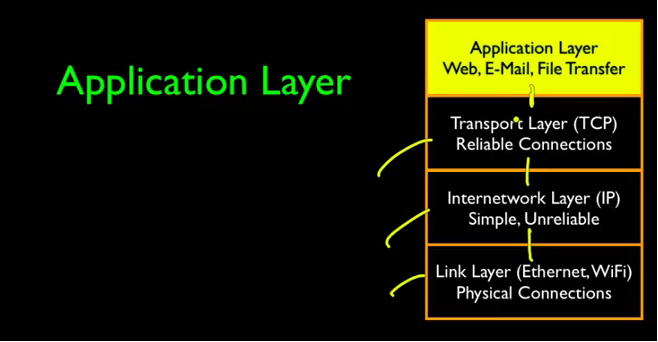
The services of the TCP layer are basically to give us a reliable, sequenced end to end stream, that can start in one application in one computer and end in an application in a different computer, and have a two way communication.
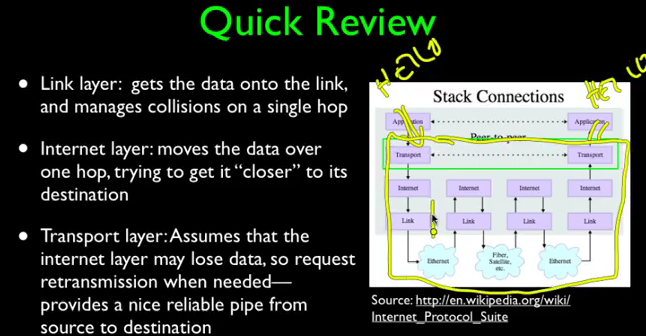
TCP give us a reliable pipe.当关注某一层级时,我们就可以忽略其他层级的实现细节。
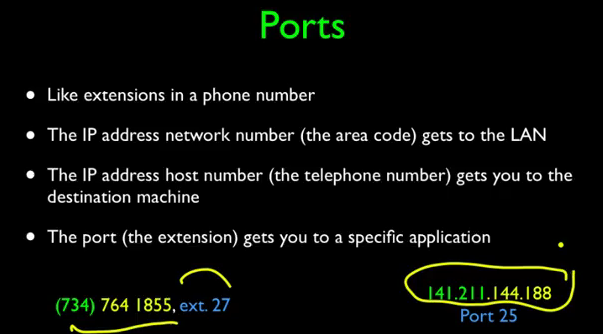
端口(port):
像电话话号码的扩展;
具体到某一个应用(application)。
关于应用层的两个问题:
- 哪个应用得到data;
- 什么规则和应用进行通话。

One is, which application gets the data. And this is done using a mechanism called ports, and ports allow a IP address, or a single computer, or a single server, to serve up multiple services, and then for a client to be able to dial up much like a telephone extension, and pick the service that they are interested in.
一句话来说:IP地址决定你连接哪台电脑,端口决定你访问这台电脑之后,会与哪个应用通信。
下图展示了各个不同的Ports:
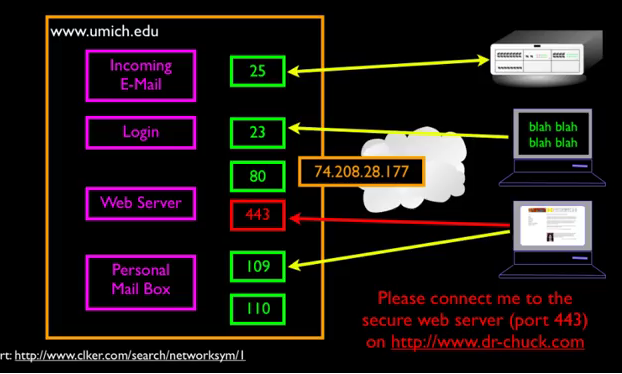
常用的端口

既然TCP给我们提供了一个可靠的通信管道,那我们可以用这个管道做什么呢?什么问题又需要解决呢?
So, TCP gives us this reliable connection, we now can connect to the server that we desire to connect to by using ports, and the question is, what are we going to to say across that connection, and what we say across that connection, who talks first, what do you send, what comes back, depends on the kind of server that you are talking to。
即万维网服务器。万维网中的客户端和服务端使用的是名为HTTP的协议进行通信。网址URL中的HTTP://dada.dada.dada就是。
下图是 HTTP Request/Response Cycle.点击一个运行在你电脑中的客户端client的一个link,浏览器就会和web server 连接并发送一个请求,web server看到了就会返回请求,返回的document就会出现在客户端的桌面上。
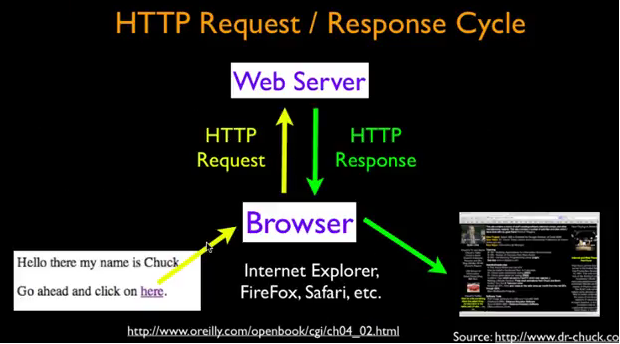
这里老师给我们展示了一个栗子:
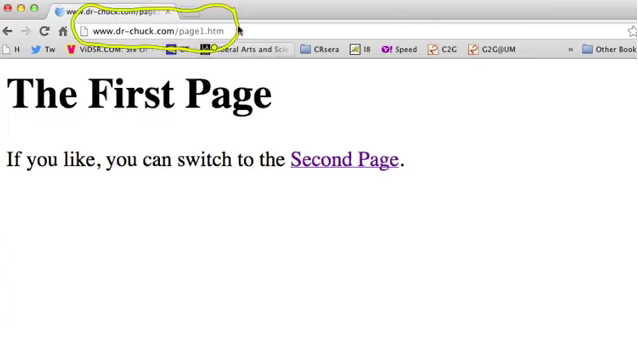
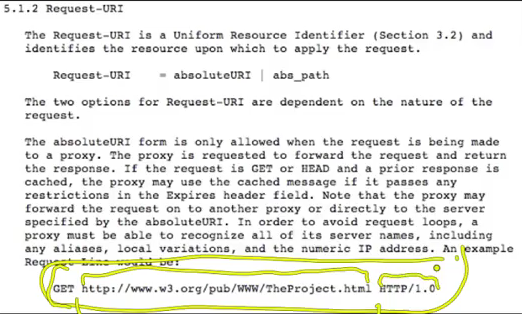
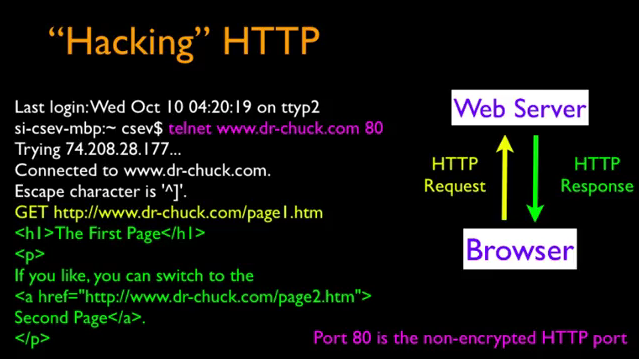
接下来老师要介绍telnet client,不过人们认为这不安全,因为这是一个old and less secure protocols.
Van Jacobson - Content Centered Networking
这里是关于人物介绍,所以感兴趣就留言吧~
Internet History, Technology and Security (Week 7)的更多相关文章
- Internet History, Technology and Security (Get Started)
Abstract 课程名称:互联网的历史.技术和安全 coursera地址 制作方:密歇根大学(University of Michigan) 教师:Charles Severance, Associ ...
- Internet History,Technology and Security
Internet History,Technology and Security(简单记录) First Week High Stakes Research in Computing,and Comm ...
- Internet History,Technology,and Security - History Through Supercomputing(Week2)
时间飞逝,一周又过去了,这周我们来到了Internet History, Technology and Security (Week 2)的学习,从标题就可以看出,这周主要是介绍“互联网”雏形的诞生. ...
- Internet History, Technology and Security (Week 2)
Week 2 History: The First Internet - NSFNet Welcome to week 2! This week, we'll be covering the hist ...
- Coursera: Internet History, Technology, and Security
课程网址:https://www.coursera.org/learn/internet-history 学习笔记: Week 1: History - Dawn of Early Computing ...
- Internet History, Technology and Security (Week 9)
Week 9 Security: Web Security We are now on the second to last week of the class and finishing up ou ...
- Internet History, Technology, and Security(week1)——History: Dawn of Electronic Computing
前言: 第一次进行课程学习,在反复观看视频和查找字典翻译理解后选出了视频中个人认为较重要的概念,以下并不按照逐句翻译,中文概括大意余下自由发挥,对老师想要告诉我们的历史有一个初步的了解,顺便锻炼以下英 ...
- Internet History, Technology and Security (Week5.1)
Week5 The Transport layer is built on the Internetwork layer and is what makes our network connectio ...
- Internet History, Technology and Security (Week 4)
Week 4 History: Commercialization and Growth We are now moving into Week 4! This week, we will be co ...
- Internet History,Technology,and Security - Technology: Internets and Packets (Week5)
Week5 Technology: Internets and Packets Welcome to Week 5! This week, we’ll be covering internets an ...
随机推荐
- c++MFC工程修改在共享DLL中使用MFC为使用标准Windows库的解决办法
由于创建MFC工程时,默认是在共享DLL中使用MFC,如果将此选项改成使用标准Windows库,会报如下错误 c:\program files\microsoft visual studio 9.0\ ...
- Python_sklearn机器学习库学习笔记(六) dimensionality-reduction-with-pca
# 用PCA降维 #计算协方差矩阵 import numpy as np X=[[2,0,-1.4], [2.2,0.2,-1.5], [2.4,0.1,-1], [1.9,0,-1.2]] np.c ...
- Zabbix实战-简易教程--业务类
一.需求 项目要求对线上服务器进行监控,包括服务器本身状态.进程相关数据.业务相关数据. 服务器本身状态可以通过基础模板即可获取数据(CPU.内存.网络.磁盘): 进程相关数据,前面也有相关文章专门监 ...
- python 另一种打开文章的方式——codecs
通常我们使用python打开文件都是 open(‘beijing.txt’)或者是 with open(‘beijing.txt’)as f 那么今天来给你带来一个新的文档打开方式 python的co ...
- oracle出现无法修改的异常记录
oracle数据库(PLSQL登录器),修改时遇到无法修改以前的记录. 解决方法: 是因为session正在操作(有锁),出现的假象让你觉得执行了sql却无法显示出修改的数据. 一个操作用户未完成操作 ...
- yum 出现error: db5 error
yum 安装k8s的过程中用了 Ctrl+ z, 然后yum 再也不能使用了: Error: rpmdb open failed 解决方法: rpm --rebuilddb yum clean all ...
- Linux之linux基础命令2
目录相关: 创建目录: mkdir 目录名 递归创建a/b c/d: mkdir -p a/b c/d 递归创建test/a,b,c,d四个目录: mkdir - p test{a,b,c,d} 递归 ...
- Linux之linux入门
学习linux之前先了解一下操作系统: 操作系统的定义: 操作系统(英语:operating system,缩写作 OS)是管理计算机硬件与软件资源的计算机程序,同时也是计算机系统的内 ...
- 稳重商务风格教师求职简历免费word模板
30款稳重商务风格教师求职简历免费word模板,也可用于其他专业和职业,个人免费简历模板,个人简历表免费,个人简历表格. 声明:该简历模板仅用于个人欣赏使用,请勿用于商业用途,谢谢. 下载地址:百度网 ...
- hdu1285确定比赛名次(拓扑排序+优先队列)
传送门 第一道拓扑排序题 每次删除入度为0的点,并输出 这题要求队名小的排前面,所以要用到重载的优先队列 #include<bits/stdc++.h> using namespace s ...