
Internet History, Technology and Security (Week 7)
Week 7
Technology: Application Protocols
Welcome to Week 7 of IHTS. This week has less material than other weeks. I like to think of it as a "seventh inning stretch" - where you get a little breather. This week wraps up the three weeks of "Technology" (i.e packets and stuff). After this week we have two weeks on Security and the final exam and then you are done. Thanks for sticking with it. You are almost there.
This week, we’ll be covering application protocols. With reliable “pipes” available from the Transport layer, we can build applications like web browsers, file transfer applications, or email clients and servers.
Layer 4: Applications
Application Layer
现在讲Application Layer.
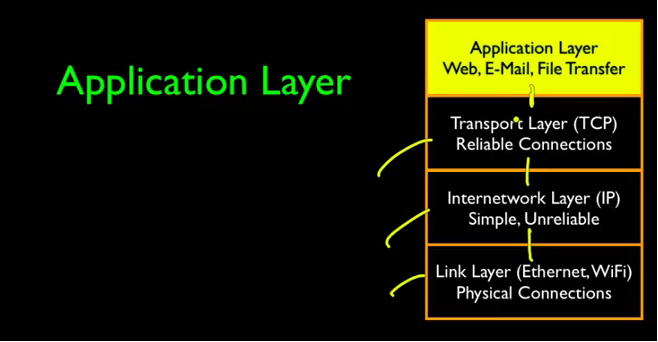
The services of the TCP layer are basically to give us a reliable, sequenced end to end stream, that can start in one application in one computer and end in an application in a different computer, and have a two way communication.
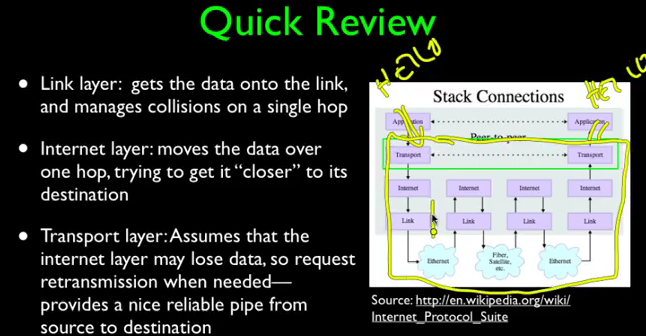
TCP give us a reliable pipe.当关注某一层级时,我们就可以忽略其他层级的实现细节。
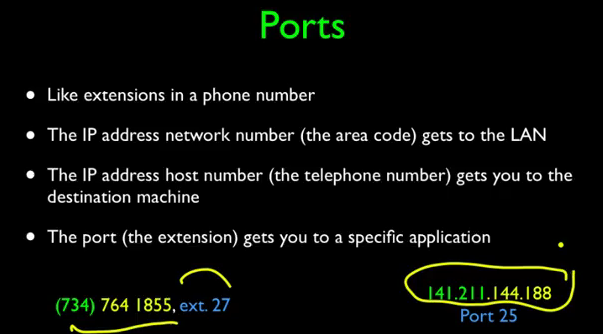
端口(port):
像电话话号码的扩展;
具体到某一个应用(application)。
关于应用层的两个问题:
- 哪个应用得到data;
- 什么规则和应用进行通话。

One is, which application gets the data. And this is done using a mechanism called ports, and ports allow a IP address, or a single computer, or a single server, to serve up multiple services, and then for a client to be able to dial up much like a telephone extension, and pick the service that they are interested in.
一句话来说:IP地址决定你连接哪台电脑,端口决定你访问这台电脑之后,会与哪个应用通信。
下图展示了各个不同的Ports:
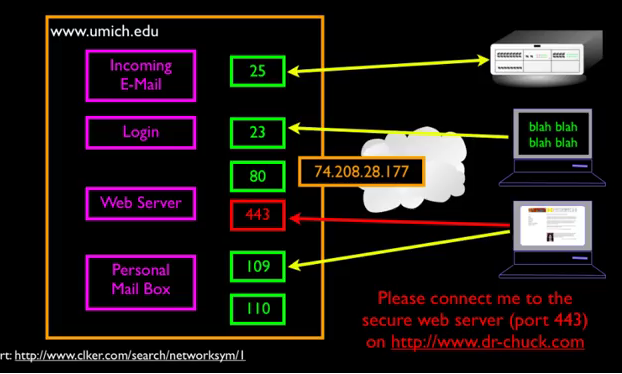
常用的端口

既然TCP给我们提供了一个可靠的通信管道,那我们可以用这个管道做什么呢?什么问题又需要解决呢?
So, TCP gives us this reliable connection, we now can connect to the server that we desire to connect to by using ports, and the question is, what are we going to to say across that connection, and what we say across that connection, who talks first, what do you send, what comes back, depends on the kind of server that you are talking to。
即万维网服务器。万维网中的客户端和服务端使用的是名为HTTP的协议进行通信。网址URL中的HTTP://dada.dada.dada就是。
下图是 HTTP Request/Response Cycle.点击一个运行在你电脑中的客户端client的一个link,浏览器就会和web server 连接并发送一个请求,web server看到了就会返回请求,返回的document就会出现在客户端的桌面上。
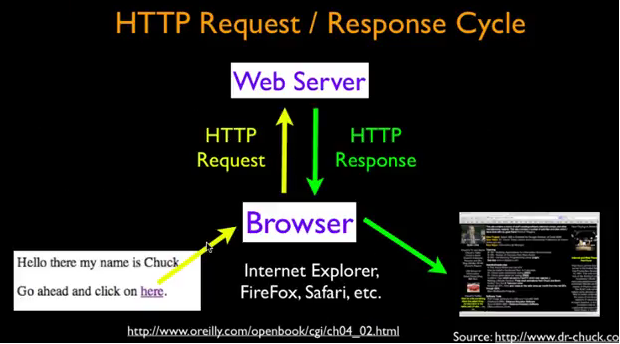
这里老师给我们展示了一个栗子:
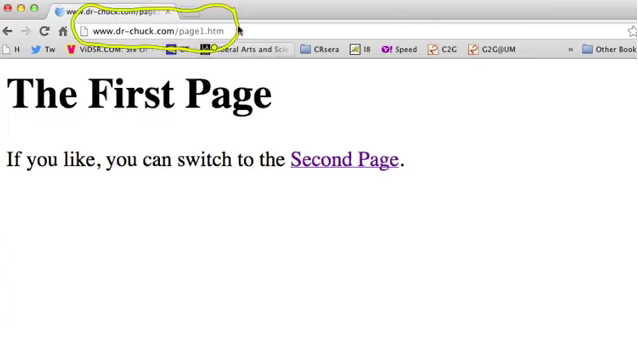
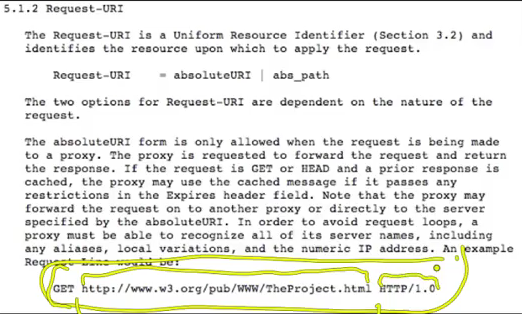
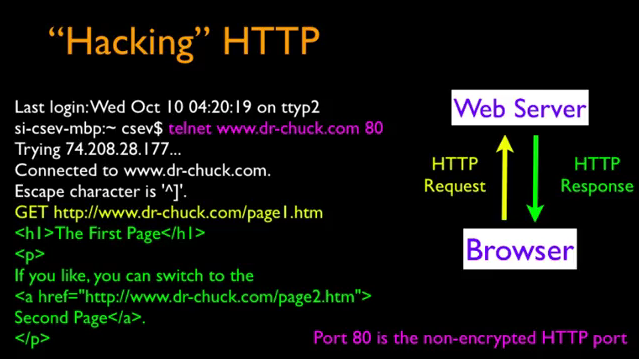
接下来老师要介绍telnet client,不过人们认为这不安全,因为这是一个old and less secure protocols.
Van Jacobson - Content Centered Networking
这里是关于人物介绍,所以感兴趣就留言吧~
Internet History, Technology and Security (Week 7)的更多相关文章
- Internet History, Technology and Security (Get Started)
Abstract 课程名称:互联网的历史.技术和安全 coursera地址 制作方:密歇根大学(University of Michigan) 教师:Charles Severance, Associ ...
- Internet History,Technology and Security
Internet History,Technology and Security(简单记录) First Week High Stakes Research in Computing,and Comm ...
- Internet History,Technology,and Security - History Through Supercomputing(Week2)
时间飞逝,一周又过去了,这周我们来到了Internet History, Technology and Security (Week 2)的学习,从标题就可以看出,这周主要是介绍“互联网”雏形的诞生. ...
- Internet History, Technology and Security (Week 2)
Week 2 History: The First Internet - NSFNet Welcome to week 2! This week, we'll be covering the hist ...
- Coursera: Internet History, Technology, and Security
课程网址:https://www.coursera.org/learn/internet-history 学习笔记: Week 1: History - Dawn of Early Computing ...
- Internet History, Technology and Security (Week 9)
Week 9 Security: Web Security We are now on the second to last week of the class and finishing up ou ...
- Internet History, Technology, and Security(week1)——History: Dawn of Electronic Computing
前言: 第一次进行课程学习,在反复观看视频和查找字典翻译理解后选出了视频中个人认为较重要的概念,以下并不按照逐句翻译,中文概括大意余下自由发挥,对老师想要告诉我们的历史有一个初步的了解,顺便锻炼以下英 ...
- Internet History, Technology and Security (Week5.1)
Week5 The Transport layer is built on the Internetwork layer and is what makes our network connectio ...
- Internet History, Technology and Security (Week 4)
Week 4 History: Commercialization and Growth We are now moving into Week 4! This week, we will be co ...
- Internet History,Technology,and Security - Technology: Internets and Packets (Week5)
Week5 Technology: Internets and Packets Welcome to Week 5! This week, we’ll be covering internets an ...
随机推荐
- 20145207 Exp9 web安全基础实践
Exp9 web安全基础实践 实验后回答问题 (1)SQL注入攻击原理,如何防御 攻击原理:修改信息 防御:禁止输入 (2)XSS攻击的原理,如何防御 攻击原理:看别人的博客,感觉就是强制访问. 防御 ...
- 【转载】完成C++不能做到的事 - Visitor模式
原文: 完成C++不能做到的事 - Visitor模式 拿着刚磨好的热咖啡,我坐在了显示器前.“美好的一天又开始了”,我想. 昨晚做完了一个非常困难的任务并送给美国同事Review,因此今天只需要根据 ...
- 13 - stark总结、github代码
1.stark - 总结 (单例,继承,反射,面向对象,modelform 应用得很好!!) 1.注册表 单例模式 site = StarkSite() 2.生成url url(r'^stark/', ...
- 【敏捷】7.showcase,开发中必须引起重视的小环节
有人说,测试者来自火星,开发者来自金星.这是因为软件测试员和软件开发者就好比一对冤家,里面的缘由说不清也道不明.开发代表着创造,而测试则代表着摧毁,因为测试的目的就是以各种方式不断地从开发出的产品中发 ...
- node的 node-sass@^4.11.0 出现:npm: no such file or directory, scandir '.../node_modules/node-sass/vendor'
解决办法: 查看node_modules文件夹,发现,并无vender 文件夹.如下图: 2. 在 node_modules/node-sass 下创建 vendor 文件夹 3. 最后运行: n ...
- APP性能测试--功耗测试
一.功耗测试基础 移动设备的电池电量是非常有限的,保持持久的续航能力尤为重要.另外,android的很多特性都比较耗电(如屏幕,GPS,sensor传感器,唤醒机制,CPU,连网等的使用),我们必须要 ...
- cpp-variable-lifetime
#include <cstdio> #include <iostream> using namespace std; class TmpClass; void FuncScop ...
- VS2017+CMake+OpenCV下报错 set OpenCV_FOUND to FALSE
问题 在 VS 2017 中使用Cmake 管理项目, 使用 opencv 库, 在find package的时候出现能找到 OpenCVConfig.cmake的文件,但是设置 OpenCV_Fou ...
- nginx 在ubuntu上使用笔记(绑定域名)
1. 重启nginx的两个语句: sudo service nginx restart sudo nginx -s reload 2. nginx配置文件路径: etc/nginx/ 尤其是 site ...
- eclipse xml文件中按alt+/没有提示信息
转载地址:http://blog.sina.com.cn/s/blog_972ddc1b01012mmh.html 今天要写这篇博文是因为遇到这样的不是技术的问题,但找到问题根源再解决这个问题又花费很 ...