
pytest(12)-Allure常用特性allure.attach、allure.step、fixture、environment、categories
上一篇文章pytest Allure生成测试报告我们学习了Allure中的一些特性,接下来继续学习其他常用的特性。
allure.attach
allure.attach用于在测试报告中添加附件,补充测试结果。附件格式可以是txt、jpg等,附件内容通常是测试数据、截图等。
allure.attach提供了两种方法:allure.attach(),allure.attach.file()
allure.attach()
作用:在测试报告中生成指定内容、名称、类型的附件
语法:allure.attach(body, name=None, attachment_type=None, extension=None)
参数说明:
body,需要显示的内容,也可以理解为写入附件的内容name,附件名称attachment_type,附件类型,如csv、jpg、html 等,由allure.attachment_type提供extension:附件扩展名,不常用
allure.attach.file()
作用:向测试用例中上传附件
语法:allure.attach.file(source, name=None, attachment_type=None, extension=None)
参数说明:source为文件路径,其他参数与allure.attach()参数一致。
在UI自动化测试中,会经常用到这个方法来上传用例执行的截图。
示例
test_login.py:
import allure

import pytest

import requests

import json

data = [("lilei", "123456"), ("hanmeimei", "888888"), ("xiaoming", "111111")]

ids = ["username:{}-password:{}".format(username, password) for username, password in data]

@allure.epic("xx在线购物平台接口测试")

@allure.feature("登录模块")

class TestLogin:

    @allure.story("用户登录")

    @allure.title("登录")

    @pytest.mark.parametrize("username, password", data, ids=ids)

    def test_login(self, username, password):

        headers = {"Content-Type": "application/json;charset=utf8"}

        url = "http://127.0.0.1:5000/login"

        _data = {

            "username": username,

            "password": password

        }

        allure.attach(

            body="用户名-{},密码-{}".format(username, password),

            name="登录参数",

            attachment_type=allure.attachment_type.TEXT

        )

        res = requests.post(url=url, headers=headers, json=_data).text

        res = json.loads(res)

        assert res['code'] == 1000

    @allure.story("用户退出登录")

    @allure.title("退出登录")

    def test_logout(self):

        '''这条测试用例仅仅只是为了举例说明allure.attach.file的使用'''

        print("退出登录,并截图")

        # 截图路径

        testcase_path = os.path.dirname(os.path.dirname(os.path.abspath(__file__)))

        source_path = testcase_path + "/screenshot/logout.jpg"

        allure.attach.file(

            source=source_path,

            name="退出登录后截图",

            attachment_type=allure.attachment_type.JPG

        )

        assert True
上述代码中使用了@pytest.mark.parametrize(),Allure能够很好的支持@pytest.mark.parametrize()进行参数化。
run.py:
if __name__ == '__main__':

    pytest.main(['testcase/test_login.py', '-s', '-q', '--alluredir', './result'])

    os.system('allure generate ./result -o ./report --clean')
运行run.py,测试报告结果展示如下:
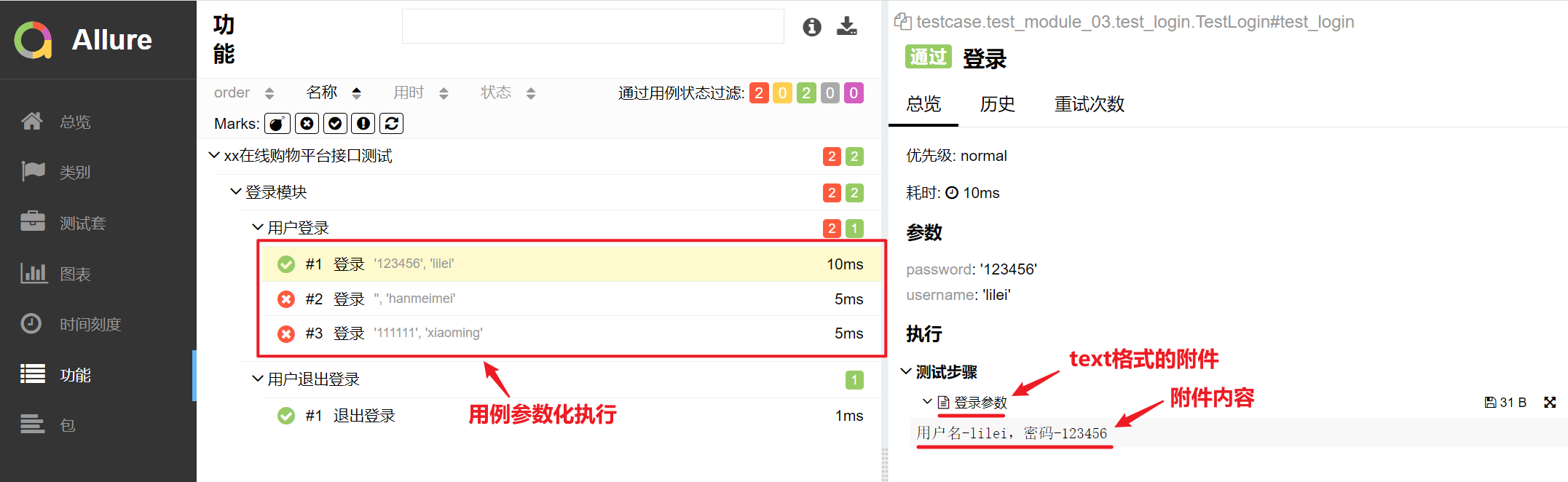
allure.attach()结果:
allure.attach.file()结果:
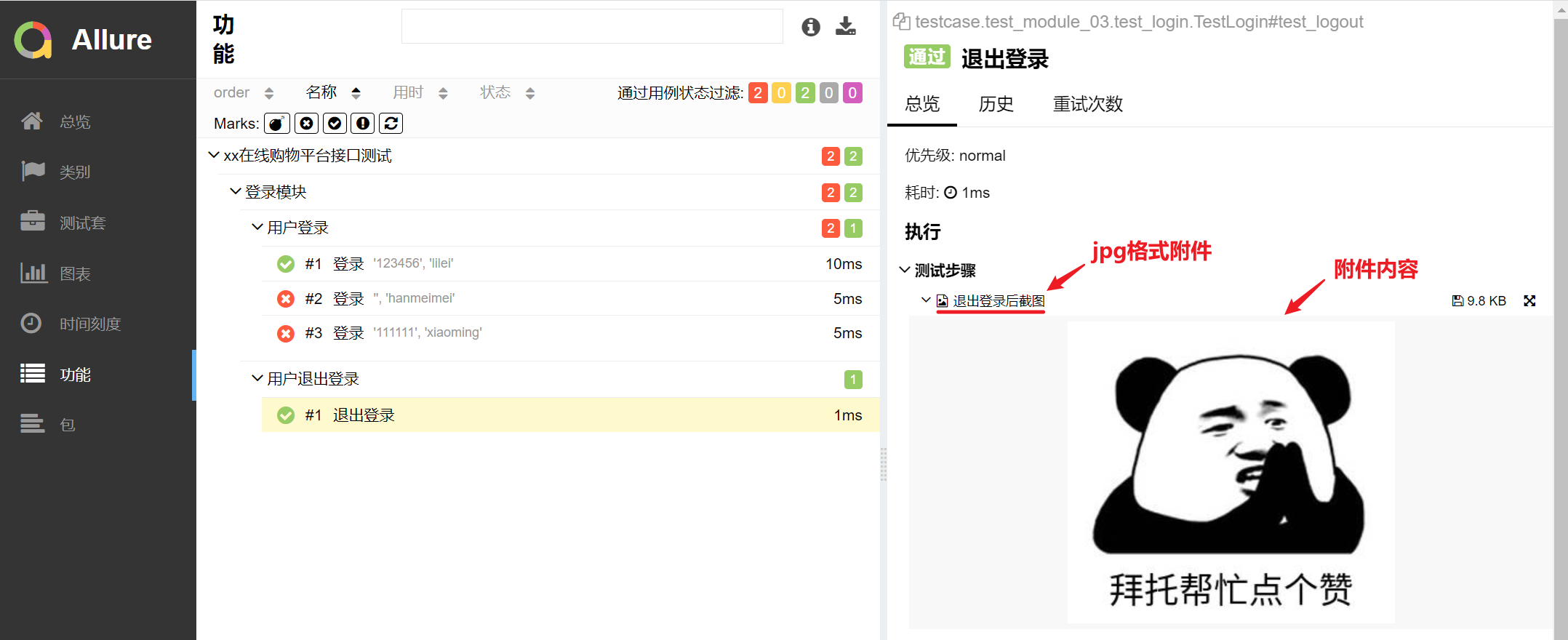
从结果可以看出来,两种方法都在报告中对应的测试用例中展示了附件内容。
从allure.attach()结果还可以看出来,Allure能够很好的支持@pytest.mark.parametrize()进行参数化。
with allure.step
上一篇文章我们使用了装饰器@allure.step()标记函数使之成为测试步骤,而在测试函数/方法中,我们还可以通过with allure.step()的方式标记测试步骤。
它们之间的区别在于,@allure.step()用于标记通用函数,当这个被标记的函数被调用后,会插入步骤说明并展示在Allure报告中。
而with allure.step()则是将普通的代码标记为测试步骤,执行到这段代码时则会在Allure报告中展示步骤说明。
我们在上面代码的基础上,加入with allure.step(),示例如下:
import allure

import pytest

import requests

import json

data = [("lilei", "123456"), ("hanmeimei", "888888"), ("xiaoming", "111111")]

ids = ["username:{}-password:{}".format(username, password) for username, password in data]

@allure.epic("xx在线购物平台接口测试")

@allure.feature("登录模块")

class TestLogin:

    @allure.story("用户登录")

    @allure.title("登录")

    @pytest.mark.parametrize("username, password", data, ids=ids)

    def test_login(self, username, password):

        headers = {"Content-Type": "application/json;charset=utf8"}

        url = "http://127.0.0.1:5000/login"

        _data = {

            "username": username,

            "password": password

        }

        # 第一步,请求登录接口

        with allure.step("请求登录接口"):

            allure.attach(

                body="用户名-{},密码-{}".format(username, password),

                name="登录参数",

                attachment_type=allure.attachment_type.TEXT

            )

            res = requests.post(url=url, headers=headers, json=_data).text

            res = json.loads(res)

        # 第二步,获取返回参数进行断言

        with allure.step("断言"):

            assert res['code'] == 1000
测试报告结果展示如下:
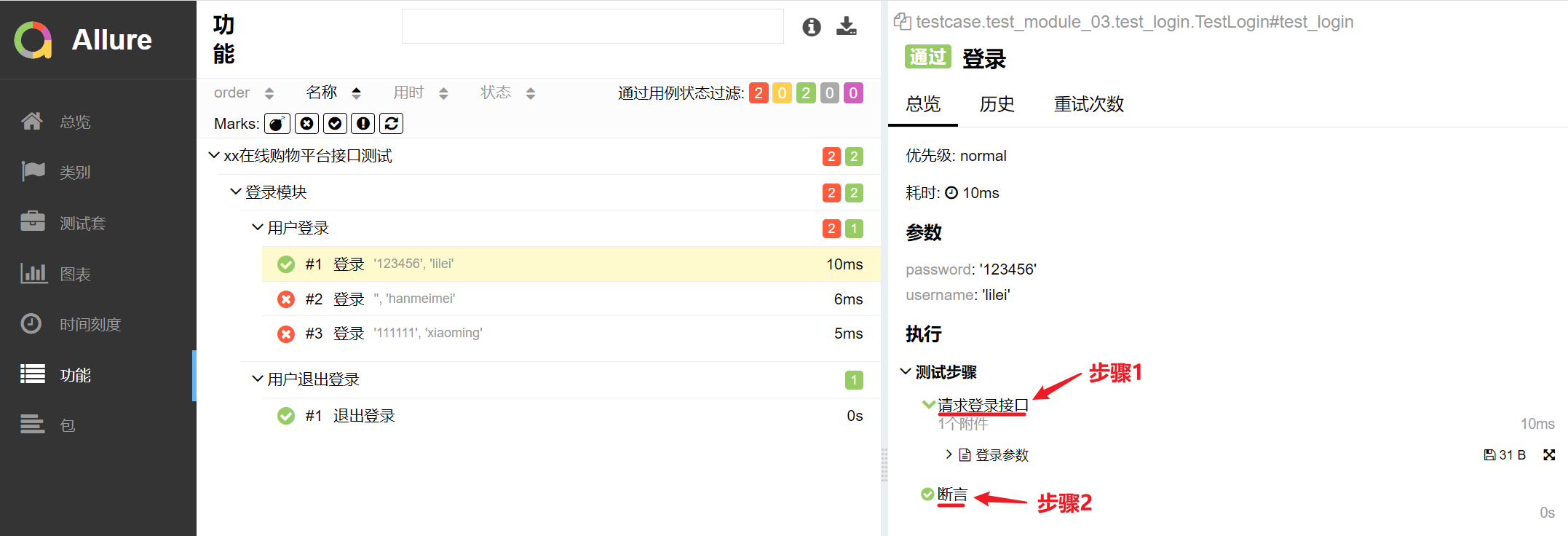
代码中插入的测试步骤如上图中的标记所示。
fixture
pytest的fixture函数可以实现setup、teardown的功能,而Allure会跟踪每个fixture的调用情况,详细显示调用了哪些fixture和参数以及调用顺序。
我们在上面代码的基础上,加入fixture函数,示例如下:
import allure

import pytest

import requests

import json

@pytest.fixture(scope="class", autouse=True)

def fixture_demo(request):

    print("连接数据库")

    def finalizer():

        print("关闭数据库")

    request.addfinalizer(finalizer)

data = [("lilei", "123456"), ("hanmeimei", "888888"), ("xiaoming", "111111")]

ids = ["username:{}-password:{}".format(username, password) for username, password in data]

@allure.epic("xx在线购物平台接口测试")

@allure.feature("登录模块")

class TestLogin:

    @allure.story("用户登录")

    @allure.title("登录")

    @pytest.mark.parametrize("username, password", data, ids=ids)

    def test_login(self, username, password):

        headers = {"Content-Type": "application/json;charset=utf8"}

        url = "http://127.0.0.1:5000/login"

        _data = {

            "username": username,

            "password": password

        }

        # 第一步,请求登录接口

        with allure.step("请求登录接口"):

            allure.attach(

                body="用户名-{},密码-{}".format(username, password),

                name="登录参数",

                attachment_type=allure.attachment_type.TEXT

            )

            res = requests.post(url=url, headers=headers, json=_data).text

            res = json.loads(res)

        # 第二步,获取返回参数进行断言

        with allure.step("断言"):

            assert res['code'] == 1000
测试报告结果展示如下:

从结果可以看出来,Allure测试报告展示了用例调用的fixture函数信息。多个fixture函数被调用及其执行顺序的展示,这里不做过多说明。
environment
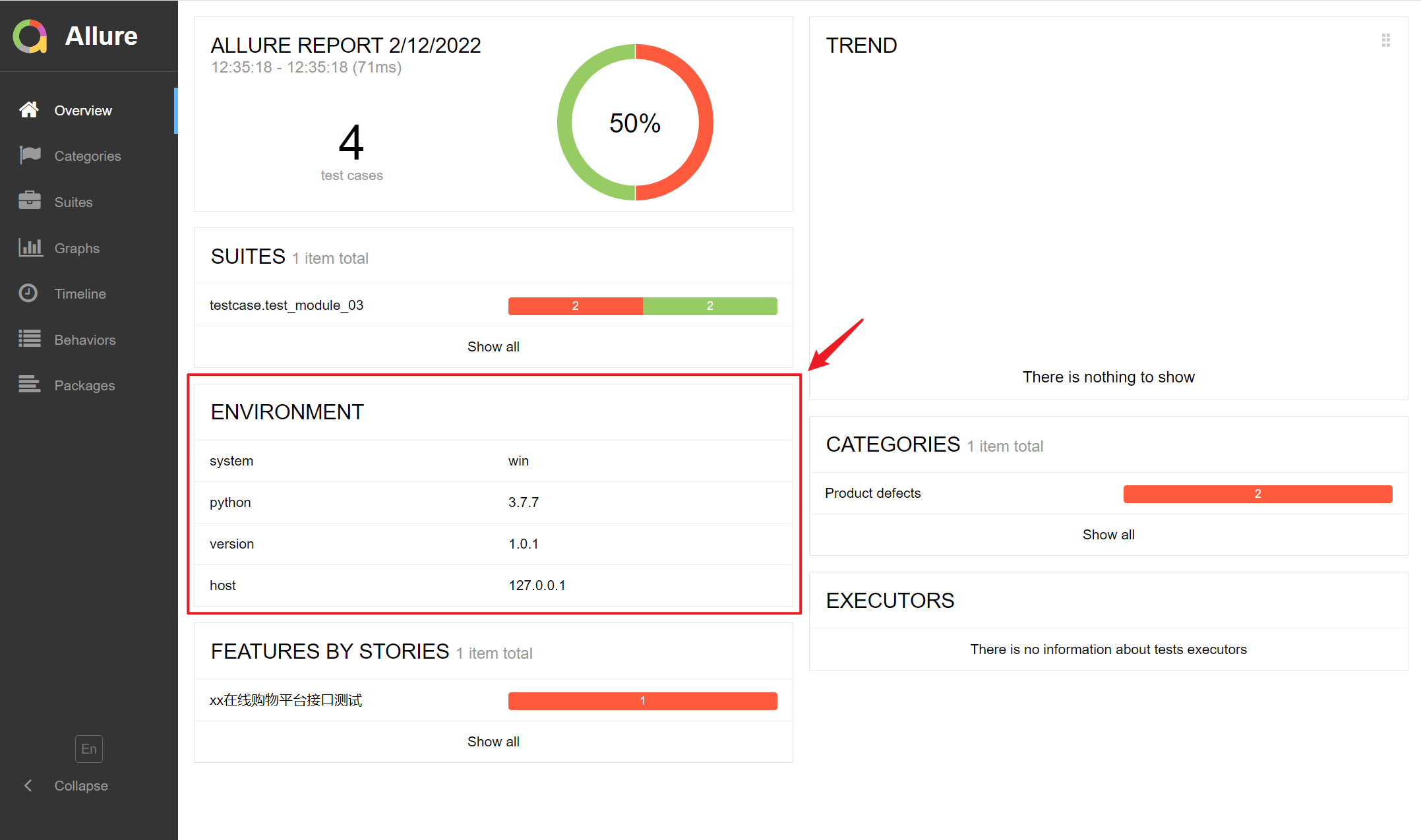
在Allure报告的首页可以展示此次测试执行的环境信息 (如测试环境、测试人员、被测系统版本号、系统配置环境等),这需要通过创建environment.properties或environment.xml进行配置,并把文件放置在--alluredir指定的文件夹中 (博主这里即result文件夹)。
environment.properties示例如下:
system=win

python=3.7.7

version=1.0.1

host=127.0.0.1
或environment.xml
<environment>

    <parameter>

        <key>system</key>

        <value>win</value>

    </parameter>

    <parameter>

        <key>python</key>

        <value>3.7.7</value>

    </parameter>

    <parameter>

        <key>version</key>

        <value>1.0.1</value>

    </parameter>

    <parameter>

        <key>host</key>

        <value>127.0.0.1</value>

    </parameter>

</environment>
生成报告后首页展示ENVIRONMENT信息如下:
categories
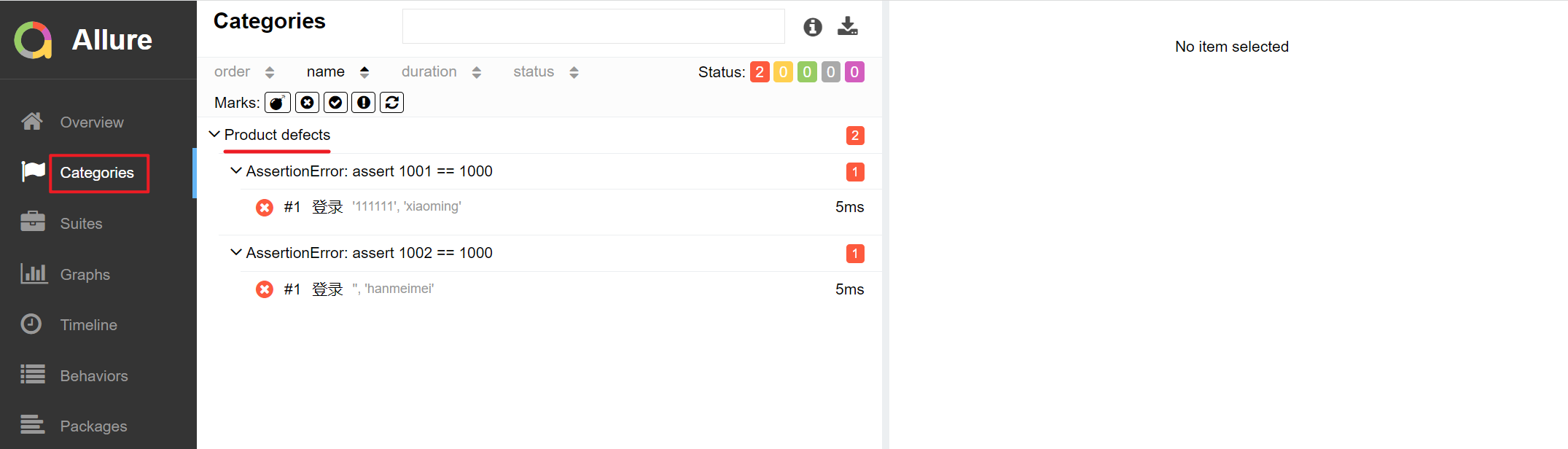
Allure报告中有一栏叫Categories,即分类,用于展示测试结果,默认只显示两类缺陷结果:
- Product defects 产品缺陷(测试结果:failed)
- Test defects 测试缺陷(测试结果:error/broken)
如下图所示
如果想要缺陷分类显示更丰富,我们可以通过创建categories.json文件进行自定义缺陷分类,并把文件放置在--alluredir指定的文件夹中 (即同environment.properties放在同一目录中)。
categories.json示例如下:
[

  {

    "name": "Passed tests",

    "matchedStatuses": ["passed"]

  },

  {

    "name": "Ignored tests",

    "matchedStatuses": ["skipped"]

  },

  {

    "name": "Infrastructure problems",

    "matchedStatuses": ["broken", "failed"],

    "messageRegex": ".*bye-bye.*"

  },

  {

    "name": "Outdated tests",

    "matchedStatuses": ["broken"],

    "traceRegex": ".*FileNotFoundException.*"

  },

  {

    "name": "Product defects",

    "matchedStatuses": ["failed"]

  },

  {

    "name": "Test defects",

    "matchedStatuses": ["broken"]

  }

]
参数说明:
- name:分类名称
- matchedStatuses:测试用例的运行状态,默认["failed", "broken", "passed", "skipped", "unknown"]
- messageRegex:测试用例运行的错误信息,默认是 .* ,通过正则去匹配
- traceRegex:测试用例运行的错误堆栈信息,默认是 .* ,同样通过正则去匹配
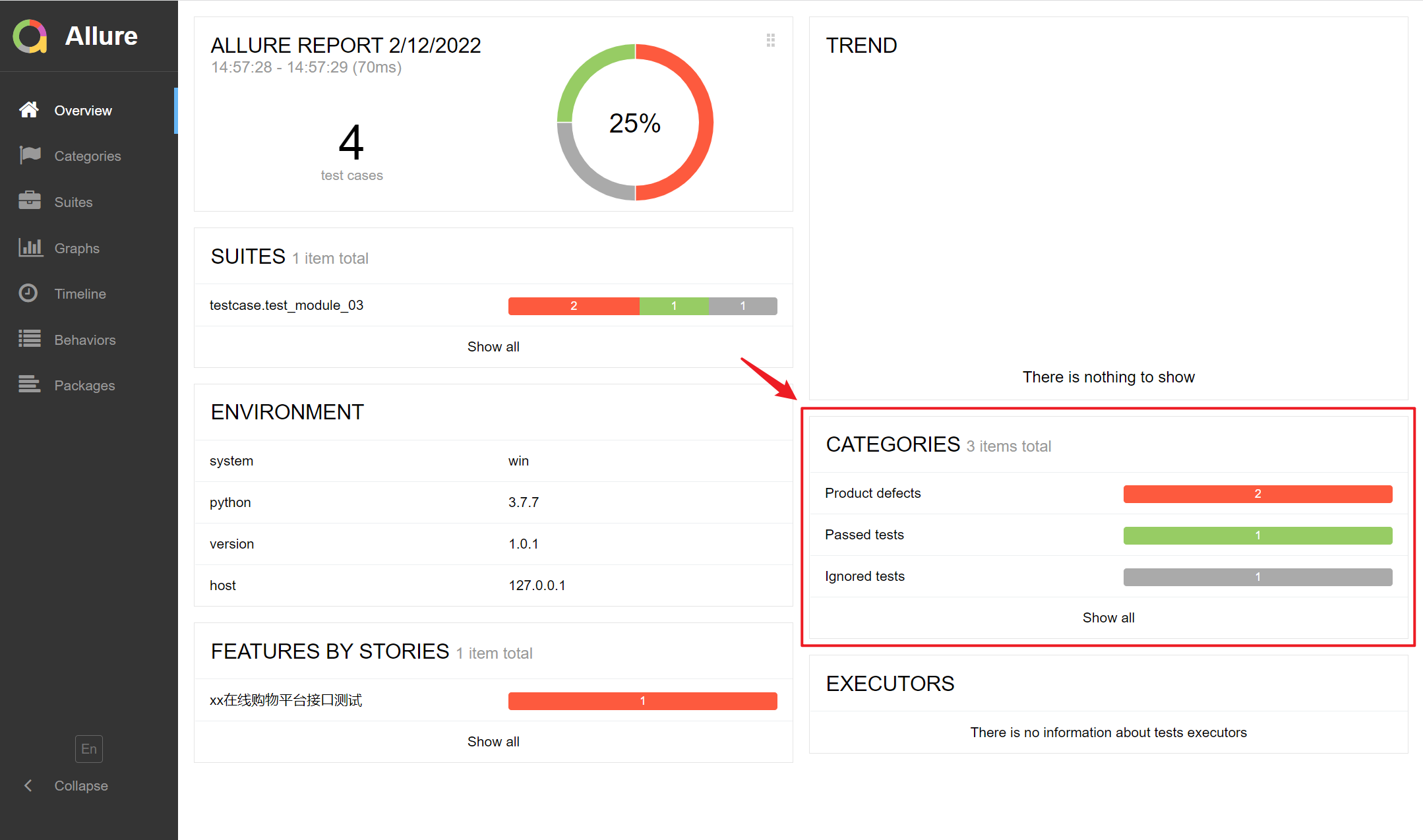
执行后会在报告的Categories中展示,首页CATERORIES栏展示如下:
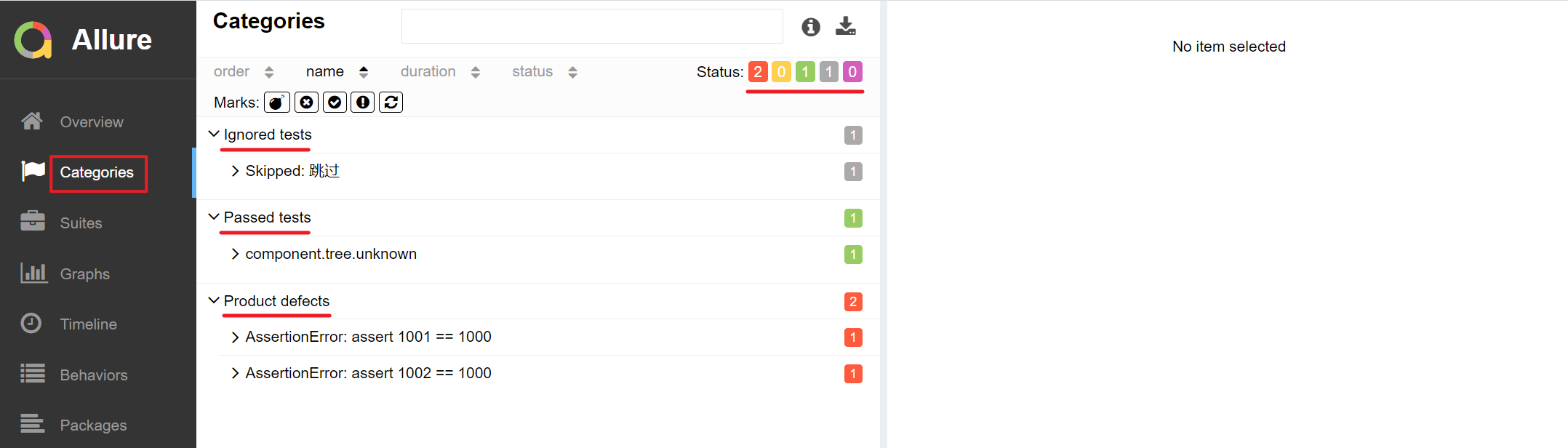
Categories页面展示:
总结
Allure中常用的特性大致就这些,以上仅为简单示例,大家可根据自身项目的需要按需选择使用。Allure提供的特性当然也不止这些,如果感兴趣大家可以查看Allure官方文档了解更多。
pytest(12)-Allure常用特性allure.attach、allure.step、fixture、environment、categories的更多相关文章
- Pytest系列(21)- allure的特性,@allure.description()、@allure.title()的详细使用
如果你还想从头学起Pytest,可以看看这个系列的文章哦! https://www.cnblogs.com/poloyy/category/1690628.html 前言 前面介绍了两种allure的 ...
- Pytest系列(22)- allure的特性,@allure.link()、@allure.issue()、@allure.testcase()的详细使用
如果你还想从头学起Pytest,可以看看这个系列的文章哦! https://www.cnblogs.com/poloyy/category/1690628.html 前言 上一篇文章介绍了两种allu ...
- Pytest 学习(二十五)- allure 命令行参数【转】
先看看 allure 命令的帮助文档 cmd 敲 allure -h allure 命令的语法格式 allure [options] [command] [command options] optio ...
- Pytest 系列(29)- 详解 allure.dynamic 动态生成功能
如果你还想从头学起Pytest,可以看看这个系列的文章哦! https://www.cnblogs.com/poloyy/category/1690628.html 前言 @allure.title ...
- Allure自动化测试报告之修改allure测试报告名称
1.从github获取allure代码 https://github.com/allure-framework/allure2 2.安装gradle,用于打包jar brew install grad ...
- Unity3D编辑器扩展(五)——常用特性(Attribute)以及Selection类
前面写了四篇关于编辑器的: Unity3D编辑器扩展(一)——定义自己的菜单按钮 Unity3D编辑器扩展(二)——定义自己的窗口 Unity3D编辑器扩展(三)——使用GUI绘制窗口 Unity3D ...
- AngularJS 的常用特性(五)
13.使用路由和 $location 切换视图 对于一些单页面应用来说,有时候需要为用户展示或者隐藏一些子页面视图,可以利用 Angular 的 $route 服务来管理这种场景. 你可以利用路由服务 ...
- mootools常用特性和示例(基础篇1)
网上关于mootools这个库的信息很少. 公司一些老的项目用到了mootools库,因为要维护,所以接触到了mootools. mootools(文档)官网:http://www.chinamoot ...
- Vue的常用特性
Vue的常用特性 一.表单基本操作 都是通过v-model 单选框 1. 两个单选框需要同时通过v-model 双向绑定 一个值 2. 每一个单选框必须要有value属性 且value值不能一样 3. ...
随机推荐
- SYCOJ2197三角形游戏
题目-三角形游戏 (shiyancang.cn) 对于任意的一个数字,把他拆分为n个数字,使得其逐层和为该数字. 首先n很小,所以很可能是搜索.DFS,n回选择. #include<bits/s ...
- 两张Number()函数图和Boolean()函数图
- Keil MDK STM32系列(五) 使用STM32CubeMX创建项目基础结构
Keil MDK STM32系列 Keil MDK STM32系列(一) 基于标准外设库SPL的STM32F103开发 Keil MDK STM32系列(二) 基于标准外设库SPL的STM32F401 ...
- 学习javaScript必知必会(6)~类、类的定义、prototype 原型、json对象
一.定义类:使用的是funciton,因为在js中没有定义类的class语句,只有function. ■ 举例: //定义一个Person类(通过类的无参构造函数定义类) function Perso ...
- 【pwn】DASCTF Sept 九月赛
[pwn]DASCTF Sept 月赛 1.hehepwn 先查看保护,栈可执行,想到shellcode 这题需要注意shellcode的写法 拖入ida中分析 一直以为iso scanf不能栈溢出, ...
- JavaScript DOM 基础操作
JavaScript DOM 基础操作 一.获取元素的六方式 document.getElementById('id名称') //根据id名称获取 document.getElementsByclas ...
- 使用EdgyGeo Cesium工具查询下载数据集
Cesium中文网:http://cesiumcn.org/ | 国内快速访问:http://cesium.coinidea.com/ EdgyGeo, Inc. 带来了一件非常棒的工作支撑架构.工程 ...
- elasticsearch启动流程
本文基于ES2.3.2来描述.通过结合源码梳理出ES实例的启动过程. elasticsearch的启动过程是根据配置和环境组装需要的模块并启动的过程.这一过程就是通过guice注入各个功能模块并启动这 ...
- 611. Valid Triangle Number
Given an array consists of non-negative integers, your task is to count the number of triplets chose ...
- ansible lineinfile 关闭selinux