
Pytest系列(21)- allure的特性,@allure.description()、@allure.title()的详细使用
如果你还想从头学起Pytest,可以看看这个系列的文章哦!
https://www.cnblogs.com/poloyy/category/1690628.html
前言
上一篇文章介绍了两种allure的特性
- @allure.step() 装饰器:可以设置测试步骤,让测试用例的执行过程更加详细
- allure.attach() 函数:可以设置需要显示在allure报告的附件,包含了多种类型,可以通过allure.attachment_type查看支持的类型
这一篇幅,我们主要来讲解另外两个特性,可以增加报告的可读性哦!
- @allure.description()
- @allure.title()
它们用法极其相近,只是作用不一样而已
@allure.description()
作用
可以添加足够详细的测试用例描述,以便于管理层查看哦哈哈哈
语法格式,有三种
- @allure.description(str)
- 在测试用例函数声明下方添加""" """
- @allure.description_html(str):相当于传一个HTML代码组成的字符串,类似allure.attach()中传HTML
注意:方式一方式二的效果和作用是一致的, 哪个方便哪个来
#!/usr/bin/env python

# -*- coding: utf-8 -*-

"""

__title__  =

__Time__   = 2020-04-18 15:24

__Author__ = 小菠萝测试笔记

__Blog__   = https://www.cnblogs.com/poloyy/

"""

import allure

import allure

# 方式一

@allure.description("""

这是一个@allure.description装饰器

没有特别的用处

""")

def test_description_from_decorator():

    assert 42 == int(6 * 7)

# 方式二

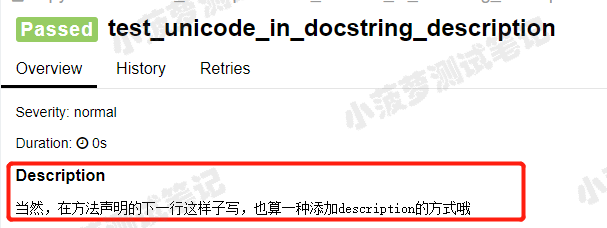
def test_unicode_in_docstring_description():

    """

    当然,在方法声明的下一行这样子写,也算一种添加description的方式哦

    """

    assert 42 == int(6 * 7)

# 方式三

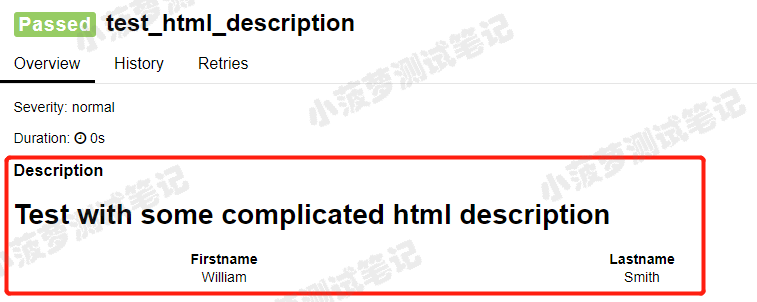
@allure.description_html("""

<h1>Test with some complicated html description</h1>

<table style="width:100%">

  <tr>

    <th>Firstname</th>

    <th>Lastname</th>

  </tr>

  <tr align="center">

    <td>William</td>

    <td>Smith</td>

</table>

""")

def test_html_description():

    assert True
运行结果
方式一的allure报告

方式二的allure报告
方式三的allure报告
@allure.title()
作用
- 使得测试用例的标题更具有可读性,毕竟我们可以写成中文
- 支持占位符传递关键字参数哦
具体栗子一
#!/usr/bin/env python

# -*- coding: utf-8 -*-

"""

__title__  =

__Time__   = 2020-04-18 16:09

__Author__ = 小菠萝测试笔记

__Blog__   = https://www.cnblogs.com/poloyy/

"""

import pytest, allure

@allure.title("前置操作:登录")

@pytest.fixture

def test_loginss(request):

    params = request.param

    name = params["username"]

    pwd = params["pwd"]

    allure.attach(f"这是测试用例传的参数{params}")

    print(name, pwd, params)

    yield name, pwd

@allure.title("成功登录,测试数据是:{test_loginss}")

@pytest.mark.parametrize("test_loginss", [

    {"username": "name1", "pwd": "pwd1"},

    {"username": "name2", "pwd": "pwd2"}], indirect=True)

def test_success_login(test_loginss):

    name, pwd = test_loginss

    allure.attach(f"账号{name},密码{pwd}")
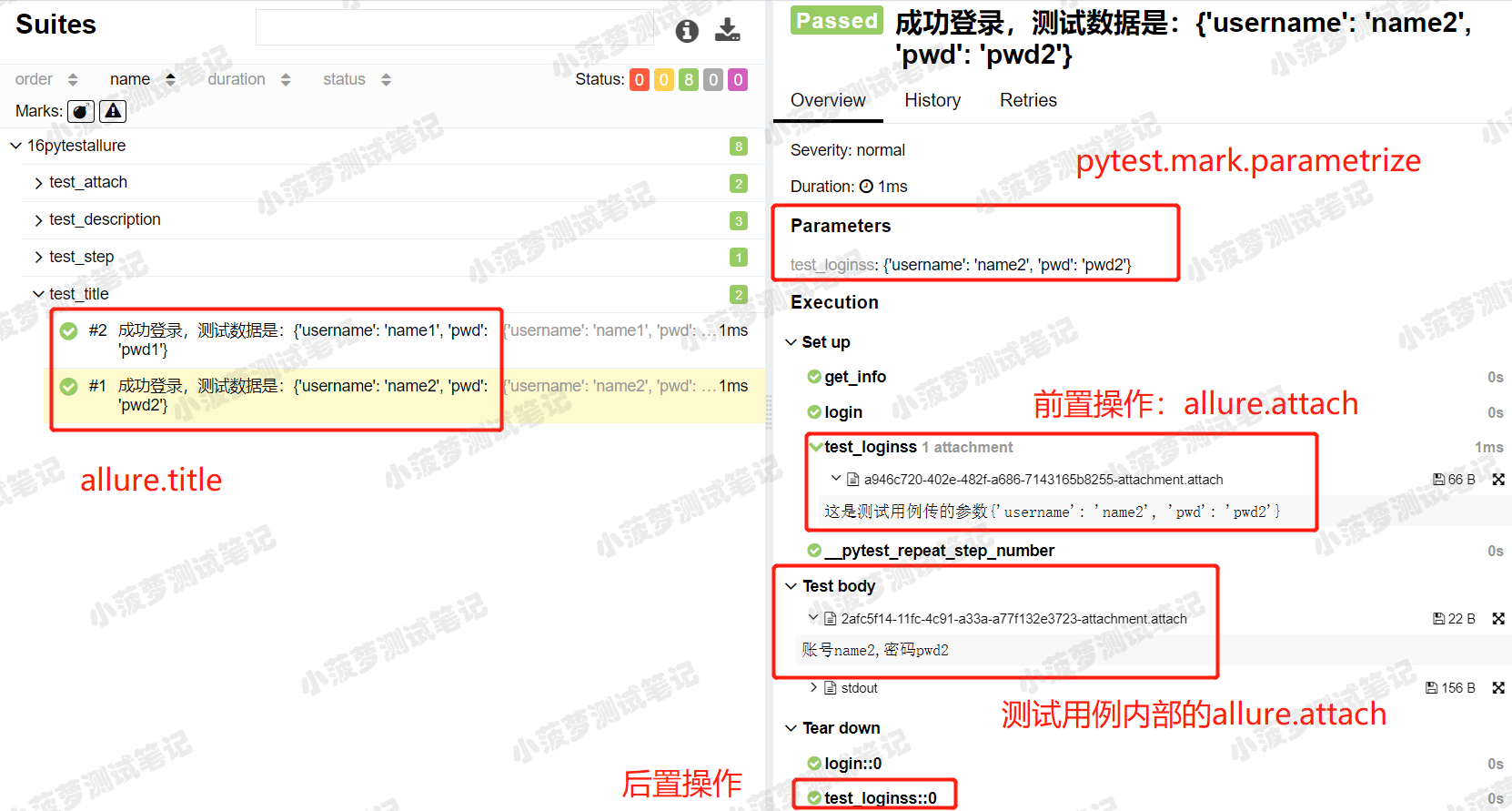
运行结果,查看allure报告
这是一次综合多个之前学到的方法来完成的栗子,已经具体标出来啦!
具体栗子二
@allure.title("多个参数{name},{phone},{age}")

@pytest.mark.parametrize("name,phone,age", [

    (1, 2, 3),

    (4, 5, 6),

    (7, 8, 9)

])

def test_test_test(name, phone, age):

    print(name, phone, age)
运行结果,查看allure报告

总结
如果没有添加 @allure.title() 的话,测试用例的标题默认就是函数名,这样的可读性不高,毕竟咱们是中国人,显示中文title还是很有必要的~所以墙裂建议大伙儿加上啦!
Pytest系列(21)- allure的特性,@allure.description()、@allure.title()的详细使用的更多相关文章
- Pytest系列(16)- 分布式测试插件之pytest-xdist的详细使用
如果你还想从头学起Pytest,可以看看这个系列的文章哦! https://www.cnblogs.com/poloyy/category/1690628.html 前言 平常我们功能测试用例非常多时 ...
- Pytest系列(15)- 多重校验插件之pytest-assume的详细使用
如果你还想从头学起Pytest,可以看看这个系列的文章哦! https://www.cnblogs.com/poloyy/category/1690628.html 前言 pytest中可以用pyth ...
- Pytest系列(22)- allure的特性,@allure.link()、@allure.issue()、@allure.testcase()的详细使用
如果你还想从头学起Pytest,可以看看这个系列的文章哦! https://www.cnblogs.com/poloyy/category/1690628.html 前言 上一篇文章介绍了两种allu ...
- Pytest系列(20)- allure结合pytest,allure.step()、allure.attach的详细使用
如果你还想从头学起Pytest,可以看看这个系列的文章哦! https://www.cnblogs.com/poloyy/category/1690628.html 前言 allure除了支持pyte ...
- Pytest系列(23)- allure打标记,@allure.feature()、@allure.story()、@allure.severity()的详细使用
如果你还想从头学起Pytest,可以看看这个系列的文章哦! https://www.cnblogs.com/poloyy/category/1690628.html 前言 前面几篇文章主要介绍了all ...
- Pytest 系列(29)- 详解 allure.dynamic 动态生成功能
如果你还想从头学起Pytest,可以看看这个系列的文章哦! https://www.cnblogs.com/poloyy/category/1690628.html 前言 @allure.title ...
- Pytest 系列(27)- allure 命令行参数
如果你还想从头学起Pytest,可以看看这个系列的文章哦! https://www.cnblogs.com/poloyy/category/1690628.html 先看看 allure 命令的帮助文 ...
- Pytest 系列(28)- 参数化 parametrize + @allure.title() 动态生成标题
如果你还想从头学起Pytest,可以看看这个系列的文章哦! https://www.cnblogs.com/poloyy/category/1690628.html 前言 参数化 @pytest.ma ...
- pytest(12)-Allure常用特性allure.attach、allure.step、fixture、environment、categories
上一篇文章pytest Allure生成测试报告我们学习了Allure中的一些特性,接下来继续学习其他常用的特性. allure.attach allure.attach用于在测试报告中添加附件,补充 ...
随机推荐
- Css五种定位之间的区别
##CSS 定位机制## CSS 有三种基本的定位机制:普通流.浮动流和定位流. 除非专门指定,否则所有框都在普通流中定位.也就是说,普通流中的元素的位置由元素在 (X)HTML 中的位置决定. 块级 ...
- 从一个小例子引发的Java内存可见性的简单思考和猜想以及DCL单例模式中的volatile的核心作用
环境 OS Win10 CPU 4核8线程 IDE IntelliJ IDEA 2019.3 JDK 1.8 -server模式 场景 最初的代码 一个线程A根据flag的值执行死循环,另一个线程B只 ...
- 3.python正则匹配不到内容时消耗大量内存
遇到问题:正常情况获取的网页源码可以通过正则表达式快速匹配到内容,,但是如果出现问题,没有匹配到的内容,正则就会一直回溯,导致内存激增,一直循坏查找. 解决思路: 一.如果能够有特殊内容可以标记,满 ...
- Python中常见的报错名称
Python中常见的报错名称 1.SyntaxError 语法错误.看看是否用Python关键字命名变量,有没有使用中文符号,运算符.逻辑运算符等符号是不是使用不规范. 2.IndentationEr ...
- Python-时间戳、元组时间的格式、自定义时间格式之间的转换
一.时间戳.元组时间的格式.自定义时间格式之间的转换 1.下面是三者之间的转换关系: 2.代码如下: import time import datetime print(time.time()) #获 ...
- pytorch tensor的索引与切片
切片方式与numpy是类似. * a[:2, :1, :, :], * 可以用-1索引. * ::2,表示所有数据,间隔为2,即 start:end:step. * a.index_select(1 ...
- django缓存和跨域解决和短信验证码的使用
缓存 在实际项目中,存在大量的数据检索,比如我们刷微博的时候,刚开始加载速度慢一点,然后第一次加载完毕之后,如果你此时的手机没有网络,但是你发现你的微博还是可以照样刷,但是刷到一定的页面就走不动了,那 ...
- UVA129 Krypton Factor 困难的串 dfs回溯【DFS】
Krypton Factor Time Limit: 2000/1000 MS (Java/Others) Memory Limit: 65536/32768 K (Java/Others ...
- Jmeter接口测试之案例实战(十一)
在前面的知识体系中详细的介绍了Jmeter测试工具在接口自动化测试中的基础知识,那么今天更新的文章主要是对昨晚的上课内容做个总结. 首先来看Jmeter测试工具在图片上传中的案例应用.首先结合互联网产 ...
- WEB缓存系统之varnish状态引擎
前文我们聊了下varnish的VCL配置以及语法特点,怎样去编译加载varnish的vcl配置,以及命令行管理工具varnishadm怎么去连接varnish管理接口进行管理varnish,回顾请参考 ...