
Pytest系列(22)- allure的特性,@allure.link()、@allure.issue()、@allure.testcase()的详细使用
如果你还想从头学起Pytest,可以看看这个系列的文章哦!
https://www.cnblogs.com/poloyy/category/1690628.html
前言
上一篇文章介绍了两种allure的特性
- @allure.description() :添加测试用例描述,一共三种方式哦!
- @allure.title():指定测试用例标题,默认是函数名哦!
这一篇幅,我们主要来讲解最后三个常见特性,主要是为了将allure报告和测试管理系统集成,可以更快速的跳转到公司内部地址
- @allure.link()
- @allure.issue()
- @allure.testcase()
先看看三个装饰器源码
def link(url, link_type=LinkType.LINK, name=None):

    return safely(plugin_manager.hook.decorate_as_link(url=url, link_type=link_type, name=name))

def issue(url, name=None):

    return link(url, link_type=LinkType.ISSUE, name=name)

def testcase(url, name=None):

    return link(url, link_type=LinkType.TEST_CASE, name=name)
知识点
- issue()和testcase()其实调用的也是link(),只是link_type不一样
- 必传参数 url:跳转的链接
- 可选参数 name:显示在allure报告的名字,如果不传就是显示完整的链接;建议传!!不然可读性不高
- 可以理解成:三个方法是一样的,我们都提供跳转链接和名字,只是链接的type不一样,最终显示出来的样式不一样而已【type不一样,样式不一样】
- 如果你喜欢,只用@allure.link()也可以
- 而出现三个装饰器的原因是为了更好地将链接分类【访问连接、Bug链接、测试用例链接】
看完源码和知识点,其实我们就没必要针对三个方法都展开来讲了,直接上代码,看报告的样式区别!
代码栗子
#!/usr/bin/env python

# -*- coding: utf-8 -*-

"""

__title__  =

__Time__   = 2020-04-18 17:01

__Author__ = 小菠萝测试笔记

__Blog__   = https://www.cnblogs.com/poloyy/

"""

import allure

TEST_CASE_LINK = 'https://github.com/qameta/allure-integrations/issues/8#issuecomment-268313637'

@allure.link('https://www.youtube.com/watch?v=4YYzUTYZRMU')

def test_with_link():

    pass

@allure.link('https://www.youtube.com/watch?v=Su5p2TqZxKU', name='点击我看一看youtube吧')

def test_with_named_link():

    pass

@allure.issue('140', 'bug issue链接')

def test_with_issue_link():

    pass

@allure.testcase(TEST_CASE_LINK, '测试用例地址')

def test_with_testcase_link():

    pass
运行结果,查看allure报告
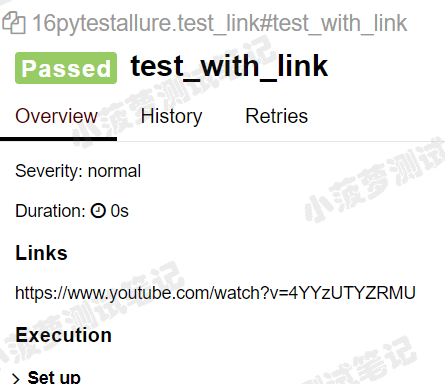
@allure.link()不传name参数时的样式
不传name的话,如果链接很长,可读性就比较差啦!
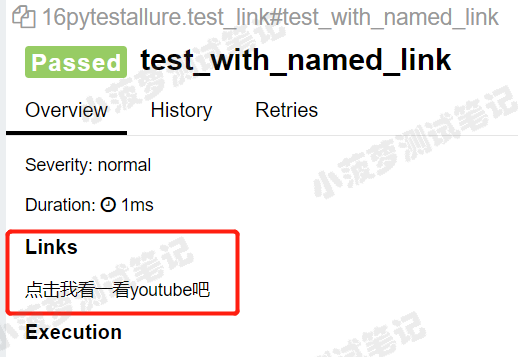
@allure.link()传了name参数时的样式
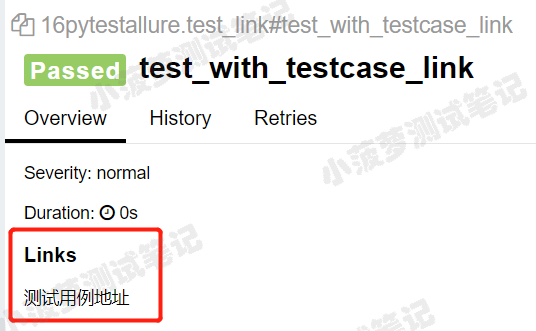
@allure.testcase()的样式
其实跟link()没有太大区别.....
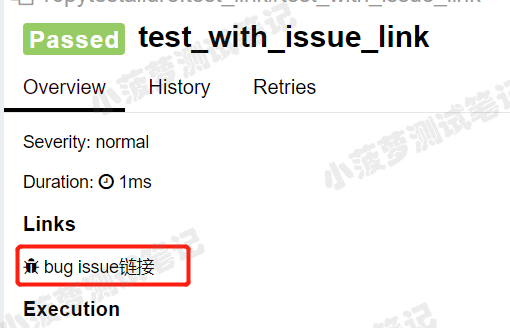
@allure.issue()的样式
多了个虫子哈哈哈哈
总结
- 为了减少程序的阅读复杂性,其实可以统一用@allure.link()
- 传name,写好链接描述,就知道这个链接是干嘛的啦,反正三个装饰器的作用都是一样的,就是样式略微不同.....
Pytest系列(22)- allure的特性,@allure.link()、@allure.issue()、@allure.testcase()的详细使用的更多相关文章
- Pytest系列(13)- 重复执行用例插件之pytest-repeat的详细使用
如果你还想从头学起Pytest,可以看看这个系列的文章哦! https://www.cnblogs.com/poloyy/category/1690628.html 前言 平常在做功能测试的时候,经常 ...
- Pytest系列(21)- allure的特性,@allure.description()、@allure.title()的详细使用
如果你还想从头学起Pytest,可以看看这个系列的文章哦! https://www.cnblogs.com/poloyy/category/1690628.html 前言 前面介绍了两种allure的 ...
- Pytest系列(20)- allure结合pytest,allure.step()、allure.attach的详细使用
如果你还想从头学起Pytest,可以看看这个系列的文章哦! https://www.cnblogs.com/poloyy/category/1690628.html 前言 allure除了支持pyte ...
- Pytest系列(23)- allure打标记,@allure.feature()、@allure.story()、@allure.severity()的详细使用
如果你还想从头学起Pytest,可以看看这个系列的文章哦! https://www.cnblogs.com/poloyy/category/1690628.html 前言 前面几篇文章主要介绍了all ...
- Pytest 系列(29)- 详解 allure.dynamic 动态生成功能
如果你还想从头学起Pytest,可以看看这个系列的文章哦! https://www.cnblogs.com/poloyy/category/1690628.html 前言 @allure.title ...
- pytest(12)-Allure常用特性allure.attach、allure.step、fixture、environment、categories
上一篇文章pytest Allure生成测试报告我们学习了Allure中的一些特性,接下来继续学习其他常用的特性. allure.attach allure.attach用于在测试报告中添加附件,补充 ...
- pytest系列(二):筛选用例新姿势,mark 一下,你就知道。
pytest系列(一)中给大家介绍了pytest的特性,以及它的编写用例的简单至极. 那么在实际工作当中呢,我们要写的自动化用例会比较多,不会都放在一个py文件里. 如下图所示,我们编写的用例存放在不 ...
- 9.9 翻译系列:数据注解特性之--MaxLength 【EF 6 Code-First系列】
原文链接:https://www.entityframeworktutorial.net/code-first/maxlength-minlength-dataannotations-attribut ...
- 9.3 翻译系列:数据注解特性之Key【EF 6 Code-First 系列】
原文链接:http://www.entityframeworktutorial.net/code-first/key-dataannotations-attribute-in-code-first.a ...
随机推荐
- sqli-labs 靶场笔记
sqli-labs 靶场笔记 冲冲冲,好好学习 2020年1月12号 先来点铺垫 分类: 按照请求方法分类: 1.Get型注入:注入参数在get的参数里. 2.POST型注入:注入参数在POST的参数 ...
- openresty——yum安装 配置 使用 错误处理 docker方式安装
yum方式安装 wget https://openresty.org/package/centos/openresty.repo mv openresty.repo /etc/yum.repos.d/ ...
- noip模拟34[惨败]
noip模拟34 solutions 我从来不为失败找借口,因为败了就是败了,没人听你诉说任何事情 今天很伤感,以来考试没考好,二来改题改半天也改不出来 这次算是炸出来了我经常范的一些错误,比如除以0 ...
- 【PTA|Python】浙大版《Python 程序设计》题目集:第二章
前言 Hello!小伙伴! 非常感谢您阅读海轰的文章,倘若文中有错误的地方,欢迎您指出- 自我介绍 ଘ(੭ˊᵕˋ)੭ 昵称:海轰 标签:程序猿|C++选手|学生 简介:因C语言结识编程,随后转入计 ...
- RHCE_DAY01
shell概述 shell是一个程序,它连接了用户和Linux内核,它可以解释用户输入的命令传递给内核,让用户可以更加方便的使用Linux系统 shell 本身并不是内核的一部分,它只是站在内核的基础 ...
- Microservices==>Service Mesh==>Serverless,走马观花
[0] 始有道 话说图灵开天辟地,冯.诺伊曼造石补天! 始有道道生ML Machine LanguageML生汇编 assembler汇编生编译器 compiler编译器生PL Programming ...
- ElasticSearch进阶篇(一)--版本控制
一.前言 ElasticSearch(以下简称ES)的数据写入支持高并发,高并发就会带来很普遍的数据一致性问题.常见的解决方法就是加锁.同样,ES为了保证高并发写的数据一致性问题,加入了类似于锁的实现 ...
- Golang语言系列-10-包
包 自定义包 package _0calc import ( "fmt" ) /* [Go语言的包] 在工程化的Go语言开发项目中,Go语言的源码复用是建立在包(package)基 ...
- pikachu Unsafe Filedownload 不安全的文件下载
不安全的文件下载概述文件下载功能在很多web系统上都会出现,一般我们当点击下载链接,便会向后台发送一个下载请求,一般这个请求会包含一个需要下载的文件名称,后台在收到请求后 会开始执行下载代码,将该文件 ...
- SQL 练习22
查询出只选修两门课程的学生学号和姓名 --方式1: SELECT Student.SId,Sname from Student WHERE SId in ( SELECT sid from sc GR ...