
【Azure 应用服务】App Service For Windows 环境中部署Python站点后,如何继续访问静态资源文件呢(Serving Static Files)?
问题描述
当创建一个App Service 后,运行时环境和版本选择Windows 和 Python 3.6. 登录Kudu 站点查看,默认的文件有 web.config, hostingstart-python.py, hostingstart-python.html, 在配置文件中,通过pythonpath来指定启动目录,而 WSGI_HANDLER 则指定启动的py文件为 hostingstart-python.py.
web.config
<configuration>

  <appSettings>

    <add key="pythonpath" value="%SystemDrive%\home\site\wwwroot" />

    <add key="WSGI_HANDLER" value="hostingstart-python.application" />

  </appSettings>

</configuration>
hostingstart-python.py 文件中定义了应用的返回内容为hostingstart-python.html中的内容
import sys

import platform

def application(environ, start_response):

    start_response(b'200 OK', [(b'Content-Type', b'text/html')])

    with open ("hostingstart-python.html", "r") as hostingstart_file:

        hosting = hostingstart_file.read()

        yield hosting.encode('utf8').replace(b'PYTHON_VERSION', platform.python_version().encode('utf8'))
hostingstart-python.html
<html>

<body>test from other root folder start Python project from wwwroot....</body>

</html>
当访问站点时候,就会把 hostingstart-python.html 中的内容显示到首页。但是当站点中也需要部署一些静态html文件时,发现不管如何修改URL,始终返回的内容都是hostingstart-python.html 。
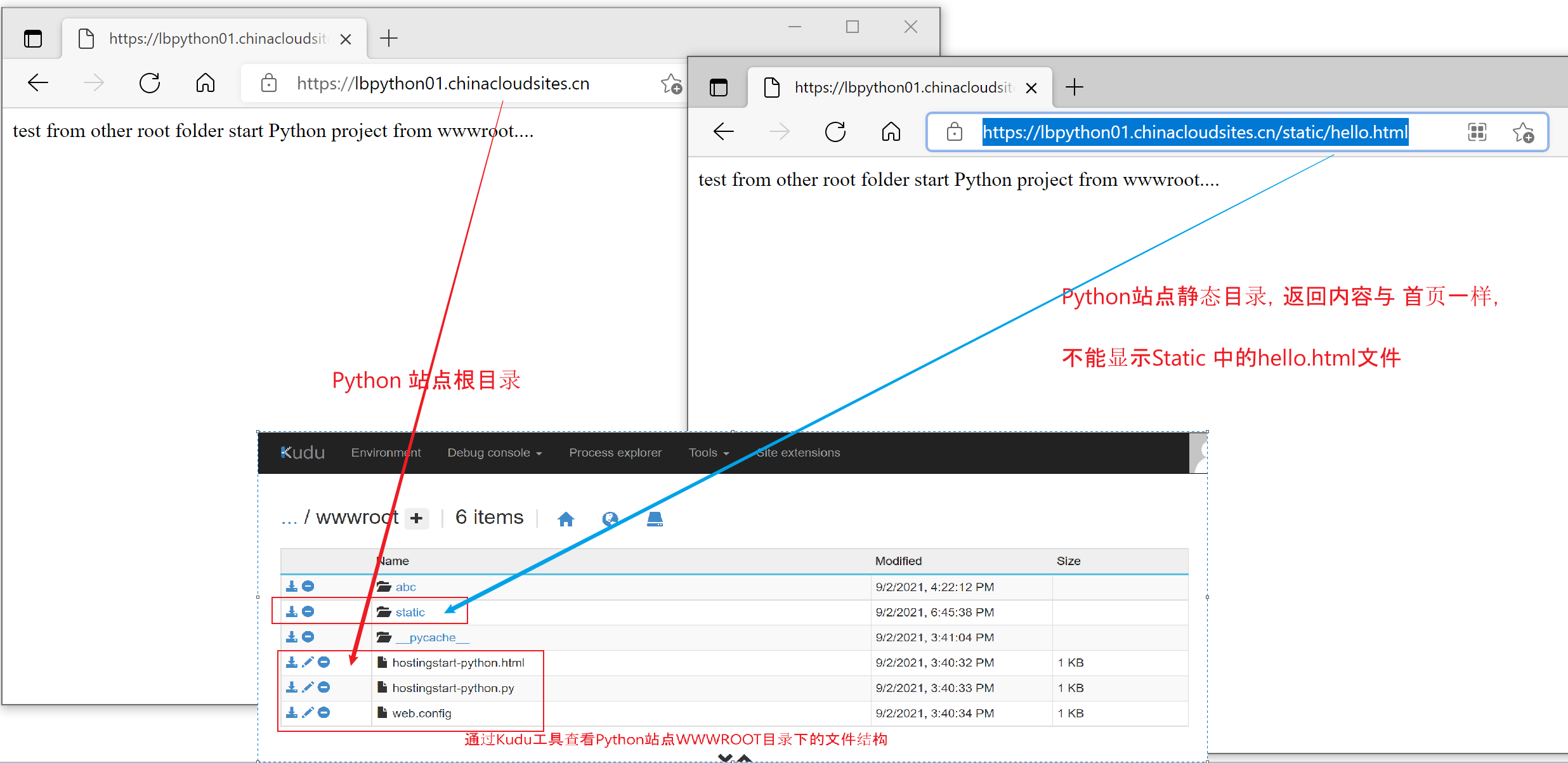
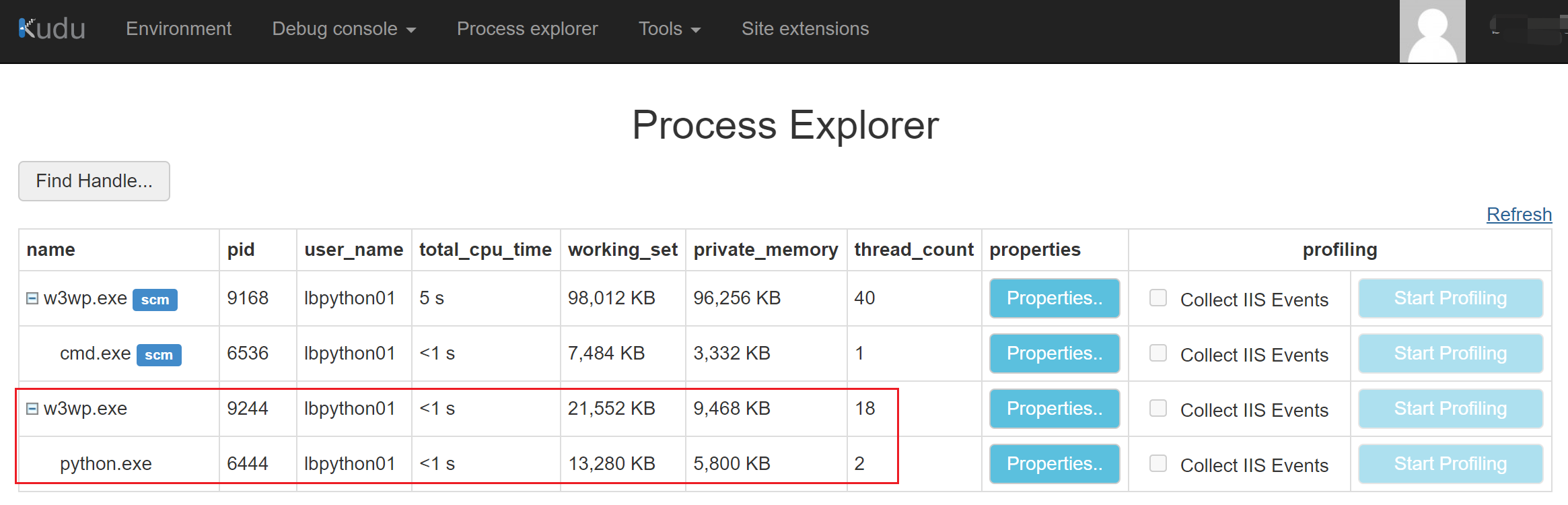
由于Python应用的启动文件中强制返回的内容为hostingstart-python.html,而且没有配置route,所以不管是什么URL访问到此站点,永远输出都是同样内容,因为处理请求的进程是Python.exe, 而非w3wp.exe
问题解决
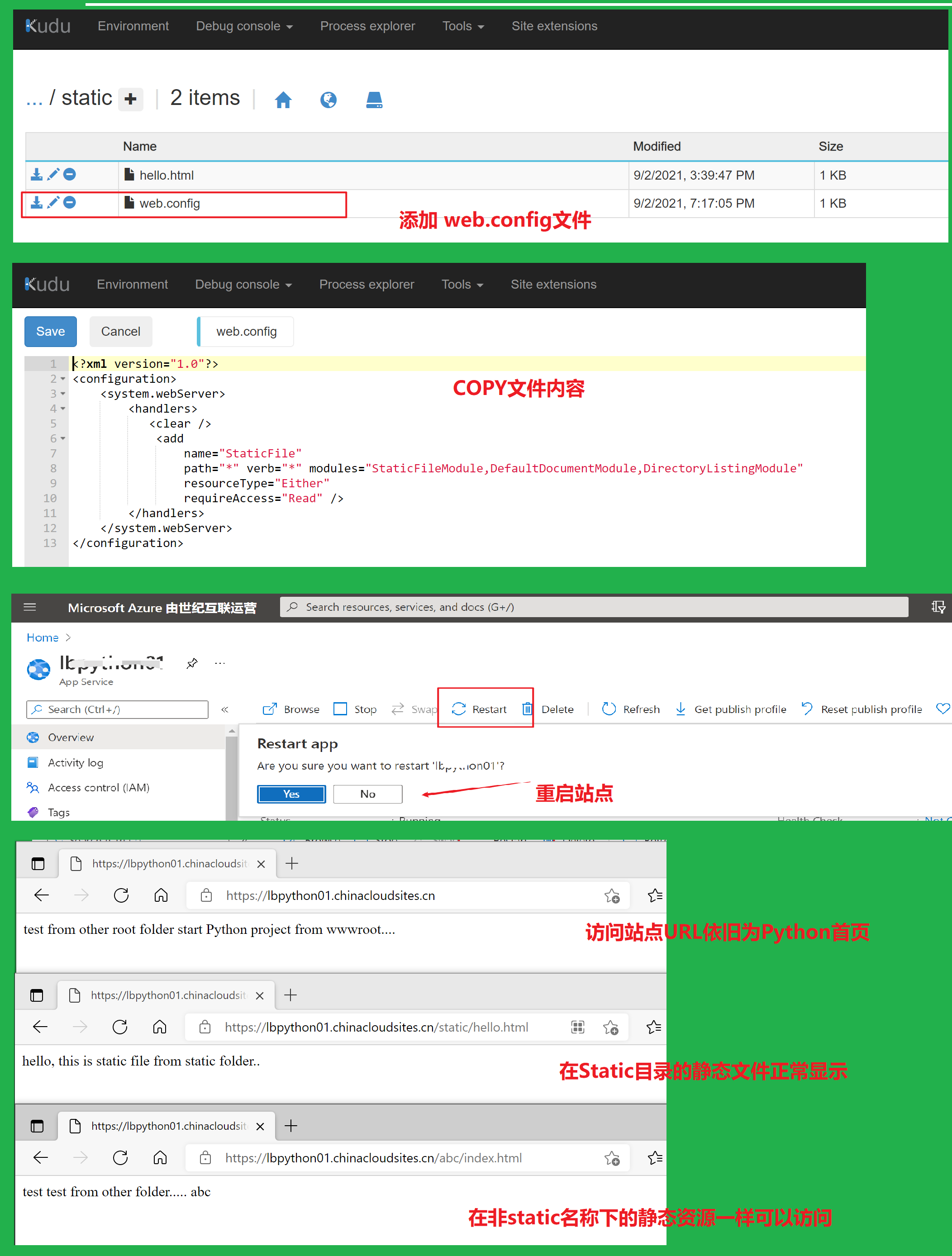
如何使用IIS来处理静态页面的请求呢?实现Python 站点也能通过URL访问到正确的静态文件(Serving Static Files): 有的。在静态文件夹中添加 web.config 文件,并添加以下内容:
<?xml version="1.0"?>

<configuration>

    <system.webServer>

        <handlers>

           <clear />

            <add

                name="StaticFile"

                path="*" verb="*" modules="StaticFileModule,DefaultDocumentModule,DirectoryListingModule"

                resourceType="Either"

                requireAccess="Read" />

        </handlers>

    </system.webServer>

</configuration>
- 它告诉IIS这是一个静态资源文件,只需要StaticFileModule 等就可以解析,不需要使用Python wfastcgi模块
注意:添加web.config文件后,需要重启站点(App Service)。 然后就可以自由查看静态页面内容。
附录:另外也可以通过在wwwroot目录中的web.config中配置URL重写的规则,来实现对静态文件的访问
添加如下的Rewrite规则:
<system.webServer>

    <rewrite>

      <rules>

        <rule name="Static Files" stopProcessing="true">

          <conditions>

            <add input="true" pattern="false" />

          </conditions>

        </rule>

        <rule name="Configure Python" stopProcessing="true">

          <match url="(.*)" ignoreCase="false" />

          <conditions>

            <add input="{REQUEST_URI}" pattern="^/static/.*" ignoreCase="true" negate="true" />

          </conditions>

          <action type="Rewrite" url="handler.fcgi/{R:1}" appendQueryString="true" />

        </rule>

      </rules>

    </rewrite>

  </system.webServer>
参考资料
Django app with HttpPlatformHandler in Azure App Services (Windows) (Serving Static Files): https://azureossd.github.io/2017/09/01/django-app-with-httpplatformhandler-in-azure-app-services-windows/
如何在 Azure 应用服务 (Windows) 上设置 Python 环境:https://docs.microsoft.com/zh-cn/visualstudio/python/managing-python-on-azure-app-service?view=vs-2019
【Azure 应用服务】App Service For Windows 环境中部署Python站点后,如何继续访问静态资源文件呢(Serving Static Files)?的更多相关文章
- 【Azure 应用服务】PHP应用部署在App Service for Linux环境中,上传文件大于1MB时,遇见了413 Request Entity Too Large 错误的解决方法
问题描述 在PHP项目部署在App Service后,上传文件如果大于1MB就会遇见 413 Request Entity Too Large 的问题. 问题解决 目前这个问题,首先需要分析应用所在的 ...
- python操作三大主流数据库(1)python操作mysql①windows环境中安装python操作mysql数据库的MySQLdb模块mysql-client
windows安装python操作mysql数据库的MySQLdb模块mysql-client 正常情况下应该是cmd下直接运行 pip install mysql-client 命令即可,试了很多台 ...
- 【Azure 应用服务】Azure Mobile App (NodeJS) 的服务端部署在App Service for Windows中出现404 Not Found -- The resource you are looking for has been removed, had its name changed, or is temporarily unavailable.
问题描述 使用NodeJS的后端应用,开发一个Mobile App的服务端,手机端通过REST API来访问获取后端数据.在本地编译好后,通过npm start启动项目,访问效果如下: 但是,当把项目 ...
- 【应用服务 App Service】快速获取DUMP文件(App Service for Windows(.NET/.NET Core))
问题情形 当应用在Azure 应用服务App Service中运行时,有时候出现CPU,Memory很高,但是没有明显的5XX错误和异常日志,有时就是有异常但是也不能明确的指出具体的代码错误.当面临这 ...
- 【Azure 应用服务】在 App Service for Windows 中自定义 PHP 版本的方法
问题描述 在App Service for Windows的环境中,当前只提供了PHP 7.4 版本的选择情况下,如何实现自定义PHP Runtime的版本呢? 如 PHP Version 8.1.9 ...
- 【应用服务 App Service】在Azure App Service中使用WebSocket - PHP的问题 - 如何使用和调用
问题描述 在Azure App Service中,有对.Net,Java的WebSocket支持的示例代码,但是没有成功的PHP代码. 以下的步骤则是如何基于Azure App Service实现PH ...
- 【应用服务 App Service】App Service中抓取网络日志
问题描述 众所周知,Azure App Service是一种PaaS服务,也就是说,IaaS层面的所有内容都由平台维护,所以使用App Service的我们根本无法触碰到远行程序的虚拟机(VM), 所 ...
- 【应用服务 App Service】Azure 应用服务测试网络访问其他域名及请求超时限制(4分钟 ≈ 230秒)
测试App Service是否可以访问其他DNS 当应用服务(Azure App Service)创建完成后,想通过ping命令来查看是否可以访问其他站点或解析DNS,但是发现ping命令无法使用.这 ...
- 【应用服务 App Service】当使用EntityFrameWorkCore访问Sql Server数据库时,在Azure App Service会出现Cannot create a DbSet for ** because this type is not included in the model for the context的错误
问题情形 使用EF Core访问数据库,在本地运行正常,发布到App Service后,偶尔出现了Cannot create a DbSet for ** because this type is n ...
随机推荐
- Linux + NodeJS 常用命令
Linux系统常用命令 1.su 由当前用户切换至root用户: 2. su username 切换至某一用户: 3.chmod u+w /etc/sudoers 为/etc/sudoers文件添加写 ...
- Floyd弗洛伊德算法
先看懂如何使用 用Java实现一个地铁票价计算程序 String station = "A1 A2 A3 A4 A5 A6 A7 A8 A9 T1 A10 A11 A12 A13 T2 A1 ...
- vue keep-alive的实现原理和缓存策略
使用 <!-- 基本 --> <keep-alive> <component :is="view"></component> < ...
- 一文带你搞定AOP切面
摘要:AOP在spring中又叫"面向切面编程",是对传统我们面向对象编程的一个补充,主要操作对象就是"切面",可以简单的理解它是贯穿于方法之中,在方法执行前. ...
- [SQL]修改和删除基本表
修改基本表 SQL语言用alter table语句修改基本表,其一般格式如下: alter table <表名> add <列名> <数据类型> [<列级完整 ...
- Java8新特性(三)之方法引用和构造器引用
1.使用场景 当要传递给Lambda体的操作,已经存在实现的方法了,就可以使用方法引用.(抽象方法的参数列表 必须与方法引用方法的参数列表保持一致) 2. 语法 使用操作符[::]将方法名和对象或类 ...
- Check Directory Existence in Shell
The following command in one line can check if a directory exists. You can check the return value (& ...
- SpringMVC学习04(数据处理及跳转)
4.数据处理及跳转 4.1结果跳转方式 4.1.1 ModelAndView 设置ModelAndView对象 , 根据view的名称 , 和视图解析器跳到指定的页面 . 页面 : {视图解析器前缀} ...
- Golang语言系列-11-goroutine并发
goroutine 并发 概念 package main import ( "fmt" "time" ) /* [Go语言中的并发编程 goroutine] [ ...
- 【Java】@Scheduled常用的注解的使用
@Scheduled注解的使用 cron cron这个参数必须要接受一个cron表达式 cron表达式是个啥呢,Cron表达式是一个具有时间含义的字符串,字符串以5个空格隔开,分为6个域,格式为 X ...