
分布式文件系统FastDFS在CentOS7上的安装及与Springboot的整合
1. 概述
FastDFS 是目前比较流行的分布式文件系统,可以很容易的实现横向扩展、动态扩容、灾备、高可用和负载均衡。
FastDFS 的服务分为 tracker 服务 和 storage 服务, tracker 服务负责管理,storage 服务负责存储。
FastDFS 的存储节点有分卷(分组)的概念,不同分卷的服务器数据不同,相当于分片,同一分卷中的服务器数据相同,相当于副本,从而实现负载均衡。
今天我们就来聊一聊FastDFS在CentOS7上是如何安装,以及如何与Springboot整合的。
2. 场景说明
服务器A IP:192.168.1.22
服务器B IP:192.168.1.8
在服务器A安装 FastDFS 的 tracker (管理)
在服务器B安装 FastDFS 的 storage(存储)
3. FastDFS在CentOS7上的安装
3.1 下载 FastDFS 安装包
下载地址:https://github.com/happyfish100/fastdfs/releases
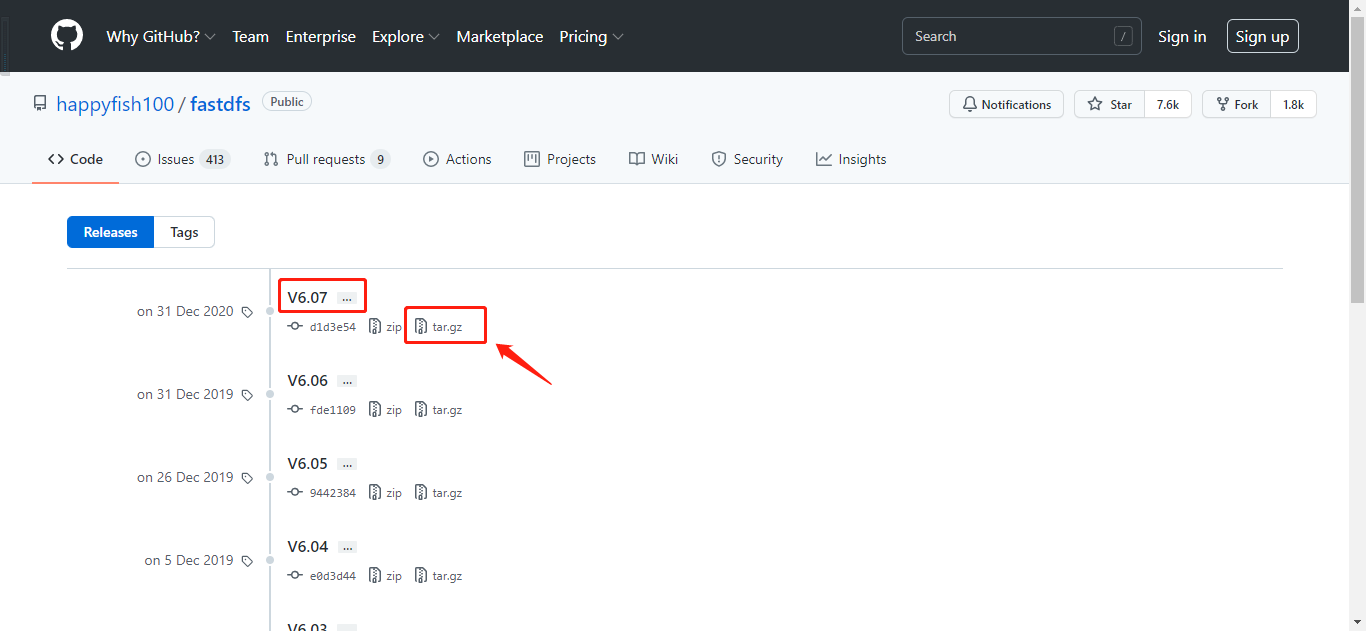
截图来自于GitHub
3.2 下载 libfastcommon 安装包
下载地址:https://github.com/happyfish100/libfastcommon/releases
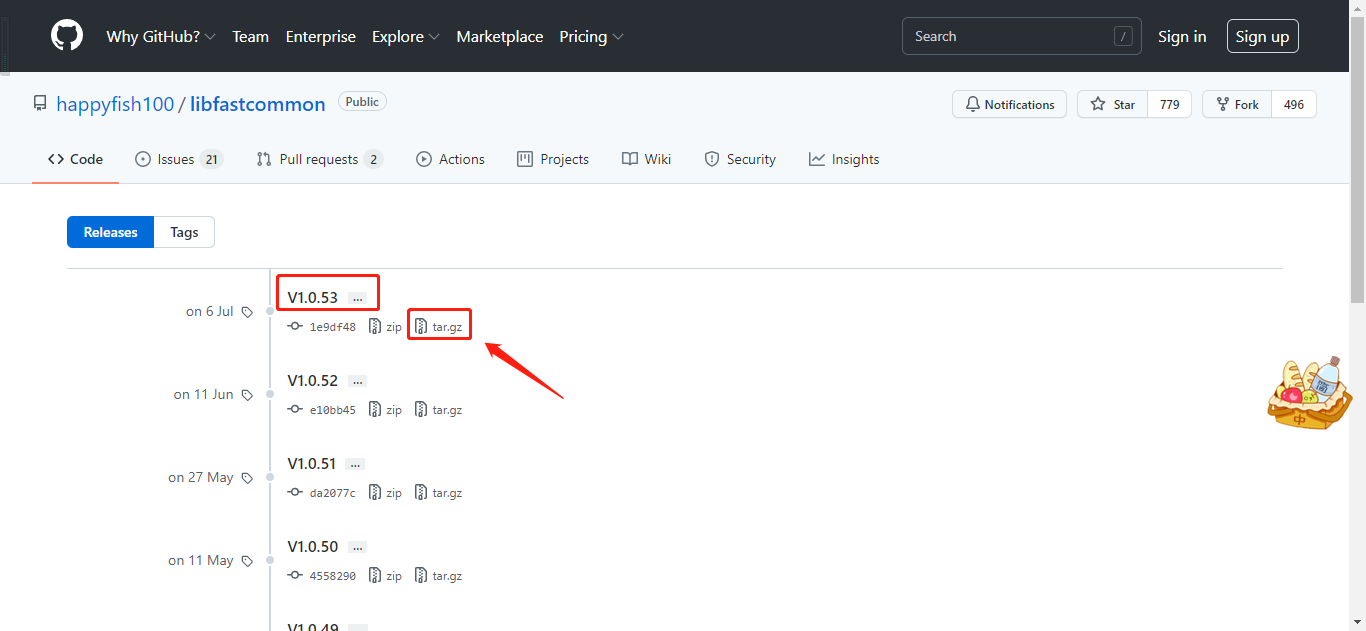
截图来自于GitHub
3.3 下载 fastdfs-nginx-module 安装包
下载地址:https://github.com/happyfish100/fastdfs-nginx-module/releases
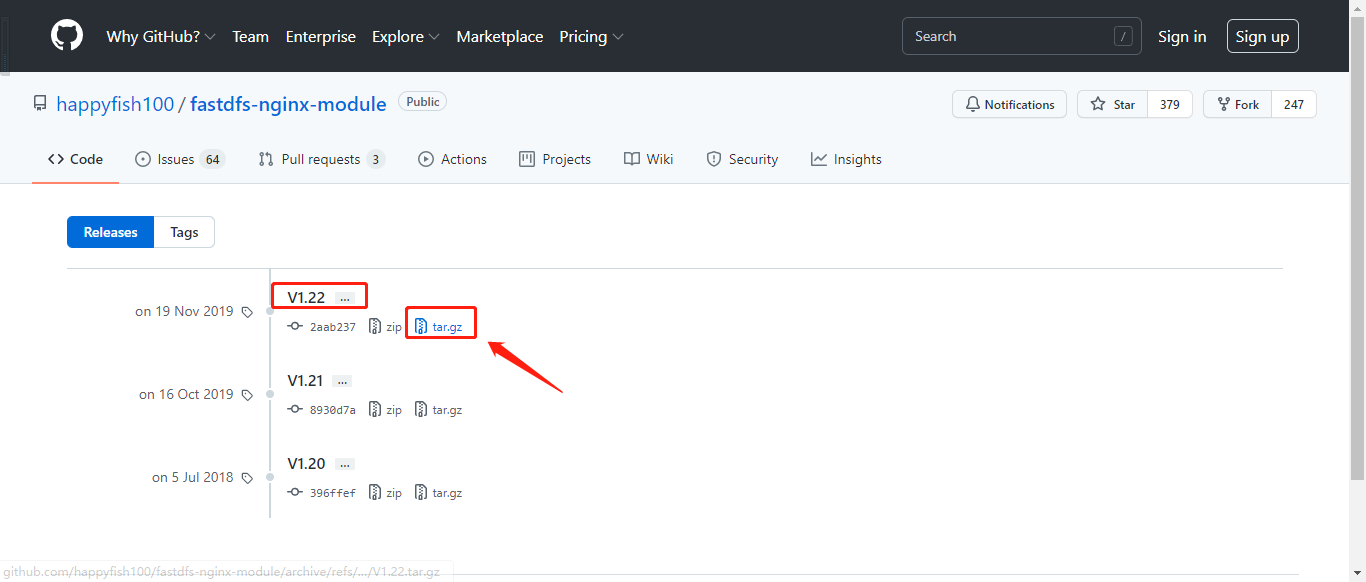
截图来自于GitHub
3.4 下载最新版本的Nginx安装包
下载地址:https://nginx.org/en/download.html
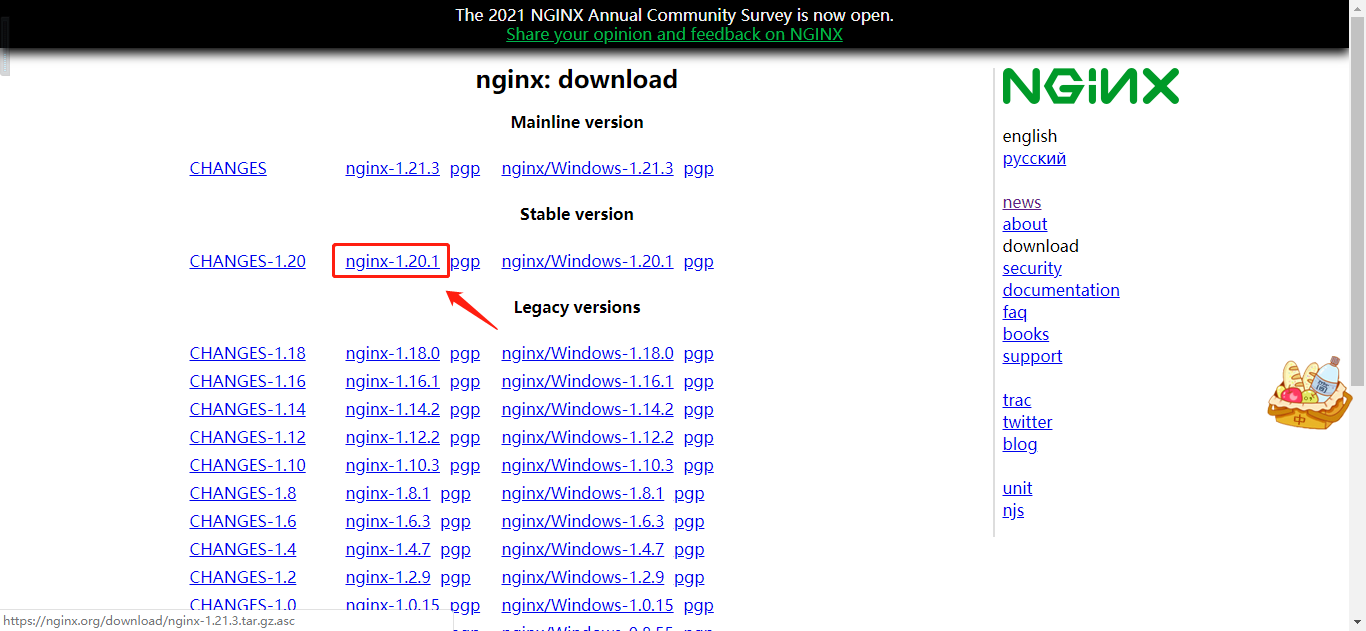
截图来自于官网
3.5 将下载的安装包统一拷贝到CentOS7的 /home 目录下
3.6 安装依赖包
# yum install -y gcc gcc-c++
# yum install -y libevent
# yum install -y perl
3.7 安装 libfastcommon
1)解压缩
# cd /home
# tar -zvxf libfastcommon-1.0.53.tar.gz
2)执行编译
# cd libfastcommon-1.0.53
# ./make.sh
3)执行安装
# ./make.sh install
3.8 安装 FastDFS
1)解压缩
# cd /home
# tar -zxvf fastdfs-6.07.tar.gz
2)执行编译
# cd fastdfs-6.07
# ./make.sh
3)执行安装
# ./make.sh install
3.9 拷贝配置文件模板
# cd /home/fastdfs-6.07/conf
# cp * /etc/fdfs/
3.10 3.5 到 3.9 的操作,服务器A、服务器B都要执行
3.11 在服务器A配置 tracker 服务
1)配置 tracker 服务
# cd /etc/fdfs/
# vi tracker.conf

2)创建工作目录
# mkdir -p /usr/local/fastdfs/tracker
3)启动 tracker 服务
# /usr/bin/fdfs_trackerd /etc/fdfs/tracker.conf
3.12 在服务器B配置 storage 服务
1)配置 storage 服务
# cd /etc/fdfs/
# vi storage.conf
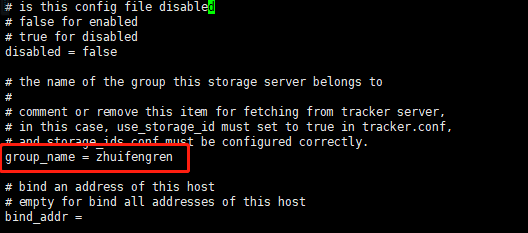

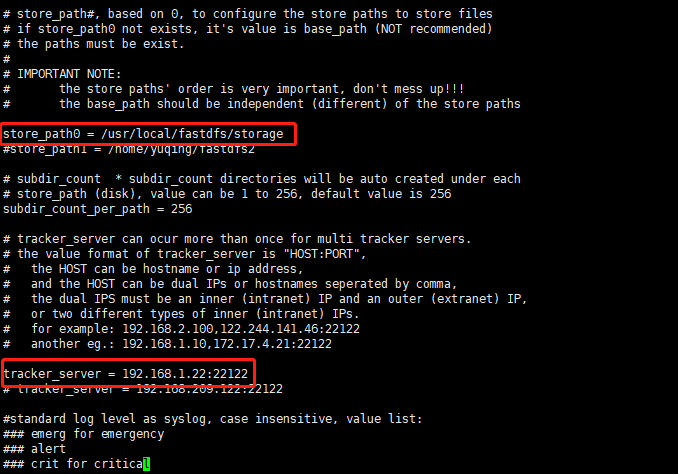
2)创建工作目录
# mkdir -p /usr/local/fastdfs/storage
3)启动 storage 服务
# /usr/bin/fdfs_storaged /etc/fdfs/storage.conf
3.13 命令行测试文件上传
1)修改 client 配置文件
# cd /etc/fdfs
# vi client.conf
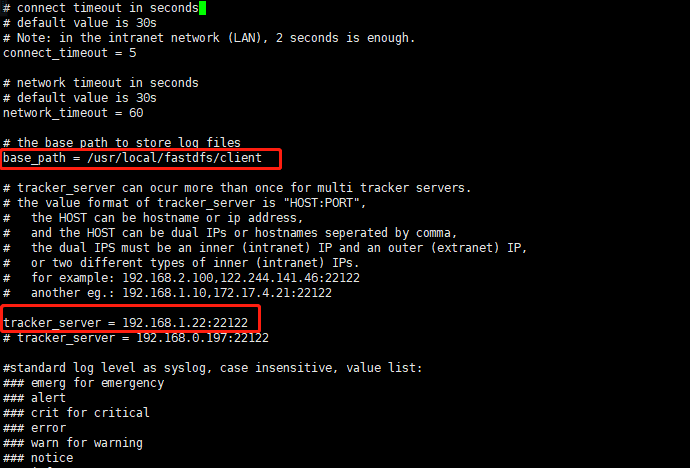
2)创建目录
# mkdir -p /usr/local/fastdfs/client
3)测试文件上传
# /usr/bin/fdfs_test /etc/fdfs/client.conf upload 1.png
结果主要内容:
group_name=zhuifengren, remote_filename=M00/00/00/wKgBCGFOzh6AB7GRAABdyNYCZvQ876.png

source ip address: 192.168.1.8

file timestamp=2021-09-25 15:22:06

file size=24008

file crc32=3590481652

example file url: http://192.168.1.8/zhuifengren/M00/00/00/wKgBCGFOzh6AB7GRAABdyNYCZvQ876.png
4)在 storage 工作目录查看文件
# cd /usr/local/fastdfs/storage/data/00/00
# ll
-rw-r--r--. 1 root root 24008 Sep 25 15:22 wKgBCGFOzh6AB7GRAABdyNYCZvQ876_big.png

-rw-r--r--. 1 root root    49 Sep 25 15:22 wKgBCGFOzh6AB7GRAABdyNYCZvQ876_big.png-m

-rw-r--r--. 1 root root 24008 Sep 25 15:22 wKgBCGFOzh6AB7GRAABdyNYCZvQ876.png

-rw-r--r--. 1 root root    49 Sep 25 15:22 wKgBCGFOzh6AB7GRAABdyNYCZvQ876.png-m
3.14 安装并配置Nginx
Nginx 必须和 storage 安装在同一个节点上,才能通过Http的方式访问图片。
1)解压 fastdfs-nginx-module
# cd /home
# tar -zxvf fastdfs-nginx-module-1.22.tar.gz
2)修改 config 配置文件
# cd /home/fastdfs-nginx-module-1.22/src
# vi config
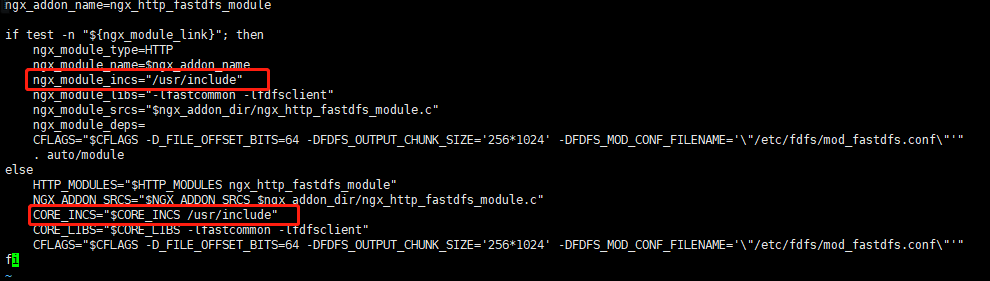
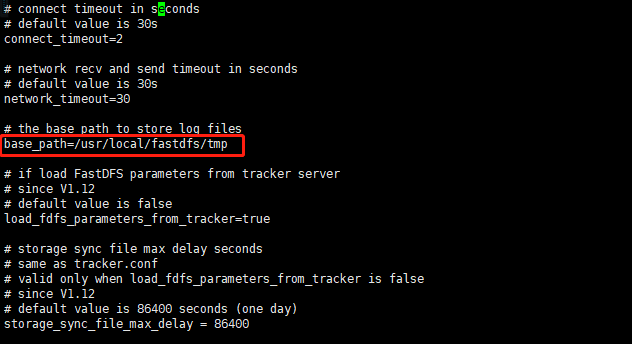
3)修改 mod_fastdfs.conf 配置文件
# cd /home/fastdfs-nginx-module-1.22/src
# cp mod_fastdfs.conf /etc/fdfs/
# mkdir -p /usr/local/fastdfs/tmp
# cd /etc/fdfs/
# vi mod_fastdfs.conf


4)安装Nginx 的依赖包
# yum install -y gcc-c++
# yum install -y pcre pcre-devel
# yum install -y zlib zlib-devel
# yum install -y openssl openssl-devel
5)解压Nginx
# cd /home
# tar -zxvf nginx-1.20.1.tar.gz
6)安装Nginx
# cd nginx-1.20.1
# ./configure \
--prefix=/usr/local/nginx \
--pid-path=/var/local/nginx/nginx.pid \
--lock-path=/var/local/nginx/nginx.lock \
--error-log-path=/var/local/nginx/error.log \
--http-log-path=/var/local/nginx/access.log \
--with-http_gzip_static_module \
--http-client-body-temp-path=/var/local/nginx/client \
--http-proxy-temp-path=/var/local/nginx/proxy \
--http-fastcgi-temp-path=/var/local/nginx/fastcgi \
--http-uwsgi-temp-path=/var/local/nginx/uwsgi \
--http-scgi-temp-path=/var/local/nginx/scgi \
--add-module=/home/fastdfs-nginx-module-1.22/src
# make
# make install
7)修改Nginx配置文件
# cd /usr/local/nginx/conf
# vi nginx.conf
server {

        listen          8888;     # 该端口为storage.conf中的http.server_port相同

        server_name     localhost;

        location        /zhuifengren/M00 {

                ngx_fastdfs_module;

        }

    }
8)启动 Nginx
# cd /usr/local/nginx/sbin
# ./nginx
9)打开之前上传的图片
http://192.168.1.8:8888/zhuifengren/M00/00/00/wKgBCGFOzh6AB7GRAABdyNYCZvQ876.png

可以正常打开 :)
4. 与 Springboot 整合
4.1 引入依赖
        <dependency>

            <groupId>com.github.tobato</groupId>

            <artifactId>fastdfs-client</artifactId>

            <version>1.27.2</version>

        </dependency>
4.2 配置Springboot
打开 application.yml
fdfs:

  connect-timeout: 300  # 连接超时时间

  so-timeout: 300       # 读取超时时间

  tracker-list: 192.168.1.22:22122

  pool:

    max-total: 100   # 连接池最大数量

    max-total-per-key: 50  # 单个tracker最大连接数

    max-wait-millis: 5000 # 连接耗尽最大等待时间 毫秒
4.3 文件上传
    @Autowired

    private FastFileStorageClient fastFileStorageClient;

    @Test

    public void upload() throws FileNotFoundException {

        File file = new File("C:\\tmp\\2.jpg");

        FileInputStream fileInputStream = new FileInputStream(file);

        StorePath storePath = fastFileStorageClient.uploadFile

                        (fileInputStream, file.length(), "jpg", null);

        System.out.println(JsonUtils.objectToJson(storePath));

    }
结果:
{

    "group": "zhuifengren",

    "path": "M00/00/00/wKgBCGFO7cqAPEqpAAIhUeJJR1c839.jpg",

    "fullPath": "zhuifengren/M00/00/00/wKgBCGFO7cqAPEqpAAIhUeJJR1c839.jpg"

}
5. 综述
今天聊了一下 分布式文件系统FastDFS在CentOS7上的安装及与Springboot的整合,希望可以对大家的工作有所帮助。
欢迎帮忙点赞、评论、转发、加关注 :)
关注追风人聊Java,每天更新Java干货。
分布式文件系统FastDFS在CentOS7上的安装及与Springboot的整合的更多相关文章
- 分布式文件系统 - FastDFS 在 CentOS 下配置安装部署
少啰嗦,直接装 看过上一篇分布式文件系统 - FastDFS 简单了解一下的朋友应该知道,本次安装是使用目前余庆老师开源的最新 V5.05 版本,是余庆老师放在 Github 上的,和目前你能在网络上 ...
- 转载:分布式文件系统 - FastDFS 在 CentOS 下配置安装部署(2)
原文:http://blog.mayongfa.cn/193.html 一.安装 Nginx 和 fastdfs-nginx-module 安装 Nginx 请看:从零开始学 Java - CentO ...
- 转载:分布式文件系统 - FastDFS 在 CentOS 下配置安装部署(1)
原文:http://blog.mayongfa.cn/192.html 一.安装 libfastcommon 和 FastDFS 1.下载安装 libfastcommon ,这里是通过wget下载(我 ...
- 【架构设计】分布式文件系统 FastDFS的原理和安装使用
本文地址 分享提纲: 1.概述 2. 原理 3. 安装 4. 使用 5. 参考文档 1. 概述 1.1)[常见文件系统] Google了一下,流行的开源分布式文件系统有很多,介绍如下: -- mo ...
- 分布式文件系统 - FastDFS 配置 Nginx 模块及上传测试
也不说废话,直接干 上一篇 分布式文件系统 - FastDFS 在 CentOS 下配置安装部署 中安装了 FastDFS 后,并配置启动了 Tracker 和 Storage 服务,已经可以上传文件 ...
- 分布式文件系统 - FastDFS 简单了解一下
别问我在哪里 也许我早已不是我自己,别问我在哪里,我一直在这里. 突然不知道说些什么了... 初识 FastDFS 记得那是我刚毕业后进入的第一家公司,一个技术小白进入到当时的项目组后,在开发中上传用 ...
- 分布式文件系统 - FastDFS
分布式文件系统 - FastDFS 别问我在哪里 也许我早已不是我自己,别问我在哪里,我一直在这里. 突然不知道说些什么了... 初识 FastDFS 记得那是我刚毕业后进入的第一家公司,一个技术小白 ...
- 记录:CentOS 7 安装配置分布式文件系统 FastDFS 5.1.1
CentOS 7 安装配置分布式文件系统 FastDFS 5.1.1 软件下载:http://download.csdn.net/download/qingchunwuxian1993/9897458 ...
- 分布式文件系统 FastDFS 5.0.8 & Linux CentOS 6.7 安装配置
原文:http://blog.csdn.net/wlwlwlwl015/article/details/52619851 前言 项目中用到文件服务器,有朋友推荐用fastdfs,所以就了解学习了一番, ...
随机推荐
- Java-Collection、Map和Array之间的转换
1 List -> Map 设个User类: public class User { private String userName; private String userId; privat ...
- 常见web中间件漏洞(一)IIS漏洞
web中间件作为web安全的重要一块,经常会有人问balabala,虽然有很多已经人尽皆知并且基本不再构成威胁了,但是还是有必要说一下,了解历史,了解我们从哪里来 鉴于内容实在是太多,本来打算一起写完 ...
- 012 PCIe总线的基础知识
一.PCIe总线的基础知识 与PCI总线不同,PCIe总线使用端到端的连接方式,在一条PCIe链路的两端只能各连接一个设备,这两个设备互为是数据发送端和数据接收端.PCIe总线除了总线链路外,还具有多 ...
- 基础篇:一文讲懂树莓派命令行文本编辑工具Vim的使用
简介 众所周知,在Linux系统下的命令行调试界面,经常会遇到需要文本编辑的情况,而树莓派官方系统默认自带了Nano编辑器,Nano的操作门槛更低,但却不如Vim编辑器方便.Vim编辑器是由早期在Li ...
- Spring boot集成Redis实现sessions共享时,sessions过期时间问题分析
Springboot鼓励零配置的方式,帮你做好大部分重复劳动的事,好到不能再好:具体的Redis安装方法和Springboot集成Redis方法,可以去搜索相关文章或参考该文章http://www.c ...
- 使用C# 实现串口拨号器的SIM卡通信
参考网址:https://www.cnblogs.com/xugang/archive/2012/08/23/2652671.html 写此博客意为抛砖引玉,希望能和博客园的朋友们探讨一下关于.NET ...
- C++11 unique_ptr智能指针详解
在<C++11 shared_ptr智能指针>的基础上,本节继续讲解 C++11 标准提供的另一种智能指针,即 unique_ptr 智能指针. 作为智能指针的一种,unique_ptr ...
- Qt Model/View(模型/视图)结构(无师自通)
Model/View(模型/视图)结构是 Qt 中用界面组件显示与编辑数据的一种结构,视图(View)是显示和编辑数据的界面组件,模型(Model)是视图与原始数据之间的接口. GUI 应用程序的一个 ...
- linux 常用的更新命令
apt update apt install g++ apt install build_essential
- SqlServer 数据库备份到服务器,及删除
一:备份 1.在数据库管理下 新建一个维护计划,然后下图中点击 标红的按钮 新建计划作业,建好后就可以 SqlServer 代理下的作业里可以看到刚新建的作业. 2.SqlServer 代理下的作业 ...