
CentOS 7.4中firewall防火墙详解和配置以及切换为iptables防火墙
转载:https://blog.csdn.net/xlgen157387/article/details/52672988
一、firewall介绍
CentOS 7中防火墙是一个非常的强大的功能,在CentOS 6.5中在iptables防火墙中进行了升级了。
1、官方介绍
The dynamic firewall daemon firewalld provides a dynamically managed firewall with support for network “zones” to assign a level of trust to a network and its associated connections and interfaces. It has support for IPv4 and IPv6 firewall settings. It supports Ethernet bridges and has a separation of runtime and permanent configuration options. It also has an interface for services or applications to add firewall rules directly.
2、什么是区域Zone:
网络区域定义了网络连接的可信等级。这是一个 一对多的关系,这意味着一次连接可以仅仅是一个区域的一部分,而一个区域可以用于很多连接。
3、哪个区域可用?
由firewalld 提供的区域按照从不信任到信任的顺序排序。
4、区域的分类?
Firewalls can be used to separate networks into different zones based on the level of trust the user has decided to place on the devices and traffic within that network. NetworkManager informs firewalld to which zone an interface belongs. An interface’s assigned zone can be changed by NetworkManager or via the firewall-config tool which can open the relevant NetworkManager window for you.
The zone settings in /etc/firewalld/ are a range of preset settings which can be quickly applied to a network interface. They are listed here with a brief explanation:
drop
Any incoming network packets are dropped, there is no reply. Only outgoing network connections are possible.
block
Any incoming network connections are rejected with an
icmp-host-prohibited message for IPv4 and icmp6-adm-prohibited for IPv6.
Only network connections initiated from within the system are possible.
public
For use in public areas. You do not trust the other computers on the
network to not harm your computer. Only selected incoming connections
are accepted.
external
For use on external networks with masquerading enabled especially for
routers. You do not trust the other computers on the network to not harm
your computer. Only selected incoming connections are accepted.
dmz
For computers in your demilitarized zone that are publicly-accessible
with limited access to your internal network. Only selected incoming
connections are accepted.
work
For use in work areas. You mostly trust the other computers on networks
to not harm your computer. Only selected incoming connections are
accepted.
home
For use in home areas. You mostly trust the other computers on networks
to not harm your computer. Only selected incoming connections are
accepted.
internal
For use on internal networks. You mostly trust the other computers on
the networks to not harm your computer. Only selected incoming
connections are accepted.
trusted
All network connections are accepted.
It is possible to designate one of these zones to be the default zone.
When interface connections are added to NetworkManager, they are
assigned to the default zone. On installation, the default zone in
firewalld is set to be the public zone.
注:具体内容,请参见官方文档介绍!
二、firewall配置
The configuration for firewalld is stored in various XML files in /usr/lib/firewalld/ and /etc/firewalld/.
This allows a great deal of flexibility as the files can be edited,
written to, backed up, used as templates for other installations and so
on.
注意:以下firewalld 的操作只有重启之后才有效:service firewalld restart 重启
1、系统配置目录
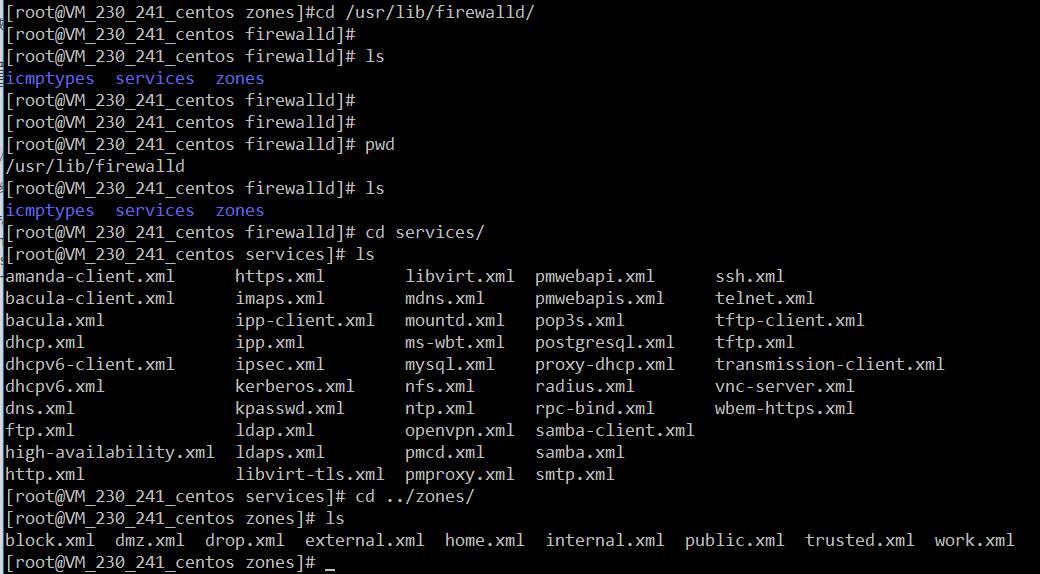
/usr/lib/firewalld/services
目录中存放定义好的网络服务和端口参数,系统参数,不能修改。
2、用户配置目录
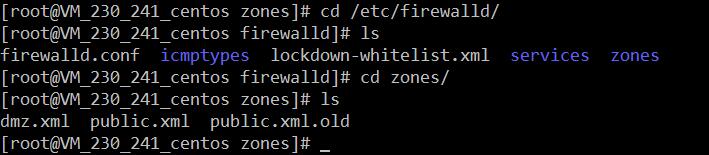
/etc/firewalld/
3、如何自定义添加端口
用户可以通过修改配置文件的方式添加端口,也可以通过命令的方式添加端口,注意,修改的内容会在/etc/firewalld/ 目录下的配置文件中还体现。
- 3.1、命令的方式添加端口
firewall-cmd --permanent --add-port=9527/tcp
参数介绍:
1、firewall-cmd:是Linux提供的操作firewall的一个工具;

2、--permanent:表示设置为持久;

3、--add-port:标识添加的端口;
另外,firewall中有Zone的概念,可以将具体的端口制定到具体的zone配置文件中。
例如:添加8010端口
firewall-cmd --zone=public --permanent --add-port=8010/tcp

--zone=public:指定的zone为public;
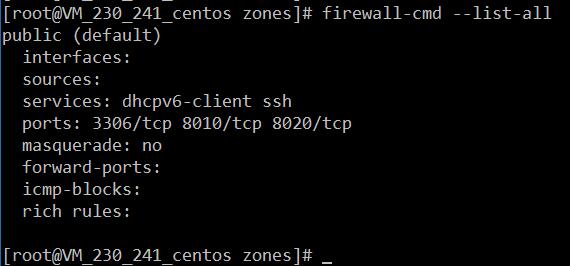
添加结果如下:

如果–zone=dmz 这样设置的话,会在dmz.xml文件中新增一条。
3.2、修改配置文件的方式添加端口
<?xml version="1.0" encoding="utf-8"?>

<zone>

  <short>Public</short>

  <description>For use in public areas.</description>

  <rule family="ipv4">

    <source address="122.10.70.234"/>

    <port protocol="udp" port="514"/>

    <accept/>

  </rule>

  <rule family="ipv4">

    <source address="123.60.255.14"/>

    <port protocol="tcp" port="10050-10051"/>

    <accept/>

  </rule>

 <rule family="ipv4">

    <source address="192.249.87.114"/> 放通指定ip,指定端口、协议

    <port protocol="tcp" port="80"/>

    <accept/>

  </rule>

<rule family="ipv4"> 放通任意ip访问服务器的9527端口

    <port protocol="tcp" port="9527"/>

    <accept/>

  </rule>

</zone>
上述的一个配置文件可以很好的看出:
1、添加需要的规则,开放通源ip为122.10.70.234,端口514,协议tcp;

2、开放通源ip为123.60.255.14,端口10050-10051,协议tcp;/3、开放通源ip为任意,端口9527,协议tcp;
三、firewall常用命令
1、重启、关闭、开启firewalld.service服务
service firewalld restart 重启

service firewalld start 开启

service firewalld stop 关闭
2、查看firewall服务状态
systemctl status firewall
3、查看firewall的状态
firewall-cmd --state

4、查看防火墙规则
firewall-cmd --list-all
四、CentOS切换为iptables防火墙
切换到iptables首先应该关掉默认的firewalld,然后安装iptables服务。
1、关闭firewall:
service firewalld stop

systemctl disable firewalld.service #禁止firewall开机启动
2、安装iptables防火墙
yum install iptables-services #安装
3、编辑iptables防火墙配置
vi /etc/sysconfig/iptables #编辑防火墙配置文件
下边是一个完整的配置文件:
*filter

:INPUT ACCEPT [0:0]

:FORWARD ACCEPT [0:0]

:OUTPUT ACCEPT [0:0]

-A INPUT -m state --state ESTABLISHED,RELATED -j ACCEPT

-A INPUT -p icmp -j ACCEPT

-A INPUT -i lo -j ACCEPT

-A INPUT -m state --state NEW -m tcp -p tcp --dport 22 -j ACCEPT

-A INPUT -m state --state NEW -m tcp -p tcp --dport 80 -j ACCEPT

-A INPUT -m state --state NEW -m tcp -p tcp --dport 3306 -j ACCEPT

-A INPUT -j REJECT --reject-with icmp-host-prohibited

-A FORWARD -j REJECT --reject-with icmp-host-prohibited

COMMIT
:wq! #保存退出
service iptables start #开启

systemctl enable iptables.service #设置防火墙开机启动
CentOS 7.4中firewall防火墙详解和配置以及切换为iptables防火墙的更多相关文章
- CentOS 7中firewall防火墙详解和配置以及切换为iptables防火墙
官方文档介绍地址: https://access.redhat.com/documentation/en-US/Red_Hat_Enterprise_Linux/7/html/Security_Gui ...
- CentOS 7中firewall防火墙详解和配置以及切换为iptables防火墙--转载
最近在linux(这里用到的是Centos7的64位版本)安装nginx时,在开放80端口时用iptables设置端口 和重启服务发现提示未找到文件,在网络上收集查找后发现在Centos7中iptab ...
- CentOS7中firewall防火墙详解和配置,.xml服务配置详解
修改防火墙配置文件之前,需要对之前防火墙做好备份 重启防火墙后,需要确认防火墙状态和防火墙规则是否加载,若重启失败或规则加载失败,则所有请求都会被防火墙 1. firewall-cmd --state ...
- Linux(centos)系统各个目录的作用详解
Linux(centos)系统各个目录的作用详解 文件系统的类型 LINUX有四种基本文件系统类型:普通文件.目录文件.连接文件和特殊文件,可用file命令来识别. 普通文件:如文本文件.C语言元代码 ...
- virtualbox centos安装增强工具和问题详解
virtualbox centos安装增强工具和问题详解 VirtualBox 大家都习惯性把它简称为 Vbox ,比 VM 的体积小.开源.速 度快.不过在使用 VirtualBox 在虚拟机中安装 ...
- php中关于引用(&)详解
php中关于引用(&)详解 php的引用(就是在变量或者函数.对象等前面加上&符号) 在PHP 中引用的意思是:不同的变量名访问同一个变量内容. 与C语言中的指针是有差别的.C语言中的 ...
- JavaScript正则表达式详解(二)JavaScript中正则表达式函数详解
二.JavaScript中正则表达式函数详解(exec, test, match, replace, search, split) 1.使用正则表达式的方法去匹配查找字符串 1.1. exec方法详解 ...
- AngularJS select中ngOptions用法详解
AngularJS select中ngOptions用法详解 一.用法 ngOption针对不同类型的数据源有不同的用法,主要体现在数组和对象上. 数组: label for value in a ...
- 【转载】C/C++中extern关键字详解
1 基本解释:extern可以置于变量或者函数前,以标示变量或者函数的定义在别的文件中,提示编译器遇到此变量和函数时在其他模块中寻找其定义.此外extern也可用来进行链接指定. 也就是说extern ...
随机推荐
- Asp.net WebApi 配置 Swagger UI
首先安装Swashbuckle.Core 然后添加swagger配置文件. [assembly: PreApplicationStartMethod(typeof(SwaggerConfig), &q ...
- 【Python】模块学习之使用paramiko连接Linux,远程执行命令,上传下载、文件
本文主要介绍paramiko远程执行linux命令,及在服务器上进行文件的上传.下载 paramiko是用python语言写的一个模块,遵循SSH2协议,支持以加密和认证的方式,进行远程服务器的连接. ...
- [Vue]Scoped Css与Css Modules的区别
均为解决CSS全局作用域问题(样式冲突(污染))的一个解决方案. 1.Scoped CSS 当 <style> 标签有 scoped 属性时,相当于在元素中添加了一个唯一属性用来区分. & ...
- 清理网页中的HTML
public string ClearHtml(string text)//过滤html,js,css代码 { text = text.Trim(); if (string.IsNullOrEmpty ...
- JAVA常用数据结构API
Quene
- qt4.8中多线程的几种方式
第一: 用QtConcurrentRun类,适合在另一个线程中运行一个函数.不用继承类,很方便 第二:用QRunnable和QThreadPool结合.继承QRunnable,重写run函数,然后用Q ...
- EBS Certifications
Last Updated: September 29, 2017. This summary cross-references published blog articles and the off ...
- html5 圆角ie8
http://files.cnblogs.com/files/panmy/%E5%9C%86%E8%A7%92.rar
- Django知识点总结
一.什么是web框架? 框架,即framework,特指为解决一个开放性问题而设计的具有一定约束性的支撑结构,使用框架可以帮你快速开发特定的系统,简单地说,就是你用别人搭建好的舞台来做表演. web应 ...
- DRF中两大视图基类APIView/GenericAPIView的介绍
(1)APIView rest_framework.views.APIView APIView是REST framework提供的所有视图的基类,继承自Django的View父类. APIView与V ...