
CentOS 7中firewall防火墙详解和配置以及切换为iptables防火墙--转载
最近在linux(这里用到的是Centos7的64位版本)安装nginx时,在开放80端口时用iptables设置端口
和重启服务发现提示未找到文件,在网络上收集查找后发现在Centos7中iptables防火墙默认是关闭的,而默
开启的是firewall防火墙;这里转载一篇大神分享的关于firewall的介绍以供参考学习。
常用命令:
linux防火墙开放和禁用指定端口

1、例如:开放8080端口

firewall-cmd --permanent --add-port=8080/tcp

2、重启firewalled

systemctl restart firewalld.service
2.1 启动一个服务:systemctl start firewalld.service
2.2 关闭一个服务:systemctl stop firewalld.service

3、查看设置

firewall-cmd --list-all

4、例如:禁用8080端口

firewall-cmd --permanent --remove-port=8080/tcp

5、重启使之生效
6、默认已经开放的端口查看,
系统配置目录:
/usr/lib/firewalld/services
目录中存放定义好的网络服务和端口参数,系统参数,不能修改。
其中,vi /usr/lib/firewalld/services/ssh.xml,存放了firewalll默认开放的22端口。
官方文档介绍地址:
https://access.redhat.com/documentation/en-US/Red_Hat_Enterprise_Linux/7/html/Security_Guide/sec-Using_Firewalls.html#sec-Introduction_to_firewalld1
一、firewall介绍
CentOS 7中防火墙是一个非常的强大的功能,在CentOS 6.5中在iptables防火墙中进行了升级了。
1、官方介绍
The dynamic firewall daemon firewalld provides a dynamically managed firewall with support for network “zones” to assign a level of trust to a network and its associated connections and interfaces. It has support for IPv4 and IPv6 firewall settings. It supports Ethernet bridges and has a separation of runtime and permanent configuration options. It also has an interface for services or applications to add firewall rules directly.
2、什么是区域Zone:
网络区域定义了网络连接的可信等级。这是一个 一对多的关系,这意味着一次连接可以仅仅是一个区域的一部分,而一个区域可以用于很多连接。
3、哪个区域可用?
由firewalld 提供的区域按照从不信任到信任的顺序排序。
4、区域的分类?
Firewalls can be used to separate networks into different zones based on the level of trust the user has decided to place on the devices and traffic within that network. NetworkManager informs firewalld to which zone an interface belongs. An interface’s assigned zone can be changed by NetworkManager or via the firewall-config tool which can open the relevant NetworkManager window for you.
The zone settings in /etc/firewalld/ are a range of preset settings which can be quickly applied to a network interface. They are listed here with a brief explanation:
drop
Any incoming network packets are dropped, there is no reply. Only outgoing network connections are possible.
block
Any incoming network connections are rejected with an icmp-host-prohibited message for IPv4 and icmp6-adm-prohibited for IPv6. Only network connections initiated from within the system are possible.
public
For use in public areas. You do not trust the other computers on the network to not harm your computer. Only selected incoming connections are accepted.
external
For use on external networks with masquerading enabled especially for routers. You do not trust the other computers on the network to not harm your computer. Only selected incoming connections are accepted.
dmz
For computers in your demilitarized zone that are publicly-accessible with limited access to your internal network. Only selected incoming connections are accepted.
work
For use in work areas. You mostly trust the other computers on networks to not harm your computer. Only selected incoming connections are accepted.
home
For use in home areas. You mostly trust the other computers on networks to not harm your computer. Only selected incoming connections are accepted.
internal
For use on internal networks. You mostly trust the other computers on the networks to not harm your computer. Only selected incoming connections are accepted.
trusted
All network connections are accepted.
It is possible to designate one of these zones to be the default zone. When interface connections are added to NetworkManager, they are assigned to the default zone. On installation, the default zone in firewalld is set to be the public zone.
注:具体内容,请参见官方文档介绍!
二、firewall配置
The configuration for firewalld is stored in various XML files in /usr/lib/firewalld/ and /etc/firewalld/.
This allows a great deal of flexibility as the files can be edited, written to, backed up, used as templates for other installations and so on.
注意:以下firewalld 的操作只有重启之后才有效:service firewalld restart 重启
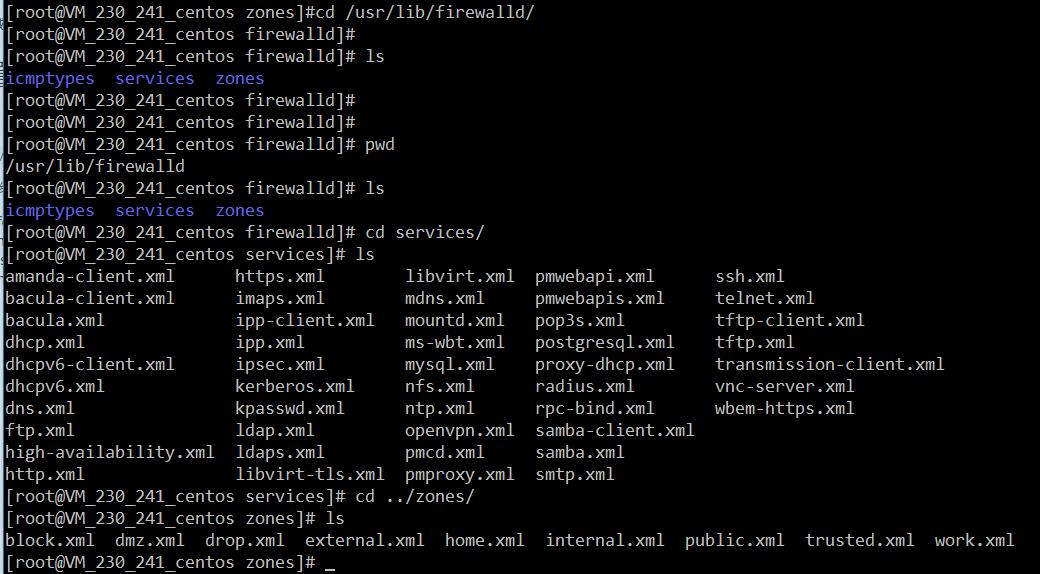
1、系统配置目录
/usr/lib/firewalld/services
目录中存放定义好的网络服务和端口参数,系统参数,不能修改。
2、用户配置目录
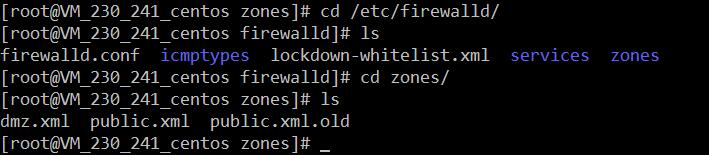
/etc/firewalld/
3、如何自定义添加端口
用户可以通过修改配置文件的方式添加端口,也可以通过命令的方式添加端口,注意,修改的内容会在/etc/firewalld/ 目录下的配置文件中还体现。
3.1、命令的方式添加端口
firewall-cmd --permanent --add-port=9527/tcp
参数介绍:
 1、firewall-cmd:是Linux提供的操作firewall的一个工具;

 2、--permanent:表示设置为持久;

 3、--add-port:标识添加的端口;
另外,firewall中有Zone的概念,可以将具体的端口制定到具体的zone配置文件中。
例如:添加8010端口
firewall-cmd --zone=public --permanent --add-port=8010/tcp
--zone=public:指定的zone为public;
添加结果如下:

如果–zone=dmz 这样设置的话,会在dmz.xml文件中新增一条。
3.2、修改配置文件的方式添加端口
# vim /etc/firewalld/zones/public.xml
 <?xml version="1.0" encoding="utf-8"?>

 <zone>

   <short>Public</short>

   <description>For use in public areas.</description>

   <rule family="ipv4">

     <source address="122.10.70.234"/>

     <port protocol="udp" port="514"/>

     <accept/>

   </rule>

   <rule family="ipv4">

     <source address="123.60.255.14"/>

     <port protocol="tcp" port="10050-10051"/>

     <accept/>

   </rule>

  <rule family="ipv4">

     <source address="192.249.87.114"/> 放通指定ip,指定端口、协议

     <port protocol="tcp" port="80"/>

     <accept/>

   </rule>

 <rule family="ipv4"> 放通任意ip访问服务器的9527端口

     <port protocol="tcp" port="9527"/>

     <accept/>

   </rule>

 </zone>
上述的一个配置文件可以很好的看出:
1、添加需要的规则,开放通源ip为122.10.70.234,端口514,协议tcp;

2、开放通源ip为123.60.255.14,端口10050-10051,协议tcp;
3、开放通源ip为任意,端口9527,协议tcp;
三、firewall常用命令
1、重启、关闭、开启firewalld.service服务
 service firewalld restart 重启

 service firewalld start 开启

 service firewalld stop 关闭
2、查看firewall服务状态
systemctl status firewalld
3、查看firewall的状态
firewall-cmd --state

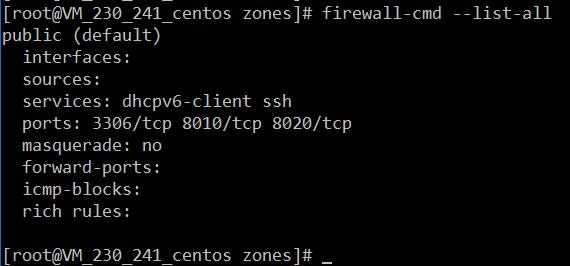
4、查看防火墙规则
firewall-cmd --list-all
四、CentOS切换为iptables防火墙
切换到iptables首先应该关掉默认的firewalld,然后安装iptables服务。
1、关闭firewall:
 service firewalld stop

 systemctl disable firewalld.service #禁止firewall开机启动
2、安装iptables防火墙
yum install iptables-services #安装
3、编辑iptables防火墙配置
vi /etc/sysconfig/iptables #编辑防火墙配置文件
下边是一个完整的配置文件:
 Firewall configuration written by system-config-firewall

 Manual customization of this file is not recommended.

 *filter

 :INPUT ACCEPT [0:0]

 :FORWARD ACCEPT [0:0]

 :OUTPUT ACCEPT [0:0]

 -A INPUT -m state --state ESTABLISHED,RELATED -j ACCEPT

 -A INPUT -p icmp -j ACCEPT

 -A INPUT -i lo -j ACCEPT

 -A INPUT -m state --state NEW -m tcp -p tcp --dport 22 -j ACCEPT

 -A INPUT -m state --state NEW -m tcp -p tcp --dport 80 -j ACCEPT

 -A INPUT -m state --state NEW -m tcp -p tcp --dport 3306 -j ACCEPT

 -A INPUT -j REJECT --reject-with icmp-host-prohibited

 -A FORWARD -j REJECT --reject-with icmp-host-prohibited

 COMMIT
:wq! #保存退出
 1 service iptables start #开启

 2 systemctl enable iptables.service #设置防火墙开机启动
该文章位转载文章,转载请注明出处;
---------------------
作者:徐刘根
来源:CSDN
原文:https://blog.csdn.net/xlgen157387/article/details/52672988
版权声明:本文为博主原创文章,转载请附上博文链接!
CentOS 7中firewall防火墙详解和配置以及切换为iptables防火墙--转载的更多相关文章
- CentOS 7中firewall防火墙详解和配置以及切换为iptables防火墙
官方文档介绍地址: https://access.redhat.com/documentation/en-US/Red_Hat_Enterprise_Linux/7/html/Security_Gui ...
- CentOS 7.4中firewall防火墙详解和配置以及切换为iptables防火墙
转载:https://blog.csdn.net/xlgen157387/article/details/52672988 一.firewall介绍 CentOS 7中防火墙是一个非常的强大的功能,在 ...
- CentOS7中firewall防火墙详解和配置,.xml服务配置详解
修改防火墙配置文件之前,需要对之前防火墙做好备份 重启防火墙后,需要确认防火墙状态和防火墙规则是否加载,若重启失败或规则加载失败,则所有请求都会被防火墙 1. firewall-cmd --state ...
- docker centos 镜像中安装python36详解!生成centos+python36的基础镜像
获取centos镜像docker pull centos:7.4.1708 启动并进入centos的容器docker run -i –t centos /bin/bash下载安装python编译环境依 ...
- centos/linux alternatives与update-alternatives详解与软件版本切换
update-alternatives是linux系统中专门维护系统命令链接符的工具,通过它可以很方便的设置系统默认使用哪个命令.哪个软件版本,比如,我们在系统中同时安装了open jdk和sun j ...
- Activity详解一 配置、启动和关闭activity转载 https://www.cnblogs.com/androidWuYou/p/5887726.html
先看效果图: Android为我们提供了四种应组件,分别为Activity.Service.Broadcast receivers和Content providers,这些组建也就是我们开发一个And ...
- 【转】centos关机与重启命令详解
连接:http://blog.csdn.net/jiangzhengdong/article/details/8036594 Linux centos关机与重启命令详解与实战 Linux centos ...
- centos关机与重启命令详解
Linux centos关机与重启命令详解与实战 Linux centos重启命令: 1.reboot 普通重启 2.shutdown -r now 立刻重启(root用户使用) 3.shutdo ...
- php中关于引用(&)详解
php中关于引用(&)详解 php的引用(就是在变量或者函数.对象等前面加上&符号) 在PHP 中引用的意思是:不同的变量名访问同一个变量内容. 与C语言中的指针是有差别的.C语言中的 ...
随机推荐
- B. Amr and The Large Array(Codeforces Round #312 (Div. 2)+找出现次数最多且区间最小)
B. Amr and The Large Array time limit per test 1 second memory limit per test 256 megabytes input st ...
- 2016/1/21 练习 arraylist 1,添加 add() 2,遍历集合
package shuzu; public class Customer { //从源码中 使用字段生成构造函数 public Customer(String good, int price) { s ...
- YTU 2516: 剪刀石头布
2516: 剪刀石头布 时间限制: 1 Sec 内存限制: 128 MB 提交: 193 解决: 123 题目描述 小慧小时候很喜欢和她的小伙伴们一起玩剪刀(Scissors).石头(Rock). ...
- ubuntu安装wine 安装QQ
安装最新版 wine sudo dpkg --add-architecture i386 sudo add-apt-repository ppa:wine/wine-builds sudo apt-g ...
- U74201 旅行计划 树上找链长度
题目背景 珂朵莉放假了,她打算去唐山旅行. 题目描述 我们简单地把唐山的共 nn 个景点看成是一棵树,有 n-1n−1 条边将它们连接起来,每个景点有一个游览指数 v_ivi.珂朵莉的假期时间不长, ...
- 浅谈C++多态性(转载)
转载:http://blog.csdn.net/hackbuteer1/article/details/7475622 C++编程语言是一款应用广泛,支持多种程序设计的计算机编程语言.我们今天就会为大 ...
- bzoj 1603: [Usaco2008 Oct]打谷机【瞎搞】
一棵树,碰到改变转向的边就异或一下,从1dfs一遍 #include<iostream> #include<cstdio> using namespace std; const ...
- [Swift]经典解题思路:联合查找Union Find
★★★★★★★★★★★★★★★★★★★★★★★★★★★★★★★★★★★★★★★★➤微信公众号:山青咏芝(shanqingyongzhi)➤博客园地址:山青咏芝(https://www.cnblogs. ...
- $CF19A\ World\ Football\ Cup$
炒鸡\(6\)批的模拟题. 注意的是输入 把握好空格 大小写. 根据题目的这句话来排序 积分榜是按照以下原则制作的:胜利一个队得3分,平分1分,失败0分. 首先,球队按积分顺序排在积分榜上,分数相等比 ...
- [JOI2014] 小笼包
题面 : https://www.ioi-jp.org/joi/2013/2014-yo/2014-yo-t6/2014-yo-t6.html 题解 dp + 康托展开 一看这题不知道怎么处理 只能枚 ...