
文字尺寸、宽高的测量 Paint FontMetrics
Paint.FontMetrics类简介
/**
 * Class that describes the various各种 metrics指标 for a font at a given text size.
 * Remember, Y values increase going down, so those values will be positive正数,
 * and values that measure distances距离 going up will be negative负数. This class
 * is returned by getFontMetrics().
 */
public static class FontMetrics {
    //The maximum distance above the baseline for the tallest glyph in the font at a given text size.
    public float   top;
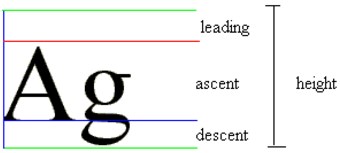
    //【字符顶部】The recommended推荐的 distance above the baseline for singled spaced text.
    public float   ascent;
    //【字符底部】The recommended distance below the baseline for singled spaced text.
    public float   descent;
    //The maximum distance below the baseline for the lowest glyph in the font at a given text size.
    public float   bottom;
    //【字符行间距】The recommended additional额外的 space to add between lines两行之间 of text.
    public float   leading;
}
网上找的各种模型图


Paint的ascent和descent方法--算高度
//Return the distance above (negative) the baseline (ascent) based on the current typeface字体 and text size.
public native float ascent();
//Return the distance below (positive) the baseline (descent) based on the current typeface and text size.
public native float descent();
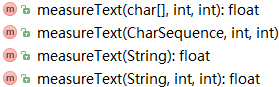
Paint的measureText方法--获取宽度
/**
 * Return the width of the text.
 *
 * @param text  The text to measure. Cannot be null.
 * @param start The index of the first character to start measuring
 * @param end   1 beyond the index of the last character to measure
 * @return      The width of the text
 */
public float measureText(String text, int start, int end) {
    if (text == null) throw new IllegalArgumentException("text cannot be null");
    if ((start | end | (end - start) | (text.length() - end)) < 0) throw new IndexOutOfBoundsException();
    if (text.length() == 0 || start == end) return 0f;
    if (!mHasCompatScaling) return (float) Math.ceil(native_measureText(text, start, end, mBidiFlags));

    final float oldSize = getTextSize();
    setTextSize(oldSize*mCompatScaling);
    float w = native_measureText(text, start, end, mBidiFlags);
    setTextSize(oldSize);
    return (float) Math.ceil(w*mInvCompatScaling);
}
Paint的getTextBounds方法--获取边界

/**
 * Return in bounds (allocated by the caller 由调用者分配) the smallest最小的 rectangle that
 * encloses围起来 all of the characters, with an implied origin默认的起始位置 at (0,0).
 * @param text  String to measure and return its bounds
 * @param start Index of the first char in the string to measure
 * @param end   1 past the last char in the string measure
 * @param bounds Returns the unioned bounds of all the text. Must be allocated by the caller.
 */
public void getTextBounds(String text, int start, int end, Rect bounds) {
    if ((start | end | (end - start) | (text.length() - end)) < 0)  throw new IndexOutOfBoundsException();
    if (bounds == null) throw new NullPointerException("need bounds Rect");
    nativeGetStringBounds(mNativePaint, mNativeTypeface, text, start, end, mBidiFlags, bounds);
}
Paint的获取
/**
 * @return the base paint used for the text.  Please use this only to
 * consult查阅 the Paint's properties属性 and not to change them.
 */
public TextPaint getPaint() {
    return mTextPaint;
}
测试代码
}
文字尺寸、宽高的测量 Paint FontMetrics的更多相关文章
- frame方式布局一段文子,设置宽高
计算一段文字的宽高 /** * 计算一段文字的宽高 * * @param size 这段文字的最大宽高 * @param options NSStringDrawingUsesLineFragment ...
- iOS_根据文字字数动态确定Label宽高
iOS7中用以下方法 CGSize 替代过时的iOS6中的- (CGSize)sizeWithFont:(UIFont *)font 方法 // iOS7_API_根据文字 字数动态确定Label宽高 ...
- iOS根据文字字数动态确定Label宽高
我们有时候在写项目的时候,会碰到,意见反馈,还有其他地方,讲座活动细则等需要大篇展示的文本, 因为每次服务器返回的内容大小不一,所以需要动态的调整label的宽高: 在ios 6 的时候可以: -(v ...
- iOS 根据文字字数动态确定Label宽高
iOS7中用以下方法 - (CGSize)sizeWithAttributes:(NSDictionary *)attrs; 替代过时的iOS6中的- (CGSize)sizeWithFont:(UI ...
- 微信 小程序 drawImage wx.canvasToTempFilePath wx.saveFile 获取设备宽高 尺寸问题
以下问题测试环境为微信开发者0.10.102800,手机端iphone6,如有不对敬谢指出. 根据我的测试,context.drawImage,在开发者工具中并不能画出来,只有预览到手机中显示. wx ...
- 如何设置a标签的宽高,如何使a标签的文字垂直居中
通常情况下a标签是没有宽高的,设置 width 和 height 没有作用. 若要使用 width 和 height,需要把a标签转为块级元素,即:display:block|inline-block ...
- js判断图片上传时的文件大小,和宽高尺寸
今天在做图片上传的小功能,使用了一个kissy上传组件.很好奇它是如何在图片上传前,检测到图片的大小和尺寸的?我们来写个小实例实现一下吧 如何读取图片的size 首先,原生input file控件有个 ...
- iOS 让UIButton根据文字内容自动计算宽高
Xcode自带的UIButton控件是没有办法根据文字内容计算自身的宽和高的,下面演示一下问题, 我用代码方式创建一个UIButton,并且设置了一些属性,下面看一下效果图 一切都是这么的美好,跟我们 ...
- 不定宽高的文字在div中垂直居中
本人在面试的时候被问到:如何使一段不定宽高的文字垂直居中呢? 现在来总结一下: 在body中写入结构 <div id="main"> <div id=&qu ...
随机推荐
- Codeforces Round #285 (Div. 1) B - Misha and Permutations Summation 康拓展开+平衡树
思路:很裸的康拓展开.. 我的平衡树居然跑的比树状数组+二分还慢.. #include<bits/stdc++.h> #define LL long long #define fi fir ...
- 十三oracle --控制结构(分支,循环,控制)
.使用各种if语句2.使用循环语句3.使用控制语句——goto和null(goto语句不推荐使用): 二.条件分支语句pl/sql中提供了三种条件分支语句if—then,if–then–else,if ...
- javascript的优缺点和内置对象
1)优点:简单易用,与Java有类似的语法,可以使用任何文本编辑工具编写,只需要浏览器就可执行程序,并且事先不用编译,逐行执行,无需进行严格的变量声明,而且内置大量现成对象,编写少量程序可以完成目标: ...
- hdu 1690 Bus System (有点恶心)
Problem Description Because of the huge population of China, public transportation is very important ...
- PHP视频教程 字符串处理函数(三)
字符串替换函数: str_replace() 替换字符串或数组元素,区分大小,第四个参数可选用于统计替换次数. str_ireplace() 不区分大小写替换 字符串函数比较 strcmp()比较字符 ...
- java8新特性——Lambda表达式
上文中简单介绍了一下java8得一些新特性,与优点,也是为本次学习java8新特性制定一个学习的方向,后面几篇会根据上文中得新特性一一展开学习.本文就从java8新特性中比较重要的Lambda表达式开 ...
- [BZOJ1559][JSOI2009]密码(AC自动机)
http://www.lydsy.com/JudgeOnline/problem.php?id=1559 2009年的省选题虽然比起现在简单了不少,但对我来说还是很有挑战性的. 首先对于这种多串匹配问 ...
- HDU 2157 How many ways?? (邻接矩阵快速幂)
http://acm.hdu.edu.cn/showproblem.php?pid=2157 题意 : 给定一个有向图,问从A点恰好走k步(允许重复经过边)到达B点的方案数mod p的值 从这道题 ...
- Google图片和NASA 网站图片的爬虫
1.根据关键字爬取NASA网站上的图片 首先针对需要爬取的网站进行分析,输入关键字查找需要的内容 通过关键字请求,网页每次会加载20张的缩略图,分析网页源码能够很容易的找到缩略图的url: 然后再点开 ...
- Problem G: 深入浅出学算法008-求佩尔方程的解
Description 求关于x y的二次不定方程的解 x2-ny2=1 Input 多组输入数据,先输入组数T 然后输入正整数n(n<=100) Output 对于每组数据输出一行,求y< ...