
安卓开发实战-记账本APP(四)
今天实现的内容有:添加账本信息,个人头像的切换,密码的修改,退出登录。
添加账本信息有三个功能:
①记一笔支出项目
②记一笔收入项目
③清空所有项目
在此期间遇到的困难有:Activity与Fragment之间数值的传递问题,我利用Bundle对象来进行传值,但是布局文件中fragment里的name=“Account_Fragment”,这里暂时没有想到如何传值。
因此暂时将name="Find_Message"这个还未改变的一个fragment,当再次点击Account图标时,就可以传进去参数。
未解决的事:
①记完账本后,按日期排序一直不对
②初始Fragment没办法传参
明天要做的事:
先将上述问题解决,在设置长按项目进行单独删除。
统计总的收入与支出的对比
找到合适的图标进行替换
学习hellochart,将数据以饼状图展示。
今日成果:

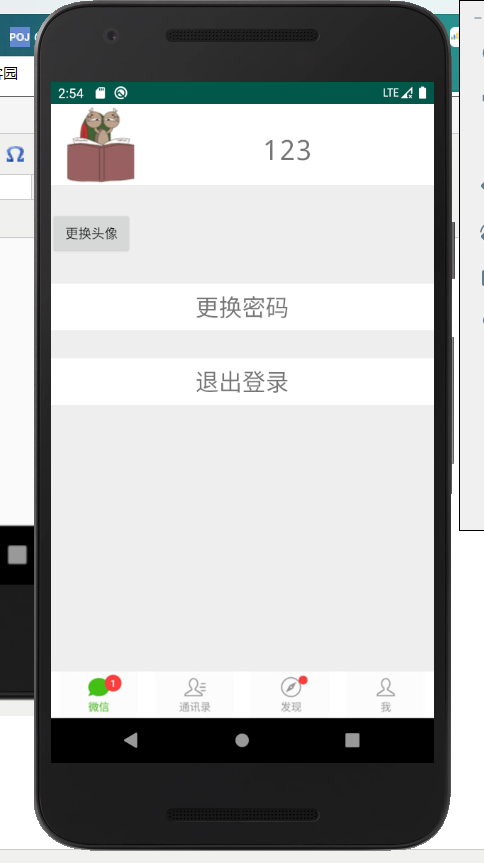
点击更换头像:会有几个头像供选择

当点击后自动跳回个人信息界面:
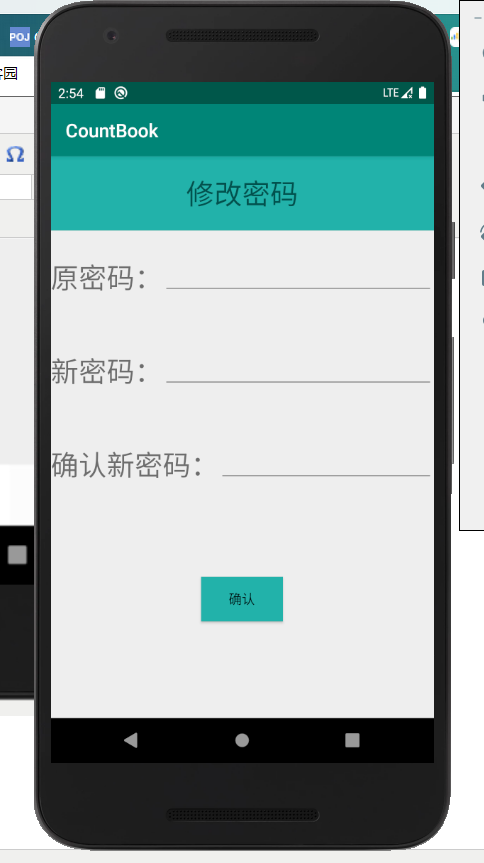
其次是更换密码:需要输入原密码与新密码
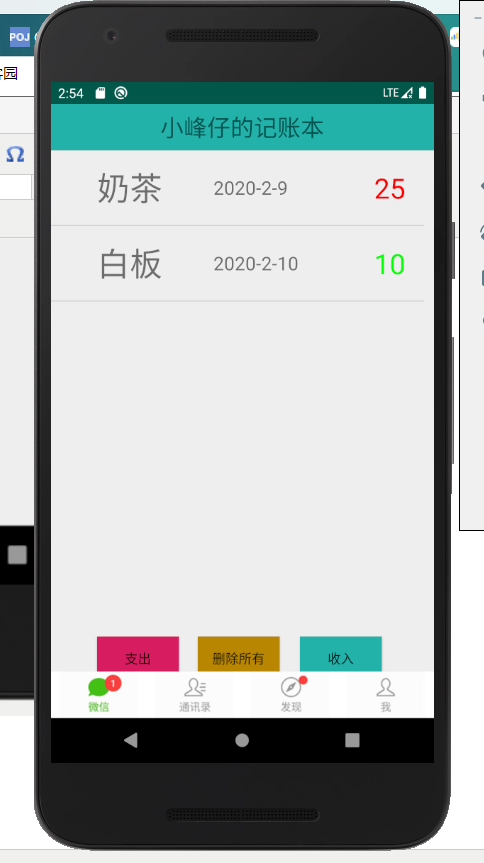
再者就是记账的页面:有支出,收入,删除所有,支出的会显示红色,收入的会显示绿色
当点击收入时,会弹出一个框来进行记账
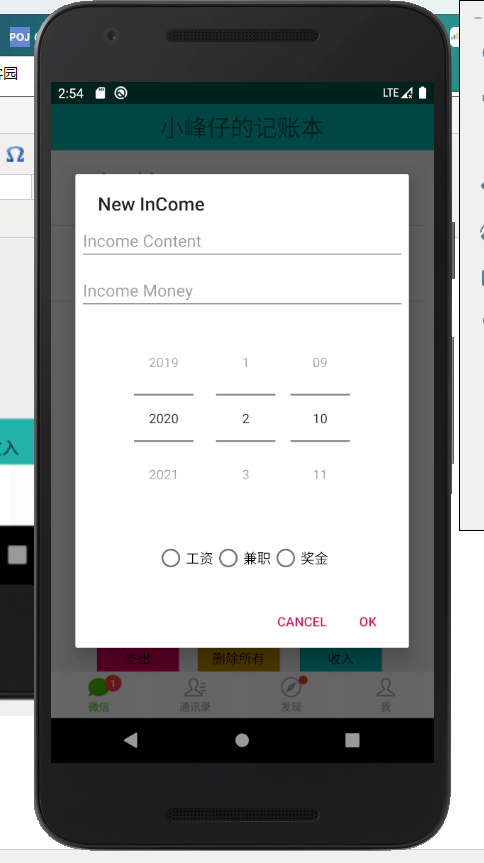
同理,当点击支出时,也会弹出一个框
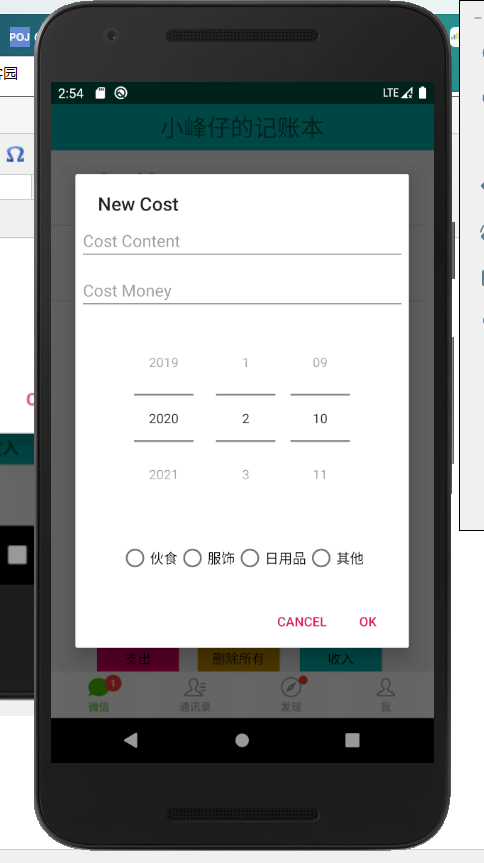
当点击删除所有时,会将所有账目全部删除。
Account_Fragment:记账的Fragment
package com.example.countbook;

import android.app.AlertDialog;

import android.app.Fragment;

import android.content.DialogInterface;

import android.database.Cursor;

import android.graphics.Color;

import android.os.Bundle;

import android.util.Log;

import android.view.LayoutInflater;

import android.view.View;

import android.view.ViewGroup;

import android.widget.Button;

import android.widget.DatePicker;

import android.widget.EditText;

import android.widget.ListView;

import android.widget.RadioButton;

import androidx.annotation.Nullable;

import java.util.ArrayList;

import java.util.List;

public class Account_Fragment extends Fragment {

    private List<Account> list;

    private AccountOperator accountOperator;

    private AccountAdapter accountAdapter;

    Button btn_shouru;

    Button btn_zhichu;

    Button btn_delete;

    Bundle bundle;

    String username;

    @Override

    public void onCreate(@Nullable Bundle savedInstanceState) {

        super.onCreate(savedInstanceState);

        bundle=getArguments();

        username=bundle.getString("username");

        //Log.i("username",username);

    }

    @Nullable

    @Override

    public View onCreateView(LayoutInflater inflater, @Nullable ViewGroup container, Bundle savedInstanceState) {

        View view=inflater.inflate(R.layout.account_fragment,null);

        btn_shouru=(Button)view.findViewById(R.id.btn_shouru);

        btn_zhichu=(Button)view.findViewById(R.id.btn_zhichu);

        btn_delete=(Button)view.findViewById(R.id.btn_delete);

        accountOperator=new AccountOperator(view.getContext());

        list=new ArrayList<>();

        ListView AccountList=(ListView)view.findViewById(R.id.lv_main);

        inin(username);

        accountAdapter=new AccountAdapter(view.getContext(),list);

        AccountList.setAdapter(accountAdapter);

        btn_zhichu.setOnClickListener(l);

        btn_shouru.setOnClickListener(l);

        btn_delete.setOnClickListener(l);

        return view;

    }

    View.OnClickListener l=new View.OnClickListener() {

        @Override

        public void onClick(View v) {

            switch (v.getId()){

                case R.id.btn_zhichu:

                    AlertDialog.Builder builder=new AlertDialog.Builder(getView().getContext());

                    LayoutInflater inflater=LayoutInflater.from(getView().getContext());

                    View viewDialog=inflater.inflate(R.layout.new_cost_data,null);

                    final EditText content=(EditText)viewDialog.findViewById(R.id.et_cost_content);

                    final DatePicker data=(DatePicker)viewDialog.findViewById(R.id.dp_cost_data);

                    final EditText money=(EditText)viewDialog.findViewById(R.id.et_cost_money);

                    final RadioButton rb1=(RadioButton)viewDialog.findViewById(R.id.rb1);

                    final RadioButton rb2=(RadioButton)viewDialog.findViewById(R.id.rb2);

                    final RadioButton rb3=(RadioButton)viewDialog.findViewById(R.id.rb3);

                    final RadioButton rb4=(RadioButton)viewDialog.findViewById(R.id.rb4);

                    builder.setView(viewDialog);

                    builder.setTitle("New Cost");

                    builder.setPositiveButton("OK", new DialogInterface.OnClickListener() {

                        @Override

                        public void onClick(DialogInterface dialog, int which) {

                            Account bean=new Account();

                            bean.author=username;

                            bean.content=content.getText().toString();

                            bean.money=Integer.parseInt(money.getText().toString());

                            bean.date=data.getYear()+"-"+(data.getMonth()+1)+"-"+data.getDayOfMonth();

                            if(rb1.isChecked()){

                                bean.title=rb1.getText().toString();

                            }else if(rb2.isChecked()){

                                bean.title=rb2.getText().toString();

                            }else if(rb3.isChecked()){

                                bean.title=rb3.getText().toString();

                            }else if(rb4.isChecked()){

                                bean.title=rb4.getText().toString();

                            }

                            accountOperator.insert(bean);

                            list.add(bean);

                            accountAdapter.notifyDataSetChanged();

                        }

                    });

                    builder.setNegativeButton("Cancel",null);

                    builder.create().show();

                    break;

                case R.id.btn_shouru:

                    AlertDialog.Builder builder2=new AlertDialog.Builder(getView().getContext());

                    LayoutInflater inflater2=LayoutInflater.from(getView().getContext());

                    View viewDialog2=inflater2.inflate(R.layout.new_income_data,null);

                    final EditText content2=(EditText)viewDialog2.findViewById(R.id.et_income_content);

                    final DatePicker data2=(DatePicker)viewDialog2.findViewById(R.id.dp_income_data);

                    final EditText money2=(EditText)viewDialog2.findViewById(R.id.et_income_money);

                    final RadioButton frb1=(RadioButton)viewDialog2.findViewById(R.id.rb1);

                    final RadioButton frb2=(RadioButton)viewDialog2.findViewById(R.id.rb2);

                    final RadioButton frb3=(RadioButton)viewDialog2.findViewById(R.id.rb3);

                    builder2.setView(viewDialog2);

                    builder2.setTitle("New InCome");

                    builder2.setPositiveButton("OK", new DialogInterface.OnClickListener() {

                        @Override

                        public void onClick(DialogInterface dialog, int which) {

                            Account bean=new Account();

                            bean.author=username;

                            bean.content=content2.getText().toString();

                            bean.money=Integer.parseInt(money2.getText().toString());

                            bean.date=data2.getYear()+"-"+(data2.getMonth()+1)+"-"+data2.getDayOfMonth();

                            if(frb1.isChecked()){

                                bean.title=frb1.getText().toString();

                            }else if(frb2.isChecked()){

                                bean.title=frb2.getText().toString();

                            }else if(frb3.isChecked()){

                                bean.title=frb3.getText().toString();

                            }

                            accountOperator.insert(bean);

                            list.add(bean);

                            accountAdapter.notifyDataSetChanged();

                        }

                    });

                    builder2.setNegativeButton("Cancel",null);

                    builder2.create().show();

                    break;

                case R.id.btn_delete:

                    accountOperator.deleteall(username);

                    list.clear();

                    accountAdapter.notifyDataSetChanged();

                    break;

            }

        }

    };

    private void inin(String author) {

        Cursor cursor= (Cursor) accountOperator.findall(author);

        if(cursor!=null){

            while(cursor.moveToNext()){

                Account bean=new Account();

                bean.content=cursor.getString(cursor.getColumnIndex("content"));

                bean.money=cursor.getInt(cursor.getColumnIndex("money"));

                bean.date=cursor.getString(cursor.getColumnIndex("date"));

                bean.title=cursor.getString(cursor.getColumnIndex("title"));

                list.add(bean);

            }

            cursor.close();

        }

    }

}
安卓开发实战-记账本APP(四)的更多相关文章
- 安卓开发实战-记账本APP(六)
记账本APP开发---终结篇 昨天的动态数字录屏奉上:在抖音上拍了一个(ps:欢迎点赞) https://v.douyin.com/poEjmG/ 今天将图表的内容进行了制作,我用的是MPChart的 ...
- 安卓开发实战-记账本APP(三)
本次实现的是有关登录,注册和整体页面的改观,实现下方选项导致页面的切换效果. 利用到的技术有Sqlite数据库的增删改查,与fragment实现.由于暂时没有找到合适的图标,先借用微信的图标暂代一下. ...
- 安卓开发实战-记账本APP(五)
今天将昨天剩余的bug修复,并且完成图标的美化,设置长按删除,模仿支付宝实现金额的动态增加. ①将昨天的布局进行了修改:之前是fragment,改成FrameLayout布局,不再设置name,进而在 ...
- android开发实战-记账本APP(二)
继昨天的开发,继续完成今天的内容. (一)开始构建一些业务逻辑,开始构建记账本的添加一笔记账的功能. ①对fab按钮的click时间进行修改,创建一个AlertDialog.Builder对象,因此我 ...
- android开发实战-记账本APP(一)
记账本开发流程: 对于一个记账本的初步开发而言,我实现的功能有: ①实现一个记账本的页面 ②可以添加数据并更新到页面中 ③可以将数据信息以图表的形式展现 (一)首先,制作一个记账本的页面. ①在系统自 ...
- Android开发实战——记账本(2)
开发日志(2)——Bean目录以及数据库 首先编写一些自己生成的数据进行测试,看一下能否显示在模拟器上.那前提就是先写出bean目录,这和之前学的Javaweb步骤差不多.bean目录有三个变量事件. ...
- Android开发实战——记账本(4)
开发日志(4)——MainActivity 在MainActivity中编写了几个方法.首先,点击账本的一条记录可以选择删除他,然后重写了fab,使之在点击他后能够添加记录.还写了删除全部记录的方法. ...
- Android开发实战——记账本(6)
开发日志——(6) 今天将app签名打包,并部署在了真机上.真机上的截图: 运行成功:
- Android开发实战——记账本(5)
开发日志——(5) 今天打算将图标的功能实现,将打开图表的选项放在右上方,所以重写MainActivity中的onOptionsItemSelected方法.增添Chart选项 public ...
随机推荐
- `docker数据持久化volume和bind mounts两种方式
将数据从宿主机到容器的三种方式: ,volumes:docker管理宿主机文件系统的一部分(/var/lib/docker/volumes)保存数据的最佳方式 ,bind mounts 将宿主机上的任 ...
- k8s集群---apiserver,controller-manager,scheduler部署
#证书自签名脚本 root@k8s-master: ~/k8s/k8s-cert :: $ cat k8s-cert.sh cat > ca-config.json <<EOF { ...
- Linux常用命令大全(四)
Linux常用命令大全(四) shell的特点 ☆组合新命令 ☆提供了文件名扩展字符 ☆直接使用shell的内置命令 ☆灵活地使用数据流 ☆结构化的程序模块 ☆在后台执行命令 ☆可配置的环境 ☆高级的 ...
- Python 官方团队在打包项目中踩过的坑
花下猫语:这是 packaging 系列的第三篇译文,该系列是全网关于此话题的最详尽(水平也很高)的一个系列.原作者是 Python 官方打包团队成员,是 virtualenv 和 tox 项目的维护 ...
- 1091 N-自守数 (15 分)C语言
如果某个数 K 的平方乘以 N 以后,结果的末尾几位数等于 K,那么就称这个数为"N-自守数".例如 3×92^2 =25392,而 25392 的末尾两位正好是 92,所以 ...
- 菜鸟学习Fabric源码学习 — Endorser背书节点
Fabric 1.4 源码分析 Endorser背书节点 本文档主要介绍fabric背书节点的主要功能及其实现. 1. 简介 Endorser节点是peer节点所扮演的一种角色,在peer启动时会创建 ...
- Stripe支付对接
一.由于文档丢失原因,我就直接上代码了. 这个Stripe支付可以支持多个币种,我下面就采用"HDK"来参照支付先上一个支付效果图 提示:先上代码,在说明博主自己理解的流程. 一 ...
- 日志查看工具 logviewer pro的使用
1.logViewer Pro 介绍 logViewer Pro 是一款log文件查看器,它可以在短短数秒内打开上G的LOG文件,支持高亮某行文字(例如警告,错误),支持Unicode名字,支持查看的 ...
- ArcGIS Server 10.1新特性系列---动态图层
ArcGIS Server 10.1新特性里面有几个新功能是非常棒的,其中有一个就是动态图层.动态图层不是一种新发明的图层,而是说在arcgis server的web应用中可以动态的配置其渲染和内容功 ...
- 七牛云上传视频并截取第一帧为图片(js实现)
本文出自APICloud官方论坛, 感谢论坛版主 东冥羽的分享. 七牛云上传视频并截取第一帧作为视频的封面图. 使用js上传,模块videoPlayer截取第一帧(有专门的截图模块,但是我使用的有点问 ...