
android中动态修改ImageView控件的宽高度
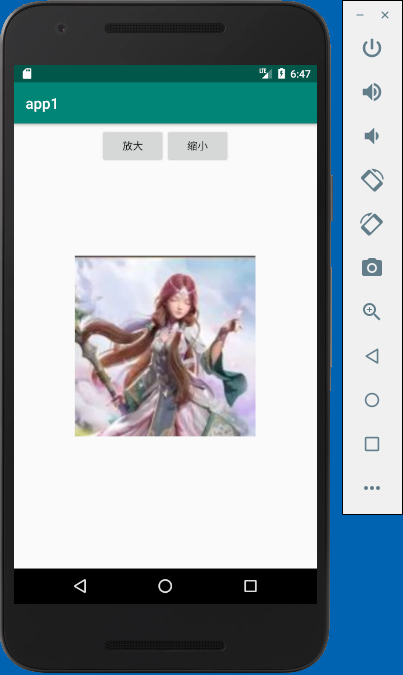
本例实现了动态修改ImageView控件的宽高度,有两个按钮,一个按钮实现放大image,一个按钮实现缩小image
activity_main.xml
<?xml version="1.0" encoding="utf-8"?>

<android.support.constraint.ConstraintLayout xmlns:android="http://schemas.android.com/apk/res/android"

    xmlns:app="http://schemas.android.com/apk/res-auto"

    xmlns:tools="http://schemas.android.com/tools"

    android:layout_width="match_parent"

    android:layout_height="match_parent"

    tools:context=".MainActivity">

    <LinearLayout

        android:layout_width="match_parent"

        android:layout_height="60dp"

        android:gravity="center"

        android:orientation="horizontal">

        <Button

            android:id="@+id/button1"

            android:layout_width="wrap_content"

            android:layout_height="wrap_content"

            android:text="放大" />

        <Button

            android:id="@+id/button2"

            android:layout_width="wrap_content"

            android:layout_height="wrap_content"

            android:text="缩小" />

    </LinearLayout>

    <ImageView

        android:id="@+id/imageView"

        android:layout_width="150dp"

        android:layout_height="150dp"

        app:layout_constraintBottom_toBottomOf="parent"

        app:layout_constraintEnd_toEndOf="parent"

        app:layout_constraintStart_toStartOf="parent"

        app:layout_constraintTop_toTopOf="parent"

        app:srcCompat="@drawable/img01" />

</android.support.constraint.ConstraintLayout>
MainActivity.java
package com.example.chenrui.app1;

import android.support.v7.app.AppCompatActivity;

import android.os.Bundle;

import android.view.View;

import android.view.ViewGroup;

import android.widget.Button;

import android.widget.ImageView;

public class MainActivity extends AppCompatActivity {

    @Override

    protected void onCreate(Bundle savedInstanceState) {

        super.onCreate(savedInstanceState);

        setContentView(R.layout.activity_main);

        final ImageView image = findViewById(R.id.imageView);

        Button button1 = findViewById(R.id.button1);

        button1.setOnClickListener(new View.OnClickListener(){

            @Override

            public void onClick(View v) {

                ViewGroup.LayoutParams params = image.getLayoutParams();

                params.width = params.width + 50;

                params.height = params.height + 50;

                image.setLayoutParams(params);

            }

        });

        Button button2 = findViewById(R.id.button2);

        button2.setOnClickListener(new View.OnClickListener(){

            @Override

            public void onClick(View v) {

                ViewGroup.LayoutParams params = image.getLayoutParams();

                params.width = params.width - 50;

                params.height = params.height - 50;

                image.setLayoutParams(params);

            }

        });

    }

}
实现的效果:
android中动态修改ImageView控件的宽高度的更多相关文章
- android中一个评分的控件
RatingBar android中一个评分的控件 如何使用 Android Studio下: dependencies { compile 'com.hedgehog.ratingbar:app:1 ...
- 谨记给UpdatePanel中动态添加的控件赋ID
原文:谨记给UpdatePanel中动态添加的控件赋ID 昨天下定决 心对上次做的布局编辑器控件加以改进,其中最主要变化的就是要完全使用ASP.NET AJAX!但是很遗憾,虽然耳闻已久,但目前对AS ...
- duilib 修复padding属性导致其他控件自动计算宽高度错误的bug和导致自己宽高度错误的bug
转载请说明原出处,谢谢~~:http://blog.csdn.net/zhuhongshu/article/details/42950733 BUG 一:padding导致其他控件宽 ...
- Android UI 统一修改Button控件的样式,以及其它系统控件的默认样式
先介绍下修改原理:首先打开位于android.widget包下面的Button.java文件,这里有一句关键的代码如下: public Button(Context context, Attribut ...
- Android中的自定义视图控件
简介 当现有控件不能满足需求时,就需要自定义控件. 自定义控件属性 自定义控件首先要继承自View,重写两个构造函数. 第一个是代码中使用的: public MyRect(Context contex ...
- VS中查看/修改Dialog控件TAB顺序的方法
打开资源视图,打开Dialog的编辑界面 查看: 格式>Tab键顺序 修改: 格式>Tab键顺序 用鼠标左键按你想要的顺序点击各个控件的TAB标签,就设定了 那些你想要TAB键能选择到的控 ...
- Android中使用shape来定义控件
本文章转接于:http://kofi1122.blog.51cto.com/2815761/521605 Android中常常使用shape来定义控件的一些显示属性,今天看了一些shape的使用,对s ...
- android中的五大布局(控件的容器,可以放button等控件)
一.android中五大布局相当于是容器,这些容器里可以放控件也可以放另一个容器,子控件和布局都需要制定属性. 1.相对布局:RelativeLayout @1控件默认堆叠排列,需要制定控件的相对位置 ...
- android 中通过代码创建控件
package bvb.de.openadbwireless.circle; import android.annotation.TargetApi; import android.app.Activ ...
随机推荐
- delphi代码实现窗口最小化,最大化,关闭消息发送
分类: 代码实现窗口最小化,最大化,关闭 var hwnd: hwnd;//句柄 PostMessage(hwnd,WM_SYSCOMMAND, SC_MINIMIZE,0); //最小化Post ...
- 用 CSS 实现三角形与平行四边形
最近在逛某个技术网站的时候,感觉文章关键词上的样式好酷炫啊.于是我将那种写法照搬到了我的博客中,也许最近逛过我博客的小伙伴已经发现了它出现在哪儿了——分页的样式.来张截图: 你在首页的底部也可以看到这 ...
- 国内打不开onedrive,怎么办?
Onedrive不能正常连接使用是由于DNS遭到污染闹的,其上传和下载文件慢也是DNS遭到污染闹的. 方法/步骤 在C盘windows/system32/drivers/etc/hosts下,用记 ...
- 在ASP.NET MVC中实现Select多选
我们知道,在ASP.NET MVC中实现多选Select的话,使用Html.ListBoxFor或Html.ListBox方法就可以.在实际应用中,到底该如何设计View Model, 控制器如何接收 ...
- NGINX前端代理TOMCAT取真实客户端IP
nginx前端代理tomcat取真实客户端IP 使用Nginx作为反向代理时,Tomcat的日志记录的客户端IP就不在是真实的客户端IP,而是Nginx代理的IP.要解决这个问题可以在Nginx配置一 ...
- C#编程(七十一)----------DLR ScriptRuntime
包含DLR ScriptRuntime DLR是微软的一个开源项目.为.NET影城程序提供了动态脚本注入支持.DLR构建的功能包含两个方面,一个是共享的动态类型系统,一个是标准的承载模型.但是VS并没 ...
- redis + Tomcat 8 的session共享解决
如果英文不错的看,建议直接看官网吧,官网写的挺清楚.下面的内容是转载的一篇文章,自己补充了一些,供大家参考,也欢迎大家一起讨论 官方截止到2015-10-12前是不支持Tomcat8的,详情见官网:h ...
- Android 开发:由模块化到组件化(一)
在Android SDK一文中,我们谈到模块化和组件化,现在我们来聊聊组件化开发背后的哪些事.最早是在广告SDK中应用组件化,但是同样适用于普通应用开发 以下高能,请做好心理准备,看不懂请发私信来交流 ...
- Caffe常用层参数介绍
版权声明:本文为博主原创文章,转载请注明出处. https://blog.csdn.net/Cheese_pop/article/details/52024980 DATA crop:截取原图像中一个 ...
- Jackson 教程演示样例
查看原文教程:http://www.ibloger.net/article/275.html Json经常使用的类库例如以下 Jackson:http://jackson.codehaus.org/ ...