
Android中使用shape来定义控件
本文章转接于:http://kofi1122.blog.51cto.com/2815761/521605
Android中常常使用shape来定义控件的一些显示属性,今天看了一些shape的使用,对shape有了大体的了解,稍作总结:
先看下面的代码:
<shape>
<!-- 实心 -->
<solid android:color="#ff9d77"/>
<!-- 渐变 -->
<gradient
android:startColor="#ff8c00"
android:endColor="#FFFFFF"
android:angle="270" />
<!-- 描边 -->
<stroke
android:width="2dp"
android:color="#dcdcdc" />
<!-- 圆角 -->
<corners
android:radius="2dp" />
<padding
android:left="10dp"
android:top="10dp"
android:right="10dp"
android:bottom="10dp" />
</shape>
solid:实心,就是填充的意思
android:color指定填充的颜色
gradient:渐变
android:startColor和android:endColor分别为起始和结束颜色,ndroid:angle是渐变角度,必须为45的整数倍。
另外渐变默认的模式为android:type="linear",即线性渐变,可以指定渐变为径向渐变,android:type="radial",径向渐变需要指定半径android:gradientRadius="50"。
stroke:描边
android:width="2dp" 描边的宽度,android:color 描边的颜色。
我们还可以把描边弄成虚线的形式,设置方式为:
android:dashWidth="5dp"
android:dashGap="3dp"
其中android:dashWidth表示'-'这样一个横线的宽度,android:dashGap表示之间隔开的距离。
corners:圆角
android:radius为角的弧度,值越大角越圆。
我们还可以把四个角设定成不同的角度,方法为:
<corners
android:topRightRadius="20dp" 右上角
android:bottomLeftRadius="20dp" 左下角
android:topLeftRadius="1dp" 左上角
android:bottomRightRadius="0dp" 右下角
/>
这里有个地方需要注意,bottomLeftRadius是右下角,而不是左下角,这个有点郁闷,不过不影响使用,记得别搞错了就行。
还有网上看到有人说设置成0dp无效,不过我在测试中发现是可以的,我用的是2.2,可能修复了这个问题吧,如果无效的话那就只能设成1dp了。
padding:间隔
这个就不用多说了,XML布局文件中经常用到。
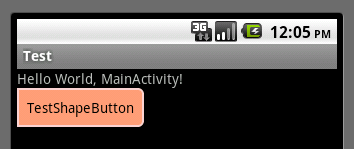
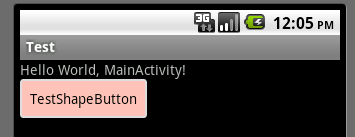
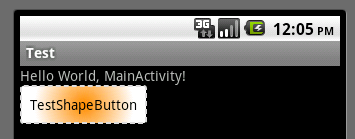
大体的就是这样,以下是一个使用的具体示例:用在Selector中作为Button的背景,分别定义了按钮的一般状态、获得焦点状态和按下时的状态,具体代码如下:
main.xml:
<Button
android:layout_width="wrap_content"
android:layout_height="wrap_content"
android:text="TestShapeButton"
android:background="@drawable/button_selector"
/>
button_selector.xml:
<?xml version="1.0" encoding="utf-8"?>
<selector
xmlns:android="http://schemas.android.com/apk/res/android">
<item android:state_pressed="true" >
<shape>
<!-- 渐变 -->
<gradient
android:startColor="#ff8c00"
android:endColor="#FFFFFF"
android:type="radial"
android:gradientRadius="50" />
<!-- 描边 -->
<stroke
android:width="2dp"
android:color="#dcdcdc"
android:dashWidth="5dp"
android:dashGap="3dp" />
<!-- 圆角 -->
<corners
android:radius="2dp" />
<padding
android:left="10dp"
android:top="10dp"
android:right="10dp"
android:bottom="10dp" />
</shape>
</item>
<item android:state_focused="true" >
<shape>
<gradient
android:startColor="#ffc2b7"
android:endColor="#ffc2b7"
android:angle="270" />
<stroke
android:width="2dp"
android:color="#dcdcdc" />
<corners
android:radius="2dp" />
<padding
android:left="10dp"
android:top="10dp"
android:right="10dp"
android:bottom="10dp" />
</shape>
</item>
<item>
<shape>
<solid android:color="#ff9d77"/>
<stroke
android:width="2dp"
android:color="#fad3cf" />
<corners
android:topRightRadius="5dp"
android:bottomLeftRadius="5dp"
android:topLeftRadius="0dp"
android:bottomRightRadius="0dp"
/>
<padding
android:left="10dp"
android:top="10dp"
android:right="10dp"
android:bottom="10dp" />
</shape>
</item>
</selector>
运行效果如下图:
一般状态:
获得焦点状态:
按下状态:
Android中使用shape来定义控件的更多相关文章
- 使用shape来定义控件的一些显示属性
Android中常常使用shape来定义控件的一些显示属性,今天看了一些shape的使用,对shape有了大体的了解,稍作总结 先看下面的代码: <shape> <!-- 实心 -- ...
- android中一个评分的控件
RatingBar android中一个评分的控件 如何使用 Android Studio下: dependencies { compile 'com.hedgehog.ratingbar:app:1 ...
- Android中的自定义视图控件
简介 当现有控件不能满足需求时,就需要自定义控件. 自定义控件属性 自定义控件首先要继承自View,重写两个构造函数. 第一个是代码中使用的: public MyRect(Context contex ...
- android中的五大布局(控件的容器,可以放button等控件)
一.android中五大布局相当于是容器,这些容器里可以放控件也可以放另一个容器,子控件和布局都需要制定属性. 1.相对布局:RelativeLayout @1控件默认堆叠排列,需要制定控件的相对位置 ...
- android 中通过代码创建控件
package bvb.de.openadbwireless.circle; import android.annotation.TargetApi; import android.app.Activ ...
- android中动态修改ImageView控件的宽高度
本例实现了动态修改ImageView控件的宽高度,有两个按钮,一个按钮实现放大image,一个按钮实现缩小image activity_main.xml <?xml version=" ...
- android中关于时间的控件
1.日期选择器 <DatePicker android:layout_width="wrap_content" android:layout_height="wra ...
- Android 拖动条/滑动条控件、星级评分控件
ProgressBar有2个子控件: SeekBar 拖动条控件 RatingBar 星级评分控件 1.拖动条控件 <SeekBar android:layout_width=" ...
- Android中查找一个Layout中指定的子控件
我们通常希望查找一个页面中指定类型的控件,单个控件知道id很容易找到,但是如果是多个呢?或者说是在程序中自定义的控件,且不知道id怎么办呢?如想找到页面中的Spinner,可用以下方法 /** * 从 ...
随机推荐
- c#读写cookie
读 response.SetCokie(new HttpCookie("Color",TextBox1.Text);写 request.Cookies["color&qu ...
- Arcgis Engine - 脱离ToolBarControl控件的命令和工具
可以手动实现脱离ToolBarControl控件的命令和工具 //打开文件. private void file_tsmItem_Click(object sender, EventArgs e) { ...
- 未在本地计算机上注册"Microsoft.ACE.OLEDB.12.0"提供程序
运行时出现了错误,提示未在本地计算机上注册"Microsoft.ACE.OLEDB.12.0"提供程序. 这个问题的原因是64位PC上安装了Office的32位版本,所以Micro ...
- js实现楼层效果
今天自己写个楼层效果,有一点烦躁,小地方犯错误.各位大神来修改不足啊!!! <!DOCTYPE html><html lang="en"><head& ...
- lnmp 60秒的服务器缓存时间
1.问题 php代码写好之后执行发现居然没有生效,打断点,改代码.刷新都没有达到预期的效果.但是间隔60秒之后刷新就看到效果了,或者删除文件就里面见效. 2.原因 从phpinfo()页面输出搜索&q ...
- 答:我们公司的ASP.NET 笔试题,你觉得难度如何
闲来无事,逛逛园子,发现有个面试题,觉得有意思.已自己的理解答来看看,不足之处,请多指教. 原文地址:http://www.cnblogs.com/leotsai/p/aspnet-tests-for ...
- Oracle多行记录合并处理
1:效果如下图所示: 表T1: CREATE TABLE T1 ( WEEKWORKID VARCHAR2(20) , DD VARCHAR2(20) ) 表T2 CREATE TABLE T2 ( ...
- python 安装 ez_setup.py出现的问题及解决办法
试了网上好几个解决办法. 下面这个办法是最对我胃口的. ~~~~~~~~~~~~~~~~ 安装ez_setup.py时出现了这个问题: UnicodeDecodeError: 'ascii' cod ...
- jQuery对象转换为DOM对象
第一种方法:借助数组下标来读取jQuery对象集合中的某个DOM元素对象. <script src="Scripts/jquery-1.4.1.js" type=" ...
- keil c51编译器的一些使用心得
现在的存储器已经不像七八年前那样昂贵了,但是ram相对于rom和eeprom的价格还是不可同样看待的,所以程序中节省内存在现在看来还是非常关键的.原因有以下几点: 1.ram的存取速度相对于eepro ...