
android中的五大布局(控件的容器,可以放button等控件)
一.android中五大布局相当于是容器,这些容器里可以放控件也可以放另一个容器,子控件和布局都需要制定属性。
1.相对布局:RelativeLayout
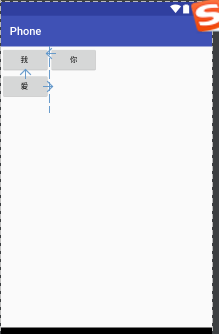
@1控件默认堆叠排列,需要制定控件的相对位置
<?xml version="1.0" encoding="utf-8"?>

<RelativeLayout

    xmlns:android="http://schemas.android.com/apk/res/android"

    android:layout_width="match_parent"

    android:layout_height="match_parent">

    <Button

        android:id="@+id/bt1"

        android:layout_width="wrap_content"

        android:layout_height="wrap_content"

        android:text="我 "/>

    <Button

        android:id="@+id/bt2"

        android:layout_width="wrap_content"

        android:layout_height="wrap_content"

        android:layout_below="@+id/bt1"

        android:text="爱 "/>

    <Button

        android:id="@+id/bt3"

        android:layout_width="wrap_content"

        android:layout_height="wrap_content"

        android:layout_toRightOf="@+id/bt2"

        android:text="你"/>

</RelativeLayout>
效果:
2.线性布局:LinearLayout
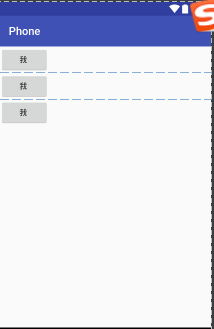
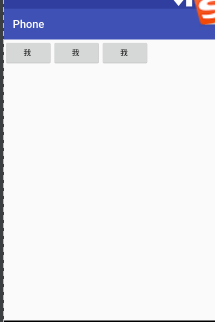
@1.控件线性排列,分为水平和垂直排列
@2.可以指定背景图片,透明度以及颜色
android:background="@android:color/holo_blue_bright"
<?xml version="1.0" encoding="utf-8"?>

<LinearLayout

    xmlns:android="http://schemas.android.com/apk/res/android"

    android:orientation="vertical"

    android:layout_width="match_parent"

    android:layout_height="match_parent">

    <Button

        android:layout_width="wrap_content"

        android:layout_height="wrap_content"

        android:text="我 "/>

    <Button

        android:layout_width="wrap_content"

        android:layout_height="wrap_content"

        android:text="我 "/>

    <Button

        android:layout_width="wrap_content"

        android:layout_height="wrap_content"

        android:text="我 "/>

</LinearLayout>
垂直效果:
水平效果:
3.帧布局:FrameLayout
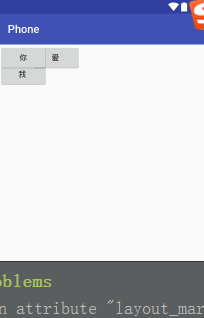
@1控件可以重叠的布局
<?xml version="1.0" encoding="utf-8"?>

<FrameLayout

    xmlns:android="http://schemas.android.com/apk/res/android"

    android:layout_width="match_parent"

    android:layout_height="match_parent">

    <Button

        android:id="@+id/bt1"

        android:layout_width="wrap_content"

        android:layout_height="wrap_content"

        android:layout_marginTop="30"

        android:text="我 "/>

    <Button

        android:id="@+id/bt2"

        android:layout_width="wrap_content"

        android:layout_height="wrap_content"

        android:layout_marginLeft="60"

        android:text="爱 "/>

    <Button

        android:id="@+id/bt3"

        android:layout_width="wrap_content"

        android:layout_height="wrap_content"

        android:layout_toRightOf="@+id/bt2"

        android:text="你"/>

</FrameLayout>
效果:
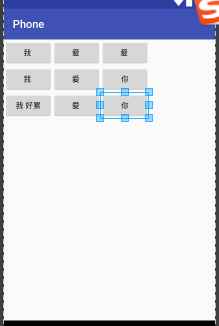
4.表格布局:TableLayout
@1控件呈现表格方式排列
@2TableRow用于制定表格的一行
<?xml version="1.0" encoding="utf-8"?>

<TableLayout

    xmlns:android="http://schemas.android.com/apk/res/android"

    android:collapseColumns="3"

    android:layout_width="match_parent"

    android:layout_height="match_parent">

    <TableRow

        android:layout_width="wrap_content"

        android:layout_height="wrap_content">

        <Button

            android:id="@+id/bt1"

            android:layout_width="wrap_content"

            android:layout_height="wrap_content"

            android:text="我 "/>

        <Button

            android:id="@+id/bt2"

            android:layout_width="wrap_content"

            android:layout_height="wrap_content"

            android:text="爱 "/>

        <Button

            android:id="@+id/bt3"

            android:layout_width="wrap_content"

            android:layout_height="wrap_content"

            android:text="爱 "/>

    </TableRow>

    <TableRow

        android:layout_width="wrap_content"

        android:layout_height="wrap_content">

        <Button

            android:id="@+id/bt4"

            android:layout_width="wrap_content"

            android:layout_height="wrap_content"

            android:text="我 "/>

        <Button

            android:id="@+id/bt5"

            android:layout_width="wrap_content"

            android:layout_height="wrap_content"

            android:text="爱 "/>

        <Button

            android:id="@+id/bt6"

            android:layout_width="wrap_content"

            android:layout_height="wrap_content"

            android:text="你"/>

    </TableRow>

    <TableRow>

        <Button

            android:id="@+id/bt8"

            android:layout_width="wrap_content"

            android:layout_height="wrap_content"

            android:text="我 好累"/>

        <Button

            android:id="@+id/bt9"

            android:layout_width="wrap_content"

            android:layout_height="wrap_content"

            android:text="爱 "/>

        <Button

            android:id="@+id/bt10"

            android:layout_width="wrap_content"

            android:layout_height="wrap_content"

            android:text="你"/>

    </TableRow>

</TableLayout>
效果:
5.方格布局:GridLayout
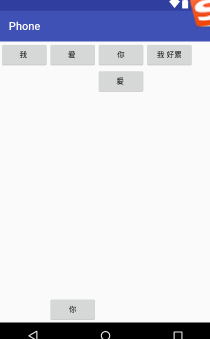
@1可以指定控件位于第几行第几列
代码:
 <?xml version="1.0" encoding="utf-8"?>

 <GridLayout

     xmlns:android="http://schemas.android.com/apk/res/android"

     android:layout_width="match_parent"

     android:layout_height="match_parent">

         <Button

             android:id="@+id/bt4"

             android:layout_width="wrap_content"

             android:layout_height="wrap_content"

             android:text="我 "/>

         <Button

             android:id="@+id/bt5"

             android:layout_width="wrap_content"

             android:layout_height="wrap_content"

             android:text="爱 "/>

         <Button

             android:id="@+id/bt6"

             android:layout_width="wrap_content"

             android:layout_height="wrap_content"

             android:text="你"/>

         <Button

             android:id="@+id/bt8"

             android:layout_width="wrap_content"

             android:layout_height="wrap_content"

             android:text="我 好累"/>

         <Button

             android:id="@+id/bt9"

             android:layout_width="wrap_content"

             android:layout_height="wrap_content"

             android:layout_column="2"

             android:layout_row="1"

             android:text="爱 "/>

         <Button

             android:id="@+id/bt10"

             android:layout_width="wrap_content"

             android:layout_height="wrap_content"

             android:layout_column="1"

             android:layout_row="3"

             android:text="你"/>

 </GridLayout>
效果:
android中的五大布局(控件的容器,可以放button等控件)的更多相关文章
- Android中的五大布局
Android中的五大布局 1.了解布局 一个丰富的界面总是要由很多个控件组成的,那我们如何才能让各个控件都有条不紊地 摆放在界面上,而不是乱糟糟的呢?这就需要借助布局来实现了.布局是一种可用于放置很 ...
- Android中的五大布局和logcat打印日志
在android中的布局有五大类,有的时候你可能用到一种,但有的时候你也可能需要两种或者三种布局同时一起使用.这五种布局为别为:LinearLayout(线性布局),FrameLayout(框架布局) ...
- 兔子--Android中的五大布局
LinearLayout:被称为线性布局,分为水平和垂直,设置的垂直或水平的属性值,来排列全部的子元素.全部的子元素都被堆放在其他元素之后,因此一个垂直列表的每一行仅仅会有一个元素,而无论他们有多宽, ...
- Android学习笔记(第二篇)View中的五大布局
PS:人不要低估自己的实力,但是也不能高估自己的能力.凡事谦为本... 学习内容: 1.用户界面View中的五大布局... i.首先介绍一下view的概念 view是什么呢?我们已经知道一个Act ...
- Android开发-之五大布局
在html中大家都知道布局是什么意思了,简单来说就是将页面划分模块,比如html中的div.table等.那么Android中也是这样的.Android五大布局让界面更加美化,开发起来也更加方便.当然 ...
- Android中的LinearLayout布局
LinearLayout : 线性布局 在一般情况下,当有很多控件需要在一个界面列出来时,我们就可以使用线性布局(LinearLayout)了, 线性布局是按照垂直方向(vertical)或水平方向 ...
- android中的常用布局管理器(三)
接上篇博客 (5)TableLayout 表格布局管理器 在android中,线性布局和表格布局用的是最多的. 在很多的输出操作中,往往会使用表格的形式对显示的数据进行排版,tablelayo ...
- Android 中常用的布局
一.线性布局----LinearLayout horizontal 水平 <?xml version="1.0" encoding="utf-8"?& ...
- Android成长日记-五大布局
1. 五布局之线性布局LinearLayout 特点:它包含的子控件将以横向或竖向的方式排列 ps:android:gravity=”center|bottom”(gravity允许多级联用) Tip ...
随机推荐
- 容易被忽视的后端服务 chunked 性能问题
容易被忽视的后端服务 chunked 性能问题 标签(空格分隔): springboot springmvc chunked 背景 spring boot 创建的默认 spring mvc 项目 集成 ...
- 初识CC_MVPMatrix
初识CC_MVPMatrix CC_MVPMatrix是一个mat4类型的uniform,在shader代码被编译之前,它由cocos2d-x框架插入进来的. bool GLProgram::comp ...
- day02HTML_CSS
掌握表单标签 <form action="http://www.baidu.com" method="post"> ... </form> ...
- fetch知识点汇总
使用XHR发送一个json请求一般是这样: const xhr = new XMLHttpRequest() xhr.open('Get', url) xhr.responseType = 'json ...
- 设置SO_RECVBUF和SO_SENDBUF套接字选项
控制套接字的行为(如修改缓冲区的大小). int getsockopt(int sockfd,int level,int optname,void *optval,socklen_t *optlen) ...
- Nomad入门
Nomad 简介 Nomad是一个管理机器集群并在集群上运行应用程序的工具. Nomad的特点: 支持docker,Nomad的job可以使用docker驱动将应用部署到集群中. Nomad安装在li ...
- Mybatis分页插件PageHelper使用
一. Mybatis分页插件PageHelper使用 1.不使用插件如何分页: 使用mybatis实现: 1)接口: List<Student> selectStudent(Map< ...
- Centos7.0 下挂载磁盘
参考:
- UWP 常用文件夹
①KnownFolders KnownFolders.PicturesLibrary 等等列举 ②ApplicationData.Current ApplicationData.Current.Loc ...
- POJ 1251 Jungle Roads(最小生成树)
题意 有n个村子 输入n 然后n-1行先输入村子的序号和与该村子相连的村子数t 后面依次输入t组s和tt s为村子序号 tt为与当前村子的距离 求链接全部村子的最短路径 还是裸的最小生成树咯 ...