
android中动态修改ImageView控件的宽高度
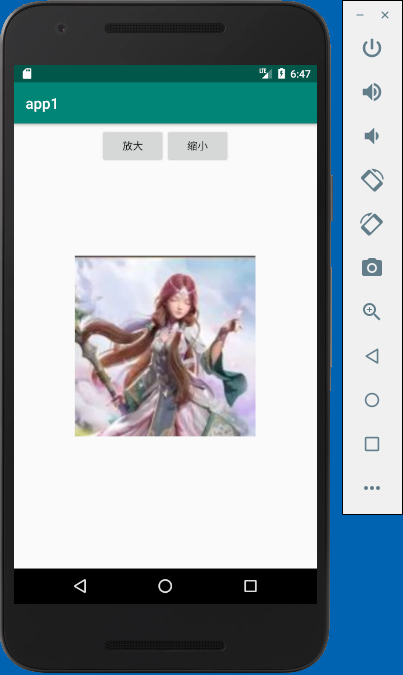
本例实现了动态修改ImageView控件的宽高度,有两个按钮,一个按钮实现放大image,一个按钮实现缩小image
activity_main.xml
<?xml version="1.0" encoding="utf-8"?>

<android.support.constraint.ConstraintLayout xmlns:android="http://schemas.android.com/apk/res/android"

    xmlns:app="http://schemas.android.com/apk/res-auto"

    xmlns:tools="http://schemas.android.com/tools"

    android:layout_width="match_parent"

    android:layout_height="match_parent"

    tools:context=".MainActivity">

    <LinearLayout

        android:layout_width="match_parent"

        android:layout_height="60dp"

        android:gravity="center"

        android:orientation="horizontal">

        <Button

            android:id="@+id/button1"

            android:layout_width="wrap_content"

            android:layout_height="wrap_content"

            android:text="放大" />

        <Button

            android:id="@+id/button2"

            android:layout_width="wrap_content"

            android:layout_height="wrap_content"

            android:text="缩小" />

    </LinearLayout>

    <ImageView

        android:id="@+id/imageView"

        android:layout_width="150dp"

        android:layout_height="150dp"

        app:layout_constraintBottom_toBottomOf="parent"

        app:layout_constraintEnd_toEndOf="parent"

        app:layout_constraintStart_toStartOf="parent"

        app:layout_constraintTop_toTopOf="parent"

        app:srcCompat="@drawable/img01" />

</android.support.constraint.ConstraintLayout>
MainActivity.java
package com.example.chenrui.app1;

import android.support.v7.app.AppCompatActivity;

import android.os.Bundle;

import android.view.View;

import android.view.ViewGroup;

import android.widget.Button;

import android.widget.ImageView;

public class MainActivity extends AppCompatActivity {

    @Override

    protected void onCreate(Bundle savedInstanceState) {

        super.onCreate(savedInstanceState);

        setContentView(R.layout.activity_main);

        final ImageView image = findViewById(R.id.imageView);

        Button button1 = findViewById(R.id.button1);

        button1.setOnClickListener(new View.OnClickListener(){

            @Override

            public void onClick(View v) {

                ViewGroup.LayoutParams params = image.getLayoutParams();

                params.width = params.width + 50;

                params.height = params.height + 50;

                image.setLayoutParams(params);

            }

        });

        Button button2 = findViewById(R.id.button2);

        button2.setOnClickListener(new View.OnClickListener(){

            @Override

            public void onClick(View v) {

                ViewGroup.LayoutParams params = image.getLayoutParams();

                params.width = params.width - 50;

                params.height = params.height - 50;

                image.setLayoutParams(params);

            }

        });

    }

}
实现的效果:
android中动态修改ImageView控件的宽高度的更多相关文章
- android中一个评分的控件
RatingBar android中一个评分的控件 如何使用 Android Studio下: dependencies { compile 'com.hedgehog.ratingbar:app:1 ...
- 谨记给UpdatePanel中动态添加的控件赋ID
原文:谨记给UpdatePanel中动态添加的控件赋ID 昨天下定决 心对上次做的布局编辑器控件加以改进,其中最主要变化的就是要完全使用ASP.NET AJAX!但是很遗憾,虽然耳闻已久,但目前对AS ...
- duilib 修复padding属性导致其他控件自动计算宽高度错误的bug和导致自己宽高度错误的bug
转载请说明原出处,谢谢~~:http://blog.csdn.net/zhuhongshu/article/details/42950733 BUG 一:padding导致其他控件宽 ...
- Android UI 统一修改Button控件的样式,以及其它系统控件的默认样式
先介绍下修改原理:首先打开位于android.widget包下面的Button.java文件,这里有一句关键的代码如下: public Button(Context context, Attribut ...
- Android中的自定义视图控件
简介 当现有控件不能满足需求时,就需要自定义控件. 自定义控件属性 自定义控件首先要继承自View,重写两个构造函数. 第一个是代码中使用的: public MyRect(Context contex ...
- VS中查看/修改Dialog控件TAB顺序的方法
打开资源视图,打开Dialog的编辑界面 查看: 格式>Tab键顺序 修改: 格式>Tab键顺序 用鼠标左键按你想要的顺序点击各个控件的TAB标签,就设定了 那些你想要TAB键能选择到的控 ...
- Android中使用shape来定义控件
本文章转接于:http://kofi1122.blog.51cto.com/2815761/521605 Android中常常使用shape来定义控件的一些显示属性,今天看了一些shape的使用,对s ...
- android中的五大布局(控件的容器,可以放button等控件)
一.android中五大布局相当于是容器,这些容器里可以放控件也可以放另一个容器,子控件和布局都需要制定属性. 1.相对布局:RelativeLayout @1控件默认堆叠排列,需要制定控件的相对位置 ...
- android 中通过代码创建控件
package bvb.de.openadbwireless.circle; import android.annotation.TargetApi; import android.app.Activ ...
随机推荐
- java 对mongodb的操作
java 对mongodb的操作 1.1连单台mongodb Mongo mg = newMongo();//默认连本机127.0.0.1 端口为27017 Mongo mg = newMongo( ...
- 初识GRUNT
什么是GRUNT? 基于任务的命令行工具.能做的事包括: ● 验证html,css, javascript● 压缩css, javascript● 编译CoffeeScript, TypeScript ...
- Java知识回顾 (1) 编译环境与基本变量类型
参考资料 runoob Java知识回顾序列的相关资料,主要来自 runoob,并对其中的知识进行概况或总结,去除对一个之前了解过Java的人员无关的知识点.以便能够使得一个新手,或之前有Java经验 ...
- 根据Request ID找到对应的Session信息
2018年3月15日 13:04 /* Formatted on 2018/3/15 13:04:45 (QP5 v5.256.13226.35538) */ --根据Request ID找到对应的S ...
- osx升级到10.10后,使用pod install报错解决的方法
先看下网上的解决方法例如以下: 先依照这个文章做:http://blog.csdn.net/dqjyong/article/details/37958067 大概过程例如以下: Open Xcode ...
- Mysql 编译安装并使用自定义用户启动
本文基于 Redhat Linux 6.7 的环境,Mysql 版本为 5.5.37 安装前的检查 必备的组件,如果没有使用 yum 进行安装,可以使用网上的源,也可以使用本地光盘作为 Yum 源. ...
- LaTeX技巧:LaTeX括号总结
功能 语法 显示 不好看 ( \frac{1}{2} ) 好一点 \left( \frac{1}{2} \right) 您可以使用\left和\right来显示不同的括号: 功能 语法 显示 ...
- ASP.NET Core 中间件 中间件(Middleware)和过滤器(Filter)的区别
https://www.cnblogs.com/savorboard/p/5586229.html 前言 在上篇文章主要介绍了DotNetCore项目状况,本篇文章是我们在开发自己的项目中实际使用的, ...
- 我的Visual Studio 2013常用快捷键
声明及广告 所有功能针对C#开发配置而写,部分功能可能由插件提供,我会尽可能标注出相应的插件名称.为行文方便,所有快捷键以大写形式表示.太常用的快捷键,如Ctrl + C, Ctrl + Z, Ctr ...
- android自定义风格的toast
先上图看一下我的自定义toast的样式 源码下载地址: CustomToastActivity.java源码 package com.jinhoward.ui_customtoast; /** * A ...