
Remote Debugging (1)
The client/server design of the Java debugger allows you to launch a Java program from computer on your network and debug it from the workstation running the platform.  This is particularly useful when you are developing a program for a device that cannot host the development platform.  It is also useful when debugging programs on dedicated machines such as web servers.

Note:  To use remote debugging, you must be using a Java VM that supports this feature.

To debug a program remotely, you must be able to launch the program in debug mode on the remote machine so that it will wait for a connection from your debugger.  The specific technique for launching the program and connecting the debugger are VM-specific.  The basic steps are as follows:

1.Ensure that you are building your Java program with available debug information.  (You can control these attributes from the  Goto the Java compiler preference page Java > Compiler preference page).

2.After you build your Java program, install it to the target computer.  This involves copying the .CLASS files or .JAR files to the appropriate location on the remote computer.

3.Invoke the Java program on the remote computer using the appropriate VM arguments to specify debug mode and a communication port for the debugger.

4.Start the debugger using a remote launch configuration and specify the address and port of the remote computer.

When setting up the remote launch configuration there are a few items to take note of:

•You must ensure you enter the correct hostname i.e. the name of the remote computer where you are currently running your code. The hostname can also be the IP address of the remote machine, for example using 127.0.0.1 instead of localhost.

•The port number must be the number of the port on the remote machine.

Certain Java VMs support another way of starting a remote debug session. In this alternative connection type, the debugger is launched first. The debugger then waits and listens for the VM to connect to it. To debug this way, you must properly configure and launch a remote debug session, then launch the VM, specifying the location of your waiting debugger. For more information, see Using the remote Java application launch configuration.
Eclipse Help
可以远程调试 a Java program 这里包含web项目application项目EJB项目
这个功能非常有用,当有一个你不能部署但是正在运行的复杂的项目
前 提
To debug a program remotely, you must be able to launch the program in debug mode on the remote machine so that it will wait for a connection from your debugger. The specific technique for launching the program and connecting the debugger are VM-specific. The basic steps are as follows:
- Ensure that you are building your Java program with available debug information. (You can control these attributes from the Goto the Java compiler preference page Java > Compiler preference page).
- After you build your Java program, install it to the target computer. This involves copying the .CLASS files or .JAR files to the appropriate location on the remote computer.
- Invoke the Java program on the remote computer using the appropriate VM arguments to specify debug mode and a communication port for the debugger.
- Start the debugger using a remote launch configuration and specify the address and port of the remote computer.
翻译:
为了远程调试一个程序,你必须能够在远程机器上以debug模式启动这个程序,以便与调试器建立连接。点击这里查看文档
- 确保携带着可用的调试信息构建你的java程序
- 构建完毕之后,将它安装到目标机器。将.CLASS 或.JAR 拷贝的远程机器的适当位置
- 调用这个指定了debug模式和通信端口的远程机器上的Java程序
- 启动这个使用了远程调试模式且指定了远程机器的地址和端口的调试器
注:
①调试信息包括:
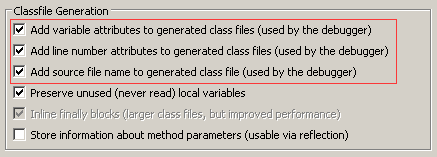
②debug模式启动服务:
-Xdebug -Xnoagent -Xrunjdwp:transport=dt_socket,address=8000,server=y,suspend=y
这里有一个例子
Remote Debugging an EJB on WebLogic Server 10.0.1 with JDeveloper 10.1.3.3
Remote Debugging (1)的更多相关文章
- 在chrome 总调试cordova出现Detached from the target. Remote debugging has been terminated with reason: Connection lost. Please re-attach to the new target
在chrome 总调试cordova出现如下错误: "Detached from the target. Remote debugging has been terminated with ...
- 转:Remote debugging with Visual Studio 2010
Original URL http://www.codeproject.com/Articles/146838/Remote-debugging-with-Visual-Studio-2010 you ...
- JPDA and Set up Tomcat for Remote Debugging
* About JPDA (http://docs.oracle.com/javase/7/docs/technotes/guides/jpda/architecture.html) JPDA: (J ...
- 安卓手机移动端Web开发调试之Chrome远程调试(Remote Debugging)
一.让安卓打debug模式的apk包 二.将电脑中的chrome升级到最新版本,在chrome浏览器地址栏中输入chrome://inspect/#devices: 在智能手机还未普及时,移动设备的调 ...
- Android WebView remote debugging
/***************************************************************************** * Android WebView rem ...
- Android/iOS Remote debugging
简单介绍 使用下面方法可以定位webview中的元素,无法定位view中的元素. 原文地址:http://mp.weixin.qq.com/s/y_UfdgjT_pkKgYivJmqt7Q webvi ...
- Remote Debugging Android Devices
Remote Debugging Android Devices //在电脑上远程调试安卓设备 By Kayce Basques Technical Writer at Google By Meggi ...
- 通过Chrome浏览器进行android调试/Remote Debugging on Android with Chrome
The way your web content behaves on mobile can be dramatically different from the desktop experience ...
- PyCharm 2017: Remote debugging using remote interpreter doesn't work
I set up a remote interpreter and verified that I can run a script using the remote interpreter. Con ...
随机推荐
- git ----(2)
Git使用40个16进制字符的SHA-1 Hash来唯一标识对象 Git的四种基本对象类型,组成了Git更高级的数据结构: blobs: 每个blob代表一个(版本的)文件,blob只包含文 ...
- jsplumb流程器使用2
jsplumb默认注册在浏览器的窗口,为整个页面提供静态实例 1. 单独实例化的方法: var firstInstance = jsPlumb.getInstance(); 内部传入可定义对象 全 ...
- No appenders could be found for logger
在运行代码时,出现下面的错误, log4j:WARN No appenders could be found for logger (genericTest.GenericTest). log4j:W ...
- javascript中的类型转换(进制转换|位运算)
1:parseInt(string) : 这个函数的功能是从string的开头开始解析,返回一个整数 parseInt("123hua"); //输出 123 parseInt(& ...
- maven构建ssh工程
1.1 需求 在web工程的基础上实现ssh工程的创建,规范依赖管理. 1.2 数据库环境 使用之前学习hibernate创建的数据库: 1.3 创建父工程 选择创建Maven Project ...
- pop_heap(_RAIter,_RAIter,_Compare)
make_heap()是生成一个堆,大顶堆或小顶堆 make_heap(_RAIter,_RAIter) 默认生成大顶堆 make_heap(_RAIter,_RAIter,_Compare) _Co ...
- code first 添加外键时,与原有的数据冲突ALTER TABLE 语句与 FOREIGN KEY 约束"FK_XXXXX"冲突
问题的原因是新增的外键字段没有默认值,造成的,有很多方法可以解决,我这里通过修改生成的迁移文件,设定为可空,或者设置默认值即可.具体看情况使用.
- UFT12 更新模式
一. 更新测试(非常规运行模式). 如果您知道应用程序已更改, 请以下列某种模式运行测试以相应更新测试: 维护运行模式.如果预计UFT 无法识别测试中的对象, 则使用此模式.当测试运行时, UFT ...
- hdu 4004 (二分加贪心) 青蛙过河
题目传送门:http://acm.hdu.edu.cn/showproblem.php?pid=4004 题目意思是青蛙要过河,现在给你河的宽度,河中石头的个数(青蛙要从石头上跳过河,这些石头都是在垂 ...
- BZOJ 1093 [ZJOI2007]最大半连通子图 - Tarjan 缩点
Description 定义一个半联通图为 : 对任意的两个点$u, v$,都有存在一条路径从$u$到$v$, 或从$v$到$u$. 给出一个有向图, 要求出节点最多的半联通子图, 并求出方案数. ...