
JPDA and Set up Tomcat for Remote Debugging
* About JPDA (http://docs.oracle.com/javase/7/docs/technotes/guides/jpda/architecture.html)
JPDA: (Java Platform Debugger Architecture), the following diagram illustrates the architecture,
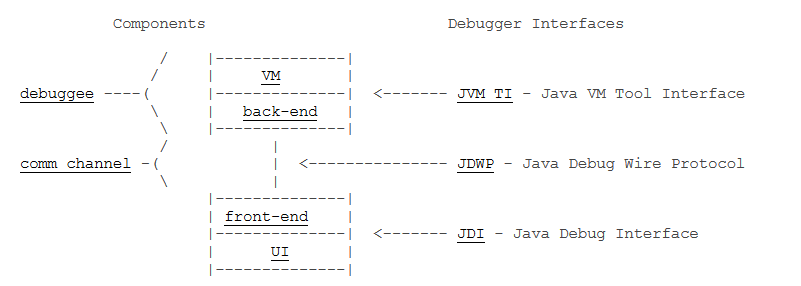
* How to setup Tomcat for remote debugging
It's quite simple to set up Tomcat for remote debugging. Open "bin/startup.bat", and you would find the following line at the end,
call "%EXECUTABLE%" start %CMD_LINE_ARGS%
Just add "jpda" in frond of "start", that's
call "%EXECUTABLE%" jpda start %CMD_LINE_ARGS%
This will use the default "JPDA_TRANSPORT" and "JPDA_ADRESS" settings in "bin/catalina.bat",
** set JPDA_TRANSPORT = dt_socket
** set JPDA_ADDRESS=8000
After that, if you start tomcat, you would see the following line from the command console,
Listening for transport dt_socket at address: 8000

Then you can set up your IDE (eclipse) to attach to the tomcat,

除了远程debug之外,还有一种在开发阶段很方便的方式就是在eclipse里面直接指定tomcat的运行目录,然后在eclipse里面启动tomcat,这样就可以直接进行debug了。
第一步: 设置eclipse
window -> preference -> Tomcat, 然后入下图所示设置tomcat的目录 -

第二步:进行调试
如下图所示,可以在工具栏上直接双击tomcat的图标进行启动,然后就可以debug了。

JPDA and Set up Tomcat for Remote Debugging的更多相关文章
- Idea进行java应用的远程调试Remote debugging
本文可以解决如下两个问题: 1.如何处理和调试那些只发生在生产环境(或其他远程环境)而本地开发环境可能没办法重现的"问题". 2.只有一个可以部署的war/jar包,只有class ...
- 在chrome 总调试cordova出现Detached from the target. Remote debugging has been terminated with reason: Connection lost. Please re-attach to the new target
在chrome 总调试cordova出现如下错误: "Detached from the target. Remote debugging has been terminated with ...
- 转:Remote debugging with Visual Studio 2010
Original URL http://www.codeproject.com/Articles/146838/Remote-debugging-with-Visual-Studio-2010 you ...
- Remote Debugging (1)
The client/server design of the Java debugger allows you to launch a Java program from computer on y ...
- 安卓手机移动端Web开发调试之Chrome远程调试(Remote Debugging)
一.让安卓打debug模式的apk包 二.将电脑中的chrome升级到最新版本,在chrome浏览器地址栏中输入chrome://inspect/#devices: 在智能手机还未普及时,移动设备的调 ...
- Android WebView remote debugging
/***************************************************************************** * Android WebView rem ...
- Android/iOS Remote debugging
简单介绍 使用下面方法可以定位webview中的元素,无法定位view中的元素. 原文地址:http://mp.weixin.qq.com/s/y_UfdgjT_pkKgYivJmqt7Q webvi ...
- Remote Debugging Android Devices
Remote Debugging Android Devices //在电脑上远程调试安卓设备 By Kayce Basques Technical Writer at Google By Meggi ...
- 通过Chrome浏览器进行android调试/Remote Debugging on Android with Chrome
The way your web content behaves on mobile can be dramatically different from the desktop experience ...
随机推荐
- Windows 8提升普通管理员权限为超级管理员权限以及激活超级管理员Administrator
在Windows 8下运行某些操作时(比如删除一些文件或者更改某些系统设置时)系统会提示我们权限不够.须要Administrator账户的权限. 相信很多其它的使用者都会觉得自己当前使用的账户已经是系 ...
- ubuntu server vsftpd 匿名用户上传下载及目录设置
ubuntu server vsftpd 匿名用户上传下载及目录设置 1:vsftpd服务器安装: sudo apt-get install vsftpd #安装 cd /srv/ #切换到默认匿名用 ...
- 给你一个能生成1到5随机数的函数,用它写一个函数生成1到7的随机数。 (即,使用函数rand5()来实现函数rand7())
给你一个能生成1到5随机数的函数,用它写一个函数生成1到7的随机数. (即,使用函数rand5()来实现函数rand7()). 解答 rand5可以随机生成1,2,3,4,5:rand7可以随机生成1 ...
- 飘逸的python - 使用reload进行热更新
一开始我们的游戏商城配置是从txt读取解析的. 后来为了方便运营修改配置,改成从数据库读取并提供后台可视化编辑配置. 如果为了使配置生效而重启游戏进程那太麻烦了. 这时候reload就派上用途了. 下 ...
- Linux内核中网络数据包的接收-第一部分 概念和框架
与网络数据包的发送不同,网络收包是异步的的.由于你不确定谁会在什么时候突然发一个网络包给你.因此这个网络收包逻辑事实上包括两件事:1.数据包到来后的通知2.收到通知并从数据包中获取数据这两件事发生在协 ...
- 页面回到顶部的三种实现(锚标记,js)
一.使用锚标记返回页面顶部 使用HTML锚标记最简单,就是看起来有点不好看,点击后会在地址栏显示这个锚标记,其它的倒没什么. 页面顶部放置: <a name="top" id ...
- gulp 常用插件汇总
2017-07-26更新:图片压缩插件使用gulp-smushit,gulp-smushit压缩率比较大,gulp-imagemin 图片压缩插件压缩率不明显. 见下图压缩率: 1.gulp安装 参照 ...
- git检查与放弃本地的代码修改情况
git diff 可以查看当前没有add 的内容修改(不在缓冲区的文件变化) git diff --cached查看已经add但没有commit 的改动(在缓冲区的文件变化) git diff HE ...
- maven 将jar包添加到本地仓库
maven 如何将jar包添加到本地仓库 CreateTime--2018年4月19日12:50:50 Author:Marydon 情景描述:当项目所需的jar包,maven中央仓库中没有该j ...
- 〖Linux〗Clang/Clang++ for Android Binary/NDK build(二进制可执行文件/NDK编译)
#1. 下载并安装NDK(解压即可,目前最新版是r9c) http://developer.android.com/tools/sdk/ndk/index.html #2. 安装NDK独立编译工具 c ...