
Remote Debugging (1)
The client/server design of the Java debugger allows you to launch a Java program from computer on your network and debug it from the workstation running the platform.  This is particularly useful when you are developing a program for a device that cannot host the development platform.  It is also useful when debugging programs on dedicated machines such as web servers.

Note:  To use remote debugging, you must be using a Java VM that supports this feature.

To debug a program remotely, you must be able to launch the program in debug mode on the remote machine so that it will wait for a connection from your debugger.  The specific technique for launching the program and connecting the debugger are VM-specific.  The basic steps are as follows:

1.Ensure that you are building your Java program with available debug information.  (You can control these attributes from the  Goto the Java compiler preference page Java > Compiler preference page).

2.After you build your Java program, install it to the target computer.  This involves copying the .CLASS files or .JAR files to the appropriate location on the remote computer.

3.Invoke the Java program on the remote computer using the appropriate VM arguments to specify debug mode and a communication port for the debugger.

4.Start the debugger using a remote launch configuration and specify the address and port of the remote computer.

When setting up the remote launch configuration there are a few items to take note of:

•You must ensure you enter the correct hostname i.e. the name of the remote computer where you are currently running your code. The hostname can also be the IP address of the remote machine, for example using 127.0.0.1 instead of localhost.

•The port number must be the number of the port on the remote machine.

Certain Java VMs support another way of starting a remote debug session. In this alternative connection type, the debugger is launched first. The debugger then waits and listens for the VM to connect to it. To debug this way, you must properly configure and launch a remote debug session, then launch the VM, specifying the location of your waiting debugger. For more information, see Using the remote Java application launch configuration.
Eclipse Help
可以远程调试 a Java program 这里包含web项目application项目EJB项目
这个功能非常有用,当有一个你不能部署但是正在运行的复杂的项目
前 提
To debug a program remotely, you must be able to launch the program in debug mode on the remote machine so that it will wait for a connection from your debugger. The specific technique for launching the program and connecting the debugger are VM-specific. The basic steps are as follows:
- Ensure that you are building your Java program with available debug information. (You can control these attributes from the Goto the Java compiler preference page Java > Compiler preference page).
- After you build your Java program, install it to the target computer. This involves copying the .CLASS files or .JAR files to the appropriate location on the remote computer.
- Invoke the Java program on the remote computer using the appropriate VM arguments to specify debug mode and a communication port for the debugger.
- Start the debugger using a remote launch configuration and specify the address and port of the remote computer.
翻译:
为了远程调试一个程序,你必须能够在远程机器上以debug模式启动这个程序,以便与调试器建立连接。点击这里查看文档
- 确保携带着可用的调试信息构建你的java程序
- 构建完毕之后,将它安装到目标机器。将.CLASS 或.JAR 拷贝的远程机器的适当位置
- 调用这个指定了debug模式和通信端口的远程机器上的Java程序
- 启动这个使用了远程调试模式且指定了远程机器的地址和端口的调试器
注:
①调试信息包括:
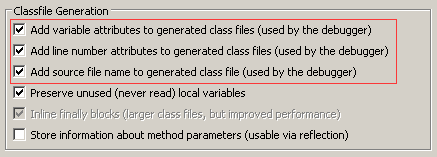
②debug模式启动服务:
-Xdebug -Xnoagent -Xrunjdwp:transport=dt_socket,address=8000,server=y,suspend=y
这里有一个例子
Remote Debugging an EJB on WebLogic Server 10.0.1 with JDeveloper 10.1.3.3
Remote Debugging (1)的更多相关文章
- 在chrome 总调试cordova出现Detached from the target. Remote debugging has been terminated with reason: Connection lost. Please re-attach to the new target
在chrome 总调试cordova出现如下错误: "Detached from the target. Remote debugging has been terminated with ...
- 转:Remote debugging with Visual Studio 2010
Original URL http://www.codeproject.com/Articles/146838/Remote-debugging-with-Visual-Studio-2010 you ...
- JPDA and Set up Tomcat for Remote Debugging
* About JPDA (http://docs.oracle.com/javase/7/docs/technotes/guides/jpda/architecture.html) JPDA: (J ...
- 安卓手机移动端Web开发调试之Chrome远程调试(Remote Debugging)
一.让安卓打debug模式的apk包 二.将电脑中的chrome升级到最新版本,在chrome浏览器地址栏中输入chrome://inspect/#devices: 在智能手机还未普及时,移动设备的调 ...
- Android WebView remote debugging
/***************************************************************************** * Android WebView rem ...
- Android/iOS Remote debugging
简单介绍 使用下面方法可以定位webview中的元素,无法定位view中的元素. 原文地址:http://mp.weixin.qq.com/s/y_UfdgjT_pkKgYivJmqt7Q webvi ...
- Remote Debugging Android Devices
Remote Debugging Android Devices //在电脑上远程调试安卓设备 By Kayce Basques Technical Writer at Google By Meggi ...
- 通过Chrome浏览器进行android调试/Remote Debugging on Android with Chrome
The way your web content behaves on mobile can be dramatically different from the desktop experience ...
- PyCharm 2017: Remote debugging using remote interpreter doesn't work
I set up a remote interpreter and verified that I can run a script using the remote interpreter. Con ...
随机推荐
- DOS下的安全空间
我们需要直接向一段内存中写入内容: 这段内存空间不应存放系统或其他程序的数据或代码,否则写入操作很可能引发错误: DOS方式下,一般情况,0:200~0:2ff空间中没有系统或其他程序的数据或代码; ...
- 关于echarts堆叠图标问题 ,某条数数不需要堆叠的处理
当直接访问的总量不需要堆叠的时候,将stack改为tiled即可,效果图如下
- js的回调函数详解
本文主要介绍了个人对于javascript中回调函数的理解和使用方法及示例,需要的朋友可以参考下 现在做native App 和Web App是主流,也就是说现在各种基于浏览器的web app框 ...
- js全局作用域
全局作用域 不在任何函数内定义的变量就具有全局作用域.实际上,JavaScript默认有一个全局对象window,全局作用域的变量实际上被绑定到window的一个属性: var course = 'L ...
- Android开发之自定义Dialog简单实现
本文着重研究了自定义对话框,通过一下步骤即可清晰的理解原理,通过更改界面设置和style类型,可以应用在各种各样适合自己的App中. 首先来看一下效果图: 首先是activity的界面 点击了上述图片 ...
- 利用spring boot构建一个简单的web工程
1.选择Spring InitiaLizr, jdk选择好路径 2.设置项目信息 3.这一步是设置选择使用哪些组件,这里我们只需要选择web 4.设置工程名和路径
- java中 this 关键字的三种用法
Java中this的三种用法 调用属性 (1)this可以调用本类中的任何成员变量 调用方法(可省略) (2)this调用本类中的成员方法(在main方法里面没有办法通过this调用) 调用构造方法 ...
- swift 属性值变化
如果创建了一个结构体的实例并将其赋值给一个常量,则无法修改该实例的任何属性,即使有属性被声明为变量也不行. 这种行为是由于结构体(struct)属于值类型.当值类型的实例被声明为常量的时候,它的所有属 ...
- 状态机学习(三)解析JSON1
来自 从零开始的 JSON 库教程 从零开始教授如何写一个符合标准的 C 语言 JSON 库 作者 Milo Yip https://zhuanlan.zhihu.com/json-tutorial ...
- JDK8集合类源码解析 - HashSet
HashSet 特点:不允许放入重复元素 查看源码,发现HashSet是基于HashMap来实现的,对HashMap做了一次“封装”. private transient HashMap<E,O ...