
pytorch的显存释放机制torch.cuda.empty_cache()
参考:
https://cloud.tencent.com/developer/article/1626387
据说在pytorch中使用torch.cuda.empty_cache()可以释放缓存空间,于是做了些尝试:
上代码:
import torch

import time

import os

#os.environ["CUDA_VISIBLE_DEVICES"] = "3"

device='cuda:2'

dummy_tensor_4 = torch.randn(120, 3, 512, 512).float().to(device)  # 120*3*512*512*4/1024/1024 = 360.0M

memory_allocated = torch.cuda.memory_allocated(device)/1024/1024

memory_reserved = torch.cuda.memory_reserved(device)/1024/1024

print("第一阶段:")

print("变量类型:", dummy_tensor_4.dtype)

print("变量实际占用内存空间:", 120*3*512*512*4/1024/1024, "M")

print("GPU实际分配给的可用内存", memory_allocated, "M")

print("GPU实际分配给的缓存", memory_reserved, "M")

torch.cuda.empty_cache()

time.sleep(15)

memory_allocated = torch.cuda.memory_allocated(device)/1024/1024

memory_reserved = torch.cuda.memory_reserved(device)/1024/1024

print("第二阶段:")

print("释放缓存后:", "."*100)

print("变量实际占用内存空间:", 120*3*512*512*4/1024/1024, "M")

print("GPU实际分配给的可用内存", memory_allocated, "M")

print("GPU实际分配给的缓存", memory_reserved, "M")

del dummy_tensor_4

torch.cuda.empty_cache()

time.sleep(15)

memory_allocated = torch.cuda.memory_allocated(device)/1024/1024

memory_reserved = torch.cuda.memory_reserved(device)/1024/1024

print("第三阶段:")

print("删除变量后释放缓存后:", "."*100)

print("变量实际占用内存空间:", 0, "M")

print("GPU实际分配给的可用内存", memory_allocated, "M")

print("GPU实际分配给的缓存", memory_reserved, "M")

time.sleep(60)
运行结果:

第一阶段:

第二阶段:

第三阶段:

===================================================
可以看到在pytorch中显存创建360M的变量其实总占有了1321M空间,其中变量自身占了360M空间,缓存也占了360M空间,中间多出了那1321-360*2=601M空间却无法解释,十分诡异。
总的来说 torch.cuda.empty_cache() 操作有一定用处,但是用处不太大。
===================================================
更改代码:
import torch

import time

import os

#os.environ["CUDA_VISIBLE_DEVICES"] = "3"

device='cuda:2'

dummy_tensor_4 = torch.randn(120, 3, 512, 512).float().to(device)  # 120*3*512*512*4/1024/1024 = 360.0M

dummy_tensor_5 = torch.randn(120, 3, 512, 512).float().to(device)  # 120*3*512*512*4/1024/1024 = 360.0M

memory_allocated = torch.cuda.memory_allocated(device)/1024/1024

memory_reserved = torch.cuda.memory_reserved(device)/1024/1024

print("第一阶段:")

print("变量类型:", dummy_tensor_4.dtype)

print("变量实际占用内存空间:", 2*120*3*512*512*4/1024/1024, "M")

print("GPU实际分配给的可用内存", memory_allocated, "M")

print("GPU实际分配给的缓存", memory_reserved, "M")

torch.cuda.empty_cache()

time.sleep(15)

memory_allocated = torch.cuda.memory_allocated(device)/1024/1024

memory_reserved = torch.cuda.memory_reserved(device)/1024/1024

print("第二阶段:")

print("释放缓存后:", "."*100)

print("变量实际占用内存空间:", 2*120*3*512*512*4/1024/1024, "M")

print("GPU实际分配给的可用内存", memory_allocated, "M")

print("GPU实际分配给的缓存", memory_reserved, "M")

del dummy_tensor_4

del dummy_tensor_5

torch.cuda.empty_cache()

time.sleep(15)

memory_allocated = torch.cuda.memory_allocated(device)/1024/1024

memory_reserved = torch.cuda.memory_reserved(device)/1024/1024

print("第三阶段:")

print("删除变量后释放缓存后:", "."*100)

print("变量实际占用内存空间:", 0, "M")

print("GPU实际分配给的可用内存", memory_allocated, "M")

print("GPU实际分配给的缓存", memory_reserved, "M")

time.sleep(60)
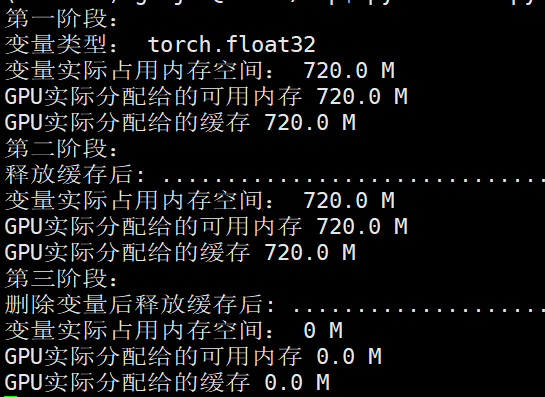
第一阶段:

第二阶段:

第三阶段:

发现依然有显存空间无法解释。
=============================================
上面的操作都是在24G显存的titan上进行的,最后决定用1060显卡试验下,6G显存比较好尝试。
代码:
import torch

import time

import os

import functools

#os.environ["CUDA_VISIBLE_DEVICES"] = "3"

device='cuda:0'

shape_ = (4, 1024, 512, 512)     # 4GB

# dummy_tensor_4 = torch.randn(120, 3, 512, 512).float().to(device)  # 120*3*512*512*4/1024/1024 = 360.0M

# dummy_tensor_5 = torch.randn(10, 120, 3, 512, 512).float().to(device)  # 120*3*512*512*4/1024/1024 = 360.0M

dummy_tensor_6 = torch.randn(*shape_).float().to(device)

memory_allocated = torch.cuda.memory_allocated(device)/1024/1024

memory_reserved = torch.cuda.memory_reserved(device)/1024/1024

print("第一阶段:")

print("变量类型:", dummy_tensor_6.dtype)

print("变量实际占用内存空间:", functools.reduce(lambda x, y: x*y, shape_)*4/1024/1024, "M")

print("GPU实际分配给的可用内存", memory_allocated, "M")

print("GPU实际分配给的缓存", memory_reserved, "M")

torch.cuda.empty_cache()

time.sleep(15)

memory_allocated = torch.cuda.memory_allocated(device)/1024/1024

memory_reserved = torch.cuda.memory_reserved(device)/1024/1024

print("第二阶段:")

print("释放缓存后:", "."*100)

print("GPU实际分配给的可用内存", memory_allocated, "M")

print("GPU实际分配给的缓存", memory_reserved, "M")

del dummy_tensor_6

torch.cuda.empty_cache()

time.sleep(15)

memory_allocated = torch.cuda.memory_allocated(device)/1024/1024

memory_reserved = torch.cuda.memory_reserved(device)/1024/1024

print("第三阶段:")

print("删除变量后释放缓存后:", "."*100)

print("GPU实际分配给的可用内存", memory_allocated, "M")

print("GPU实际分配给的缓存", memory_reserved, "M")

time.sleep(60)
输出结果:
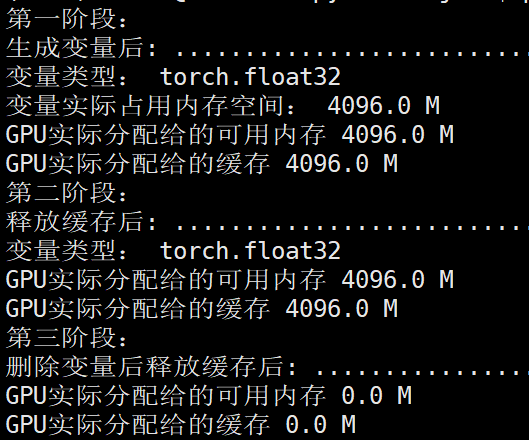
第一阶段:

第二阶段:

第三阶段:

由于显卡总共6G显存,所以
memory_allocated
memory_reserved
这两部分应该是指的相同显存空间,因为这两个部分都是显示4G空间,总共6G空间。
可以看到单独执行:torch.cuda.empty_cache()
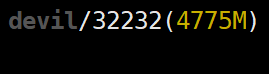
并没有释放显存,还是4775MB,但是执行:
del dummy_tensor_6
torch.cuda.empty_cache()
显存就进行了释放,为679MB。
更改代码:
import torch

import time

import os

import functools

#os.environ["CUDA_VISIBLE_DEVICES"] = "3"

device='cuda:0'

shape_ = (4, 1024, 512, 512)     # 4GB

# dummy_tensor_4 = torch.randn(120, 3, 512, 512).float().to(device)  # 120*3*512*512*4/1024/1024 = 360.0M

# dummy_tensor_5 = torch.randn(10, 120, 3, 512, 512).float().to(device)  # 120*3*512*512*4/1024/1024 = 360.0M

dummy_tensor_6 = torch.randn(*shape_).float().to(device)

memory_allocated = torch.cuda.memory_allocated(device)/1024/1024

memory_reserved = torch.cuda.memory_reserved(device)/1024/1024

print("第一阶段:")

print("生成变量后:", "."*100)

print("变量类型:", dummy_tensor_6.dtype)

print("变量实际占用内存空间:", functools.reduce(lambda x, y: x*y, shape_)*4/1024/1024, "M")

print("GPU实际分配给的可用内存", memory_allocated, "M")

print("GPU实际分配给的缓存", memory_reserved, "M")

torch.cuda.empty_cache()

time.sleep(15)

memory_allocated = torch.cuda.memory_allocated(device)/1024/1024

memory_reserved = torch.cuda.memory_reserved(device)/1024/1024

print("第二阶段:")

print("释放缓存后:", "."*100)

print("变量类型:", dummy_tensor_6.dtype)

print("GPU实际分配给的可用内存", memory_allocated, "M")

print("GPU实际分配给的缓存", memory_reserved, "M")

# for _ in range(10000):

#     dummy_tensor_6 += 0.001

# print(torch.sum(dummy_tensor_6))

del dummy_tensor_6

time.sleep(15)

memory_allocated = torch.cuda.memory_allocated(device)/1024/1024

memory_reserved = torch.cuda.memory_reserved(device)/1024/1024

print("第三阶段:")

print("删除变量后释放缓存后:", "."*100)

print("GPU实际分配给的可用内存", memory_allocated, "M")

print("GPU实际分配给的缓存", memory_reserved, "M")

time.sleep(60)
运行结果:
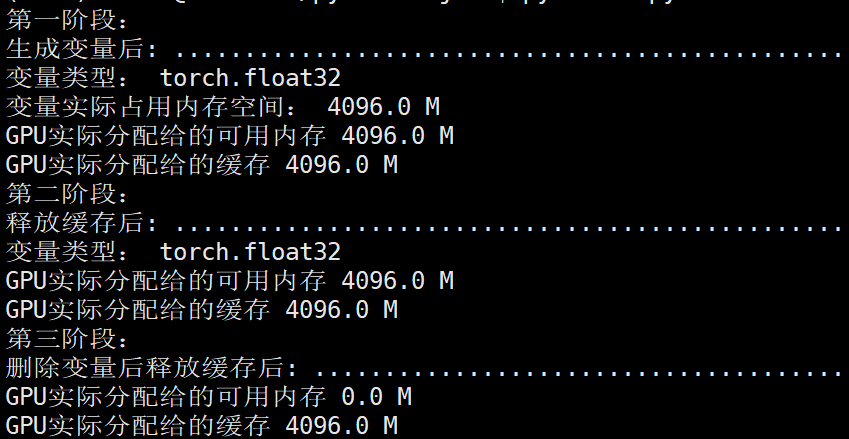
NVIDIA显存显示第一,二,,三阶段均为:
如果没有执行torch.cuda.empty_cache(),即使删除GPU上的变量显存空间也不会被释放,该部分显存还为缓存空间所占。
================================================
总结:
torch.cuda.memory_reserved() 表示进程所获得分配到总显存大小(包括变量显存和缓存等)
torch.cuda.memory_allocated 表示进程为变量所分配的显存大小
torch.cuda.memory_reserved() - torch.cuda.memory_allocated
表示进程中空闲的显存空间,一般是指进程显存中缓存空间的大小。(不是GPU空闲显存空间,而是进程已获得的显存中未被使用的空间)
================================================
pytorch的显存释放机制torch.cuda.empty_cache()的更多相关文章
- 显卡、显卡驱动、显存、GPU、CUDA、cuDNN
显卡 Video card,Graphics card,又叫显示接口卡,是一个硬件概念(相似的还有网卡),执行计算机到显示设备的数模信号转换任务,安装在计算机的主板上,将计算机的数字信号转换成模拟 ...
- 【原创】Linux环境下的图形系统和AMD R600显卡编程(4)——AMD显卡显存管理机制
显卡使用的内存分为两部分,一部分是显卡自带的显存称为VRAM内存,另外一部分是系统主存称为GTT内存(graphics translation table和后面的GART含义相同,都是指显卡的页表,G ...
- GPU 显存释放
我们在使用tensorflow 的时候, 有时候会在控制台终止掉正在运行的程序,但是有时候程序已经结束了,nvidia-smi也看到没有程序了,但是GPU的内存并没有释放,那么怎么解决该问题呢? 首先 ...
- GPU显存释放
一.当程序没有运行,但GPU仍被占用, 可通过nvidia-smi查看,被占用的pid是什么 或通过sudo fuser -v /dev/nvidia* #查找占用GPU资源的PID 然后采用kill ...
- Pytorch显存动态分配规律探索
下面通过实验来探索Pytorch分配显存的方式. 实验 显存到主存 我使用VSCode的jupyter来进行实验,首先只导入pytorch,代码如下: import torch 打开任务管理器查看主存 ...
- Ubuntu-Tensorflow 程序结束掉GPU显存没有释放的问题
笔者在ubuntu上跑Tensorflow的程序的时候,中途使用了Win+C键结束了程序的进行,但是GPU的显存却显示没有释放,一直处于被占用状态. 使用命令 nvidia-smi 显示如下 两个GP ...
- TensorFlow中的显存管理器——BFC Allocator
背景 作者:DeepLearningStack,阿里巴巴算法工程师,开源TensorFlow Contributor] 使用GPU训练时,一次训练任务无论是模型参数还是中间结果都需要占用大量显存.为了 ...
- [Pytorch]深度模型的显存计算以及优化
原文链接:https://oldpan.me/archives/how-to-calculate-gpu-memory 前言 亲,显存炸了,你的显卡快冒烟了! torch.FatalError: cu ...
- Pytorch训练时显存分配过程探究
对于显存不充足的炼丹研究者来说,弄清楚Pytorch显存的分配机制是很有必要的.下面直接通过实验来推出Pytorch显存的分配过程. 实验实验代码如下: import torch from torch ...
- 解决GPU显存未释放问题
前言 今早我想用多块GPU测试模型,于是就用了PyTorch里的torch.nn.parallel.DistributedDataParallel来支持用多块GPU的同时使用(下面简称其为Dist). ...
随机推荐
- FlashDuty Changelog 2023-09-07 | 新增深色模式与主题配置
FlashDuty:一站式告警响应平台,前往此地址免费体验! FlashDuty 现在已经全面支持了深色模式,这为您提供了更柔和的光线和舒适的界面外观.并且,您可以根据自己的喜好和使用环境动态切换深色 ...
- 关于excel表
对excel表的操作主要通过xlwt,xlrd模块. 创建excel表 import xlwtworkbook = xlwt.Workbook(encoding='utf-8') worksheet ...
- SQL索引优化,菜单列表优化
SQL索引优化,菜单列表优化 现象:在系统中几个数据量大的列表页面,首次进入页面未增加筛选条件,导致进入的列表查询速度非常慢.分析:通过SQL查看,是做了count求和查询,然后根据总的记录数来做分页 ...
- java8 Lambda 测试示例
import com.google.gson.Gson; import org.junit.Test; import java.util.Arrays; import java.util.IntSum ...
- skywalking需要引入的背景(查询调用链),传统的日志查询方法, 引入EFK日志搜索重要性
1.根据两次请求日志的关键点来截取日志,缩小日志的范围.tail -f orderApi.log | grep "orderKeyWordSubmit" 确定两次异常请求的 ...
- C++与Unity C#交互
C++与Unity C#交互 C++转C#小工具:https://github.com/jaredpar/pinvoke-interop-assistant C++ Custom.h #pragma ...
- iOS开发流程总结(新坑持续更新)
[上线前流程] 将测试环境修改成正式环境 修改版本号,而且build version比version多一位,如version设置为1.0.1,那么build就设置成1.0.1.x:这么做的理由是,当你 ...
- Java面试知识点(二)super 和 this 关键字
this this 是自身的一个对象,代表对象本身,可以理解为:指向对象本身的一个指针. this 的用法在 java 中大体可以分为 3 种: 普通的直接引用 这种就不用讲了,this 相当于是指向 ...
- Winform程序获取不到windows系统下本机的配置信息(解决)
无法获取到本地的mac地址的原因: 本地网络问题 相关服务被禁用 wmi配置错误或者失败. 本文着力于第三种问题的解决:可以参考 无法获取本地mac,如果是wmi服务没有打开的问题.可以使用运行wmi ...
- vue - ElementUI
关于ElementUI最好还是通过实践项目来做,来熟悉. 这只是一些ElementUI的注意事项,至此vue2的内容真的全部完结,后面将继续vue3的内容更新. 一.完整引入 一般提及什么什么UI会有 ...