
Spring Cloud LoadBalancer原理讲解及自定义负载均衡器
Spring Cloud LoadBalancer原理
LoadBalancerClient作为负载均衡客户端,用于进行负载均衡逻辑,从服务列表中选择出一个服务地址进行调用,其内部方法为下图显示:

(图1-1)
在LoadBalancerClient种存在两个execute()方法,均是用来执行请求的,reconstructURI()是用来重构URL。对于LoadBalancerClient在Spring Cloud LoadBalancer中实现类则是BlockingLoadBalancerClient。BlockingLoadBalancerClient存在两个choose()方法,其实现的是图1-1中的ServiceInstanceChooser接口种的两个choose()方法(图1-2):
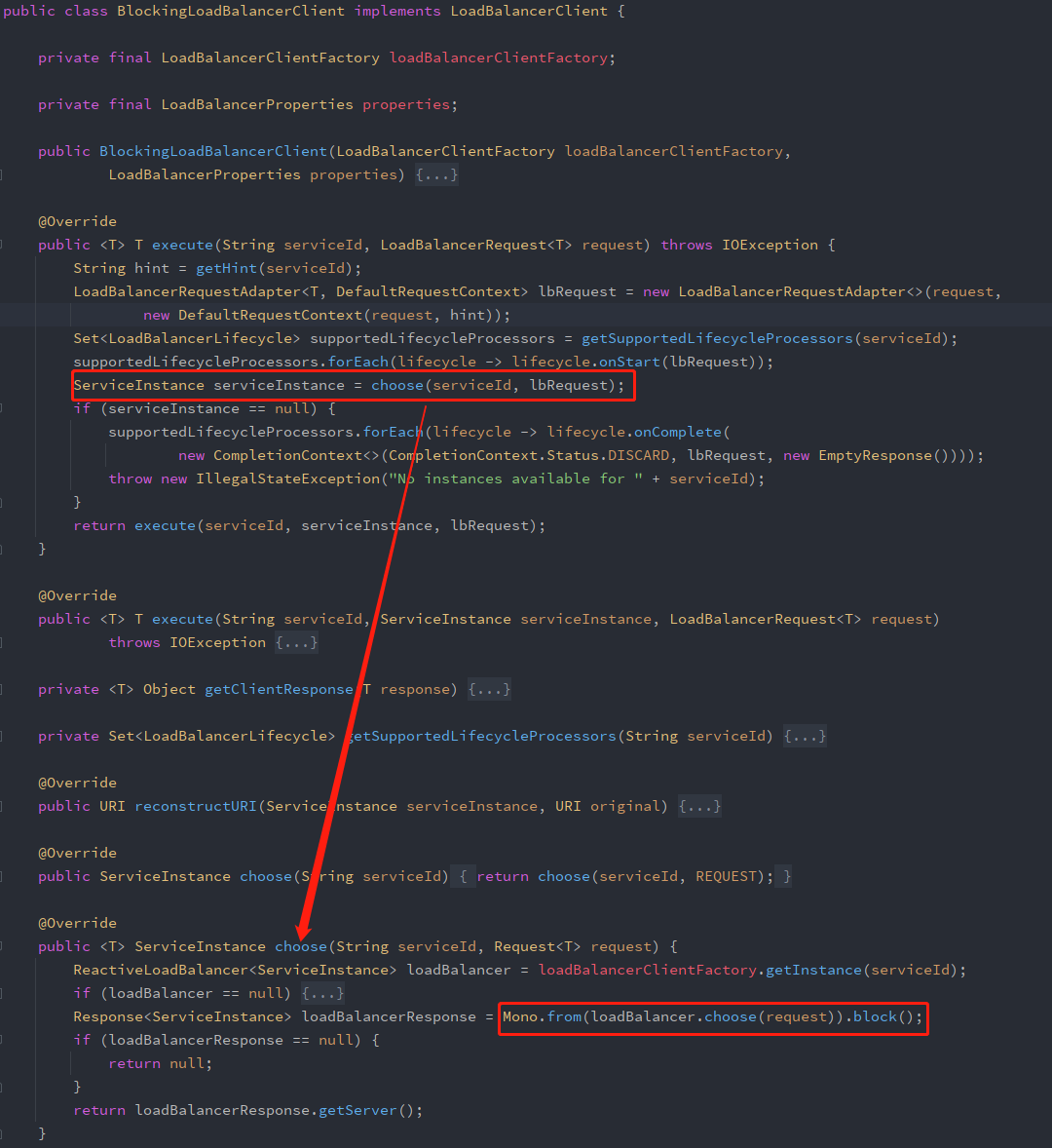
(图1-2)
在上述图片中通过通过工厂类LoadBalancerClientFactory获取具体的负载均衡器实例,后面的loadBalancer.choose(request)调用(图1-3)接口choose()方法实现根据负载均衡算法选择下一个服务器完成负载均衡。
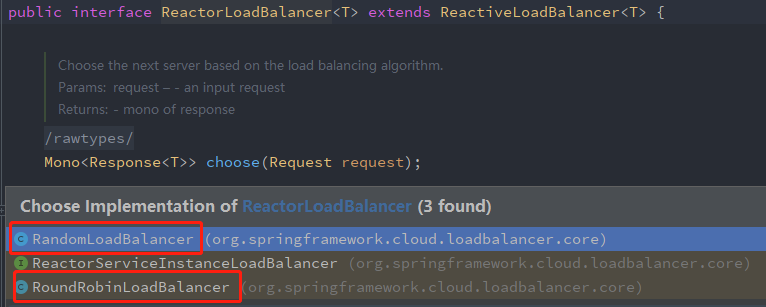
(图1-3)
图1-3可以看出ReactorLoadBalancer接口继承ReactiveLoadBalancer接口,ReactorLoadBalancer接口后续又被ReactorServiceInstanceLoadBalancer继承且其实现了两个方法,分别是:RandomLoadBalancer(随机负载均衡器)和RoundRobinLoadBalancer(轮询负载均衡器)。
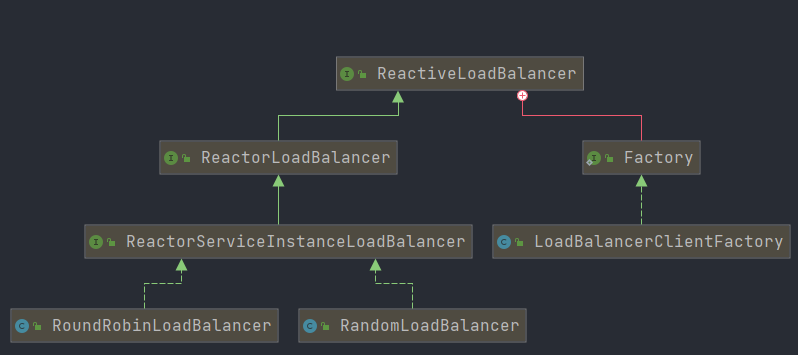
(图1-4)
LoadBalancer自定义负载均衡器
根据图1-4类图显示,我们只需要在自定义配置轮询方法时重定义ReactorServiceInstanceLoadBalancer接口即可,如下例子:
@Configuration

public class MyLoadBalancerConfig {

    @Bean

    public ReactorServiceInstanceLoadBalancer reactorServiceInstanceLoadBalancer(Environment environment, LoadBalancerClientFactory loadBalancerClientFactory) {

        String name = environment.getProperty(LoadBalancerClientFactory.PROPERTY_NAME);

        //返回随机轮询负载均衡方式

        return new RandomLoadBalancer(loadBalancerClientFactory.getLazyProvider(name, ServiceInstanceListSupplier.class), name);

    }

}
但是如果我们要自定义轮询算法该如何做呢?根据上面可以知道LoadBalancerClientFactory是创建客户机、负载均衡器和客户机配置实例的工厂。它根据客户端名称创建一个Spring ApplicationContext,并从中提取所需的bean(官方解释)。因此我们进入到LoadBalancerClientFactory类中:
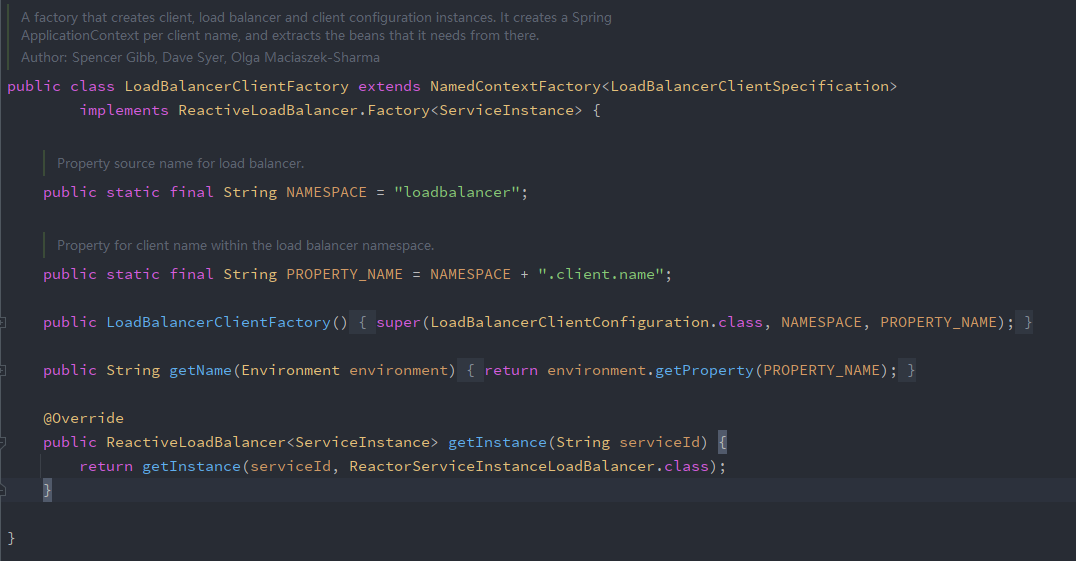
(图1-5)
我们需要去实现它的子接口ReactorServiceInstanceLoadBalancer,因为去获取负载均衡器实例的时候,是通过去容器中查找ReactorServiceInstanceLoadBalancer类型的bean来实现的,参照RandomLoadBalancer我们进行仿写
public class CustomRandomLoadBalancerClient implements ReactorServiceInstanceLoadBalancer {

    // 服务列表

    private ObjectProvider<ServiceInstanceListSupplier> serviceInstanceListSupplierProvider;

    public CustomRandomLoadBalancerClient(ObjectProvider<ServiceInstanceListSupplier> serviceInstanceListSupplierProvider) {

        this.serviceInstanceListSupplierProvider = serviceInstanceListSupplierProvider;

    }

    @Override

    public Mono<Response<ServiceInstance>> choose(Request request) {

        ServiceInstanceListSupplier supplier = serviceInstanceListSupplierProvider.getIfAvailable();

        return supplier.get().next().map(this::getInstanceResponse);

    }

    /**

     * 使用随机数获取服务

     * @param instances

     * @return

     */

    private Response<ServiceInstance> getInstanceResponse(

            List<ServiceInstance> instances) {

        System.out.println("进来了");

        if (instances.isEmpty()) {

            return new EmptyResponse();

        }

        System.out.println("进行随机选取服务");

        // 随机算法

        int size = instances.size();

        Random random = new Random();

        ServiceInstance instance = instances.get(random.nextInt(size));

        return new DefaultResponse(instance);

    }

}
自定义配置类:
@Configuration

public class MyLoadBalancerConfig {

    // 参数 serviceInstanceListSupplierProvider 会自动注入

    @Bean

    public ReactorServiceInstanceLoadBalancer customLoadBalancer(ObjectProvider<ServiceInstanceListSupplier> serviceInstanceListSupplierProvider) {

        return new CustomRandomLoadBalancerClient(serviceInstanceListSupplierProvider);

    }

}
在项目启动类上添加@LoadBalancerClient注解:name值一定要使用服务端配置的服务名(spring.application.name),通过configuration指定自定义的配置
@SpringBootApplication

@LoadBalancerClient(name = "myServer", configuration = MyLoadBalancerConfig.class)

public class BlockClientApplication {

    public static void main(String[] args) {

        SpringApplication.run(BlockClientApplication.class, args);

    }

}
以上内容参考借鉴总结得出,如有其他疑问可去一下地址查看详情:
https://blog.csdn.net/weixin_50518271/article/details/111449560
https://blog.csdn.net/qq_31142237/article/details/90486836
Spring Cloud LoadBalancer原理讲解及自定义负载均衡器的更多相关文章
- Spring Cloud 升级之路 - 2020.0.x - 6. 使用 Spring Cloud LoadBalancer (1)
本项目代码地址:https://github.com/HashZhang/spring-cloud-scaffold/tree/master/spring-cloud-iiford 我们使用 Spri ...
- SpringCloud升级之路2020.0.x版-22.Spring Cloud LoadBalancer核心源码
本系列代码地址:https://github.com/HashZhang/spring-cloud-scaffold/tree/master/spring-cloud-iiford 经过上一节的详细分 ...
- 微服务生态组件之Spring Cloud LoadBalancer详解和源码分析
Spring Cloud LoadBalancer 概述 Spring Cloud LoadBalancer目前Spring官方是放在spring-cloud-commons里,Spring Clou ...
- Spring Cloud 升级之路 - 2020.0.x - 7. 使用 Spring Cloud LoadBalancer (2)
本项目代码地址:https://github.com/HashZhang/spring-cloud-scaffold/tree/master/spring-cloud-iiford 我们使用 Spri ...
- SpringCloud升级之路2020.0.x版-21.Spring Cloud LoadBalancer简介
本系列代码地址:https://github.com/HashZhang/spring-cloud-scaffold/tree/master/spring-cloud-iiford 我们使用 Spri ...
- SpringCloud升级之路2020.0.x版-23.订制Spring Cloud LoadBalancer
本系列代码地址:https://github.com/HashZhang/spring-cloud-scaffold/tree/master/spring-cloud-iiford 我们使用 Spri ...
- 拜托!面试请不要再问我Spring Cloud底层原理[z]
[z]https://juejin.im/post/5be13b83f265da6116393fc7 拜托!面试请不要再问我Spring Cloud底层原理 欢迎关注微信公众号:石杉的架构笔记(id: ...
- Spring Cloud底层原理(转载 石杉的架构笔记)
拜托!面试请不要再问我Spring Cloud底层原理 原创: 中华石杉 石杉的架构笔记 目录 一.业务场景介绍 二.Spring Cloud核心组件:Eureka 三.Spring Cloud核 ...
- spring cloud 2.x版本 Gateway自定义过滤器教程
前言 本文采用Spring cloud本文为2.1.8RELEASE,version=Greenwich.SR3 本文基于前两篇文章eureka-server.eureka-client.eureka ...
- [转帖]Spring Cloud底层原理
拜托!面试不要再问我Spring Cloud底层原理 https://mp.weixin.qq.com/s/ZH-3JK90mhnJPfdsYH2yDA 毫无疑问,Spring Cloud 是目前微服 ...
随机推荐
- 代码随想录算法训练营Day39 动态规划
代码随想录算法训练营 代码随想录算法训练营Day38 动态规划|62.不同路径 63. 不同路径 II 62.不同路径 题目链接:62.不同路径 一个机器人位于一个 m x n 网格的左上角 (起始点 ...
- 安全测试实践-万家APP越权逻辑漏洞挖掘
逻辑漏洞会导致业务面临着巨大的经济损失隐患与敏感数据泄露的风险,本文从安全测试的角度,以越权逻辑漏洞为例,介绍逻辑漏洞的挖掘方法和实践过程. 一.什么是越权逻辑漏洞 定义: 指由于系统的权限控制逻辑不 ...
- vue模拟el-table演示插槽用法
vue模拟el-table演示插槽用法 很多人知道插槽分为三种,但是实际到elementui当中为什么这么用,就一脸懵逼,接下来就跟大家聊一聊插槽在elementui中的应用,并且自己写一个类似el- ...
- python 爬虫某东网商品信息 | 没想到销量最高的是
哈喽大家好,我是咸鱼 好久没更新 python 爬虫相关的文章了,今天我们使用 selenium 模块来简单写个爬虫程序--爬取某东网商品信息 网址链接:https://www.jd.com/ 完整源 ...
- S32DS---make: *** No rule to make target 'clean'. Stop和make: *** No rule to make target 'all'. Stop的一个解决方法
问题: 最近在用S32DS调试代码的时候,遇到一个稀奇古怪的问题: and 折腾了半天,发现从这个页面导入工程编译就不会出现这个问题???? file-->import projects fro ...
- SAP ABAP 动态结构实现发送企业微信应用消息
企业微信官方接口: 应用支持推送文本.图片.视频.文件.图文等类型. 请求方式:POST(HTTPS)请求地址: https://qyapi.weixin.qq.com/cgi-bin/message ...
- 使用Python接口自动化测试post请求和get请求,获取请求返回值
引言我们在做python接口自动化测试时,接口的请求方法有get,post等:get和post请求传参,和获取接口响应数据的方法: 请求接口为Post时,传参方法我们在使用python中request ...
- Unity 4.6 bate 20 or 4.5.5 +vuforia3.0.9 发布到真机错误 解决
错误图 +错误码 014-11-20 15:45:49.224 youzheng[6527:1035587] ################### enable 32014-11-20 15:45: ...
- 详解同为4800W像素的相机传感器,三星GM1和索尼IMX586区别在哪里?
数字影像之父Bryce Bayer基于RGB模式,通过在感光元件前加上一个滤镜的方法终于实现了彩色照片.Bayer滤镜跨出了照片从黑白到彩色的一大步,但是对于挑剔的人眼来说,每个像素只有一个颜色是远远 ...
- MIT 6.5840 Raft Implementation(2A, Leader Election)
Raft实现思路+细节 2A 任务分解 总体来说,2A中主要的任务就是选出领导人,在选出领导人的时候,我们要遵循下图. 在2A中,由于并没有出现日志复制,所以我们只需要考察两者的任期是否相等,以及接收 ...