
JS中关于clientWidth offsetWidth scrollWidth 等的含义
网页可见区域宽: document.body.clientWidth;
网页可见区域高: document.body.clientHeight;
网页可见区域宽: document.body.offsetWidth (包括边线的宽);
网页可见区域高: document.body.offsetHeight (包括边线的宽);
网页正文全文宽: document.body.scrollWidth;
网页正文全文高: document.body.scrollHeight;
网页被卷去的高: document.body.scrollTop;
网页被卷去的左: document.body.scrollLeft;
网页正文部分上: window.screenTop;
网页正文部分左: window.screenLeft;
屏幕分辨率的高: window.screen.height;
屏幕分辨率的宽: window.screen.width;
屏幕可用工作区高度: window.screen.availHeight;
屏幕可用工作区宽度:window.screen.availWidth;
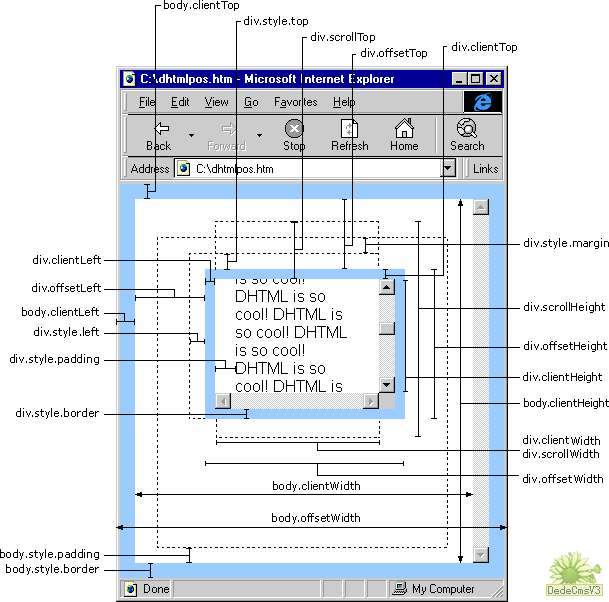
1、offsetWidth  width+padding+border)
当前对象的宽度。
style.width也是当前对象的宽度(width+padding+border)。
区别:1)style.width返回值除了数字外还带有单位px;
2)如对象的宽度设定值为百分比宽度,则无论页面变大还是变小,
style.width都返回此百分比,而offsetWidth则返回在不同页面中对象的宽度值而不是百分比值;
3)如果没有给 HTML 元素指定过 width样式,则 style.width 返回的是空字符串;
2、offsetHeight :(Height+padding+border)
当前对象的高度。
style.height也是当前对象的高度(height+padding+border)。
区别:1)style.height返回值除了数字外还带有单位px;
2)如对象的高度设定值为百分比高度,则无论页面变高还是变矮,
style.height都返回此百分比,而offsetHeight则返回在不同页面中对象的高度值而不是百分比值;
3)如果没有给 HTML 元素指定过 height样式,则 style.height返回的是空字符串;
3、offsetLeft :
当前对象到其上级层左边的距离。
不能对其进行赋值.设置对象到其上级层左边的距离请用style.left属性。
style.left当前对象到其上级层左边的距离。
区别:1)style.left返回值除了数字外还带有单位px;
2)如对象到其上级层左边的距离设定值为百分比,
style.left返回此百分比,而offsetLeft则返回到其上级层左边的距离的值;
3)如果没有给 HTML 元素指定过 left样式,则 style.left返回的是空字符串;
4、offsetTop :
当前对象到其上级层顶部边的距离。
不能对其进行赋值.设置对象到上级层顶部边的距离请用style.top属性。
style.top当前对象到其上级层顶部边的距离。
区别:1)style.top返回值除了数字外还带有单位px;
2)如对象到其上级层顶部边的距离设定值为百分比,
style.top返回此百分比,而offsetTop则返回到其上级顶部边的距离的值;
3)如果没有给 HTML 元素指定过 top样式,则 style.top返回的是空字符串;
注意:如果上级层为body,由于IE、FF对padding、margin的解释不一样所以要明确规定处理不是下列的区别就不成立了。
IE 1)如果Div的上级层是body,而div与body之间有个div,如body->div->divo;divo的offsetTop=div的padding+margin+boder;
2)如果Div的上级层是body,如body>divo;divo的offsetTop=div的padding+margin+boder;
这divo的offsetTop=divo的margin >body.padding则为divo的margin,否则为body.padding谁大是谁?
FF 上述两种情况:offsetTop=margin+padding ;
(IE与FF中的body默认padding为10)在IE6.0 FF3.6.13
5、scrollWidth:获取对象的滚动宽度 。
6、scrollHeight: 获取对象的滚动高度。
7、scrollLeft:设置或获取位于对象左边界和对象中目前可见内容的最左端之间的距离(width+padding为一体)
8、scrollTop:设置或获取位于对象最顶端和对象中可见内容的最顶端之间的距离;(height+padding为一体)
9、clientWidth: 获取对象可见内容的宽度,不包括滚动条,不包括边框;
10、clientHeight: 获取对象可见内容的高度,不包括滚动条,不包括边框;
11、clientLeft: 获取对象的border宽度
12、clientTop:获取对象的border高度
13、offsetParent :当前对象的上级层对象.
IE6.0、FF1.06+:
clientWidth = width + padding
clientHeight = height + padding
offsetWidth = width + padding + border
offsetHeight = height + padding + border
IE5.0/5.5:
clientWidth = width - border
clientHeight = height - border
offsetWidth = width
offsetHeight = height
以上属性测试的文档类型为:
<!DOCTYPE html PUBLIC "-//W3C//DTD XHTML 1.0 Transitional//EN" "http://www.w3.org/TR/xhtml1/DTD/xhtml1-transitional.dtd">
如果不写文档类型,浏览器就会按照 HTML 4.0 的方式来处理,则效果可能不同。
JS中关于clientWidth offsetWidth scrollWidth 等的含义的更多相关文章
- JQuery中width和JS中JS中关于clientWidth offsetWidth scrollWidth 等的含义
JQuery中: width()方法用于获得元素宽度: innerWidth()方法用于获得包括内边界(padding)的元素宽度: outerWidth()方法用于获得包括内边界(padding)和 ...
- js中的clientWidth offsetWidth scrollWidth等的含义
网页可见区域宽: document.body.clientWidth;网页可见区域高: document.body.clientHeight;网页可见区域宽: document.body.offset ...
- JS中关于clientWidth offsetWidth scrollWidth 等的含义的详细介绍
网页可见区域宽: document.body.clientWidth;网页可见区域高: document.body.clientHeight;网页可见区域宽: document.body.offset ...
- JS中关于clientWidth offsetWidth scrollWidth 的区别及意义
网页可见区域宽: document.body.clientWidth;网页可见区域高: document.body.clientHeight;网页可见区域宽: document.body.offset ...
- JS中关于clientWidth offsetWidth scrollWidth 等的区别
网页可见区域宽: document.body.clientWidth;网页可见区域高: document.body.clientHeight;网页可见区域宽: document.body.offset ...
- JS中关于clientWidth offsetWidth srollWidth等的含义
网页可见区域宽: document.body.clientWidth;网页可见区域高: document.body.clientHeight;网页可见区域宽: document.body.offset ...
- clientWidth,offsetWidth,scrollWidth区别
<html> <head> <title>clientWidth,offsetWidth,scrollWidth区别</title> </head ...
- clientWidth offsetWidth scrollWidth
网页可见区域宽: document.body.clientWidth;网页可见区域高: document.body.clientHeight;网页可见区域宽: document.body.offset ...
- js中clientWidth, scrollWidth, innerWidth, outerWidth,offsetWidth的区别
js中clientWidth, scrollWidth, innerWidth, outerWidth,offsetWidth的属性汇总,测试浏览器:ie7~ie11.chrome 和 firefox ...
随机推荐
- android ViewPager使用遇到的问题
项目需求是需要实现一个有两页可滑动的界面,就想到了使用ViewPager,在实现是没有深入考虑,就直接使用了PagerAdapter,页面是正常实现了,可是发现无法流畅的刷新页面(直接使用notify ...
- .dtsi .dts dtc dtb 是什么
基础 .dts: device tree source .dtsi: device tree source include .dts比作源文件,.dtsi比作头文件. dtc是linux源码 /s ...
- 历尽磨难之PL/SQL链接Oracle数据库
说起来都是泪啊,上司布置的任务需要远程连接Oracle数据库,说实话这又是我人生中的第一次.我听到以后觉得不是什么大问题,然而我错了..错的很厉害! 我搞了一天一夜才弄好,这里面原因有很多,大体来讲还 ...
- 封装的ajax请求
在做登录注册这类提交表单数据时,我们经常需要局部刷新网页来验证用户输入的信息,这就需要用到ajax请求,我们通常需要获取表单中的数据,发起ajax请求,通过服务程序,与数据库的数据进行比对,判断信息的 ...
- C#位运算讲解与示例
首先每一个权限数都是2的N次方数 如:k1=2 ; //添加 k2=4 ; //删除 k3=8; //修改 ... 如此定义功能权限数,当需要组合权限时,就需要对各个所拥有的权限数按位或了. 如: p ...
- 尝试用md编辑器写博客, 内容为 jupyter笔记
Matplotlib tutorial http://www.labri.fr/perso/nrougier/teaching/matplotlib/#introduction %matplotlib ...
- 锁相关知识 & mutex怎么实现的 & spinlock怎么用的 & 怎样避免死锁 & 内核同步机制 & 读写锁
spinlock在上一篇文章有提到:http://www.cnblogs.com/charlesblc/p/6254437.html 通过锁数据总线来实现. 而看了这篇文章说明:mutex内部也用到 ...
- python迭代器
首先解释以下迭代器跟可迭代对象(Iterable)的区别,可以直接作用于for循环或者实现了__iter__的对象统称为可迭代对象(Iterable).可以被next()函数调用并不断返回下一个值的对 ...
- ant 错误 Specified VM install not found: type Standard VM, name jdk1.6.0_27
ant 错误 ant Specified VM install not found: type Standard VM, name jdk1.6.0_27 原因: 安装了新的jdk, 在workspa ...
- ORACLE RAISE
ORACLE 出错信息的输出 偷懒的办法直接在Exception 后使用raise但是错误信息不是很完整使用RAISE_APPLICATION_ERROR(-20999, DBMS_UTILITY.f ...