
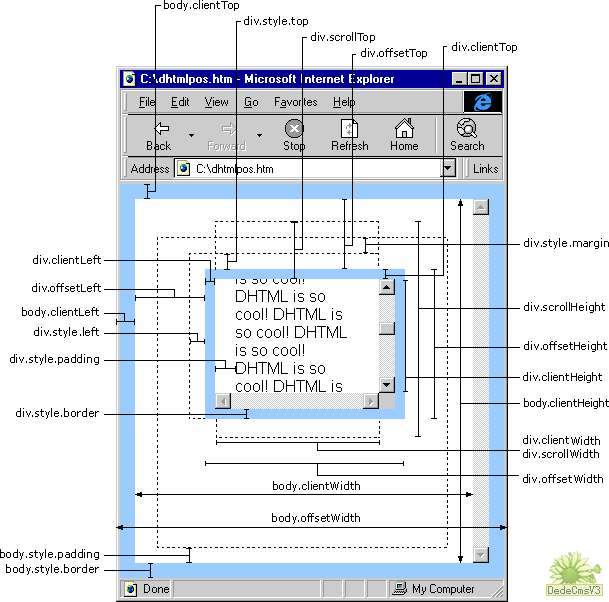
clientWidth offsetWidth scrollWidth
网页可见区域宽: document.body.clientWidth;
网页可见区域高: document.body.clientHeight;
网页可见区域宽: document.body.offsetWidth (包括边线的宽);
网页可见区域高: document.body.offsetHeight (包括边线的宽);
网页正文全文宽: document.body.scrollWidth;
网页正文全文高: document.body.scrollHeight;
网页被卷去的高: document.body.scrollTop;
网页被卷去的左: document.body.scrollLeft;
网页正文部分上: window.screenTop;
网页正文部分左: window.screenLeft;
屏幕分辨率的高: window.screen.height;
屏幕分辨率的宽: window.screen.width;
屏幕可用工作区高度: window.screen.availHeight;
屏幕可用工作区宽度:window.screen.availWidth;
1、offsetWidth  width+padding+border)
当前对象的宽度。
style.width也是当前对象的宽度(width+padding+border)。
区别:1)style.width返回值除了数字外还带有单位px;
2)如对象的宽度设定值为百分比宽度,则无论页面变大还是变小,
style.width都返回此百分比,而offsetWidth则返回在不同页面中对象的宽度值而不是百分比值;
3)如果没有给 HTML 元素指定过 width样式,则 style.width 返回的是空字符串;
2、offsetHeight :(Height+padding+border)
当前对象的高度。
style.height也是当前对象的高度(height+padding+border)。
区别:1)style.height返回值除了数字外还带有单位px;
2)如对象的高度设定值为百分比高度,则无论页面变高还是变矮,
style.height都返回此百分比,而offsetHeight则返回在不同页面中对象的高度值而不是百分比值;
3)如果没有给 HTML 元素指定过 height样式,则 style.height返回的是空字符串;
3、offsetLeft :
当前对象到其上级层左边的距离。
不能对其进行赋值.设置对象到其上级层左边的距离请用style.left属性。
style.left当前对象到其上级层左边的距离。
区别:1)style.left返回值除了数字外还带有单位px;
2)如对象到其上级层左边的距离设定值为百分比,
style.left返回此百分比,而offsetLeft则返回到其上级层左边的距离的值;
3)如果没有给 HTML 元素指定过 left样式,则 style.left返回的是空字符串;
4、offsetTop :
当前对象到其上级层顶部边的距离。
不能对其进行赋值.设置对象到上级层顶部边的距离请用style.top属性。
style.top当前对象到其上级层顶部边的距离。
区别:1)style.top返回值除了数字外还带有单位px;
2)如对象到其上级层顶部边的距离设定值为百分比,
style.top返回此百分比,而offsetTop则返回到其上级顶部边的距离的值;
3)如果没有给 HTML 元素指定过 top样式,则 style.top返回的是空字符串;
注意:如果上级层为body,由于IE、FF对padding、margin的解释不一样所以要明确规定处理不是下列的区别就不成立了。
IE 1)如果Div的上级层是body,而div与body之间有个div,如body->div->divo;divo的offsetTop=div的padding+margin+boder;
2)如果Div的上级层是body,如body>divo;divo的offsetTop=div的padding+margin+boder;
这divo的offsetTop=divo的margin >body.padding则为divo的margin,否则为body.padding谁大是谁?
FF 上述两种情况:offsetTop=margin+padding ;
(IE与FF中的body默认padding为10)在IE6.0 FF3.6.13
5、scrollWidth:获取对象的滚动宽度 。
6、scrollHeight: 获取对象的滚动高度。
7、scrollLeft:设置或获取位于对象左边界和对象中目前可见内容的最左端之间的距离(width+padding为一体)
8、scrollTop:设置或获取位于对象最顶端和对象中可见内容的最顶端之间的距离;(height+padding为一体)
9、clientWidth: 获取对象可见内容的宽度,不包括滚动条,不包括边框;
10、clientHeight: 获取对象可见内容的高度,不包括滚动条,不包括边框;
11、clientLeft: 获取对象的border宽度
12、clientTop:获取对象的border高度
13、offsetParent :当前对象的上级层对象.
IE6.0、FF1.06+:
clientWidth = width + padding
clientHeight = height + padding
offsetWidth = width + padding + border
offsetHeight = height + padding + border
IE5.0/5.5:
clientWidth = width - border
clientHeight = height - border
offsetWidth = width
offsetHeight = height
以上属性测试的文档类型为:
<!DOCTYPE html PUBLIC "-//W3C//DTD XHTML 1.0 Transitional//EN" "http://www.w3.org/TR/xhtml1/DTD/xhtml1-transitional.dtd">
如果不写文档类型,浏览器就会按照 HTML 4.0 的方式来处理,则效果可能不同。
clientWidth offsetWidth scrollWidth的更多相关文章
- clientWidth,offsetWidth,scrollWidth区别
<html> <head> <title>clientWidth,offsetWidth,scrollWidth区别</title> </head ...
- JS中关于clientWidth offsetWidth scrollWidth 的区别及意义
网页可见区域宽: document.body.clientWidth;网页可见区域高: document.body.clientHeight;网页可见区域宽: document.body.offset ...
- JS中关于clientWidth offsetWidth scrollWidth 等的含义
网页可见区域宽: document.body.clientWidth;网页可见区域高: document.body.clientHeight;网页可见区域宽: document.body.offset ...
- js中的clientWidth offsetWidth scrollWidth等的含义
网页可见区域宽: document.body.clientWidth;网页可见区域高: document.body.clientHeight;网页可见区域宽: document.body.offset ...
- JQuery中width和JS中JS中关于clientWidth offsetWidth scrollWidth 等的含义
JQuery中: width()方法用于获得元素宽度: innerWidth()方法用于获得包括内边界(padding)的元素宽度: outerWidth()方法用于获得包括内边界(padding)和 ...
- JS中关于clientWidth offsetWidth scrollWidth 等的区别
网页可见区域宽: document.body.clientWidth;网页可见区域高: document.body.clientHeight;网页可见区域宽: document.body.offset ...
- JS中关于clientWidth offsetWidth scrollWidth 等的含义的详细介绍
网页可见区域宽: document.body.clientWidth;网页可见区域高: document.body.clientHeight;网页可见区域宽: document.body.offset ...
- HTML精确定位:scrollLeft,scrollWidth,clientWidth,offsetWidth
HTML精确定位:scrollLeft,scrollWidth,clientWidth,offsetWidth scrollHeight: 获取对象的滚动高度. scrollLeft:设置或获取位于对 ...
- scrollWidth,clientWidth,offsetWidth的区别
通过一个demo测试这三个属性的差别. 说明: scrollWidth:对象的实际内容的宽度,不包边线宽度,会随对象中内容超过可视区后而变大. clientWidth:对象内容的可视区的宽度,不包 ...
随机推荐
- 【BZOJ4517】[Sdoi2016]排列计数 组合数+错排
[BZOJ4517][Sdoi2016]排列计数 Description 求有多少种长度为 n 的序列 A,满足以下条件: 1 ~ n 这 n 个数在序列中各出现了一次 若第 i 个数 A[i] 的值 ...
- 170425、centos安装mysql5.6数据库
# rpm -qa | grep mysql ## 查看该操作系统上是否已经安装了 mysql 数据库, 有的话,可以通过 rpm -e 命令 或者 rpm -e --nodeps 命令来卸载掉 # ...
- FZU 2144 Shooting Game (贪心区域划分)
Problem 2144 Shooting Game Accept: 370 Submit: 1902 Time Limit: 1000 mSec Memory Limit : 32768 KB Pr ...
- Cgroups子系统介绍
blkio -- 这个子系统为块设备设定输入/输出限制,比如物理设备(磁盘,固态硬盘,USB 等等). cpu -- 这个子系统使用调度程序提供对 CPU 的 cgroup 任务访问. cpuacct ...
- UEFI,BIOS,MBR,
UEFI启动是一种新的主板引导项,正被看做是有近20多年历史的BIOS 的继任者.顾名思义,快速启动是可以提高开机后操作系统的启动速度.由于开机过程中UEFI的介入 第一:安全性更强 UEFI启动需要 ...
- CF#301 B:School Marks(贪心)
B:School Marks 有n个测试,已经完成了k个,每个测试得分为a[i],接下来的分数不知道,让我们求出任何一个满足题意的即可,满足题意就是n个测试的得分总和<=x, 中位数>=y ...
- app瘦身和包压缩技术有什么区别?
APP瘦身 针对app文件中的文件进行优化,利用素材的拉伸,祛除不必要的文件,优化png, jpg素材,压缩音视频素材等方式实现app文件的减小. 包压缩技术 所谓包压缩,顾名思义就是将手游的安装包体 ...
- luarocks安装以及lfs安装
一.先安装lua: brew install lua 我本机的安装路径为:/usr/local/Cellar/lua/5.3.4_2 二.安装luarocks 下载luarocks的安装包: http ...
- git学习------>git-rev-parse命令初识
一.准备工作 第一步:在d盘git test目录下,新建工作区根目录demo,进入该目录后,执行git init创建版本库. DH207891+OuyangPeng@DH207891 MINGW32 ...
- K近邻python
有一个带标签的数据集X,标签为y.我们想通过这个数据集预测目标点x0的所属类别. K近邻算法是指在X的特征空间中,把x0放进去,然后找到距离x0最近的K个点.通过这K个点所属类别,一般根据少数服从多数 ...