
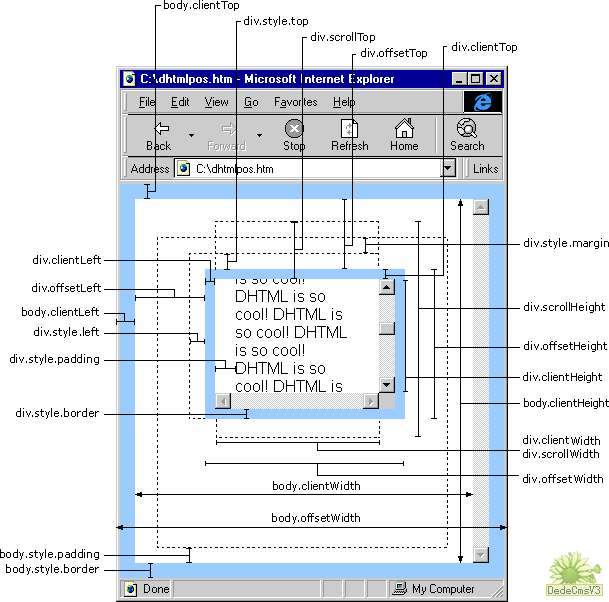
js中的clientWidth offsetWidth scrollWidth等的含义
网页可见区域宽: document.body.clientWidth;
网页可见区域高: document.body.clientHeight;
网页可见区域宽: document.body.offsetWidth (包括边线的宽);
网页可见区域高: document.body.offsetHeight (包括边线的宽);
网页正文全文宽: document.body.scrollWidth;
网页正文全文高: document.body.scrollHeight;
网页被卷去的高: document.body.scrollTop;
网页被卷去的左: document.body.scrollLeft;
网页正文部分上: window.screenTop;
网页正文部分左: window.screenLeft;
屏幕分辨率的高: window.screen.height;
屏幕分辨率的宽: window.screen.width;
屏幕可用工作区高度: window.screen.availHeight;
屏幕可用工作区宽度:window.screen.availWidth;
1、offsetWidth  width+padding+border)
当前对象的宽度。
style.width也是当前对象的宽度(width+padding+border)。
区别:1)style.width返回值除了数字外还带有单位px;
2)如对象的宽度设定值为百分比宽度,则无论页面变大还是变小,
style.width都返回此百分比,而offsetWidth则返回在不同页面中对象的宽度值而不是百分比值;
3)如果没有给 HTML 元素指定过 width样式,则 style.width 返回的是空字符串;
2、offsetHeight :(Height+padding+border)
当前对象的高度。
style.height也是当前对象的高度(height+padding+border)。
区别:1)style.height返回值除了数字外还带有单位px;
2)如对象的高度设定值为百分比高度,则无论页面变高还是变矮,
style.height都返回此百分比,而offsetHeight则返回在不同页面中对象的高度值而不是百分比值;
3)如果没有给 HTML 元素指定过 height样式,则 style.height返回的是空字符串;
3、offsetLeft :
当前对象到其上级层左边的距离。
不能对其进行赋值.设置对象到其上级层左边的距离请用style.left属性。
style.left当前对象到其上级层左边的距离。
区别:1)style.left返回值除了数字外还带有单位px;
2)如对象到其上级层左边的距离设定值为百分比,
style.left返回此百分比,而offsetLeft则返回到其上级层左边的距离的值;
3)如果没有给 HTML 元素指定过 left样式,则 style.left返回的是空字符串;
4、offsetTop :
当前对象到其上级层顶部边的距离。
不能对其进行赋值.设置对象到上级层顶部边的距离请用style.top属性。
style.top当前对象到其上级层顶部边的距离。
区别:1)style.top返回值除了数字外还带有单位px;
2)如对象到其上级层顶部边的距离设定值为百分比,
style.top返回此百分比,而offsetTop则返回到其上级顶部边的距离的值;
3)如果没有给 HTML 元素指定过 top样式,则 style.top返回的是空字符串;
注意:如果上级层为body,由于IE、FF对padding、margin的解释不一样所以要明确规定处理不是下列的区别就不成立了。
IE 1)如果Div的上级层是body,而div与body之间有个div,如body->div->divo;divo的offsetTop=div的padding+margin+boder;
2)如果Div的上级层是body,如body>divo;divo的offsetTop=div的padding+margin+boder;
这divo的offsetTop=divo的margin >body.padding则为divo的margin,否则为body.padding谁大是谁?
FF 上述两种情况:offsetTop=margin+padding ;
(IE与FF中的body默认padding为10)在IE6.0 FF3.6.13
5、scrollWidth:获取对象的滚动宽度 。
6、scrollHeight: 获取对象的滚动高度。
7、scrollLeft:设置或获取位于对象左边界和对象中目前可见内容的最左端之间的距离(width+padding为一体)
8、scrollTop:设置或获取位于对象最顶端和对象中可见内容的最顶端之间的距离;(height+padding为一体)
9、clientWidth: 获取对象可见内容的宽度,不包括滚动条,不包括边框;
10、clientHeight: 获取对象可见内容的高度,不包括滚动条,不包括边框;
11、clientLeft: 获取对象的border宽度
12、clientTop:获取对象的border高度
13、offsetParent :当前对象的上级层对象.
IE6.0、FF1.06+:
clientWidth = width + padding
clientHeight = height + padding
offsetWidth = width + padding + border
offsetHeight = height + padding + border
IE5.0/5.5:
clientWidth = width - border
clientHeight = height - border
offsetWidth = width
offsetHeight = height
以上属性测试的文档类型为:
<!DOCTYPE html PUBLIC "-//W3C//DTD XHTML 1.0 Transitional//EN" "http://www.w3.org/TR/xhtml1/DTD/xhtml1-transitional.dtd">
如果不写文档类型,浏览器就会按照 HTML 4.0 的方式来处理,则效果可能不同。
js中的clientWidth offsetWidth scrollWidth等的含义的更多相关文章
- JQuery中width和JS中JS中关于clientWidth offsetWidth scrollWidth 等的含义
JQuery中: width()方法用于获得元素宽度: innerWidth()方法用于获得包括内边界(padding)的元素宽度: outerWidth()方法用于获得包括内边界(padding)和 ...
- JS中关于clientWidth offsetWidth scrollWidth 等的含义
网页可见区域宽: document.body.clientWidth;网页可见区域高: document.body.clientHeight;网页可见区域宽: document.body.offset ...
- JS中关于clientWidth offsetWidth scrollWidth 等的含义的详细介绍
网页可见区域宽: document.body.clientWidth;网页可见区域高: document.body.clientHeight;网页可见区域宽: document.body.offset ...
- JS中关于clientWidth offsetWidth scrollWidth 的区别及意义
网页可见区域宽: document.body.clientWidth;网页可见区域高: document.body.clientHeight;网页可见区域宽: document.body.offset ...
- JS中关于clientWidth offsetWidth scrollWidth 等的区别
网页可见区域宽: document.body.clientWidth;网页可见区域高: document.body.clientHeight;网页可见区域宽: document.body.offset ...
- JS中关于clientWidth offsetWidth srollWidth等的含义
网页可见区域宽: document.body.clientWidth;网页可见区域高: document.body.clientHeight;网页可见区域宽: document.body.offset ...
- clientWidth,offsetWidth,scrollWidth区别
<html> <head> <title>clientWidth,offsetWidth,scrollWidth区别</title> </head ...
- clientWidth offsetWidth scrollWidth
网页可见区域宽: document.body.clientWidth;网页可见区域高: document.body.clientHeight;网页可见区域宽: document.body.offset ...
- js中clientWidth, scrollWidth, innerWidth, outerWidth,offsetWidth的区别
js中clientWidth, scrollWidth, innerWidth, outerWidth,offsetWidth的属性汇总,测试浏览器:ie7~ie11.chrome 和 firefox ...
随机推荐
- 常用的js事件
onmouseover:鼠标放上去时触发事件 onmouseout:鼠标从上面移开时触发事件 onclick:鼠标单击事件 onfocus:获得焦点 onblur:失去焦点 onchange:下拉菜单 ...
- Centos安装vncserver服务
vnc是一款Windows远程桌面软件,其优点是支持跨操作系统的远程图形化控制.下面开始记录第一次安装vnc服务的过程. 1.先检查系统是否有安装VNC服务 [root@localhost ~]# [ ...
- Spring-MVC填坑之旅-返回json数据
本文是自己开发中所遇到的问题,对一些及百度到的解决方案做一个记录. DispatcherServlet配置文件 <!-- 定义跳转的文件的前后缀 ,视图模式配置--> <bean i ...
- 自定义GridLayout实现条目的拖动动画特效
1.自定义GridLayout实现增加条目过度动画操作 public class MyGridLayout extends GridLayout { public MyGridLayout(Conte ...
- EventBus消息机制在Eclipse环境下的使用
1.在onStart()方法中注册 @Override public void onStart() { super.onStart(); // 注册 EventBus // 判断 Eventbus 是 ...
- 自动安装Redis服务端与PHP扩展Redis
该脚本基于阿里云服务器安装脚本,并只能运用于centos / aliyun os,该脚本使用时,需要与阿里云安装脚本的install.sh放在同一目录下.有缘人切忌乱用: #! /bin/bash # ...
- hashmap冲突的解决方法以及原理分析:
在Java编程语言中,最基本的结构就是两种,一种是数组,一种是模拟指针(引用),所有的数据结构都可以用这两个基本结构构造,HashMap也一样.当程序试图将多个 key-value 放入 HashMa ...
- mvn 如何添加本地jar包 IDEA pom.xm
-------------背景介绍------------------------------------ 最近做的项目,就是office在线浏览功能, 使用的是openoffice+jodconve ...
- js-学习方法之3
熟悉JavaScript每一个方法的作用 这一要求听起来似乎有点不太实际,我想这个要求对于像C#.JAVA这些大型语言来说确实是,因为这些语言类库实在太庞大了,相信没有人可以全面记住它,而且也是没有必 ...
- CentOS 6.0找不到ifcfg-eth0解决方案
症状: /etc/sysconfig/network-scripts/中只有ifcfg-lo文件,而没有ifcfg-eth0. 终端中执行命令ifconfig显示的信息为ifcfg-lo的信息 ...