
Java广度优先爬虫示例(抓取复旦新闻信息)
以下内容仅供学习交流使用,请勿做他用,否则后果自负。
一.使用的技术
这个爬虫是近半个月前学习爬虫技术的一个小例子,比较简单,怕时间久了会忘,这里简单总结一下.主要用到的外部Jar包有HttpClient4.3.4,HtmlParser2.1,使用的开发工具(IDE)为intelij 13.1,Jar包管理工具为Maven,不习惯用intelij的同学,也可以使用eclipse新建一个项目.
二.爬虫基本知识
1.什么是网络爬虫?(爬虫的基本原理)
网络爬虫,拆开来讲,网络即指互联网,互联网就像一个蜘蛛网一样,爬虫就像是蜘蛛一样可以到处爬来爬去,把爬来的数据再进行加工处理.
百科上的解释:网络爬虫(又被称为网页蜘蛛,网络机器人,在FOAF社区中间,更经常的称为网页追逐者),是一种按照一定的规则,自动的抓取万维网信息的程序或者脚本。另外一些不常使用的名字还有蚂蚁,自动索引,模拟程序或者蠕虫。
基本原理:传统爬虫从一个或若干初始网页的URL开始,获得初始网页上的URL,在抓取网页的过程中,不断从当前页面上抽取新的URL放入队列,直到满足系统的一定停止条件,流程图所示。聚焦爬虫的工作流程较为复杂,需要根据一定的网页分析算法过滤与主题无关的链接,保留有用的链接并将其放入等待抓取的URL队列。然后,它将根据一定的搜索策略从队列中选择下一步要抓取的网页URL,并重复上述过程,直到达到系统的某一条件时停止
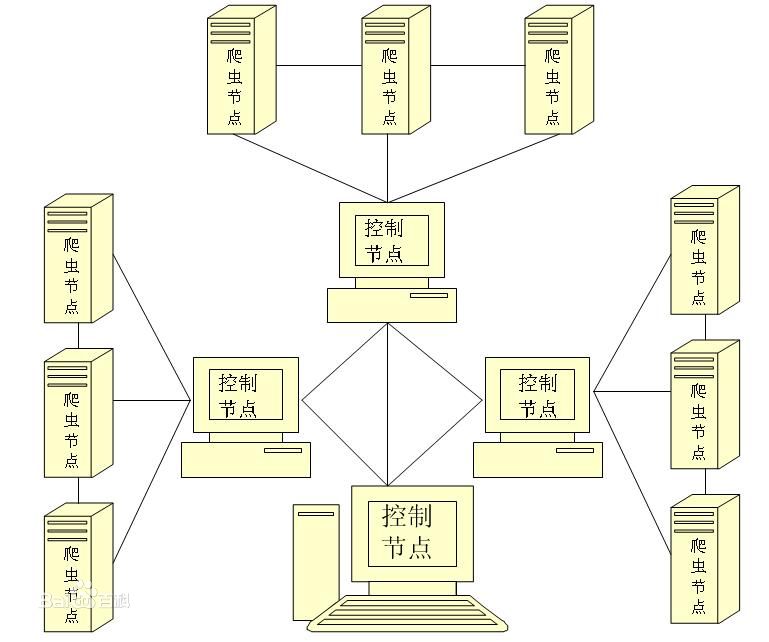
2.常用的爬虫策略有哪些?
网页的抓取策略可以分为深度优先、广度优先和最佳优先三种。深度优先在很多情况下会导致爬虫的陷入(trapped)问题,目前常见的是广度优先和最佳优先方法。
2.1广度优先(Width-First)
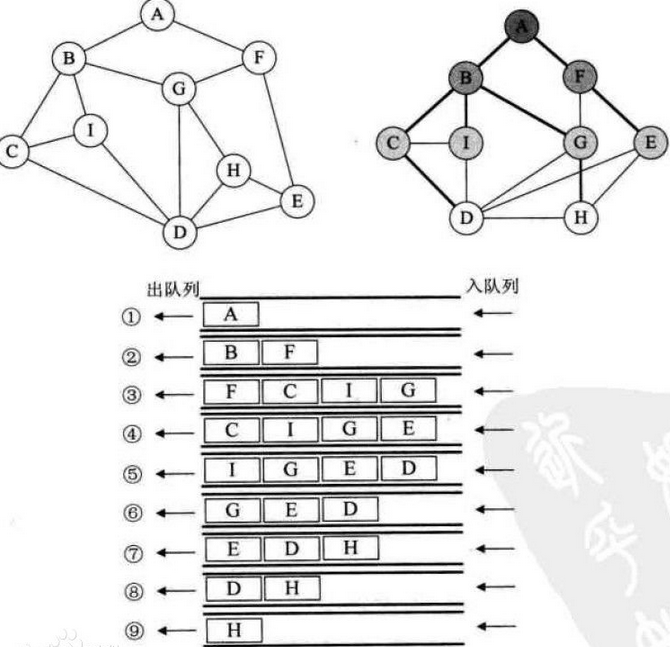
广度优先遍历是连通图的一种遍历策略。因为它的思想是从一个顶点V0开始,辐射状地优先遍历其周围较广的区域,故得名.
其基本思想:
如下图所示:
2.2深度优先(Depth-First)
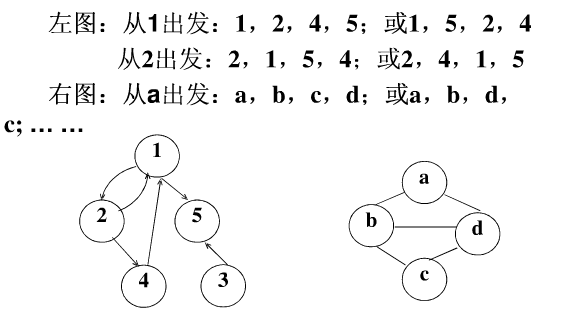
下面以一个有向图和一个无向图为例:
广度和深度和区别:
广度优先遍历是以层为顺序,将某一层上的所有节点都搜索到了之后才向下一层搜索;而深度优先遍历是将某一条枝桠上的所有节点都搜索到了之后,才转向搜索另一条枝桠上的所有节点。
2.3 最佳优先搜索
最佳优先搜索策略按照一定的网页分析算法,预测候选URL与目标网页的相似度,或与主题的相关性,并选取评价最好的一个或几个URL进行抓取。它只访问经过网页分析算法预测为“有用”的网页。这种搜索适合暗网数据的爬取,只要符合要求的内容.
3.本文爬虫示例图
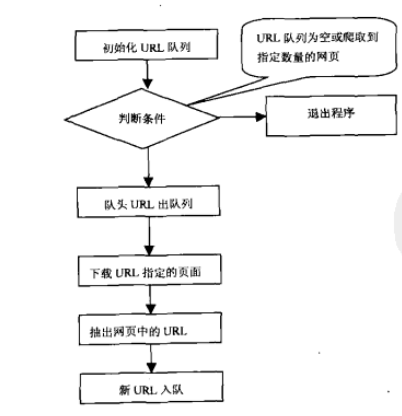
本文介绍的例子是抓取新闻类的信息,因为一般新闻类的信息,重要的和时间近的都会放在首页,处在网络层中比较深的信息的重要性一般将逐级降低,所以广度优先算法更适合,下图是本文将要抓取的网页结构图:
三.广度优先爬虫示例
1.需求:抓取复旦新闻信息(只抓取100个网页信息)
这里只抓取100条信息,并用url必须以new.fudan.edu.cn开头.
2.代码实现
使用maven引入外部jar包:
       <dependency>

            <groupId>org.apache.httpcomponents</groupId>

            <artifactId>httpclient</artifactId>

            <version>4.3.4</version>

        </dependency>

        <dependency>

            <groupId>org.htmlparser</groupId>

            <artifactId>htmlparser</artifactId>

            <version>2.1</version>

        </dependency>
程序主入口:
package com.amos.crawl;

import java.util.Set;

/**

 * Created by amosli on 14-7-10.

 */

public class MyCrawler {

    /**

     * 使用种子初始化URL队列

     *

     * @param seeds

     */

    private void initCrawlerWithSeeds(String[] seeds) {

        for (int i = 0; i < seeds.length; i++) {

            LinkQueue.addUnvisitedUrl(seeds[i]);

        }

    }

    public void crawling(String[] seeds) {

        //定义过滤器,提取以http://news.fudan.edu.cn/的链接

        LinkFilter filter = new LinkFilter() {

            @Override

            public boolean accept(String url) {

                if (url.startsWith("http://news.fudan.edu.cn")) {

                    return true;

                }

                return false;

            }

        };

        //初始化URL队列

        initCrawlerWithSeeds(seeds);

        int count=0;

        //循环条件:待抓取的链接不为空抓取的网页最多100条

        while (!LinkQueue.isUnvisitedUrlsEmpty() && LinkQueue.getVisitedUrlNum() <= 100) {

            System.out.println("count:"+(++count));

            //附头URL出队列

            String visitURL = (String) LinkQueue.unVisitedUrlDeQueue();

            DownLoadFile downloader = new DownLoadFile();

            //下载网页

            downloader.downloadFile(visitURL);

            //该URL放入怩访问的URL中

            LinkQueue.addVisitedUrl(visitURL);

            //提取出下载网页中的URL

            Set<String> links = HtmlParserTool.extractLinks(visitURL, filter);

            //新的未访问的URL入列

            for (String link : links) {

                System.out.println("link:"+link);

                LinkQueue.addUnvisitedUrl(link);

            }

        }

    }

    public static void main(String args[]) {

        //程序入口

        MyCrawler myCrawler = new MyCrawler();

        myCrawler.crawling(new String[]{"http://news.fudan.edu.cn/news/"});

    }

}
工具类:Tools.java
package com.amos.tool;

import java.io.*;

import java.net.URI;

import java.net.URISyntaxException;

import java.net.UnknownHostException;

import java.security.KeyManagementException;

import java.security.KeyStoreException;

import java.security.NoSuchAlgorithmException;

import java.security.cert.CertificateException;

import java.security.cert.X509Certificate;

import java.util.Locale;

import javax.net.ssl.SSLContext;

import javax.net.ssl.SSLException;

import org.apache.http.*;

import org.apache.http.client.CircularRedirectException;

import org.apache.http.client.CookieStore;

import org.apache.http.client.HttpRequestRetryHandler;

import org.apache.http.client.RedirectStrategy;

import org.apache.http.client.config.RequestConfig;

import org.apache.http.client.methods.HttpGet;

import org.apache.http.client.methods.HttpHead;

import org.apache.http.client.methods.HttpUriRequest;

import org.apache.http.client.methods.RequestBuilder;

import org.apache.http.client.protocol.HttpClientContext;

import org.apache.http.client.utils.URIBuilder;

import org.apache.http.client.utils.URIUtils;

import org.apache.http.conn.ConnectTimeoutException;

import org.apache.http.conn.HttpClientConnectionManager;

import org.apache.http.conn.ssl.SSLConnectionSocketFactory;

import org.apache.http.conn.ssl.SSLContextBuilder;

import org.apache.http.conn.ssl.TrustStrategy;

import org.apache.http.cookie.Cookie;

import org.apache.http.impl.client.*;

import org.apache.http.impl.conn.BasicHttpClientConnectionManager;

import org.apache.http.impl.cookie.BasicClientCookie;

import org.apache.http.protocol.HttpContext;

import org.apache.http.util.Args;

import org.apache.http.util.Asserts;

import org.apache.http.util.TextUtils;

import org.omg.CORBA.Request;

/**

 * Created by amosli on 14-6-25.

 */

public class Tools {

    /**

     * 写文件到本地

     *

     * @param httpEntity

     * @param filename

     */

    public static void saveToLocal(HttpEntity httpEntity, String filename) {

        try {

            File dir = new File(Configuration.FILEDIR);

            if (!dir.isDirectory()) {

                dir.mkdir();

            }

            File file = new File(dir.getAbsolutePath() + "/" + filename);

            FileOutputStream fileOutputStream = new FileOutputStream(file);

            InputStream inputStream = httpEntity.getContent();

            byte[] bytes = new byte[1024];

            int length = 0;

            while ((length = inputStream.read(bytes)) > 0) {

                fileOutputStream.write(bytes, 0, length);

            }

            inputStream.close();

            fileOutputStream.close();

        } catch (Exception e) {

            e.printStackTrace();

        }

    }

    /**

     * 写文件到本地

     *

     * @param bytes

     * @param filename

     */

    public static void saveToLocalByBytes(byte[] bytes, String filename) {

        try {

            File dir = new File(Configuration.FILEDIR);

            if (!dir.isDirectory()) {

                dir.mkdir();

            }

            File file = new File(dir.getAbsolutePath() + "/" + filename);

            FileOutputStream fileOutputStream = new FileOutputStream(file);

                fileOutputStream.write(bytes);

                //fileOutputStream.write(bytes, 0, bytes.length);

                fileOutputStream.close();

        } catch (Exception e) {

            e.printStackTrace();

        }

    }

    /**

     * 输出

     * @param string

     */

    public static void println(String string){

        System.out.println("string:"+string);

    }

    /**

     * 输出

     * @param string

     */

    public static void printlnerr(String string){

        System.err.println("string:"+string);

    }

    /**

     * 使用ssl通道并设置请求重试处理

     * @return

     */

    public static CloseableHttpClient createSSLClientDefault() {

        try {

            SSLContext sslContext = new SSLContextBuilder().loadTrustMaterial(null, new TrustStrategy() {

                //信任所有

                public boolean isTrusted(X509Certificate[] chain,String authType) throws CertificateException {

                    return true;

                }

            }).build();

            SSLConnectionSocketFactory sslsf = new SSLConnectionSocketFactory(sslContext);

            //设置请求重试处理,重试机制,这里如果请求失败会重试5次

            HttpRequestRetryHandler retryHandler = new HttpRequestRetryHandler() {

                @Override

                public boolean retryRequest(IOException exception, int executionCount, HttpContext context) {

                    if (executionCount >= 5) {

                        // Do not retry if over max retry count

                        return false;

                    }

                    if (exception instanceof InterruptedIOException) {

                        // Timeout

                        return false;

                    }

                    if (exception instanceof UnknownHostException) {

                        // Unknown host

                        return false;

                    }

                    if (exception instanceof ConnectTimeoutException) {

                        // Connection refused

                        return false;

                    }

                    if (exception instanceof SSLException) {

                        // SSL handshake exception

                        return false;

                    }

                    HttpClientContext clientContext = HttpClientContext.adapt(context);

                    HttpRequest request = clientContext.getRequest();

                    boolean idempotent = !(request instanceof HttpEntityEnclosingRequest);

                    if (idempotent) {

                        // Retry if the request is considered idempotent

                        return true;

                    }

                    return false;

                }

            };

            //请求参数设置,设置请求超时时间为20秒,连接超时为10秒,不允许循环重定向

            RequestConfig requestConfig = RequestConfig.custom()

                    .setConnectionRequestTimeout(20000).setConnectTimeout(20000)

                    .setCircularRedirectsAllowed(false)

                    .build();

            Cookie cookie ;

            return HttpClients.custom().setSSLSocketFactory(sslsf)

                    .setUserAgent("Mozilla/5.0 (X11; Linux x86_64) AppleWebKit/537.36 (KHTML, like Gecko) Chrome/35.0.1916.153 Safari/537.36")

                    .setMaxConnPerRoute(25).setMaxConnPerRoute(256)

                    .setRetryHandler(retryHandler)

                    .setRedirectStrategy(new SelfRedirectStrategy())

                    .setDefaultRequestConfig(requestConfig)

                    .build();

        } catch (KeyManagementException e) {

            e.printStackTrace();

        } catch (NoSuchAlgorithmException e) {

            e.printStackTrace();

        } catch (KeyStoreException e) {

            e.printStackTrace();

        }

        return HttpClients.createDefault();

    }

    /**

     * 带cookiestore

     * @param cookieStore

     * @return

     */

    public static CloseableHttpClient createSSLClientDefaultWithCookie(CookieStore cookieStore) {

        try {

            SSLContext sslContext = new SSLContextBuilder().loadTrustMaterial(null, new TrustStrategy() {

                //信任所有

                public boolean isTrusted(X509Certificate[] chain,String authType) throws CertificateException {

                    return true;

                }

            }).build();

            SSLConnectionSocketFactory sslsf = new SSLConnectionSocketFactory(sslContext);

            //设置请求重试处理,重试机制,这里如果请求失败会重试5次

            HttpRequestRetryHandler retryHandler = new HttpRequestRetryHandler() {

                @Override

                public boolean retryRequest(IOException exception, int executionCount, HttpContext context) {

                    if (executionCount >= 5) {

                        // Do not retry if over max retry count

                        return false;

                    }

                    if (exception instanceof InterruptedIOException) {

                        // Timeout

                        return false;

                    }

                    if (exception instanceof UnknownHostException) {

                        // Unknown host

                        return false;

                    }

                    if (exception instanceof ConnectTimeoutException) {

                        // Connection refused

                        return false;

                    }

                    if (exception instanceof SSLException) {

                        // SSL handshake exception

                        return false;

                    }

                    HttpClientContext clientContext = HttpClientContext.adapt(context);

                    HttpRequest request = clientContext.getRequest();

                    boolean idempotent = !(request instanceof HttpEntityEnclosingRequest);

                    if (idempotent) {

                        // Retry if the request is considered idempotent

                        return true;

                    }

                    return false;

                }

            };

            //请求参数设置,设置请求超时时间为20秒,连接超时为10秒,不允许循环重定向

            RequestConfig requestConfig = RequestConfig.custom()

                    .setConnectionRequestTimeout(20000).setConnectTimeout(20000)

                    .setCircularRedirectsAllowed(false)

                    .build();

            return HttpClients.custom().setSSLSocketFactory(sslsf)

                    .setUserAgent("Mozilla/5.0 (X11; Linux x86_64) AppleWebKit/537.36 (KHTML, like Gecko) Chrome/35.0.1916.153 Safari/537.36")

                    .setMaxConnPerRoute(25).setMaxConnPerRoute(256)

                    .setRetryHandler(retryHandler)

                    .setRedirectStrategy(new SelfRedirectStrategy())

                    .setDefaultRequestConfig(requestConfig)

                    .setDefaultCookieStore(cookieStore)

                    .build();

        } catch (KeyManagementException e) {

            e.printStackTrace();

        } catch (NoSuchAlgorithmException e) {

            e.printStackTrace();

        } catch (KeyStoreException e) {

            e.printStackTrace();

        }

        return HttpClients.createDefault();

    }

}
将网页写入到本地的下载类:DownLoadFile.java
package com.amos.crawl;

import com.amos.tool.Configuration;

import com.amos.tool.Tools;

import org.apache.http.*;

import org.apache.http.client.HttpClient;

import org.apache.http.client.HttpRequestRetryHandler;

import org.apache.http.client.config.RequestConfig;

import org.apache.http.client.methods.HttpGet;

import org.apache.http.client.protocol.HttpClientContext;

import org.apache.http.conn.ClientConnectionManager;

import org.apache.http.conn.ConnectTimeoutException;

import org.apache.http.impl.client.AutoRetryHttpClient;

import org.apache.http.impl.client.DefaultHttpClient;

import org.apache.http.protocol.HttpContext;

import javax.net.ssl.SSLException;

import java.io.*;

import java.net.UnknownHostException;

/**

 * Created by amosli on 14-7-9.

 */

public class DownLoadFile {

    public String getFileNameByUrl(String url, String contentType) {

        //移除http http://

        url = url.contains("http://") ? url.substring(7) : url.substring(8);

        //text/html类型

        if (url.contains(".html")) {

            url = url.replaceAll("[\\?/:*|<>\"]", "_");

        } else if (contentType.indexOf("html") != -1) {

            url = url.replaceAll("[\\?/:*|<>\"]", "_") + ".html";

        } else {

            url = url.replaceAll("[\\?/:*|<>\"]", "_") + "." + contentType.substring(contentType.lastIndexOf("/") + 1);

        }

        return url;

    }

    /**

     * 将网页写入到本地

     * @param data

     * @param filePath

     */

    private void saveToLocal(byte[] data, String filePath) {

        try {

            DataOutputStream out = new DataOutputStream(new FileOutputStream(new File(filePath)));

            for(int i=0;i<data.length;i++){

                out.write(data[i]);

            }

            out.flush();

            out.close();

        } catch (Exception e) {

            e.printStackTrace();

        }

    }

    /**

     * 写文件到本地

     *

     * @param httpEntity

     * @param filename

     */

    public static void saveToLocal(HttpEntity httpEntity, String filename) {

        try {

            File dir = new File(Configuration.FILEDIR);

            if (!dir.isDirectory()) {

                dir.mkdir();

            }

            File file = new File(dir.getAbsolutePath() + "/" + filename);

            FileOutputStream fileOutputStream = new FileOutputStream(file);

            InputStream inputStream = httpEntity.getContent();

            if (!file.exists()) {

                file.createNewFile();

            }

            byte[] bytes = new byte[1024];

            int length = 0;

            while ((length = inputStream.read(bytes)) > 0) {

                fileOutputStream.write(bytes, 0, length);

            }

            inputStream.close();

            fileOutputStream.close();

        } catch (Exception e) {

            e.printStackTrace();

        }

    }

    public String downloadFile(String url)  {

        //文件路径

        String filePath=null;

        //1.生成HttpClient对象并设置参数

        HttpClient httpClient = Tools.createSSLClientDefault();

        //2.HttpGet对象并设置参数

        HttpGet httpGet = new HttpGet(url);

        //设置get请求超时5s

        //方法1

        //httpGet.getParams().setParameter("connectTimeout",5000);

        //方法2

        RequestConfig requestConfig = RequestConfig.custom().setConnectTimeout(5000).build();

        httpGet.setConfig(requestConfig);

        try {

            HttpResponse httpResponse = httpClient.execute(httpGet);

            int statusCode = httpResponse.getStatusLine().getStatusCode();

            if(statusCode!= HttpStatus.SC_OK){

                System.err.println("Method failed:"+httpResponse.getStatusLine());

                filePath=null;

            }

            filePath=getFileNameByUrl(url,httpResponse.getEntity().getContentType().getValue());

            saveToLocal(httpResponse.getEntity(),filePath);

        } catch (Exception e) {

            e.printStackTrace();

        }

        return filePath;

    }

    public static void main(String args[]) throws IOException {

        String url = "http://websearch.fudan.edu.cn/search_dep.html";

        HttpClient httpClient = new DefaultHttpClient();

        HttpGet httpGet = new HttpGet(url);

        HttpResponse httpResponse = httpClient.execute(httpGet);

        Header contentType = httpResponse.getEntity().getContentType();

        System.out.println("name:" + contentType.getName() + "value:" + contentType.getValue());

        System.out.println(new DownLoadFile().getFileNameByUrl(url, contentType.getValue()));

    }

}
创建一个过滤接口:LinkFilter.java
package com.amos.crawl;

/**

 * Created by amosli on 14-7-10.

 */

public interface LinkFilter {

    public boolean accept(String url);

}
使用HtmlParser的过滤url的方法:HtmlParserTool.java
package com.amos.crawl;

import org.htmlparser.Node;

import org.htmlparser.NodeFilter;

import org.htmlparser.Parser;

import org.htmlparser.filters.NodeClassFilter;

import org.htmlparser.filters.OrFilter;

import org.htmlparser.tags.LinkTag;

import org.htmlparser.util.NodeList;

import java.util.HashSet;

import java.util.Set;

/**

 * Created by amosli on 14-7-10.

 */

public class HtmlParserTool {

    public static Set<String> extractLinks(String url, LinkFilter filter) {

        Set<String> links = new HashSet<String>();

        try {

            Parser parser = new Parser(url);

            parser.setEncoding("GBK");

            //过滤<frame>标签的filter,用来提取frame标签里的src属性

            NodeFilter framFilter = new NodeFilter() {

                @Override

                public boolean accept(Node node) {

                    if (node.getText().contains("frame src=")) {

                        return true;

                    } else {

                        return false;

                    }

                }

            };

            //OrFilter来设置过滤<a>标签和<frame>标签

            OrFilter linkFilter = new OrFilter(new NodeClassFilter(LinkTag.class), framFilter);

            //得到所有经过过滤的标签

            NodeList list = parser.extractAllNodesThatMatch(linkFilter);

            for (int i = 0; i < list.size(); i++) {

                Node tag = list.elementAt(i);

                if (tag instanceof LinkTag) {

                    tag = (LinkTag) tag;

                    String linkURL = ((LinkTag) tag).getLink();

                    //如果符合条件那么将url添加进去

                    if (filter.accept(linkURL)) {

                        links.add(linkURL);

                    }

                } else {//frame 标签

                    //frmae里src属性的链接,如<frame src="test.html" />

                    String frame = tag.getText();

                    int start = frame.indexOf("src=");

                    frame = frame.substring(start);

                    int end = frame.indexOf(" ");

                    if (end == -1) {

                        end = frame.indexOf(">");

                    }

                    String frameUrl = frame.substring(5, end - 1);

                    if (filter.accept(frameUrl)) {

                        links.add(frameUrl);

                    }

                }

            }

        } catch (Exception e) {

            e.printStackTrace();

        }

        return links;

    }

}
管理网页url的实现队列: Queue.java
package com.amos.crawl;

import java.util.LinkedList;

/**

 * Created by amosli on 14-7-9.

 */

public class Queue {

    //使用链表实现队列

    private LinkedList queueList = new LinkedList();

    //入队列

    public void enQueue(Object object) {

        queueList.addLast(object);

    }

    //出队列

    public Object deQueue() {

        return queueList.removeFirst();

    }

    //判断队列是否为空

    public boolean isQueueEmpty() {

        return queueList.isEmpty();

    }

    //判断队列是否包含ject元素..

    public boolean contains(Object object) {

        return queueList.contains(object);

    }

    //判断队列是否为空

    public boolean empty() {

        return queueList.isEmpty();

    }

}
网页链接进出队列的管理:LinkQueue.java
package com.amos.crawl;

import java.util.HashSet;

import java.util.Set;

/**

 * Created by amosli on 14-7-9.

 */

public class LinkQueue {

    //已经访问的队列

    private static Set visitedUrl = new HashSet();

    //未访问的队列

    private static Queue unVisitedUrl = new Queue();

    //获得URL队列

    public static Queue getUnVisitedUrl() {

        return unVisitedUrl;

    }

    public static Set getVisitedUrl() {

        return visitedUrl;

    }

    //添加到访问过的URL队列中

    public static void addVisitedUrl(String url) {

        visitedUrl.add(url);

    }

    //删除已经访问过的URL

    public static void removeVisitedUrl(String url){

        visitedUrl.remove(url);

    }

    //未访问的URL出队列

    public static Object unVisitedUrlDeQueue(){

        return unVisitedUrl.deQueue();

    }

    //保证每个URL只被访问一次,url不能为空,同时已经访问的URL队列中不能包含该url,而且因为已经出队列了所未访问的URL队列中也不能包含该url

    public static void addUnvisitedUrl(String url){

        if(url!=null&&!url.trim().equals("")&&!visitedUrl.contains(url)&&!unVisitedUrl.contains(url))

        unVisitedUrl.enQueue(url);

    }

    //获得已经访问过的URL的数量

    public static int getVisitedUrlNum(){

        return visitedUrl.size();

    }

    //判断未访问的URL队列中是否为空

    public static boolean isUnvisitedUrlsEmpty(){

        return unVisitedUrl.empty();

    }

}
抓取思路是:首先给出要抓取的url==>查询符合条件的url,并将其加入到队列中==>按顺序取出队列中的url,并访问之,同时取出符合条件的url==>下载队列中的url网页,即按层探索,最多限制100条数据.
3.3 截图

Java广度优先爬虫示例(抓取复旦新闻信息)的更多相关文章
- Python爬虫实战---抓取图书馆借阅信息
Python爬虫实战---抓取图书馆借阅信息 原创作品,引用请表明出处:Python爬虫实战---抓取图书馆借阅信息 前段时间在图书馆借了很多书,借得多了就容易忘记每本书的应还日期,老是担心自己会违约 ...
- 教您使用java爬虫gecco抓取JD全部商品信息
gecco爬虫 如果对gecco还没有了解可以参看一下gecco的github首页.gecco爬虫十分的简单易用,JD全部商品信息的抓取9个类就能搞定. JD网站的分析 要抓取JD网站的全部商品信息, ...
- java网络爬虫----------简单抓取慕课网首页数据
© 版权声明:本文为博主原创文章,转载请注明出处 一.分析 1.目标:抓取慕课网首页推荐课程的名称和描述信息 2.分析:浏览器F12分析得到,推荐课程的名称都放在class="course- ...
- java利用爬虫技术抓取(省、市(区号\邮编)、县)数据
近期项目须要用到 城市的地址信息,但从网上下载的xml数据没有几个是最新的地址信息.....数据太老,导致有些地区不全.所以才想到天气预报官网特定有最新最全的数据.贴出代码,希望能给有相同困惑的朋友. ...
- 【JAVA系列】Google爬虫如何抓取JavaScript的?
公众号:SAP Technical 本文作者:matinal 原文出处:http://www.cnblogs.com/SAPmatinal/ 原文链接:[JAVA系列]Google爬虫如何抓取Java ...
- Golang分布式爬虫:抓取煎蛋文章|Redis/Mysql|56,961 篇文章
--- layout: post title: "Golang分布式爬虫:抓取煎蛋文章" date: 2017-04-15 author: hunterhug categories ...
- Pyhton爬虫实战 - 抓取BOSS直聘职位描述 和 数据清洗
Pyhton爬虫实战 - 抓取BOSS直聘职位描述 和 数据清洗 零.致谢 感谢BOSS直聘相对权威的招聘信息,使本人有了这次比较有意思的研究之旅. 由于爬虫持续爬取 www.zhipin.com 网 ...
- 第三百三十四节,web爬虫讲解2—Scrapy框架爬虫—Scrapy爬取百度新闻,爬取Ajax动态生成的信息
第三百三十四节,web爬虫讲解2—Scrapy框架爬虫—Scrapy爬取百度新闻,爬取Ajax动态生成的信息 crapy爬取百度新闻,爬取Ajax动态生成的信息,抓取百度新闻首页的新闻rul地址 有多 ...
- 十三 web爬虫讲解2—Scrapy框架爬虫—Scrapy爬取百度新闻,爬取Ajax动态生成的信息
crapy爬取百度新闻,爬取Ajax动态生成的信息,抓取百度新闻首页的新闻rul地址 有多网站,当你浏览器访问时看到的信息,在html源文件里却找不到,由得信息还是滚动条滚动到对应的位置后才显示信息, ...
随机推荐
- iOS中的round ceil floorf表示的含义
round:如果参数是小数,则求本身的四舍五入. ceil:如果参数是小数,则求最小的整数但不小于本身. floor:如果参数是小数,则求最大的整数但不大于本身.
- MyBatis学习总结(八)——Mybatis3.x与Spring4.x整合(转载)
孤傲苍狼 只为成功找方法,不为失败找借口! MyBatis学习总结(八)--Mybatis3.x与Spring4.x整合 一.搭建开发环境 1.1.使用Maven创建Web项目 执行如下命令: m ...
- jQuery on 绑定的事件触发多次
jquery用on绑定事件,在代码执行过程中,可能会遇到多次执行的情况. 解决方案是在on的事件前面加上一个off,再on. $('#btnBind').off('click').on('click' ...
- centos 6.5 x64创建并挂载使用iscsi共享磁盘
前景摘要:NFS或iSCSI,哪个更好?文件 vs 块NFS使用文件级别的实施,服务器或存储阵列托管整个文件系统,客户到文件系统上读写文件,可以在阵列端对主存储数据进行重复数据删除.iSCSI和FC则 ...
- Macbook下virtualenv无法使用解决办法
Mac下删除自己安装的Python 删除Python框架sudo rm -rf /Library/Frameworks/Python.framework/Versions 删除Python程序sudo ...
- EBS中配置OAF
配置EBS的OAF作者 redqq 16:09 | 静态链接网址 | 最新回复 (0) | 引用 (0) | ERP学习 载jdev 9.03.5带Oracle Applications Extens ...
- Foundation框架—数据类(NSData)
一 NSData的使用 .string -> data NSString *str = @"changxiangweilai"; NSData *data = ...
- PHP memory_get_usage()管理内存
PHP memory_get_usage()管理内存 我们在实际编码中,要想实现对内存的查看和操作,许多程序员们第一个想到的就是PHP memory_get_usage()这个PHP脚本内存函数. 下 ...
- angular表单
angular的表单,点击确定进行创建,支持批量创建,表单验证有样式提醒; <!DOCTYPE html> <html lang="en"> <hea ...
- 解决低版本chrome浏览器不支持es6 Array.find()
if (!Array.prototype.find) { Array.prototype.find = function(predicate) { 'use strict'; if ( ...