
java爬虫-妹子图
一,分析
1.选择入口
打开 https://www.mzitu.com/ 主页,我们发现主页有200+页图片,我们如果从首页入手,这里可能不是全部图片。这里我们打开每日更新 https://www.mzitu.com/all/ ,从url上看这应该是所有的图片了,但是从网页上有个早期图片 的超链接 https://www.mzitu.com/old/ ,我们得知这两个url包含了所有的图片了。
2. 技术选型
作为爬虫学习阶段,我们的目标应该是不顾一切把想要的资源爬到手,至于使用java或者使用python,使用Linux还是Windows就有些无关紧要。
技术选型:HttpClient+Jsoup
3.深入分析
思路:
- 根据 https://www.mzitu.com/all/ 获取所有的album
- 使用HttpClient获取当前页面的html(字符串格式)
- 使用Jsoup解析html,获取每个album的url
- 获取每个album里的图片
- 根据每个album的url,获取每页的html
- 使用Jsoup解析html,获取图片src属性值
- 下载

获取所有的album的url
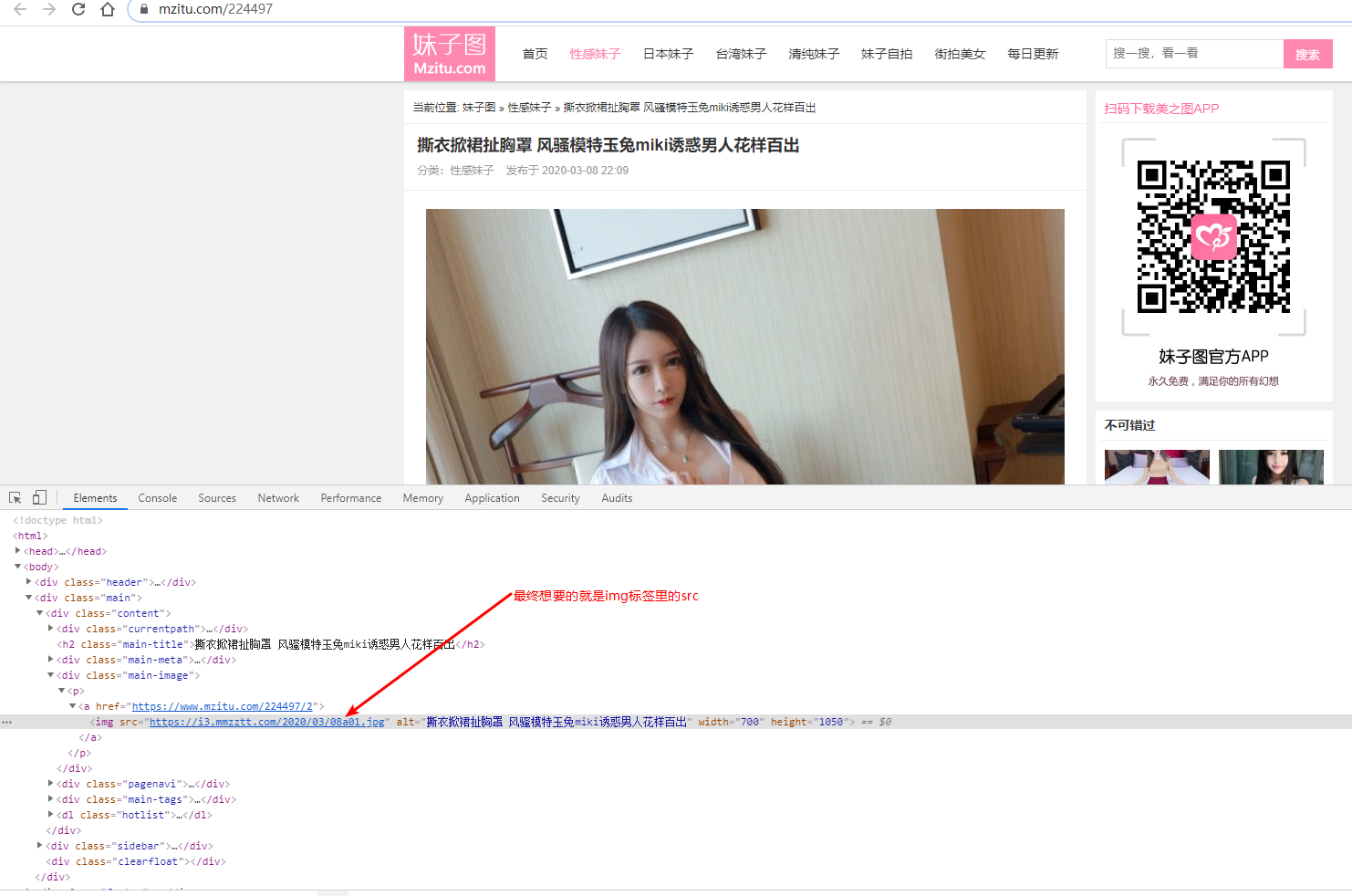
获取图片里的src,这里我们不禁想到怎么实现下一页呢?我们点击下一页按钮发现了规律
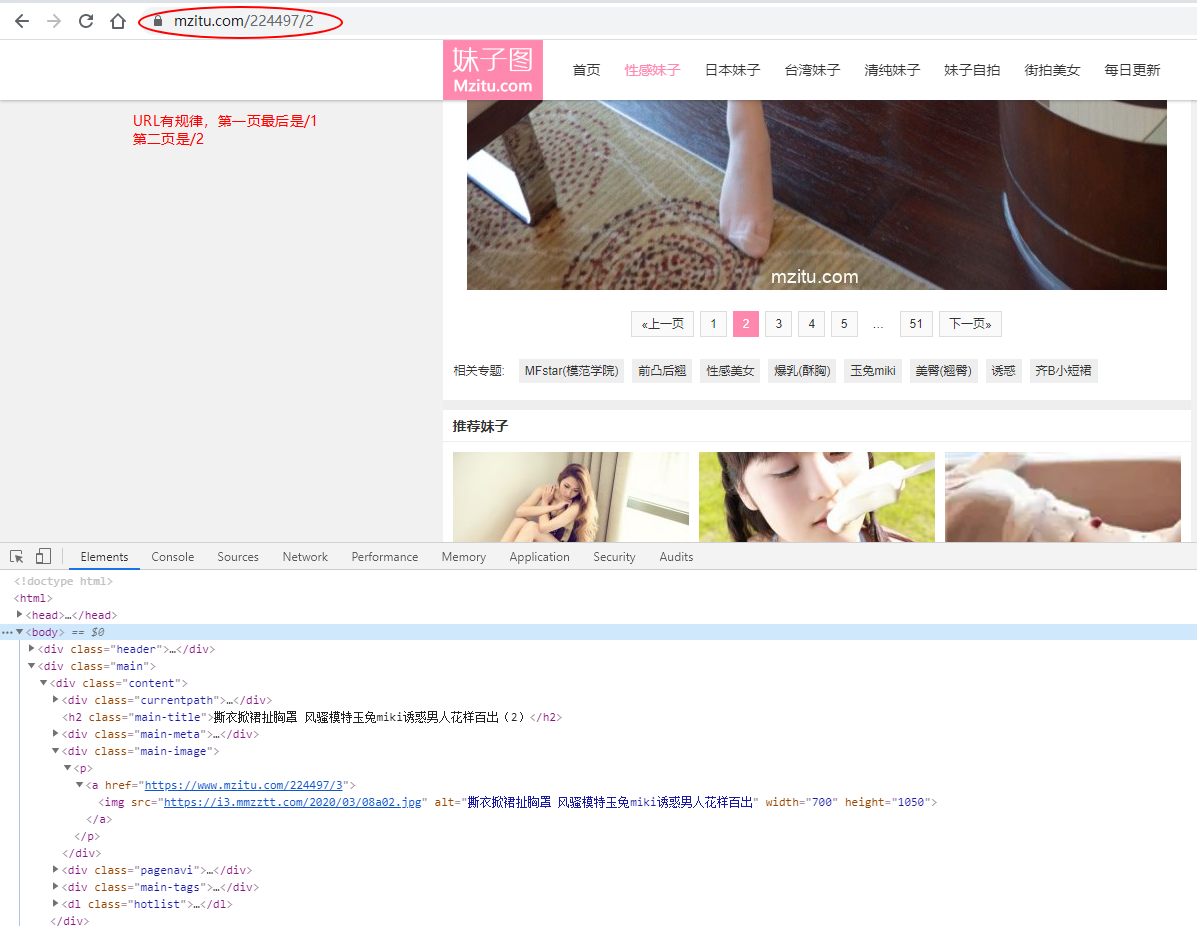
至此,我们就可以获取所有的图片src了,但是还有个问题,如果一个album只有51张图片,那我什么时候判断结束?也就是https://www.mzitu.com/224497/52 会出现什么?
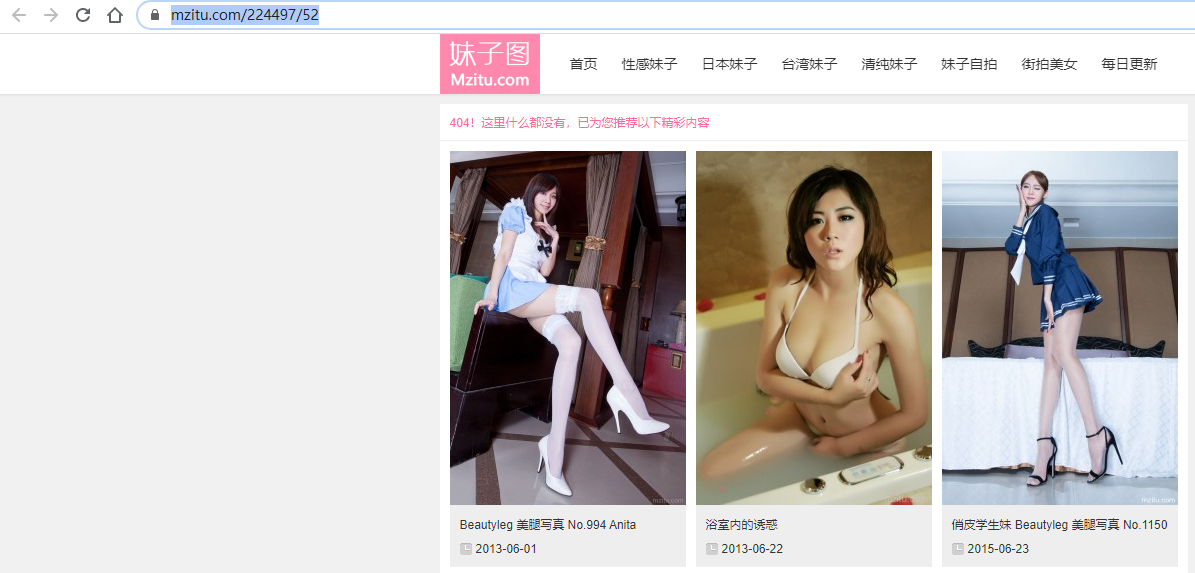
会出现404,找不到页面,这里就应该跳出去遍历别的相册了,此时,大致思路和问题就解决了,现在就是coding时间了。
二、代码
package com.my.crawler.util;

import org.apache.http.HttpEntity;

import org.apache.http.client.config.RequestConfig;

import org.apache.http.client.methods.CloseableHttpResponse;

import org.apache.http.client.methods.HttpGet;

import org.apache.http.impl.client.CloseableHttpClient;

import org.apache.http.impl.client.HttpClients;

import org.apache.http.impl.conn.PoolingHttpClientConnectionManager;

import org.apache.http.util.EntityUtils;

import java.io.File;

import java.io.FileOutputStream;

import java.io.IOException;

import java.io.OutputStream;

import java.util.UUID;

public class HttpUtils {

    public static PoolingHttpClientConnectionManager cm = null;

    static{

        cm = new PoolingHttpClientConnectionManager();

        cm.setMaxTotal(100); // 设置最大连接数

        cm.setDefaultMaxPerRoute(10); // 设置主机的最大连接数

    }

    // 目的:传递一个url(http的地址),返回对应地址下的HTML的文档

    public static String getHtml(String url){

        CloseableHttpClient client = HttpClients.custom().setConnectionManager(cm).build();

        HttpGet httpGet = new HttpGet(url);

        /**设置参数*/

        httpGet.setConfig(setConfig());

        /*************************添加代码*********************************/

        httpGet.setHeader("User-Agent", "Mozilla/5.0 (Windows NT 6.1; WOW64) AppleWebKit/537.36 (KHTML, like Gecko) Chrome/53.0.2785.104 Safari/537.36 Core/1.53.2595.400 QQBrowser/9.6.10872.400");

        httpGet.setHeader("Referer","https://www.mzitu.com/");

        /*************************添加代码*********************************/

        CloseableHttpResponse response = null;

        // 封装网站中的内容

        String html = "";

        try {

            response = client.execute(httpGet);

            // 响应成功(200)

            if(response.getStatusLine().getStatusCode()==200){

                HttpEntity httpEntity = response.getEntity();

                html = EntityUtils.toString(httpEntity,"UTF-8");

            }

        } catch (IOException e) {

            e.printStackTrace();

        } finally {

            if(response!=null){

                try {

                    response.close();

                } catch (IOException e) {

                    e.printStackTrace();

                }

            }

            // 使用连接池不需要关闭

        }

        return html;

    }

    public static String getImg(String url){

        CloseableHttpClient client = HttpClients.custom().setConnectionManager(cm).build();

        HttpGet httpGet = new HttpGet(url);

        /**设置参数*/

        httpGet.setConfig(setConfig());

        /*************************添加代码*********************************/

        httpGet.setHeader("User-Agent", "Mozilla/5.0 (Windows NT 6.1; WOW64) AppleWebKit/537.36 (KHTML, like Gecko) Chrome/53.0.2785.104 Safari/537.36 Core/1.53.2595.400 QQBrowser/9.6.10872.400");

        httpGet.setHeader("Referer","https://www.mzitu.com/");

        /*************************添加代码*********************************/

        CloseableHttpResponse response = null;

        // 图片名称

        String img = "";

        try {

            response = client.execute(httpGet);

            // 响应成功(200)

            if(response.getStatusLine().getStatusCode()==200){

                HttpEntity httpEntity = response.getEntity();

                String ext = url.substring(url.lastIndexOf("."));

                img = UUID.randomUUID().toString()+ext;

                OutputStream outputStream = new FileOutputStream(new File("D:\\images\\"+img));

                httpEntity.writeTo(outputStream);

            }

        } catch (IOException e) {

            e.printStackTrace();

        } finally {

            if(response!=null){

                try {

                    response.close();

                } catch (IOException e) {

                    e.printStackTrace();

                }

            }

            // 使用连接池不需要关闭

        }

        return img;

    }

    public static String getImg(String url,String dir){

        CloseableHttpClient client = HttpClients.custom().setConnectionManager(cm).build();

        HttpGet httpGet = new HttpGet(url);

        /**设置参数*/

        httpGet.setConfig(setConfig());

        /*************************添加代码*********************************/

        httpGet.setHeader("User-Agent", "Mozilla/5.0 (Windows NT 6.1; WOW64) AppleWebKit/537.36 (KHTML, like Gecko) Chrome/53.0.2785.104 Safari/537.36 Core/1.53.2595.400 QQBrowser/9.6.10872.400");

        httpGet.setHeader("Referer","https://www.mzitu.com/");

        /*************************添加代码*********************************/

        CloseableHttpResponse response = null;

        // 图片名称

        String img = "";

        try {

            response = client.execute(httpGet);

            // 响应成功(200)

            if(response.getStatusLine().getStatusCode()==200){

                HttpEntity httpEntity = response.getEntity();

                String ext = url.substring(url.lastIndexOf("."));

                img = UUID.randomUUID().toString()+ext;

                // 先建文件夹

                File file = new File("D:\\images\\" + dir+"\\");

                if (!file.exists()){

                    file.mkdirs();

                }

                OutputStream outputStream = new FileOutputStream(new File("D:\\images\\"+dir+"\\"+img));

                httpEntity.writeTo(outputStream);

            }

        } catch (IOException e) {

            e.printStackTrace();

        } finally {

            if(response!=null){

                try {

                    response.close();

                } catch (IOException e) {

                    e.printStackTrace();

                }

            }

            // 使用连接池不需要关闭

        }

        return img;

    }

    // 用来设置HttpClient的参数

    private static RequestConfig setConfig() {

        RequestConfig config = RequestConfig.custom()

                .setConnectTimeout(1000) // 创建连接的超时时间,单位毫秒

                .setConnectionRequestTimeout(1000) // 从连接池中创建连接的超时时间,单位毫秒

                .setSocketTimeout(10*1000) // 数据传输的超时时间,单位毫秒;启动如果你的网络慢或者你访问的是国外的url,有可能出现超时异常

                .build();

        return config;

    }

    // 测试

    public static void main(String[] args) {

        // 测试getHtml

        String html = getHtml("https://www.mzitu.com/224497/52");

        System.out.println(html.equals(""));

    }

}
public class MzituTask {

    public static void main(String[] args) {

        // 初始化url

        String url = "https://www.mzitu.com/all/";

        // 获取所有页面

        String html = HttpUtils.getHtml(url);

        // 解析url

        Document document = Jsoup.parse(html);

        Elements elements = document.select("[target=_blank]");

        //System.out.println(elements.text());

        for (Element element : elements) {

            String albumUrl = element.attr("href");

            // 遍历解析每一个URL,得到每一个相册的html

            String eachAlblumHtml = HttpUtils.getHtml(albumUrl);

            // 根据第一页找剩下的URL

            int page = 1;

            while (true) {

                try {

                    String singleUrl = albumUrl+"/"+page;

                    String singleHtml = HttpUtils.getHtml(singleUrl);

                    System.out.println(singleHtml);

                    if (singleHtml.equals("")) {

                        break;

                    }

                    Document singleDoc = Jsoup.parse(singleHtml);

                    // 找到想要的照片信息

                    Elements imgElements = singleDoc.select(".main-image img");

                    if (imgElements.size() > 0) {

                        String imgSrc = imgElements.get(0).attr("src");

                        HttpUtils.getImg(imgSrc,element.text());

                        // 睡1s

                        Thread.sleep(1000);

                    }

                    page++;

                } catch (Exception e) {

                    e.printStackTrace();

                    continue;

                }

            }

        }

    }

}

java爬虫-妹子图的更多相关文章
- [Java]使用HttpClient实现一个简单爬虫,抓取煎蛋妹子图
第一篇文章,就从一个简单爬虫开始吧. 这只虫子的功能很简单,抓取到”煎蛋网xxoo”网页(http://jandan.net/ooxx/page-1537),解析出其中的妹子图,保存至本地. 先放结果 ...
- Python 爬虫入门(二)——爬取妹子图
Python 爬虫入门 听说你写代码没动力?本文就给你动力,爬取妹子图.如果这也没动力那就没救了. GitHub 地址: https://github.com/injetlee/Python/blob ...
- Python 爬虫入门之爬取妹子图
Python 爬虫入门之爬取妹子图 来源:李英杰 链接: https://segmentfault.com/a/1190000015798452 听说你写代码没动力?本文就给你动力,爬取妹子图.如果 ...
- python3爬虫.4.下载煎蛋网妹子图
开始我学习爬虫的目标 ----> 煎蛋网 通过设置User-Agent获取网页,发现本该是图片链接的地方被一个js函数代替了 于是全局搜索到该函数 function jandan_load_im ...
- python爬虫—— 抓取今日头条的街拍的妹子图
AJAX 是一种用于创建快速动态网页的技术. 通过在后台与服务器进行少量数据交换,AJAX 可以使网页实现异步更新.这意味着可以在不重新加载整个网页的情况下,对网页的某部分进行更新. 近期在学习获取j ...
- Python使用Scrapy爬虫框架全站爬取图片并保存本地(妹子图)
大家可以在Github上clone全部源码. Github:https://github.com/williamzxl/Scrapy_CrawlMeiziTu Scrapy官方文档:http://sc ...
- scrapy 也能爬取妹子图?
目录 前言 Media Pipeline 启用Media Pipeline 使用 ImgPipeline 抓取妹子图 瞎比比前言 我们在抓取数据的过程中,除了要抓取文本数据之外,当然也会有抓取图片的需 ...
- webmagic的设计机制及原理-如何开发一个Java爬虫
之前就有网友在博客里留言,觉得webmagic的实现比较有意思,想要借此研究一下爬虫.最近终于集中精力,花了三天时间,终于写完了这篇文章.之前垂直爬虫写了一年多,webmagic框架写了一个多月,这方 ...
- JAVA爬虫挖取CSDN博客文章
开门见山,看看这个教程的主要任务,就去csdn博客,挖取技术文章,我以<第一行代码–安卓>的作者为例,将他在csdn发表的额博客信息都挖取出来.因为郭神是我在大学期间比较崇拜的对象之一.他 ...
随机推荐
- 002.前端开发知识,前端基础HTML(2020-01-07)
一.列表标签 1.无序列表 ul <ul> <li>列表项1</li> <li>列表项2</li> <li>列表项3</l ...
- K-th K
题目描述 You are given an integer sequence x of length N. Determine if there exists an integer sequence ...
- 1.redis安装配置
Redis 1.Redis安装: 说明: 1.也是一种类似于Memcached的kev-value机制的存储服务 2.是非关系型数据库(NoSQL)的一种. 3.官网:www.redis.io,中文网 ...
- mysql数据库-索引-长期维护
############### 索引介绍 ############## """ 1. 索引介绍 需求: 一般的应用系统,读写比例在10:1左右,而且插入操作和 ...
- Archives: 2018/11
There are 35 posts in total till now. 11月 11, 2018 HTTP 11月 11, 2018 TCP与UDP 11月 10, 2018 Python测试 1 ...
- 使json或字典输出更美观
这里是选取的项目中部分代码,但是关于json或字典格式化输出的代码是完整的def send_post(url, data): 使用json.dumps()后数据被转成了str类型,如果还要对该数据像字 ...
- 3DSMAX 卸载工具,完美彻底卸载清除干净3dsmax各种残留注册表和文件
一些同学安装3dsmax出错了,也有时候想重新安装3dsmax的时候会出现这种本电脑已安装3dsmax,你要是不留意直接安装,只会安装3dsmax的附件,3dsmax是不会安装上的.这种原因呢就是大家 ...
- FileZilla相关配置说明
相关下载可以直接到官网,或者阿里云帮助:https://help.aliyun.com/knowledge_detail/36243.html?spm=5176.10695662.1996646101 ...
- supervised learning|unsupervised learning
监督学习即是supervised learning,原始数据中有每个数据有自己的数据结构同时有标签,用于classify,机器learn的是判定规则,通过已成熟的数据training model达到判 ...
- docker 使用:创建nginx容器
在上一节中了解了镜像和容器.对于镜像可以这样的理解,镜像相当于一个光盘,里面刻录了一个系统这个系统已经带有相关的服务了. 容器是通过镜像这个光盘安装的一个操作系统,光盘预加了什么服务,容器就有什么服务 ...