
Springmvc入门基础(三) ---与mybatis框架整合
1.创建数据库springmvc及表items,且插入一些数据
DROP TABLE IF EXISTS `items`;

CREATE TABLE `items` (

  `id` int(11) NOT NULL AUTO_INCREMENT,

  `name` varchar(32) NOT NULL COMMENT '商品名称',

  `price` float(10,1) NOT NULL COMMENT '商品定价',

  `detail` text COMMENT '商品描述',

  `pic` varchar(64) DEFAULT NULL COMMENT '商品图片',

  `createtime` datetime NOT NULL COMMENT '生产日期',

  PRIMARY KEY (`id`)

) ENGINE=InnoDB AUTO_INCREMENT=4 DEFAULT CHARSET=utf8;

INSERT INTO `springmvc`.`items` (`id`, `name`, `price`, `detail`, `pic`, `createtime`) VALUES ('1', '台式机', '3000.0', '该电脑质量非常好!!!!', NULL, '2019-09-21 13:22:53');

INSERT INTO `springmvc`.`items` (`id`, `name`, `price`, `detail`, `pic`, `createtime`) VALUES ('2', '笔记本', '6000.0', '笔记本性能好,质量好!!!!!', NULL, '2019-09-21 13:22:57');

INSERT INTO `springmvc`.`items` (`id`, `name`, `price`, `detail`, `pic`, `createtime`) VALUES ('3', '背包', '200.0', '名牌背包,容量大质量好!!!!', NULL, '2019-09-21 13:23:02');
2.创建java web工程,此处以第一篇博文创建的demo项目为基准--基于idea创建的demo项目
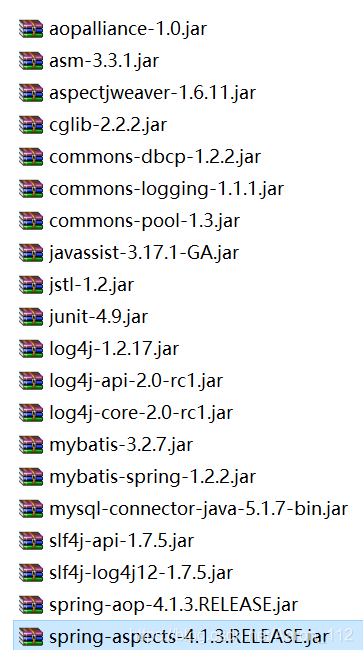
3.导入需要用到的jar包,且加载依赖到项目中去

4.根据逆向工程,生成mapper文件和pojo类文件,或者手写,以及创建service相关类

下面是各个文件内容:
4.1 ItemsMapper.javpackage cn.springmvc.mapper;
import cn.springmvc.pojo.Items;
import cn.springmvc.pojo.ItemsExample;
import org.apache.ibatis.annotations.Param;
import java.util.List;
public interface ItemsMapper {
int countByExample(ItemsExample example);
int deleteByExample(ItemsExample example);
int deleteByPrimaryKey(Integer id);
int insert(Items record);
int insertSelective(Items record);
List<Items> selectByExampleWithBLOBs(ItemsExample example);
List<Items> selectByExample(ItemsExample example);
Items selectByPrimaryKey(Integer id);
int updateByExampleSelective(@Param("record") Items record, @Param("example") ItemsExample example);
int updateByExampleWithBLOBs(@Param("record") Items record, @Param("example") ItemsExample example);
int updateByExample(@Param("record") Items record, @Param("example") ItemsExample example);
int updateByPrimaryKeySelective(Items record);
int updateByPrimaryKeyWithBLOBs(Items record);
int updateByPrimaryKey(Items record);
}4.2 ItemsMapper.xml<?xml version="1.0" encoding="UTF-8" ?>
<!DOCTYPE mapper PUBLIC "-//mybatis.org//DTD Mapper 3.0//EN" "http://mybatis.org/dtd/mybatis-3-mapper.dtd" >
<mapper namespace="cn.springmvc.mapper.ItemsMapper" >
<resultMap id="BaseResultMap" type="cn.springmvc.pojo.Items" >
<id column="id" property="id" jdbcType="INTEGER" />
<result column="name" property="name" jdbcType="VARCHAR" />
<result column="price" property="price" jdbcType="REAL" />
<result column="pic" property="pic" jdbcType="VARCHAR" />
<result column="createtime" property="createtime" jdbcType="TIMESTAMP" />
</resultMap>
<resultMap id="ResultMapWithBLOBs" type="cn.springmvc.pojo.Items" extends="BaseResultMap" >
<result column="detail" property="detail" jdbcType="LONGVARCHAR" />
</resultMap>
<sql id="Example_Where_Clause" >
<where >
<foreach collection="oredCriteria" item="criteria" separator="or" >
<if test="criteria.valid" >
<trim prefix="(" suffix=")" prefixOverrides="and" >
<foreach collection="criteria.criteria" item="criterion" >
<choose >
<when test="criterion.noValue" >
and ${criterion.condition}
</when>
<when test="criterion.singleValue" >
and ${criterion.condition} #{criterion.value}
</when>
<when test="criterion.betweenValue" >
and ${criterion.condition} #{criterion.value} and #{criterion.secondValue}
</when>
<when test="criterion.listValue" >
and ${criterion.condition}
<foreach collection="criterion.value" item="listItem" open="(" close=")" separator="," >
#{listItem}
</foreach>
</when>
</choose>
</foreach>
</trim>
</if>
</foreach>
</where>
</sql>
<sql id="Base_Column_List" >
id, name, price, pic, createtime
</sql>
<sql id="Blob_Column_List" >
detail
</sql>
<select id="selectByExampleWithBLOBs" resultMap="ResultMapWithBLOBs" parameterType="cn.springmvc.pojo.ItemsExample" >
select
<if test="distinct" >
distinct
</if>
<include refid="Base_Column_List" />
,
<include refid="Blob_Column_List" />
from items
<if test="_parameter != null" >
<include refid="Example_Where_Clause" />
</if>
<if test="orderByClause != null" >
order by ${orderByClause}
</if>
</select>
<select id="selectByExample" resultMap="BaseResultMap" parameterType="cn.springmvc.pojo.ItemsExample" >
select
<if test="distinct" >
distinct
</if>
<include refid="Base_Column_List" />
from items
<if test="_parameter != null" >
<include refid="Example_Where_Clause" />
</if>
<if test="orderByClause != null" >
order by ${orderByClause}
</if>
</select>
<select id="selectByPrimaryKey" resultMap="ResultMapWithBLOBs" parameterType="java.lang.Integer" >
select
<include refid="Base_Column_List" />
,
<include refid="Blob_Column_List" />
from items
where id = #{id,jdbcType=INTEGER}
</select>
<select id="countByExample" parameterType="cn.springmvc.pojo.ItemsExample" resultType="java.lang.Integer" >
select count(*) from items
<if test="_parameter != null" >
<include refid="Example_Where_Clause" />
</if>
</select>
</mapper>4.3 Items.javapackage cn.springmvc.pojo;
import java.util.Date;
public class Items {
private Integer id;
private String name;
private Float price;
private String pic;
private Date createtime;
private String detail;
public Integer getId() {
return id;
}
public void setId(Integer id) {
this.id = id;
}
public String getName() {
return name;
}
public void setName(String name) {
this.name = name == null ? null : name.trim();
}
public Float getPrice() {
return price;
}
public void setPrice(Float price) {
this.price = price;
}
public String getPic() {
return pic;
}
public void setPic(String pic) {
this.pic = pic == null ? null : pic.trim();
}
public Date getCreatetime() {
return createtime;
}
public void setCreatetime(Date createtime) {
this.createtime = createtime;
}
public String getDetail() {
return detail;
}
public void setDetail(String detail) {
this.detail = detail == null ? null : detail.trim();
}
}4.4 ItemsExample.javapackage cn.springmvc.pojo;
import java.util.ArrayList;
import java.util.Date;
import java.util.List;
public class ItemsExample {
protected List<Criteria> oredCriteria;
public ItemsExample() {
oredCriteria = new ArrayList<Criteria>();
}
protected abstract static class GeneratedCriteria {
protected List<Criterion> criteria;
protected GeneratedCriteria() {
super();
criteria = new ArrayList<Criterion>();
}
}
public static class Criteria extends GeneratedCriteria {
protected Criteria() {
super();
}
}
public static class Criterion {
private String condition;
private Object value;
private Object secondValue;
private boolean noValue;
private boolean singleValue;
private boolean betweenValue;
private boolean listValue;
private String typeHandler;
protected Criterion(String condition) {
super();
this.condition = condition;
this.typeHandler = null;
this.noValue = true;
}
protected Criterion(String condition, Object value, String typeHandler) {
super();
this.condition = condition;
this.value = value;
this.typeHandler = typeHandler;
if (value instanceof List<?>) {
this.listValue = true;
} else {
this.singleValue = true;
}
}
}
}4.5 ItemService.javapackage cn.springmvc.service;
import cn.springmvc.pojo.Items;
import java.util.List;
public interface ItemService {
//查询商品列表
public List<Items> selectItemsList();
}
4.6 ItemServiceImplpackage cn.springmvc.service;
import cn.springmvc.mapper.ItemsMapper;
import cn.springmvc.pojo.Items;
import org.springframework.beans.factory.annotation.Autowired;
import org.springframework.stereotype.Service;
import java.util.List;
/**
* 查询商品信息
* @author lx
*
*/
@Service
public class ItemServiceImpl implements ItemService {
@Autowired
private ItemsMapper itemsMapper;
//查询商品列表
public List<Items> selectItemsList(){
return itemsMapper.selectByExampleWithBLOBs(null);
}
}
5..创建相关配置文件
把创建的相关配置文件放到src目录下即可,如下图所示,记得把创建的applicationContext.xml文件给配置加载依赖到项目中去,具体加载方法请看上一篇博文。

4.1创建db.properties
jdbc.driver=com.mysql.jdbc.Driver

jdbc.url=jdbc:mysql://localhost:3306/springmvc?characterEncoding=utf-8

jdbc.username=root

jdbc.password=root
4.2 创建sqlMapConfig.xml
<?xml version="1.0" encoding="UTF-8" ?>

<!DOCTYPE configuration

PUBLIC "-//mybatis.org//DTD Config 3.0//EN"

"http://mybatis.org/dtd/mybatis-3-config.dtd">

<configuration>

	<!-- 设置别名 -->

	<typeAliases>

		<!-- 2. 指定扫描包,会把包内所有的类都设置别名,别名的名称就是类名,大小写不敏感 -->

		<package name="cn.springmvc.pojo" />

	</typeAliases>

</configuration>
4.3 创建log4g.properties
# Global logging configuration

log4j.rootLogger=DEBUG, stdout

# Console output...

log4j.appender.stdout=org.apache.log4j.ConsoleAppender

log4j.appender.stdout.layout=org.apache.log4j.PatternLayout

log4j.appender.stdout.layout.ConversionPattern=%5p [%t] - %m%n
4.4 创建applicationContexnt.xml
<?xml version="1.0" encoding="UTF-8"?>

<beans xmlns="http://www.springframework.org/schema/beans"

	xmlns:context="http://www.springframework.org/schema/context" xmlns:p="http://www.springframework.org/schema/p"

	xmlns:aop="http://www.springframework.org/schema/aop" xmlns:tx="http://www.springframework.org/schema/tx"

	xmlns:xsi="http://www.w3.org/2001/XMLSchema-instance"

	xsi:schemaLocation="http://www.springframework.org/schema/beans http://www.springframework.org/schema/beans/spring-beans-4.0.xsd

	http://www.springframework.org/schema/context http://www.springframework.org/schema/context/spring-context-4.0.xsd

	http://www.springframework.org/schema/aop http://www.springframework.org/schema/aop/spring-aop-4.0.xsd http://www.springframework.org/schema/tx http://www.springframework.org/schema/tx/spring-tx-4.0.xsd

	http://www.springframework.org/schema/util http://www.springframework.org/schema/util/spring-util-4.0.xsd">

	<context:property-placeholder location="classpath:db.properties"/>

	<!-- 数据库连接池 -->

	<bean id="dataSource" class="org.apache.commons.dbcp.BasicDataSource"

		destroy-method="close">

		<property name="driverClassName" value="${jdbc.driver}" />

		<property name="url" value="${jdbc.url}" />

		<property name="username" value="${jdbc.username}" />

		<property name="password" value="${jdbc.password}" />

		<property name="maxActive" value="10" />

		<property name="maxIdle" value="5" />

	</bean>

	<!-- Mybatis的工厂 -->

	<bean id="sqlSessionFactoryBean" class="org.mybatis.spring.SqlSessionFactoryBean">

		<property name="dataSource" ref="dataSource"/>

		<!-- 核心配置文件的位置 -->

		<property name="configLocation" value="classpath:sqlMapConfig.xml"/>

	</bean>

	<!-- Mapper动态代理开发   扫描 -->

	<bean class="org.mybatis.spring.mapper.MapperScannerConfigurer">

		<!-- 基本包 -->

		<property name="basePackage" value="cn.springmvc.mapper"/>

	</bean>

	<!-- 注解事务 -->

	<bean id="transactionManager" class="org.springframework.jdbc.datasource.DataSourceTransactionManager">

		<property name="dataSource" ref="dataSource"/>

	</bean>

	<!-- 开启注解 -->

	<tx:annotation-driven transaction-manager="transactionManager"/>

</beans>
4.5 配置修改web.xml,如下图所示
<?xml version="1.0" encoding="UTF-8"?>

<web-app xmlns:xsi="http://www.w3.org/2001/XMLSchema-instance" xmlns="http://java.sun.com/xml/ns/javaee" xsi:schemaLocation="http://java.sun.com/xml/ns/javaee http://java.sun.com/xml/ns/javaee/web-app_2_5.xsd" id="WebApp_ID" version="2.5">

    <display-name>springmvc-mybatis</display-name>

    <welcome-file-list>

        <welcome-file>index.html</welcome-file>

        <welcome-file>index.htm</welcome-file>

        <welcome-file>index.jsp</welcome-file>

        <welcome-file>default.html</welcome-file>

        <welcome-file>default.htm</welcome-file>

        <welcome-file>default.jsp</welcome-file>

    </welcome-file-list>

    <context-param>

        <param-name>contextConfigLocation</param-name>

        <param-value>classpath:applicationContext.xml</param-value>

    </context-param>

    <!-- Spring监听器 -->

    <listener>

        <listener-class>org.springframework.web.context.ContextLoaderListener</listener-class>

    </listener>

    <!-- 处理POST提交乱码问题 -->

    <filter>

        <filter-name>encoding</filter-name>

        <filter-class>org.springframework.web.filter.CharacterEncodingFilter</filter-class>

        <init-param>

            <param-name>encoding</param-name>

            <param-value>UTF-8</param-value>

        </init-param>

    </filter>

    <filter-mapping>

        <filter-name>encoding</filter-name>

        <url-pattern>*.action</url-pattern>

    </filter-mapping>

    <!-- 前端控制器 -->

    <servlet>

        <servlet-name>springmvc</servlet-name>

        <servlet-class>org.springframework.web.servlet.DispatcherServlet</servlet-class>

        <!-- 默认找 /WEB-INF/[servlet的名称]-servlet.xml -->

        <init-param>

            <param-name>contextConfigLocation</param-name>

            <param-value>classpath:springmvc.xml</param-value>

        </init-param>

    </servlet>

    <servlet-mapping>

        <servlet-name>springmvc</servlet-name>

        <!--

            1. /*  拦截所有   jsp  js png .css  真的全拦截   建议不使用

            2. *.action *.do 拦截以do action 结尾的请求     肯定能使用   ERP

            3. /  拦截所有 (不包括jsp) (包含.js .png.css)  强烈建议使用     前台 面向消费者  www.jd.com/search   /对静态资源放行

         -->

        <url-pattern>*.action</url-pattern>

    </servlet-mapping>

</web-app>
6.创建jsp文件
创建itemList.jsp,放到WEB-INF/jsp目录下
<%@ page language="java" contentType="text/html; charset=UTF-8"

    pageEncoding="UTF-8"%>

<%@ taglib uri="http://java.sun.com/jsp/jstl/core" prefix="c" %>

<%@ taglib uri="http://java.sun.com/jsp/jstl/fmt"  prefix="fmt"%>

<!DOCTYPE html PUBLIC "-//W3C//DTD HTML 4.01 Transitional//EN" "http://www.w3.org/TR/html4/loose.dtd">

<html>

<head>

<meta http-equiv="Content-Type" content="text/html; charset=UTF-8">

<title>查询商品列表</title>

</head>

<body>

<form action="${pageContext.request.contextPath }/item/queryitem.action" method="post">

查询条件:

<table width="100%" border=1>

<tr>

<td><input type="submit" value="查询"/></td>

</tr>

</table>

商品列表:

<table width="100%" border=1>

<tr>

	<td>商品名称</td>

	<td>商品价格</td>

	<td>生产日期</td>

	<td>商品描述</td>

	<td>操作</td>

</tr>

<c:forEach items="${itemList }" var="item">

<tr>

	<td>${item.name }</td>

	<td>${item.price }</td>

	<td><fmt:formatDate value="${item.createtime}" pattern="yyyy-MM-dd HH:mm:ss"/></td>

	<td>${item.detail }</td>

	<td><a href="${pageContext.request.contextPath }/itemEdit.action?id=${item.id}">修改</a></td>

</tr>

</c:forEach>

</table>

</form>

</body>

</html>7.启动tomcat,访问http://localhost:8080/springmvcdemo/samePage.action,如下图所示

Springmvc入门基础(三) ---与mybatis框架整合的更多相关文章
- SSM(Spring+SpringMVC+MyBatis)框架整合开发流程
回忆了 Spring.SpringMVC.MyBatis 框架整合,完善一个小demo,包括基本的增删改查功能. 开发环境 IDEA MySQL 5.7 Tomcat 9 Maven 3.2.5 需要 ...
- SSM(Spring,SpringMVC,Mybatis)框架整合项目
快速上手SSM(Spring,SpringMVC,Mybatis)框架整合项目 环境要求: IDEA MySQL 8.0.25 Tomcat 9 Maven 3.6 数据库环境: 创建一个存放书籍数据 ...
- mybatis框架整合及逆向工程
mybatis框架整合及逆向工程 一.三大框架整合 整合SSM框架 1.导入pom文件 1.导入spring的pom依赖 <?xml version="1.0" enco ...
- struts2 + spring + mybatis 框架整合详细介绍
struts2 + spring + mybatis 框架整合详细介绍 参考地址: https://blog.csdn.net/qq_22028771/article/details/5149898 ...
- SSM Spring SpringMVC Mybatis框架整合Java配置完整版
以前用着SSH都是老师给配好的,自己直接改就可以.但是公司主流还是SSM,就自己研究了一下Java版本的配置.网上大多是基于xnl的配置,但是越往后越新的项目都开始基于JavaConfig配置了,这也 ...
- SSM框架-----------SpringMVC+Spring+Mybatis框架整合详细教程
1.基本概念 1.1.Spring Spring是一个开源框架,Spring是于2003 年兴起的一个轻量级的Java 开发框架,由Rod Johnson 在其著作Expert One-On-One ...
- mybatis入门基础(三)----SqlMapConfig.xml全局配置文件解析
一:SqlMapConfig.xml配置文件的内容和配置顺序如下 properties(属性) settings(全局配置参数) typeAiases(类型别名) typeHandlers(类型处理器 ...
- ssm(spring、springmvc、mybatis)框架整合
第一次接触这3大框架,打算一个一个慢慢学,参照网上资料搭建了一个ssm项目,作为新手吃亏在jar包的导入上,比如jdbc DataSource配置的时候由于导入的jar包不兼容或者缺包导致项目无法正常 ...
- SpringMVC Spring MyBatis 框架整合 Annotation MavenProject
项目结构目录 pom.xml jar包管理 <project xmlns="http://maven.apache.org/POM/4.0.0" xmlns:xsi=&q ...
随机推荐
- RFC2889——拥塞控制测试
一.简介 RFC 2889为LAN交换设备的基准测试提供了方法学,它将RFC 2544中为网络互联设备基准测试所定义的方法学扩展到了交换设备,提供了交换机转发性能(Forwarding Perform ...
- 技术管理进阶——为什么Leader的话有时候你听不懂
原创不易,求分享.求一键三连 Hi,各位亲爱的小伙伴,小钗公号遵循日复盘->周复盘->月复盘->季度复盘->年总结策略,所以某类型文章到后期才会成体系. 今天这篇文章属于「月复 ...
- Blazor和Vue对比学习:说在开始前
1.Vue:现代前端三大框架之一(Vue/React/Angualr),基于HTML.CSS和JavaScript,2014年正式对外发布,目前已发展到3.X版本.值得说道的是,Vue的创始人作者是华 ...
- Java课程设计---学生信息管理系统需求分析及总体设计
按照软件工程实践的原则,开发大型程序需要经历需求分析.总体设计.详细设计.编码实现.系统测试.系统维护等几个阶段. 1.需求分析 本阶段是整个软件开发过程中最重要的环节.通过了解实际运行的系统或与用户 ...
- 微信小程序使用weui扩展组件踩坑
最近在做微信小程序,引入weui的时候踩坑了好久,这里记录一下遇到的问题. 微信官方文档给了两种weui引入方式: 通过 useExtendedLib 扩展库 的方式引入,这种方式引入的组件将不会计入 ...
- (第三章)TF框架之实现验证码识别
这里实现一个用神经网络(卷积神经网络也可以)实现验证码识别的小案例,主要记录本人做这个案例的流程,不会像之前那么详细,主要用作个人记录用... 这里是验证码的四个字母,被one-hot编码后形成的四个 ...
- LeetCode-015-三数之和
三数之和 题目描述:给你一个包含 n 个整数的数组 nums,判断 nums 中是否存在三个元素 a,b,c ,使得 a + b + c = 0 ?请你找出所有和为 0 且不重复的三元组. 注意:答案 ...
- VirtualBox虚拟机--导入导出系统&主机启用硬件虚拟化
问题概述:在往新电脑中导入其他电脑中导出的虚拟机后,启动该虚拟机系统时报错说主机不支持硬件虚拟化. 将电脑1中VirtualBox的一个虚拟机系统win7导出成.ova格式的文件, 在电脑2中安装Vi ...
- laravel7 h-ui模板点改
1:html页面 <td> @if($item->fang_status == 0) <span onclick="changeFangStatus(this,{{$ ...
- AVCaptureSession部分用法
原文链接 AVCaptureSession阻塞主线程问题 前阵子程序中出现了一个奇怪的 bug,在 iOS 系统上,页面弹出的时候会卡很久,相机始终黑屏,大概6-7秒钟,跟踪具体每个步骤花费时间的时候 ...