
[Python爬虫] 之十四:Selenium +phantomjs抓取媒介360数据
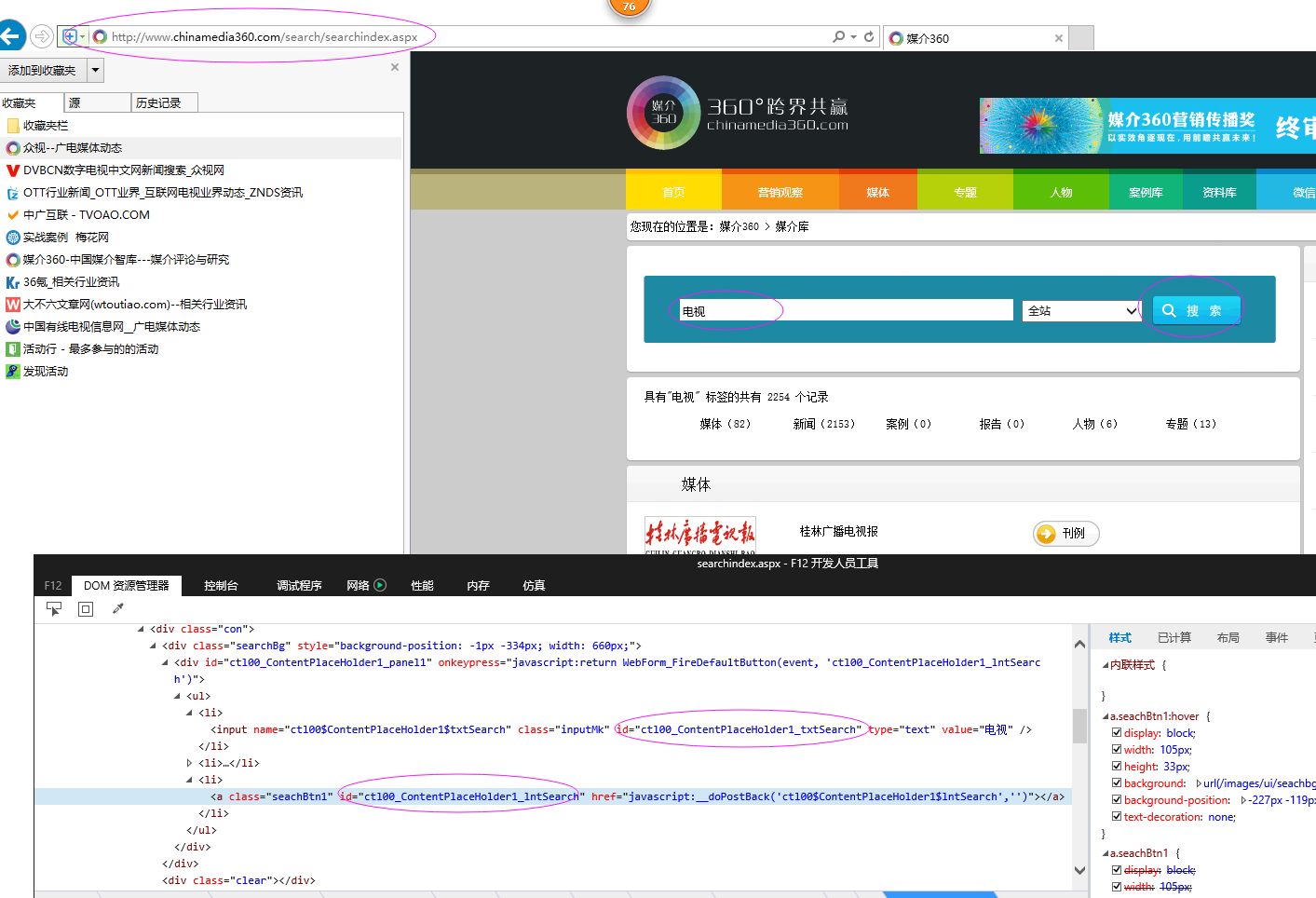

具体代码如下:
# coding=utf-8
import os
import re
from selenium import webdriver
import selenium.webdriver.support.ui as ui
from selenium.webdriver.common.keys import Keys
import time
from selenium.webdriver.common.action_chains import ActionChains
from selenium.webdriver.support.select import Select
import IniFile
from selenium.webdriver.common.keys import Keys
from threading import Thread
import thread
import LogFile
import urllib
import mongoDB
#抓取数据线程类
class ScrapyData_Thread(Thread):
    #抓取数据线程类
    def __init__(self,webSearchUrl,inputTXTIDLabel,searchlinkIDLabel,htmlLable,htmltime,keyword,invalid_day,db):
        '''
        构造函数
        :param webSearchUrl: 搜索页url
        :param inputTXTIDLabel: 搜索输入框的标签
        :param searchlinkIDLabel: 搜索链接的标签
        :param htmlLable: 要搜索的标签
        :param htmltime: 要搜索的时间
        :param invalid_day: 要搜索的关键字,多个关键字中间用分号(;)隔开
        :param keywords: #资讯发布的有效时间,默认是3天以内
        :param db: 保存数据库引擎
        '''
        Thread.__init__(self)

        self.webSearchUrl = webSearchUrl
        self.inputTXTIDLabel = inputTXTIDLabel
        self.searchlinkIDLabel = searchlinkIDLabel
        self.htmlLable = htmlLable
        self.htmltime = htmltime
        self.keyword = keyword
        self.invalid_day = invalid_day
        self.db = db

        self.driver = webdriver.PhantomJS()
        self.wait = ui.WebDriverWait(self.driver, 20)
        self.driver.maximize_window()

    def Comapre_to_days(self,leftdate, rightdate):
        '''
        比较连个字符串日期,左边日期大于右边日期多少天
        :param leftdate: 格式:2017-04-15
        :param rightdate: 格式:2017-04-15
        :return: 天数
        '''
        l_time = time.mktime(time.strptime(leftdate, '%Y-%m-%d'))
        r_time = time.mktime(time.strptime(rightdate, '%Y-%m-%d'))
        result = int(l_time - r_time) / 86400
        return result

    def run(self):
        print '关键字:%s' % self.keyword

        self.driver.get(self.webSearchUrl)
        time.sleep(1)

        # js = "var obj = document.getElementById('ctl00_ContentPlaceHolder1_txtSearch');obj.value='" + self.keyword + "';"
        # self.driver.execute_script(js)
        # 点击搜索链接
        ss_elements = self.driver.find_element_by_id(self.inputTXTIDLabel)
        ss_elements.send_keys(unicode(self.keyword,'utf8'))

        search_elements = self.driver.find_element_by_id(self.searchlinkIDLabel)
        search_elements.click()
        time.sleep(4)

        self.wait.until(lambda driver: self.driver.find_elements_by_xpath(self.htmlLable))
        Elements = self.driver.find_elements_by_xpath(self.htmlLable)

        timeElements = self.driver.find_elements_by_xpath(self.htmltime)
        urlList = []
        for hrefe in Elements:
            urlList.append(hrefe.get_attribute('href').encode('utf8'))

        index = 0
        strMessage = ' '
        strsplit = '\n------------------------------------------------------------------------------------\n'
        index = 0
        # 每页中有用记录
        recordCount = 0
        usefulCount = 0
        meetingList = []
        kword = self.keyword
        currentDate = time.strftime('%Y-%m-%d')

        for element in Elements:

            strDate = timeElements[index].text.encode('utf8')
            # 日期在3天内并且搜索的关键字在标题中才认为是复合要求的数据
            #因为搜索的记录是安装时间倒序,所以如果当前记录的时间不在3天以内,那么剩下的记录肯定是小于当前日期的,所以就退出
            if self.Comapre_to_days(currentDate,strDate) < self.invalid_day:
                usefulCount =  1
                txt = element.text.encode('utf8')
                if txt.find(kword) > -1:
                    dictM = {'title': txt, 'date': strDate,
                             'url': urlList[index], 'keyword': kword, 'info': txt}
                    meetingList.append(dictM)

                    # print ' '
                    # print '标题:%s' % txt
                    # print '日期:%s' % strDate
                    # print '资讯链接:' + urlList[index]
                    # print strsplit

                    # # log.WriteLog(strMessage)
                    recordCount = recordCount + 1
            else:
                usefulCount = 0

            if usefulCount:
                break
            index = index + 1

        self.db.SaveMeetings(meetingList)
        print "共抓取了: %d 个符合条件的资讯记录" % recordCount

        self.driver.close()
        self.driver.quit()

if __name__ == '__main__':

    configfile = os.path.join(os.getcwd(), 'chinaMedia.conf')
    cf = IniFile.ConfigFile(configfile)
    webSearchUrl = cf.GetValue("section", "webSearchUrl")
    inputTXTIDLabel = cf.GetValue("section", "inputTXTIDLabel")
    searchlinkIDLabel = cf.GetValue("section", "searchlinkIDLabel")
    htmlLable = cf.GetValue("section", "htmlLable")
    htmltime = cf.GetValue("section", "htmltime")

    invalid_day = int(cf.GetValue("section", "invalid_day"))

    keywords= cf.GetValue("section", "keywords")
    keywordlist = keywords.split(';')
    start = time.clock()
    db = mongoDB.mongoDbBase()
    for keyword in keywordlist:
        if len(keyword) > 0:
            t = ScrapyData_Thread(webSearchUrl,inputTXTIDLabel,searchlinkIDLabel,htmlLable,htmltime,keyword,invalid_day,db)
            t.setDaemon(True)
            t.start()
            t.join()

    end = time.clock()
    print "整个过程用时间: %f 秒" % (end - start)
[Python爬虫] 之十四:Selenium +phantomjs抓取媒介360数据的更多相关文章
- [Python爬虫] 之十:Selenium +phantomjs抓取活动行中会议活动
一.介绍 本例子用Selenium +phantomjs爬取活动树(http://www.huodongshu.com/html/find_search.html?search_keyword=数字) ...
- [Python爬虫] 之九:Selenium +phantomjs抓取活动行中会议活动(单线程抓取)
思路是这样的,给一系列关键字:互联网电视:智能电视:数字:影音:家庭娱乐:节目:视听:版权:数据等.在活动行网站搜索页(http://www.huodongxing.com/search?city=% ...
- [Python爬虫] 之十一:Selenium +phantomjs抓取活动行中会议活动信息
一.介绍 本例子用Selenium +phantomjs爬取活动行(http://www.huodongxing.com/search?qs=数字&city=全国&pi=1)的资讯信息 ...
- [Python爬虫] 之十三:Selenium +phantomjs抓取活动树会议活动数据
抓取活动树网站中会议活动数据(http://www.huodongshu.com/html/index.html) 具体的思路是[Python爬虫] 之十一中抓取活动行网站的类似,都是用多线程来抓取, ...
- [Python爬虫] 之三十:Selenium +phantomjs 利用 pyquery抓取栏目
一.介绍 本例子用Selenium +phantomjs爬取栏目(http://tv.cctv.com/lm/)的信息 二.网站信息 三.数据抓取 首先抓取所有要抓取网页链接,共39页,保存到数据库里 ...
- PYTHON 爬虫笔记十:利用selenium+PyQuery实现淘宝美食数据搜集并保存至MongeDB(实战项目三)
利用selenium+PyQuery实现淘宝美食数据搜集并保存至MongeDB 目标站点分析 淘宝页面信息很复杂的,含有各种请求参数和加密参数,如果直接请求或者分析Ajax请求的话会很繁琐.所以我们可 ...
- C#使用Selenium+PhantomJS抓取数据
本文主要介绍了C#使用Selenium+PhantomJS抓取数据的方法步骤,具有很好的参考价值,下面跟着小编一起来看下吧 手头项目需要抓取一个用js渲染出来的网站中的数据.使用常用的httpclie ...
- selenium+PhantomJS 抓取淘宝搜索商品
最近项目有些需求,抓取淘宝的搜索商品,抓取的品类还多.直接用selenium+PhantomJS 抓取淘宝搜索商品,快速完成. #-*- coding:utf-8 -*-__author__ =''i ...
- [Python爬虫] 之十二:Selenium +phantomjs抓取中的url编码问题
最近在抓取活动树网站 (http://www.huodongshu.com/html/find.html) 上数据时发现,在用搜索框输入中文后,点击搜索,phantomjs抓取数据怎么也抓取不到,但是 ...
随机推荐
- Vue 2.0 生命周期-钩子函数理解
Vue 2.0 + 生命周期钩子在项目过程中经常用到,所以闲下来整理了下,直接复制下面的实例运行: <!DOCTYPE html> <html lang="en" ...
- php中网页生成图片的方式
在网上找了很多方法,发现与自己最初的思路也是大同小异,那就是HTML——>PDF——>JPG.从上午9点钟一直搞到下午6点钟,代码方面其实很简单,更多的还是环境和PHP拓展上面,忙了一天的 ...
- 运行hadoop的时候提示物理内存或虚拟内存溢出的解决方案running beyond physical memory或者beyond vitual memory limits
当运行中出现Container is running beyond physical memory这个问题出现主要是因为物理内存不足导致的,在执行mapreduce的时候,每个map和reduce都有 ...
- JavaScript之函数和this
一. 函数的内部属性 1. 在函数内部有两个特殊的对象: arguments: 类数组对象,包含传入函数中的所有参数.其有一个callee属性,该属性是一个指针,指向拥有这个arguments对象的函 ...
- ARM开发板不工作的几个原因
刚焊了5块ARM(LPC2478)的开发板,上程序测试了一下,发现只有一个板子工作其他四个全部歇菜.努力地找了一会最终发现是板子的来个电阻焊翻了.因为是1206 的封装而且来个电阻在PCB上摆放的位置 ...
- Flask实战第52天:cms添加轮播图前端代码逻辑完成
首页我们在模态框中的保存按钮加一个id,这样方便我们选取这个按钮 <button type="button" class="btn btn-primary" ...
- HDU 6373 Pinball
Pinball Time Limit: 2000/1000 MS (Java/Others) Memory Limit: 262144/262144 K (Java/Others)Total S ...
- 函数的扩展--ES6
箭头函数 由于大括号被解释为代码块,所以如果箭头函数直接返回一个对象,必须在对象外面加上括号. var f = () => ({a:1}); f(); // 返回 {a: 1} 若写成: var ...
- [P2526][SHOI2001]小狗散步
Link: P2526 传送门 Solution: 一道提示非常到位的题目 题面中强调了在两个路径相邻点间只能再去至多一个点,且每个点只计算一次贡献 于是明显可以将原题看作询问在两个不相交点集间最多能 ...
- 【计算几何】【分类讨论】Gym - 101173C - Convex Contour
注意等边三角形的上顶点是卡不到边界上的. 于是整个凸包分成三部分:左边的连续的三角形.中间的.右边的连续的三角形. 套个计算几何板子求个三角形顶点到圆的切线.三角形顶点到正方形左上角距离啥的就行了,分 ...