
用 Eclipse 开发 WebService 项目
1、安装tomcat
2、安装CXF
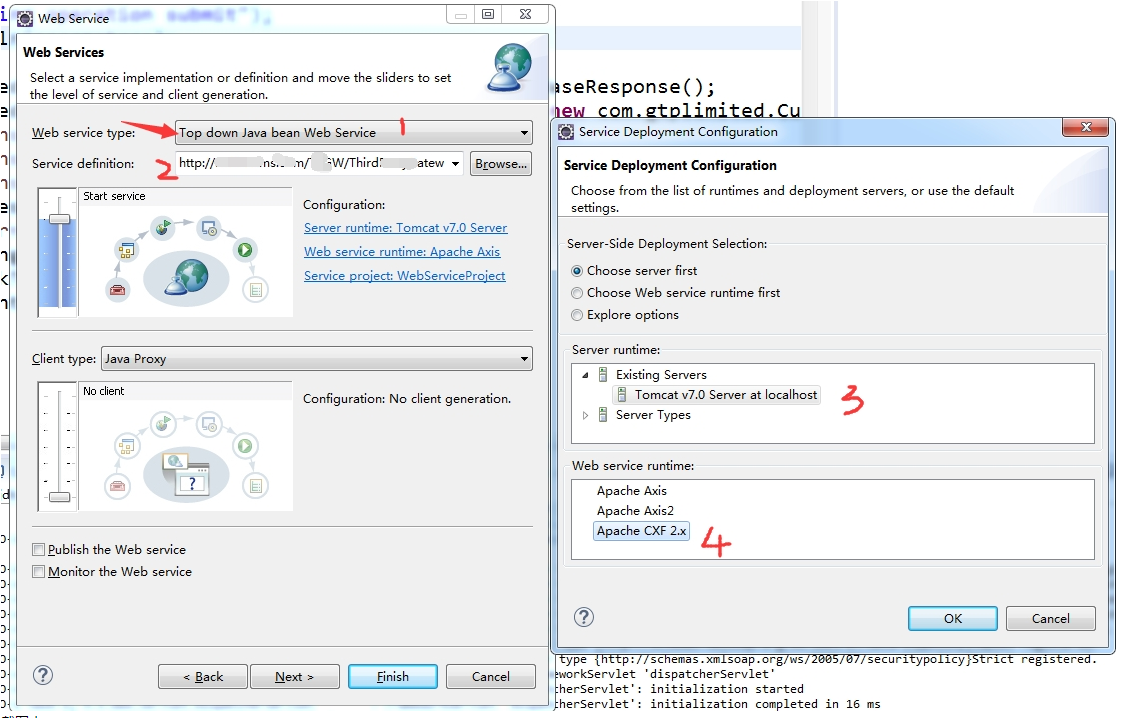
.jpg)
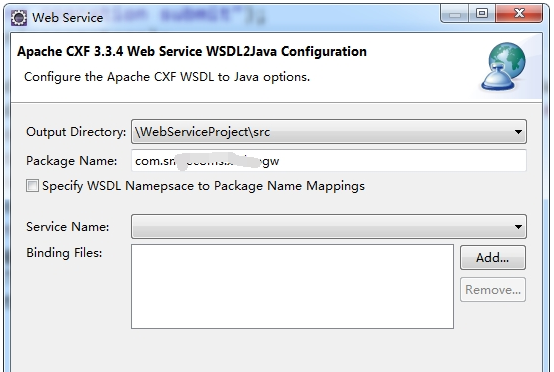
.jpg)
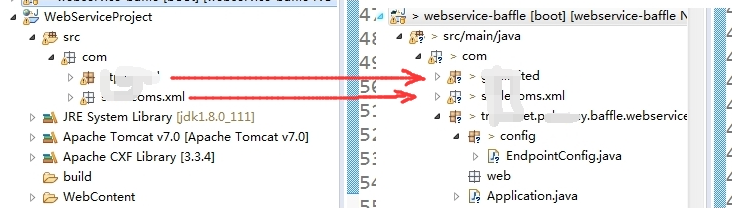
.jpg)
@Configuration

public class CxfConfig {

    @Autowired

    private Bus bus;   //private SpringBus bus;

    @Autowired

    private CommonService commonService;

    //  配置CXF服务发布,默认服务是在host:port/services/发布地址

    // 访问地址 http://127.0.0.1:8080/Service/common?wsdl

    @Bean

    public Endpoint another_endpoint() {

        EndpointImpl endpoint = new EndpointImpl(bus, commonService);

        endpoint.publish("/common");   //发布地址

        return endpoint;

    }

    // 访问地址 http://127.0.0.1:8080/Service/hello?wsdl

    @Bean

    public Endpoint endpoint() {

        EndpointImpl endpoint = new EndpointImpl(bus,  new HelloServiceImpl());

        endpoint.publish("/hello");    //发布地址

        return endpoint;

    }
.jpg)
问题:
1、与Spring整合问题
Caused by: org.apache.cxf.ws.policy.PolicyException: These policy alternatives can not be satisfied:
{http://docs.oasis-open.org/ws-sx/ws-securitypolicy/200702}SupportingTokens
{http://docs.oasis-open.org/ws-sx/ws-securitypolicy/200702}UsernameToken
at org.apache.cxf.ws.policy.AssertionInfoMap.checkEffectivePolicy(AssertionInfoMap.java:166)
at org.apache.cxf.ws.policy.PolicyVerificationInInterceptor.handle(PolicyVerificationInInterceptor.java:101)
解决方法
esb-server.xml配置增加
<cxf:bus>
<cxf:properties>
<entry key="org.apache.cxf.message.Message.ENCODING" value="UTF-8"/>
</cxf:properties>
<cxf:features>
<cxf:logging/>
<p:policies enabled="false" />
</cxf:features>
</cxf:bus>
    @Bean(name = Bus.DEFAULT_BUS_ID)

    public SpringBus springBus() {

        SpringBus springBus = new SpringBus();

        WSPolicyFeature wpf = new WSPolicyFeature();

        wpf.setEnabled(false);

        Collection<Feature> features = springBus.getFeatures();

        features.add(wpf);

        return springBus;

    }
用 Eclipse 开发 WebService 项目的更多相关文章
- 使用Eclipse开发Web项目(JSP)——简单登录、无sql
1.使用Eclipse开发Web项目(JSP) tomcat 2.在Eclipse中创建的Web项目: 浏览器可以直接访问webContent中的文件 例如http://localhost:8080/ ...
- Eclipse开发Web项目连接MySQL时找不到驱动的解决办法
当我们使用Eclipse开发Web项目连接MySQL时后台报找不到驱动的错误,如下:解决办法: 1.这时我们首先要检查我们是否导入了连接MySQL数据库的jar包,如图,是否已经将jar包复制到项目下 ...
- Apache axis2 + Eclipse 开发 WebService
yd小结注意:1.axis2的2个插件的版本必须与引入的jar包匹配,如果不同则可能报以下错误 “没有实现序列化方法”或 “org.apache.axis2.databinding.utils.wri ...
- Eclipse开发Python项目
最近倒腾python自带的开发工具idle,用的很不习惯,还是用Eclipse编写python项目方便(自动补齐,智能报错,调试方便),下面就说说怎么用Eclipse编写python代码吧~ 1.安装 ...
- Eclipse开发Android项目报错解决方案详细教程,最新版一篇就够了!
本文记录刚接触Android开发搭建环境后新建工程各种可能的报错,并亲身经历漫长的解决过程(╥╯^╰╥),寻找各种偏方,避免大家采坑,希望能帮助到大家. 报错信息 出错一:The import and ...
- Android开发:《Gradle Recipes for Android》阅读笔记(翻译)2.2——将Eclipse开发的项目导入到AndroidStudio
问题: 你想要将一个Eclipse ADT项目导入到Android Studio中. 解决方案: Android Studio提供了一个导入向导,可以重写已有的项目. 详细: 在Android Stu ...
- Eclipse开发Android项目安装配置
在windows安装Android的开发环境不简单也说不上算复杂,本文写给第一次想在自己Windows上建立Android开发环境投入Android浪潮的朋友们,为了确保大家能顺利完成开发环境的搭建, ...
- JavaWeb核心编程之使用Eclipse开发JavaWEB项目
文章目录 1.eclipse切换到javaee项目 2.创建服务器(如果没有server选项, 怎么做) 3.定制新建面板内容 4.创建动态web工程 1.eclipse切换到javaee项目 如图 ...
- Eclipse开发Maven项目提示:程序包org.junit不存在解决方案
原因: 个人考虑产生此错误的原因是因为Eclipse中对于测试和开发的鉴定不明?Intellij中没有错误,因为Intellij对项目的管理就是同Maven结构的. 解决方案: 原来的junit的sc ...
随机推荐
- 10年前文章_fedora10root登录
fedora10系统root用户登录以及普通用户使用sudo命令1.问题:fedora10默认不能够直接用root用户登录解决方法:我们可以先以普通用户登录$su#vi /etc/pam.d/gdm删 ...
- 图解NuGet服务器搭建和使用过程
听语音 浏览:0 | 更新:2017-10-31 09:13 | 标签:服务器 1 2 3 4 5 6 7 分步阅读 本篇经验将和大家介绍内网搭建NuGet服务器的步骤,希望对大家的工作和学习有所帮助 ...
- mysql的索引以及优化
本人qq群也有许多的技术文档,希望可以为你提供一些帮助(非技术的勿加). QQ群: 281442983 (点击链接加入群:http://jq.qq.com/?_wv=1027&k=29Lo ...
- USB-TTL
- NOIP模拟赛(by hzwer) T3 小奇回地球
[题目背景] 开学了,小奇在回地球的路上,遇到了一个棘手的问题. [问题描述] 简单来说,它要从标号为 1 的星球到标号为 n 的星球,某一些星球之间有航线. 由于超时空隧道的存在,从一个星球到另一个 ...
- LeetCode--064--最小路径和
给定一个包含非负整数的 m x n 网格,请找出一条从左上角到右下角的路径,使得路径上的数字总和为最小. 说明:每次只能向下或者向右移动一步. 示例: 输入:[ [1,3,1], [1,5,1], ...
- vue-cli3.0以上项目中引入jquery的方法
这里配置的是vue-cli3.0引入jquery的方法,不是vue-cli2.0的配置方法 一.安装jquery npm install jquery --save 二.在vue.config.js ...
- Comet OJ - Contest #7 D 机器学习题 斜率优化 + 未调完
Code: #include <cstdio> #include <algorithm> #include <cstring> #define setIO(s) f ...
- Shell的简单介绍(一)
shell 的分类 Shell 类别 易学性 可移植性 编辑性 快捷性 Bourne Shell (sh) 容易 好 较差 较差 Korn Shell (ksh) 较难 较好 好 较好 Bourne ...
- 【BZOJ1563】诗人小G(决策单调性DP)
题意:给定N,L,P,求f[N] sum[i]递增,L<=3e6,P<=10 思路:四边形不等式的证明见https://www.byvoid.com/zhs/blog/noi-2009-p ...