
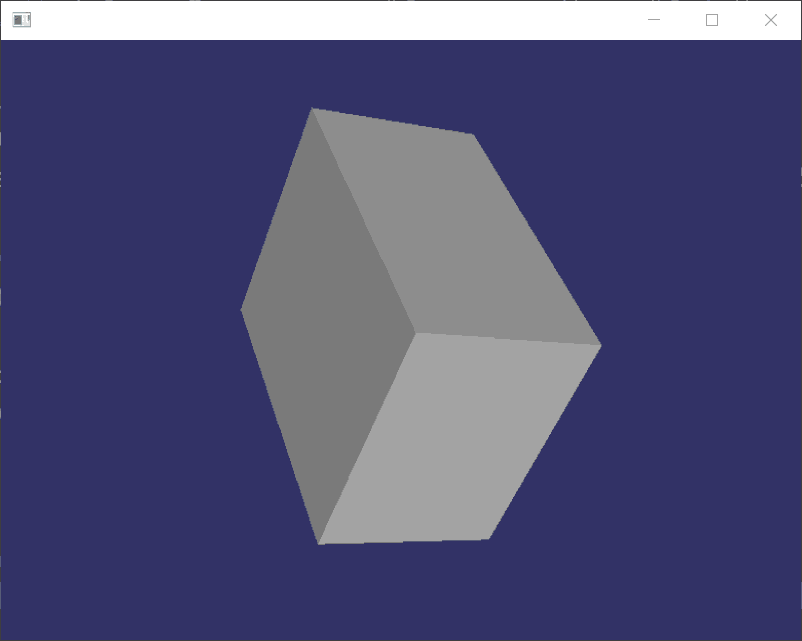
osg define shape(create box)
#ifdef _WIN32

#include <Windows.h>

#endif // _WIN32

#include <osgViewer/Viewer>

#include <osgViewer/ViewerEventHandlers>

#include <osgViewer/CompositeViewer>

#include <osgDB/ReadFile>

#include <osg/Geode>

#include <osg/Node>

#include <osgGA/TrackballManipulator>

#include <osg/GraphicsContext>

#include <osg/ShapeDrawable>

#include <osg/Material>

#include <osg/Image>

#include <osg/Texture2D>

#include <osg/TexEnv>

#include <osg/TexGen>

#include <osg/MatrixTransform>

#include <osg/PositionAttitudeTransform>

#include <osg/AnimationPath>

#include <osg/Matrixd>

#include <osgGA/GUIEventHandler>

#include <osgGA/CameraManipulator>

#include <osgGA/StandardManipulator>

#include <osgGA/OrbitManipulator>

#include <osgGA/TrackballManipulator>

//创建盒子

osg::ref_ptr<osg::Geode> createBox()

{

    osg::ref_ptr<osg::Geode> geode1 = new osg::Geode;

    geode1->addDrawable(new osg::ShapeDrawable(new osg::Box(osg::Vec3(0.0,0.0,0.0),10.0,8.0,6.0)));

    return geode1;

}

int main()

{

    osg::ref_ptr<osgViewer::Viewer> viewer1 = new osgViewer::Viewer;

    osg::ref_ptr<osg::Group> group1 = new osg::Group;

    group1->addChild(createBox());

    viewer1->setSceneData(group1.get());

    viewer1->setUpViewInWindow(, , , , );

    return viewer1->run();

}

osg define shape(create box)的更多相关文章
- Virsh中创建虚拟机两种方式define和create的区别
本质上两者一样的,都是从xml配置文件创建虚拟机 define 丛xml配置文件创建主机但是不启动 create 同样是丛xml配置文件创建主机,但是可以指定很多选项,比如是否启动,是否连接控制台 ...
- OSG开源教程(转)
例:geom->addPrimitiveSet(new osg::DrawArrays(osg::PrimitiveSet::QUADS,0,4)); 来指定要利用这些数据生成一个怎么样的形状. ...
- OSG学习:转动的小汽车示例
由于只是简单的示例,所以小汽车的模型也比较简单,是由简单的几何体组成. 代码如下: #include <osg\ShapeDrawable> #include <osg\Animat ...
- osg模型部分节点旋转
osg::ref_ptr<osg::Geode> CreateBox() { osg::ref_ptr<osg::Geode> geode = new osg::Geode; ...
- OSG入坑之路[转]
转载自:https://segmentfault.com/a/1190000010506374?utm_source=tag-newest osg插件原理:https://blog.csdn.net/ ...
- Learning OSG programing---osgShape
本例示范了osg中Shape ---- 基本几何元素的绘制过程.参照osg官方文档,Shape 类包含以下子类: 在示例程序中,函数createShapes函数用于生成需要绘制的几何形状. osg:: ...
- osg使用shader动态修改纹理坐标
#include <osg/Node> #include <osg/Geometry> #include <osg/Notify> #include <osg ...
- OSG绘制金字塔geode+动态纹理坐标
osg::Node* createPyramidModel() { // create the root node which will hold the model. osg::Group* roo ...
- 如何使用box2d做碰撞检测
cocos2dx3.0+vs2012编译通过. 主要是通过body->SetTransform来设置body的位置和角度,然后自己写个ContactListener来监听碰撞事件 源代码下载 # ...
随机推荐
- 用js刷剑指offer(连续子数组的最大和)
题目描述 HZ偶尔会拿些专业问题来忽悠那些非计算机专业的同学.今天测试组开完会后,他又发话了:在古老的一维模式识别中,常常需要计算连续子向量的最大和,当向量全为正数的时候,问题很好解决.但是,如果向量 ...
- 【转】通过BeanNameAutoProxyCreator改变臃肿代码
https://www.cnblogs.com/zdd-java/p/7861824.html 前言: 最近接手了一个项目,大概过了下需求,然后打开项目准备开搞的时候发现一个问题,这个项目是提供res ...
- shell 文本替换 ---出现--- sed:-e 表达式 #1,字符 8:“s”的未知选项
需要替换的行为: monitor.url=http://192.168.25.100:8443/rest 查询资料得知,报错是因为替换的字符串包含有分隔符/ 所以这行改一下分隔符就可以解决问题了 ( ...
- linux网络编程之进程间通信介绍
从今天起,开始学习进程间通信相关的东东,关于socket的编程先告一段落了,在学习进程间通信之前,首先先要了解一些概念,所以,这次不开始真正的代码编写,先纯理论,理解了为之后的更深入的学习可以打下良好 ...
- 14 webpack中url-loader的使用
默认情况下,webpack无法处理css文件中的url地址,不管是图片还是字体库,只要是URL地址,都处理不了,需要第三方loader 1.安装loader cnpm i url-loader fil ...
- springcloud注册中心Eureka<英 [juəˈri:kə]>的基本搭建
1.http://start.spring.io搭建基本的springboot环境,版本用的是1.5.10 2.在pom文件中添加注册中心的jar包和springcloud的jar包 <!-- ...
- vue 自定义全局组件
- POJ-2689-Prime Distance(素数区间筛法)
链接: https://vjudge.net/problem/POJ-2689 题意: The branch of mathematics called number theory is about ...
- python 操作excle 之第三方库 openpyxl学习
目录 python 操作excle 之第三方库 openpyxl学习 安装 pip install openpyxl 英文文档链接 : 点击这里~ 1,定位excel 2,读取excle中的内容 3, ...
- [ARIA] Accessible modal dialogs
Learn how to create a modal dialog with accessible keyboard and screen reader mechanics using the na ...