
Learning OSG programing---osgShape
本例示范了osg中Shape ---- 基本几何元素的绘制过程。参照osg官方文档,Shape 类包含以下子类:
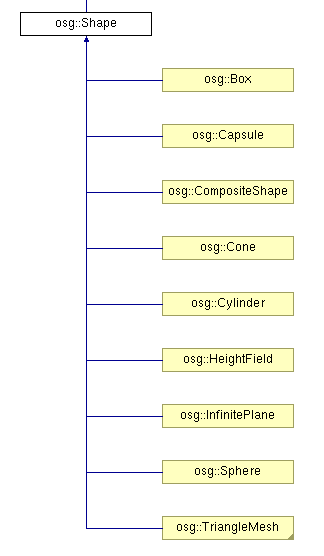
在示例程序中,函数createShapes函数用于生成需要绘制的几何形状。
 osg::Geode* createShapes(osg::ArgumentParser& arguments)

 {

     osg::Geode* geode = new osg::Geode();

     // ---------------------------------------

     // Set up a StateSet to texture the objects

     // ---------------------------------------

     osg::StateSet* stateset = new osg::StateSet();

   //设置材质图片

     osg::ref_ptr<osg::Image> image = osgDB::readRefImageFile( "Images/lz.rgb" );

     if (image)

     {

         osg::Texture2D* texture = new osg::Texture2D;

         texture->setImage(image);

         texture->setFilter(osg::Texture::MIN_FILTER, osg::Texture::LINEAR);

         stateset->setTextureAttributeAndModes(,texture, osg::StateAttribute::ON);

     }

     stateset->setMode(GL_LIGHTING, osg::StateAttribute::ON);

     geode->setStateSet( stateset );

     float radius = 0.8f;

     float height = 1.0f;

     osg::TessellationHints* hints = new osg::TessellationHints;

     hints->setDetailRatio(0.5f);

   //建立各种几何实体

     geode->addDrawable(new osg::ShapeDrawable(new osg::Sphere(osg::Vec3(0.0f,0.0f,0.0f),radius),hints));

     geode->addDrawable(new osg::ShapeDrawable(new osg::Box(osg::Vec3(2.0f,0.0f,0.0f),*radius),hints));

     geode->addDrawable(new osg::ShapeDrawable(new osg::Cone(osg::Vec3(4.0f,0.0f,0.0f),radius,height),hints));

     geode->addDrawable(new osg::ShapeDrawable(new osg::Cylinder(osg::Vec3(6.0f,0.0f,0.0f),radius,height),hints));

     geode->addDrawable(new osg::ShapeDrawable(new osg::Capsule(osg::Vec3(8.0f,0.0f,0.0f),radius,height),hints));

   //用于控制平面的高程起伏

     osg::HeightField* grid = new osg::HeightField;

     if (arguments.read("--large"))      //大范围

     {

         unsigned int numX = ;

         unsigned int numY = ;

         double sizeX = 10.0;

         double sizeY = 10.0;

         grid->allocate(numX,numY);

         grid->setXInterval(sizeX/float(numX));

         grid->setYInterval(sizeY/float(numY));

         for(unsigned int r=;r<numY;++r)

         {

             for(unsigned int c=;c<numX;++c)

             {

                 double rx = double(c)/double(numX-);

                 double ry = double(r)/double(numY-);

                 grid->setHeight(c, r, 2.0*sin(rx*ry*4.0*osg::PI));

             }

         }

     }

     else              //小范围

     {

         grid->allocate(,);

         grid->setXInterval(0.28f);

         grid->setYInterval(0.28f);

         for(unsigned int r=;r<;++r)

         {

             for(unsigned int c=;c<;++c)

             {

                 grid->setHeight(c,r,vertex[r+c*][]);

             }

         }

     }

     geode->addDrawable(new osg::ShapeDrawable(grid));

     return geode;

 }
在以上代码中,首先建立了几何节点Geode,加载纹理图像,并将其设置为节点的材质。
之后向节点中加入各种Shape模型,设置它们的集合参数。之后建立了高程域模型osg::HeightField* grid,根据运行程序时提供的命令行参数,设置其为不同的点密度。若运行命令中提供有--large选项,则建立高密度高程集,两层for循环中嵌套的语句,即为计算高程网格中各点的高程值方程。对于large情形,其在点(x,y)处的高程值为2*sin(x*y*4π)。而在普通情况下,点的高程值取决与vertex向量的第三个分量,因为在文件的开始,包含了地形坐标数据:
#include "../osghangglide/terrain_coords.h"
最后,将定义的地形平面添加到节点中去。
在主函数中,调用上面定义的createShapes函数,在进行一些其他准备工作即可:
int main(int argc, char **argv)

{

    osg::ArgumentParser arguments(&argc,argv);

    // construct the viewer.

    osgViewer::Viewer viewer(arguments);

    // add model to viewer.

    viewer.setSceneData( createShapes(arguments) );

    // add the state manipulator

    viewer.addEventHandler( new osgGA::StateSetManipulator(viewer.getCamera()->getOrCreateStateSet()) );

    return viewer.run();

}
按不同模式运行程序,得到不同的效果:
--large模式:

正常模式:

由此程序受到启发,可利用osg高程域,建立DEM(数字高程模型)浏览或仿真、编辑工具,达到学以致用的目的。
Enjoy!
Learning OSG programing---osgShape的更多相关文章
- Learning OSG programing---osgScribe
Learning OSG programing---osgScribe Scribe可以翻译为素描,抄写等.本例通过在模型表面添加一层素描,来显示模型的骨架. 关键代码: osg::ref_ptr&l ...
- Learning OSG programing---Multi Camera in Multi window 在多窗口中创建多相机
这个例子演示了在多个窗口中创建多个相机,函数的代码如下: void multiWindowMultipleCameras(osgViewer::Viewer& viewer,bool mult ...
- Learning OSG programing---Multi Camera in one window 在单窗口中创建多相机
在学习OSG提供的例子osgCamera中,由于例子很长,涉及很多细节,考虑将其分解为几个小例子.本文介绍实现在一个窗口中添加多个相机的功能. 此函数接受一个Viewer引用类型参数,设置图形上下文的 ...
- Learning OSG programing---osgAnimation(3)
接下来是用createModel函数创建模型: osg::ref_ptr<osg::Group> createModel(bool overlay, osgSim::OverlayNode ...
- Learning OSG programing---osgAnimation(2)
osg::Node* createBase(const osg::Vec3& center,float radius) { ; ; *radius; *radius; osg::Vec3 v0 ...
- Learning OSG programing---osgAnimation(1)
osg::AnimationPath* createAnimationPath(const osg::Vec3& center,float radius,double looptime) { ...
- Learning OSG programing---osgClip
OSG Clip例程剖析 首先是创建剪切节点的函数代码: osg::ref_ptr<osg::Node> decorate_with_clip_node(const osg::ref_pt ...
- Learning OSG programing---osgwindows
/* OpenSceneGraph example, osgwindows. * * Permission is hereby granted, free of charge, to any pers ...
- Coursera Deep Learning 2 Improving Deep Neural Networks: Hyperparameter tuning, Regularization and Optimization - week3, Hyperparameter tuning, Batch Normalization and Programming Frameworks
Tuning process 下图中的需要tune的parameter的先后顺序, 红色>黄色>紫色,其他基本不会tune. 先讲到怎么选hyperparameter, 需要随机选取(sa ...
随机推荐
- hadoop编程小技巧(1)---map端聚合
測试hadoop版本号:2.4 Map端聚合的应用场景:当我们仅仅关心全部数据中的部分数据时,而且数据能够放入内存中. 使用的优点:能够大大减小网络数据的传输量,提高效率: 一般编程思路:在Mapp ...
- html表格单元格添加斜下框线的方法
一.分隔单元格的方法 1.用“transform: rotate(-55deg);”把一条水平线旋转一定角度就成斜线了 2.利用以下命令调整分割线位置等. :after :before transfo ...
- nativescript(angular2)——ListView组件
NativeScript是一个不使用webview的情况下构建跨平台并且原生的iOS和Android应用.使用Angular.TypeScript或JavaScript来获得原生UI和性能体验,同时可 ...
- zabbix 4.2 安装教程
1.我这里使用的是ali的yum源 #wget -O /etc/yum.repos.d/CentOS-Base.repo http://mirrors.aliyun.com/repo/Centos-7 ...
- c++函数参数或返回值为函数指针
C++中函数指针的形式为:返回值类型 + 参数类型,函数没有值类型,但是却可以声明函数的指针,因为函数是可寻址的,存放在内存中的代码段,可以从指针访问. 函数指针可以声明为: void (*pF)(v ...
- 基于Redis实现简单的分布式锁【理论】
摘要 分布式锁在很多应用场景下是非常有效的手段,比如当运行在多个机器上的不同进程需要访问同一个竞争资源的时候,那么就会涉及到进程对资源的加锁和释放,这样才能保证数据的安全访问.分布式锁实现的方案有很多 ...
- less:运算
less中的运算 -任何数字.颜色或者变量都可以参加运算,运算应该被包裹在括号中. -例如:+-*. @width: 30px; .box { width: (20 + 5) * @width; } ...
- Java8 的一些新特性的学习理解
近期在学习队列相关的一些知识,在学习过程中发现Iterable<T>接口中新增了两个新的方法,出于好奇,就想知道这是什么东东,干什么用的.俗话说:实践出真知,所以就有了以下反复的测试. 先 ...
- Ansible笔记(2)---常用模块之文件操作
一.copy模块 1.1作用: copy模块是将ansible主机上的文件拷贝到远程受控主机 1.2常用参数: src参数 :用于指定需要copy的文件或目录. dest参数 :用于指定文件将被拷贝到 ...
- tpcc-mysql测试mysql5.6 (xfs文件系统)
操作系统版本:CentOS release 6.5 (Final) 2.6.32-431.el6.x86_64 #1 内存:32G CPU:Intel(R) Xeon(R) CPU E5-2450 ...