
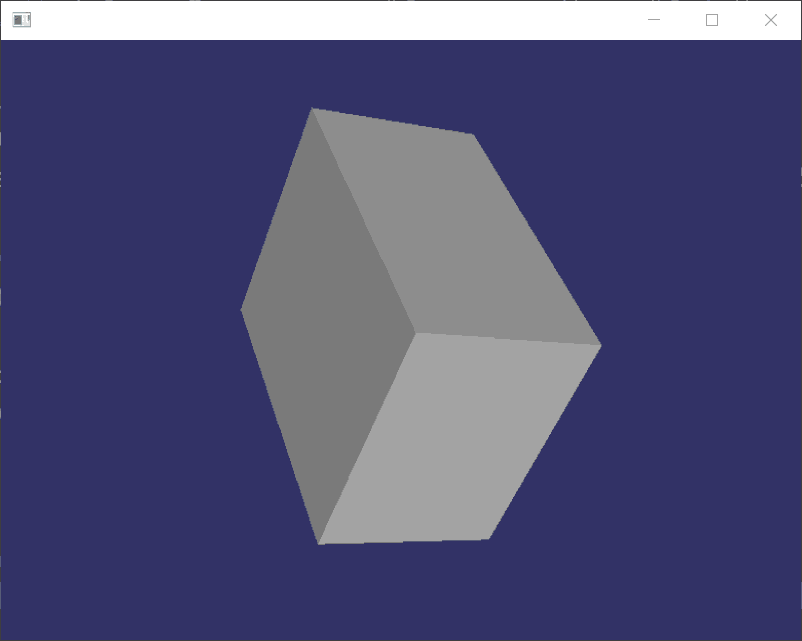
osg define shape(create box)
#ifdef _WIN32

#include <Windows.h>

#endif // _WIN32

#include <osgViewer/Viewer>

#include <osgViewer/ViewerEventHandlers>

#include <osgViewer/CompositeViewer>

#include <osgDB/ReadFile>

#include <osg/Geode>

#include <osg/Node>

#include <osgGA/TrackballManipulator>

#include <osg/GraphicsContext>

#include <osg/ShapeDrawable>

#include <osg/Material>

#include <osg/Image>

#include <osg/Texture2D>

#include <osg/TexEnv>

#include <osg/TexGen>

#include <osg/MatrixTransform>

#include <osg/PositionAttitudeTransform>

#include <osg/AnimationPath>

#include <osg/Matrixd>

#include <osgGA/GUIEventHandler>

#include <osgGA/CameraManipulator>

#include <osgGA/StandardManipulator>

#include <osgGA/OrbitManipulator>

#include <osgGA/TrackballManipulator>

//创建盒子

osg::ref_ptr<osg::Geode> createBox()

{

    osg::ref_ptr<osg::Geode> geode1 = new osg::Geode;

    geode1->addDrawable(new osg::ShapeDrawable(new osg::Box(osg::Vec3(0.0,0.0,0.0),10.0,8.0,6.0)));

    return geode1;

}

int main()

{

    osg::ref_ptr<osgViewer::Viewer> viewer1 = new osgViewer::Viewer;

    osg::ref_ptr<osg::Group> group1 = new osg::Group;

    group1->addChild(createBox());

    viewer1->setSceneData(group1.get());

    viewer1->setUpViewInWindow(, , , , );

    return viewer1->run();

}

osg define shape(create box)的更多相关文章
- Virsh中创建虚拟机两种方式define和create的区别
本质上两者一样的,都是从xml配置文件创建虚拟机 define 丛xml配置文件创建主机但是不启动 create 同样是丛xml配置文件创建主机,但是可以指定很多选项,比如是否启动,是否连接控制台 ...
- OSG开源教程(转)
例:geom->addPrimitiveSet(new osg::DrawArrays(osg::PrimitiveSet::QUADS,0,4)); 来指定要利用这些数据生成一个怎么样的形状. ...
- OSG学习:转动的小汽车示例
由于只是简单的示例,所以小汽车的模型也比较简单,是由简单的几何体组成. 代码如下: #include <osg\ShapeDrawable> #include <osg\Animat ...
- osg模型部分节点旋转
osg::ref_ptr<osg::Geode> CreateBox() { osg::ref_ptr<osg::Geode> geode = new osg::Geode; ...
- OSG入坑之路[转]
转载自:https://segmentfault.com/a/1190000010506374?utm_source=tag-newest osg插件原理:https://blog.csdn.net/ ...
- Learning OSG programing---osgShape
本例示范了osg中Shape ---- 基本几何元素的绘制过程.参照osg官方文档,Shape 类包含以下子类: 在示例程序中,函数createShapes函数用于生成需要绘制的几何形状. osg:: ...
- osg使用shader动态修改纹理坐标
#include <osg/Node> #include <osg/Geometry> #include <osg/Notify> #include <osg ...
- OSG绘制金字塔geode+动态纹理坐标
osg::Node* createPyramidModel() { // create the root node which will hold the model. osg::Group* roo ...
- 如何使用box2d做碰撞检测
cocos2dx3.0+vs2012编译通过. 主要是通过body->SetTransform来设置body的位置和角度,然后自己写个ContactListener来监听碰撞事件 源代码下载 # ...
随机推荐
- JDBC终章- 使用 DBUtils实现增删查改- C3P0Utils数据源/QueryRunner runner连接数据源并执行sql
JDBC终章- 使用 DBUtils实现增删查改 1.数据库结构 Create Table CREATE TABLE `user` ( `id` ) NOT NULL AUTO_INCREMENT, ...
- element-ui upload组件 onchange事件 传自定义参数
<el-upload class="upload-demo" list-type="picture" accept=" ...
- sbt 配置个屁的国内源
~/.sbt/repositories [repositories] #本地源 local #兼容 Ivy 路径布局 apache-ivy: https://repo1.maven.apache.or ...
- Java8 中的 Optional 相关用法
基本方法: ofNullable() 为可能 null 的值创建一个 Optional 实例, 然后可以对该实例遍历/过滤, 判断是否存在,或者为空时执行.. ifPresent(...) 如果值存 ...
- django设置时区与语言
django的目录下,django/conf/locale,这个目录下,看有什么语言包, zh_Hans代表中文简体,zh_Hant代表中文繁体,设置即可. TIME_ZONE设置为:Asia/Sha ...
- c语言二级指针的使用,malloc内存申请
#include<stdio.h> #include<stdlib.h> void AllocateMemory(int **pGetMemory, int n) { int ...
- CF436E Cardboard Box(贪心)
题意 有nnn个关卡,第iii关可以花费aia_iai的代价打一颗星,bib_ibi的代价打两颗星.保证1≤ai<bi≤1091\le a_i<b_i\le10^91≤ai<b ...
- [GraphQL] Set variable and default value & alias
query($category:PetCategory=CAT, $status:PetStatus=AVAILABLE) { #availablePets is the alias availabl ...
- 【安卓笔记】Android接入https证书进行请求
Nginx在开发环境用的还是比较少,之前用在Web开发中解决跨域的问题,在安卓开发中如果想经过Nginx开启https并且转发到其他服务器,相关的配置步骤也不是特别复杂. Android使用自签名证书 ...
- hive on spark (spark2.0.0 hive2.3.3)
hive on spark真的很折腾人啊!!!!!!! 一.软件准备阶段 maven3.3.9 spark2.0.0 hive2.3.3 hadoop2.7.6 二.下载源码spark2.0.0,编译 ...