
easyui_datagrid合并行单击某行选中所有
实现如下功能:
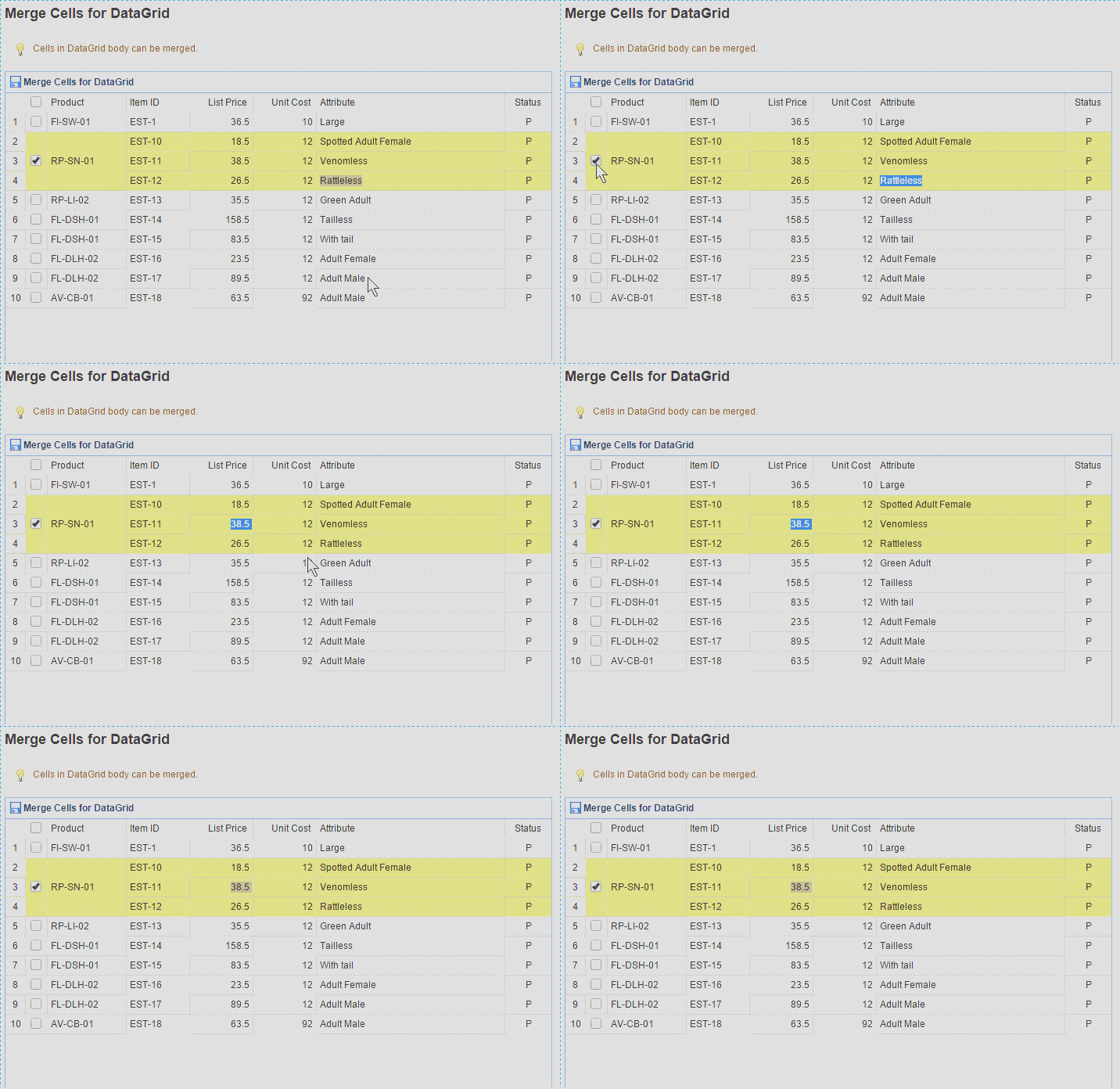
代码:
<table id="dg" class="easyui-datagrid" title="Merge Cells for DataGrid" style="width:700px;height:750px"

            data-options="

                rownumbers: true,

                singleSelect: false,

                iconCls: 'icon-save',

                url: '../datagrid/datagrid_data1.json?n='+Math.random(),

           method:'get',

           onLoadSuccess: onLoadSuccess,

           checkOnSelect:true,

           selectOnCheck:true,

           onCheck:onCheck,

           onUncheck:onUncheck

            ">

        <thead>

            <tr>

                <th data-options="field:'ck',checkbox:true"></th>

                <th data-options="field:'productid',width:100">Product</th>

                <th data-options="field:'itemid',width:80">Item ID</th>

                <th data-options="field:'listprice',width:80,align:'right'">List Price</th>

                <th data-options="field:'unitcost',width:80,align:'right'">Unit Cost</th>

                <th data-options="field:'attr1',width:240">Attribute</th>

                <th data-options="field:'status',width:60,align:'center'">Status</th>

            </tr>

        </thead>

    </table>

    <script type="text/javascript">

        //判断rowIndex是否被选中

        //调用方法:$("#dg").datagrid("isChecked", { rowIndex: rowIndex })

        $.extend($.fn.datagrid.methods, {

            isChecked: function (dg, param) {

                var flag = false;//是否选中

                var allRows = $(dg).datagrid('getChecked');   //获取所有被选中的行

                $.each(allRows, function (index,item) {

                    if (param.rowIndex == $(dg).datagrid('getRowIndex', item)) {

                        flag = true;

                        return false;//return false终止循环,return true,跳出循环,进入下一次循环,跟函数返回值无关

                    }

                })

                return flag;

            }

            })

        var index = '';

        function onCheck(rowIndex, rowData) {

            if (index == '') {

                index = rowIndex;

                var productid = rowData["productid"];

                var rows = $("#dg").datagrid("getRows");

                //alert($("#dg").datagrid("isChecked", { rowIndex: rowIndex }));

                for (var i = 0; i < rows.length; i++) {

                    if (rows[i]["productid"] == productid) {

                        $("#dg").datagrid("checkRow", i);

                    }

                }

                index = '';

            }

        }

        function onUncheck(rowIndex, rowData) {

            if (index == '') {

                index = rowIndex;

                var productid = rowData["productid"];

                var rows = $("#dg").datagrid("getRows");

                //alert($("#dg").datagrid("isChecked", { rowIndex: rowIndex }));

                for (var i = 0; i < rows.length; i++) {

                    if (rows[i]["productid"] == productid) {

                        $("#dg").datagrid("uncheckRow", i);

                    }

                }

                index = '';

            }

        }

        function onLoadSuccess(data){

            var merges = [{

                index: 1,

                rowspan: 3

            }];

            for(var i=0; i<merges.length; i++){

                $(this).datagrid('mergeCells',{

                    index: merges[0].index,

                    field: 'productid',

                    rowspan: merges[0].rowspan

                }).datagrid('mergeCells', {

                    index: merges[0].index,

                    field: 'ck',

                    rowspan: merges[0].rowspan

                });

            }

        }

    </script>
easyui_datagrid合并行单击某行选中所有的更多相关文章
- 基于jquery 全选、反选、各行换色、单击行选中事件实现代码
<script language="javascript"> $(document).ready(function(){ //各行换色 $('table tr:odd' ...
- 使用自连接、for xml path('')和stuff合并显示多行数据到一行中(转)
原文: http://njm.iteye.com/blog/795881 --使用 自连接.for xml path('')和stuff合并显示多行数据到一行中 --注 --1.计算列可以不用包含在聚 ...
- QTableWidget行选中/删除/添加行
1 均分各列 tableWidget->horizontalHeader()->setStretchLastSection(true); //就是这个地方 tableWidget-> ...
- GridView/DataGrid行单击和双击事件实现代码_.Net教程
功能: 单击选中行,双击打开详细页面 说明:单击事件(onclick)使用了 setTimeout 延迟,根据实际需要修改延迟时间 ;当双击时,通过全局变量 dbl_click 来取消单击事件的响应 ...
- TreeViewItem实现整行选中 (两种用法)
用法一 <ResourceDictionary xmlns="http://schemas.microsoft.com/winfx/2006/xaml/presentation&quo ...
- 支持行单击、双击事件的GridView和DataList控件(译)
支持行单击.双击事件的GridView和DataList控件(译) 让GridView 和 DataList 控件响应鼠标单击.双击事件.并且,使用 ClientScript.Regi ...
- 在dbgrid中如何多行选中记录(ctl与shift均可用)
在dbgrid中如何多行选中记录(ctl与shift均可用),设置dbgrid的dgmultiselect为true,只有ctl好用而shift不好用,如何使shift也好用 Dbgrid源代码:pr ...
- jquery-easyui的datagrid在checkbox多选时,行选中不正确应,去除高亮的解决方法
jquery-easyui的datagrid在checkbox多选时,行选中不正确应,去除高亮的解决方法 工作中用到一个具有多选功能的easyui-datagrid在处理cell的点击事件时,不同 ...
- el-table合并行并自定义某一列或几列
在el-table的官方组件中并没有看到具体的合并行或者列及自定义表格内容,于是就自己写了一个效果如下所示. 这种对左侧内容要求比较高,要求行合并,并要自定义一些内容.下面说一下具体方法及代码写法. ...
随机推荐
- Map Class Example
Here's a quick look at how to use the Scala Map class, with a colllection of Map class examples. The ...
- C++编程思想
写在前面的话:自己看书的时候不是太习惯边看边做上面的例子,因为感觉那样子看书太慢了,但是这样子又会因为看的太快,之后什么都记不住,所以就想写写读书笔记 第六章
- C#中一道关于线程同步的练习题——模拟多窗口售票
题目:模拟窗口卖票,四个窗口同时对外开放售票,需要按顺序售出. 要求:输出每一张票的售出时间和售出窗口,不能出现票未售出或者被售出多次的情况. using System; using System.C ...
- c++——派生类和基类转换(类型兼容性原则)
基类也叫父类,派生类也叫子类. 类之间的继承关系继承关系是类之间的父子关系. 继承关系的特点如下:A. 子类拥有父类的所有属性和行为B. 子类也是一种特殊的父类C. 子类对象可以当父类对象使用D. 子 ...
- VBA学习笔记(4)--数组和单元格互相转换
说明(2017.3.23): 1. VBA的数组还是很难用的,其实就是非常难用! 2. 要先定义一个数组,可以是空的,也可以里面写个数字作为数组长度. 3. 如果是空数组,可以后面redim重新定义数 ...
- 【Unity笔记】使用协程(Coroutine)异步加载场景
using UnityEngine; using System.Collections; using UnityEngine.SceneManagement; using System; public ...
- 【Visual Studio】解决方案未保存,请先保存你的解决方案,然后再管理Nuget包
上网下的Demo,文件夹中没有.sln文件,用VS打开.csproj文件来打开方案.此时可能因为一些引用问题想打开Nuget包管理器,会弹出如下提示: 解决方案未保存,请先保存你的解决方案,然后再管理 ...
- 更新Python以及随后的nose,easy_install,pip,numpy,scipy和theano
这里报错:ImportError: No module named models.dnn. 应该是PDNN的目录没有加入到PYTHONPATH当中,因而执行下一句: export PYTHONPATH ...
- am335x ti SDK6.0 kernel 时钟源码文件记录
源码流程记录 板级文件开始 // arch/arm/mach-omap2/board-aplex_cmi_at101.c MACHINE_START(APLEX_CMI_AT101, "ap ...
- pthread_setschedparam
#include <stdlib.h> #include <pthread.h> #include <stdio.h> #include <sched.h&g ...