
unity3d Resources.Load动态加载资源
初步整理并且学习unity3d资源加载方法,预计用时两天完成入门学习Unity3d常用两种加载资源方案:Resources.Load和AssetBundle
Resources.Load就是从一个缺省打进程序包里的AssetBundle里加载资源而一般AssetBundle文件需要你自己创建,运行时动态加载,
可以指定路径和来源的。其实场景里所有静态的对象也有这么一个加载过程,只是Unity后台替你自动完成
一:Resources.Load:使用这种方式加载资源,首先需要下Asset目录下创建一个名为Resources的文件夹,这个命名是U3D规定的方式,然后把资源文件放进去,
当然也可以在Resources中再创建子文件夹,当然在代码加载时需要添加相应的资源路径,下面是一个简demo,两个预设,Cube和Sphere,
其中Cube放在Resource中的Prebs中,而Sphere放在Resources跟目录下,下面分别实现Resources.Load资源的加载

using UnityEngine;

using System.Collections;

public class LoadResDemo : MonoBehaviour {

    private string cubePath = "Prebs/MyCubePreb";

    private string spherePath = "MySpherePreb";

    void Start () {

        //把资源加载到内存中

        Object  cubePreb = Resources.Load(cubePath, typeof(GameObject));

        //用加载得到的资源对象,实例化游戏对象,实现游戏物体的动态加载

        GameObject cube = Instantiate(cubePreb) as GameObject;

        //以下同理实现Sphere的动态实例化

        //把资源加载到内存中

        Object spherePreb = Resources.Load(spherePath, typeof(GameObject));

        //用加载得到的资源对象,实例化游戏对象,实现游戏物体的动态加载

        GameObject sphere = Instantiate(spherePreb) as GameObject;

    }

    void Update () {

    }

}
将上面的脚本附加到某个游戏对象上,在运行游戏时就可以看到场景中动态创建的上面的游戏对象了
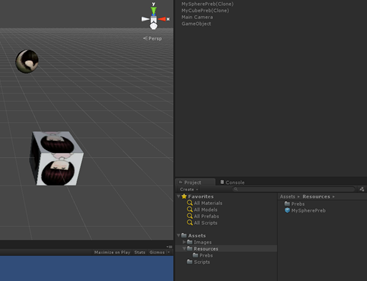
上面是第一种使用Resources.Load()的方式动态加载游戏对象的,然而在项目中更长用的却是第二种使用AssetBundle的方式动态加载游戏对象。
使用AssetBundle打包预设或者场景可以将与其相关的所有资源打包,这样很好地解决资源的依赖问题,使得我们可以方便的加载GameObject
首先需要打包资源:
using UnityEngine;

using System.Collections;

using UnityEditor;

using System.IO;

public class AesstBundleTest : MonoBehaviour {

    [MenuItem("Custom Bundle/Create Bundel Main")]

    public static void creatBundleMain()

    {

        //获取选择的对象的路径

        Object[] os = Selection.GetFiltered(typeof(Object), SelectionMode.DeepAssets);

        bool isExist = Directory.Exists(Application.dataPath + "/StreamingAssets");

        if (!isExist)

        {

            Directory.CreateDirectory(Application.dataPath + "/StreamingAssets");

        }

        foreach (Object o in os)

        {

            string sourcePath = AssetDatabase.GetAssetPath(o);

            string targetPath = Application.dataPath + "/StreamingAssets/" + o.name + ".assetbundle";

            if (BuildPipeline.BuildAssetBundle(o, null, targetPath, BuildAssetBundleOptions.CollectDependencies))

            {

                print("create bundle cuccess!");

            }

            else

            {

                print("failure happen");

            }

            AssetDatabase.Refresh();

        }

    }

    [MenuItem("Custom Bundle/Create Bundle All")]

    public static void CreateBundleAll()

    {

        bool isExist = Directory.Exists(Application.dataPath + "/StreamingAssets");

        if (!isExist)

        {

            Directory.CreateDirectory(Application.dataPath + "/StreamingAssets");

        }

        Object[] os = Selection.GetFiltered(typeof(Object), SelectionMode.DeepAssets);

        if (os == null || os.Length == )

        {

            return;

        }

        string targetPath = Application.dataPath + "/StreamingAssets/" + "All.assetbundle";

        if (BuildPipeline.BuildAssetBundle(null, os, targetPath, BuildAssetBundleOptions.CollectDependencies))

        {

            print("create bundle all cuccess");

        }

        else

        {

            print("failure happen");

        }

        AssetDatabase.Refresh();

    }

}
把上面的代码放在Editor中,在菜单栏中就可以看见自定的菜单项,选中需要打包的预设,就可以把对应的预设打包并输出到StreamAssets中了
然后是动态加载资源:
using UnityEngine;

using System.Collections;

public class LoadBundleTest : MonoBehaviour {

    //不同平台下StreamingAssets的路径是不同的,这里需要注意一下。

    public static readonly string PathURL =

    #if UNITY_ANDROID

        "jar:file://" + Application.dataPath + "!/assets/";

    #elif UNITY_IPHONE

        Application.dataPath + "/Raw/";

    #elif UNITY_STANDALONE_WIN || UNITY_EDITOR

    "file://" + Application.dataPath + "/StreamingAssets/";

    #else

        string.Empty;

    #endif

    // Update is called once per frame

    void Update () {

    }

    void OnGUI()

    {

        if (GUILayout.Button("Load Bundle Main"))

        {

            string path_shpere = PathURL + "MySpherePreb.assetbundle";

            StartCoroutine(loadBundleMain(path_shpere));

            string path_cube = PathURL + "MyCubePreb.assetbundle";

            StartCoroutine(loadBundleMain(path_cube));

            print(path_cube);

        }

        if (GUILayout.Button("Load Bundle All"))

        {

            StartCoroutine(loadBundleAll(PathURL + "All.assetbundle"));

        }

    }

    private IEnumerator loadBundleMain(string path)

    {

        WWW bundle = new WWW(path);

      //  yield return bundle;

         Instantiate(bundle.assetBundle.mainAsset);

         bundle.assetBundle.Unload(false);

         yield return ;

    }

    private IEnumerator loadBundleAll(string path)

    {

        WWW bundle = new WWW(path);

        yield return bundle;

        Instantiate(bundle.assetBundle.Load("MyCubePreb"));

        Instantiate(bundle.assetBundle.Load("MySpherePreb"));

        yield return ;

    }

}
unity3d Resources.Load动态加载资源的更多相关文章
- 【Unity3D】Unity3D之 Resources.Load 动态加载资源
[Unity3D]Unity3D之 Resources.Load 动态加载资源 1.Resources.Load:使用这种方式加载资源,首先需要下Asset目录下创建一个名为Resources的文件夹 ...
- unity3d动态加载资源
在Unity3D的网络游戏中实现资源动态加载 分类: 最新学习2012-06-14 13:35 1127人阅读 评论(0) 收藏 举报 网络游戏nullvectorjson游戏string 用Unit ...
- 从高德 SDK 学习 Android 动态加载资源
前不久跑去折腾高德 SDK 中的 HUD 功能,相信用过该功能的用户都知道 HUD 界面上的导航转向图标是动态变化的.从高德官方导航 API 文档中 AMapNaviGuide 类的描述可知,导航转向 ...
- 动态加载资源文件(ResourceDictionary)
原文:动态加载资源文件(ResourceDictionary) 在xaml中控件通过绑定静态资源StaticResource来获取样式Style有多种方式: 1.在项目的启动文件App中<App ...
- Style样式的四种使用(包括用C#代码动态加载资源文件并设置样式)
Posted on 2012-03-23 11:21 祥叔 阅读(2886) 评论(6) 编辑 收藏 在Web开发中,我们通过CSS来控制页面元素的样式,一般常用三种方式: 1. 内联样式 ...
- [UE4]一个好用的虚幻4插件,根据资源名称动态加载资源,GetCurrentLeveName(获得当前地图名称)
下载地址 一.下载与UE4相对应的版本 二.在工程根目录新建Plugins目录,解压插件. 三.如果工程已经打开,则需要重新打开 四.重新打开工程后,右下角会有提示有新插件可用. 五.这个插件提供 ...
- JavaScript动态加载资源【js|css】示例代码
在开发过程中会用到各种第三方的插件,或者自己写在单独文件中的js方法库或者css样式,在html头部总是需要写一大堆的script和link标签,如果想要自己实现动态的引入资源文件,可以使用开源的re ...
- WPF 界面实现多语言支持 中英文切换 动态加载资源字典
1.使用资源字典,首先新建两个字典文件en-us.xaml.zh-cn.xaml.定义中英文的字符串在这里面[注意:添加xmlns:s="clr-namespace:System;assem ...
- JavaScript动态加载资源
//动态加载样式 function dynamicLoadingCss(path){ if(!path || path.length === 0){ return false; } var head ...
随机推荐
- 【mysql】【转发】[Err]1267 - Illegal mix of collations(utf8_general_ci,IMPLICIT) and (utf8_unicode_ci,I
[Err]1267 - Illegal mix of collations(utf8_general_ci,IMPLICIT) and (utf8_unicode_ci,IMPLICIT) for o ...
- 阿里云全国快递物流查询api接口
口地址: https://market.aliyun.com/products/56928004/cmapi021863.html?spm=5176.730005.productlist.d_cmap ...
- 图解Disruptor框架(二):核心概念
图解Disruptor框架(二):核心概念 概述 上一个章节简单的介绍了了下Disruptor,这节就是要好好的理清楚Disruptor中的核心的概念.并且会给出个HelloWorld的小例子. 在正 ...
- python基础-面向对象的三大特征
继承 单继承 父类 基类 子类 派生类 继承:是面向对象软件技术当中的一个概念,如果一个类别A“继承自”另一个类别B,就把这个A称为“B的子类别”,而把B称为“A的父类别”也可以称“B是A的超类”. ...
- Applied Nonparametric Statistics-lec9
Ref:https://onlinecourses.science.psu.edu/stat464/print/book/export/html/12 前面我们考虑的情况是:response是连续的, ...
- LeetCode(260) Single Number III
题目 Given an array of numbers nums, in which exactly two elements appear only once and all the other ...
- ZOJ 2314 (sgu 194) Reactor Cooling (无源汇有上下界最大流)
题意: 给定n个点和m条边, 每条边有流量上下限[b,c], 求是否存在一种流动方法使得每条边流量在范围内, 而且每个点的流入 = 流出 分析: 无源汇有上下界最大流模板, 记录每个点流的 in 和 ...
- 数学基础:HUD1124-Factorial(N!末尾0的个数)
Factorial Problem Description The most important part of a GSM network is so called Base Transceiver ...
- JSP 页面 jstl 时间戳 long型转时间
转载http://www.cnblogs.com/gmq-sh/p/5528989.html
- DataContext.ExecuteQuery的两种方法调用
ExecuteQuery主要用于DataContext类直接执行SQL语句的查询,在MSDN上有两种执行方法,下面为两种方法的不同调用: 1.ExecuteQuery<TResult>(S ...