
Java-JUC(十四):SimpleDateFormat是线程不安全的
SimpleDateFormat是Java提供的一个格式化和解析日期的工具类,日常开发中应该经常会用到,但是由于它是线程不安全的,多线程公用一个SimpleDateFormat实例对日期进行解析、格式化都会导致程序出错,接下来就讨论下它为何是线程不安全的,以及如何避免。
问题复现
编写测试代码如下:
    private static SimpleDateFormat sdf = new SimpleDateFormat("yyyy-MM-dd");

    public static void main(String[] args) {

        String[] waitingFormatTimeItems = { "2019-08-06", "2019-08-07", "2019-08-08" };

        for (int i = 0; i < waitingFormatTimeItems.length; i++) {

            final int i2 = i;

            Thread thread = new Thread(new Runnable() {

                @Override

                public void run() {

                    for (int j = 0; j < 100; j++) {

                        String str = waitingFormatTimeItems[i2];

                        String str2 = null;

                        Date parserDate = null;

                        try {

                            parserDate = sdf.parse(str);

                        } catch (ParseException e) {

                            e.printStackTrace();

                        }

                        str2 = sdf.format(parserDate);

                        System.out.println("i: " + i2 + "\tj: " + j + "\tThreadName: " + Thread.currentThread().getName() + "\t" + str + "\t" + str2);

                        if (!str.equals(str2)) {

                            throw new RuntimeException("date conversion failed after " + j + " iterations. Expected " + str + " but got " + str2);

                        }

                    }

                }

            });

            thread.start();

        }

    }
运行会抛出java.lang.RuntimeException,说明处理的结果时不正确的,从下边日志也看出来。
i: 2    j: 0    ThreadName: Thread-2    2019-08-08    2208-09-17

Exception in thread "Thread-2" Exception in thread "Thread-1" Exception in thread "Thread-0"

i: 1    j: 0    ThreadName: Thread-1    2019-08-07    2208-09-17

i: 0    j: 0    ThreadName: Thread-0    2019-08-06    2208-09-17

java.lang.RuntimeException: date conversion failed after 0 iterations. Expected 2019-08-08 but got 2208-09-17

    at dx.test.ThreadLocalTest$2.run(ThreadLocalTest.java:36)

    at java.lang.Thread.run(Thread.java:748)

java.lang.RuntimeException: date conversion failed after 0 iterations. Expected 2019-08-07 but got 2208-09-17

    at dx.test.ThreadLocalTest$2.run(ThreadLocalTest.java:36)

    at java.lang.Thread.run(Thread.java:748)

java.lang.RuntimeException: date conversion failed after 0 iterations. Expected 2019-08-06 but got 2208-09-17

    at dx.test.ThreadLocalTest$2.run(ThreadLocalTest.java:36)

    at java.lang.Thread.run(Thread.java:748)
测试代码多运行几次,会发现抛出 java.lang.NumberFormatException 异常:
Exception in thread "Thread-1" Exception in thread "Thread-0" Exception in thread "Thread-2" java.lang.NumberFormatException: multiple points

    at sun.misc.FloatingDecimal.readJavaFormatString(FloatingDecimal.java:1890)

    at sun.misc.FloatingDecimal.parseDouble(FloatingDecimal.java:110)

    at java.lang.Double.parseDouble(Double.java:538)

    at java.text.DigitList.getDouble(DigitList.java:169)

    at java.text.DecimalFormat.parse(DecimalFormat.java:2056)

    at java.text.SimpleDateFormat.subParse(SimpleDateFormat.java:1869)

    at java.text.SimpleDateFormat.parse(SimpleDateFormat.java:1514)

    at java.text.DateFormat.parse(DateFormat.java:364)

    at com.dx.test.ThreadLocalTest$2.run(ThreadLocalTest.java:29)

    at java.lang.Thread.run(Thread.java:748)

java.lang.NumberFormatException: multiple points

    at sun.misc.FloatingDecimal.readJavaFormatString(FloatingDecimal.java:1890)

    at sun.misc.FloatingDecimal.parseDouble(FloatingDecimal.java:110)

    at java.lang.Double.parseDouble(Double.java:538)

    at java.text.DigitList.getDouble(DigitList.java:169)

    at java.text.DecimalFormat.parse(DecimalFormat.java:2056)

    at java.text.SimpleDateFormat.subParse(SimpleDateFormat.java:1869)

    at java.text.SimpleDateFormat.parse(SimpleDateFormat.java:1514)

    at java.text.DateFormat.parse(DateFormat.java:364)

    at com.dx.test.ThreadLocalTest$2.run(ThreadLocalTest.java:29)

    at java.lang.Thread.run(Thread.java:748)

java.lang.NumberFormatException: multiple points

    at sun.misc.FloatingDecimal.readJavaFormatString(FloatingDecimal.java:1890)

    at sun.misc.FloatingDecimal.parseDouble(FloatingDecimal.java:110)

    at java.lang.Double.parseDouble(Double.java:538)

    at java.text.DigitList.getDouble(DigitList.java:169)

    at java.text.DecimalFormat.parse(DecimalFormat.java:2056)

    at java.text.SimpleDateFormat.subParse(SimpleDateFormat.java:1869)

    at java.text.SimpleDateFormat.parse(SimpleDateFormat.java:1514)

    at java.text.DateFormat.parse(DateFormat.java:364)

    at com.dx.test.ThreadLocalTest$2.run(ThreadLocalTest.java:29)

    at java.lang.Thread.run(Thread.java:748)
问题分析
首先看下SimpleDateFormat的类图结构:
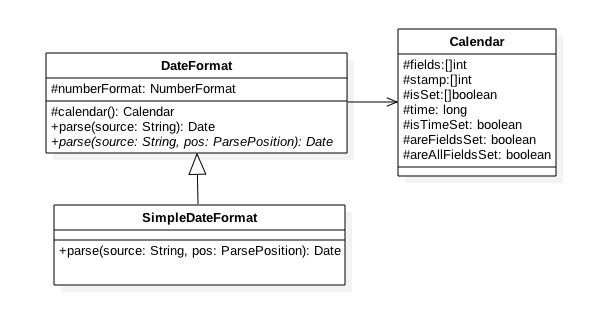
从类图和源代码从都可以发现,SimpleDateFormat内部依赖于Calendar对象,通过下边代码分析会发现:实际上SimpleDateFormat的线程不安全就是因为Calendar是线程不安全的。
Calendar内部存储的日期数据的变量field,time等都是不安全的,更重要的Calendar内部函数操作对变量操作是不具有原子性的操作。
SimpleDateFormat#parse方法:
    @Override

    public Date parse(String text, ParsePosition pos)

    {

        checkNegativeNumberExpression();

        int start = pos.index;

        int oldStart = start;

        int textLength = text.length();

        boolean[] ambiguousYear = {false};

        //(1)解析日期字符串放入CalendarBuilder的实例calb中

        CalendarBuilder calb = new CalendarBuilder();

        for (int i = 0; i < compiledPattern.length; ) {

            int tag = compiledPattern[i] >>> 8;

            int count = compiledPattern[i++] & 0xff;

            if (count == 255) {

                count = compiledPattern[i++] << 16;

                count |= compiledPattern[i++];

            }

            switch (tag) {

            case TAG_QUOTE_ASCII_CHAR:

                if (start >= textLength || text.charAt(start) != (char)count) {

                    pos.index = oldStart;

                    pos.errorIndex = start;

                    return null;

                }

                start++;

                break;

            case TAG_QUOTE_CHARS:

                while (count-- > 0) {

                    if (start >= textLength || text.charAt(start) != compiledPattern[i++]) {

                        pos.index = oldStart;

                        pos.errorIndex = start;

                        return null;

                    }

                    start++;

                }

                break;

            default:

                // Peek the next pattern to determine if we need to obey the number of pattern letters for parsing.

                // It's required when parsing contiguous digit text (e.g., "20010704") with a pattern which has no delimiters between fields, like "yyyyMMdd".

                boolean obeyCount = false;

                // In Arabic, a minus sign for a negative number is put after the number. Even in another locale, a minus sign can be put after a number using DateFormat.setNumberFormat().

                // If both the minus sign and the field-delimiter are '-', subParse() needs to determine whether a '-' after a number in the given text is a delimiter or is a minus sign for the preceding number.

                // We give subParse() a clue based on the information in compiledPattern.

                boolean useFollowingMinusSignAsDelimiter = false;

                if (i < compiledPattern.length) {

                    int nextTag = compiledPattern[i] >>> 8;

                    if (!(nextTag == TAG_QUOTE_ASCII_CHAR ||

                          nextTag == TAG_QUOTE_CHARS)) {

                        obeyCount = true;

                    }

                    if (hasFollowingMinusSign &&

                        (nextTag == TAG_QUOTE_ASCII_CHAR ||

                         nextTag == TAG_QUOTE_CHARS)) {

                        int c;

                        if (nextTag == TAG_QUOTE_ASCII_CHAR) {

                            c = compiledPattern[i] & 0xff;

                        } else {

                            c = compiledPattern[i+1];

                        }

                        if (c == minusSign) {

                            useFollowingMinusSignAsDelimiter = true;

                        }

                    }

                }

                start = subParse(text, start, tag, count, obeyCount,

                                 ambiguousYear, pos,

                                 useFollowingMinusSignAsDelimiter, calb);

                if (start < 0) {

                    pos.index = oldStart;

                    return null;

                }

            }

        }

        // At this point the fields of Calendar have been set.  Calendar

        // will fill in default values for missing fields when the time

        // is computed.

        pos.index = start;

        Date parsedDate;

        try {

        //(2)使用calb中解析好的日期数据设置calendar

            parsedDate = calb.establish(calendar).getTime();

            // If the year value is ambiguous,

            // then the two-digit year == the default start year

            if (ambiguousYear[0]) {

                if (parsedDate.before(defaultCenturyStart)) {

                    parsedDate = calb.addYear(100).establish(calendar).getTime();

                }

            }

        }

        // An IllegalArgumentException will be thrown by Calendar.getTime()

        // if any fields are out of range, e.g., MONTH == 17.

        catch (IllegalArgumentException e) {

            pos.errorIndex = start;

            pos.index = oldStart;

            return null;

        }

        return parsedDate;

    }
CalendarBuilder#establish方法:
    Calendar establish(Calendar cal) {

        boolean weekDate = isSet(WEEK_YEAR)

                            && field[WEEK_YEAR] > field[YEAR];

        if (weekDate && !cal.isWeekDateSupported()) {

            // Use YEAR instead

            if (!isSet(YEAR)) {

                set(YEAR, field[MAX_FIELD + WEEK_YEAR]);

            }

            weekDate = false;

        }

        //(3)重置日期对象cal的属性值

        cal.clear();

        //(4) 使用calb中中属性设置cal

        // Set the fields from the min stamp to the max stamp so that

        // the field resolution works in the Calendar.

        for (int stamp = MINIMUM_USER_STAMP; stamp < nextStamp; stamp++) {

            for (int index = 0; index <= maxFieldIndex; index++) {

                if (field[index] == stamp) {

                    cal.set(index, field[MAX_FIELD + index]);

                    break;

                }

            }

        }

        if (weekDate) {

            int weekOfYear = isSet(WEEK_OF_YEAR) ? field[MAX_FIELD + WEEK_OF_YEAR] : 1;

            int dayOfWeek = isSet(DAY_OF_WEEK) ?

                                field[MAX_FIELD + DAY_OF_WEEK] : cal.getFirstDayOfWeek();

            if (!isValidDayOfWeek(dayOfWeek) && cal.isLenient()) {

                if (dayOfWeek >= 8) {

                    dayOfWeek--;

                    weekOfYear += dayOfWeek / 7;

                    dayOfWeek = (dayOfWeek % 7) + 1;

                } else {

                    while (dayOfWeek <= 0) {

                        dayOfWeek += 7;

                        weekOfYear--;

                    }

                }

                dayOfWeek = toCalendarDayOfWeek(dayOfWeek);

            }

            cal.setWeekDate(field[MAX_FIELD + WEEK_YEAR], weekOfYear, dayOfWeek);

        }

        //(5)返回设置好的cal对象

        return cal;

    }
Calendar#clear()方法:
代码(3)重置Calendar对象里面的属性值,如下代码:
    public final void clear()

    {

        for (int i = 0; i < fields.length; ) {

            stamp[i] = fields[i] = 0; // UNSET == 0

            isSet[i++] = false;

        }

        areAllFieldsSet = areFieldsSet = false;

        isTimeSet = false;

    }
代码(4)使用calb中解析好的日期数据设置cal对象
代码(5) 返回设置好的cal对象
代码(3)、(4)、(5)这几步骤一起操作不具有原子性,当A线程操作了(3)、(4),当将要执行(5)返回结果之前,如果B线程执行(3)会导致线程A的结果错误。
那么多线程下如何保证SimpleDateFormat的安全性呢?
1)每个线程使用时,都new一个SimpleDateFormat的实例,这保证每个线程都用各自的Calendar实例。
    public static void main(String[] args) {

        String[] waitingFormatTimeItems = { "2019-08-06", "2019-08-07", "2019-08-08" };

        for (int i = 0; i < waitingFormatTimeItems.length; i++) {

            final int i2 = i;

            Thread thread = new Thread(new Runnable() {

                @Override

                public void run() {

                    SimpleDateFormat sdf = new SimpleDateFormat("yyyy-MM-dd");

                    for (int j = 0; j < 100; j++) {

                        String str = waitingFormatTimeItems[i2];

                        String str2 = null;

                        Date parserDate = null;try {

                            parserDate = sdf.parse(str);

                        } catch (ParseException e) {

                            e.printStackTrace();

                        }

                        str2 = sdf.format(parserDate);

                        System.out.println("i: " + i2 + "\tj: " + j + "\tThreadName: " + Thread.currentThread().getName() + "\t" + str + "\t" + str2);

                        if (!str.equals(str2)) {

                            throw new RuntimeException("date conversion failed after " + j + " iterations. Expected " + str + " but got " + str2);

                        }

                    }

                }

            });

            thread.start();

        }

    }
这种方式缺点:每个线程都 new 一个对象,并且使用后由于没有其它引用,都需要被回收,开销比较大。
2)经过分析最终导致SimpleDateFormat的线程不安全原因是步骤(3)、(4)、(5)不是一个原子性操作,那么就可以对其进行同步,让(3)、(4)、(5)成为原子操作,可以使用ReetentLock。Synchronized等进行同步。
    private static SimpleDateFormat sdf = new SimpleDateFormat("yyyy-MM-dd");

    public static void main(String[] args) {

        String[] waitingFormatTimeItems = { "2019-08-06", "2019-08-07", "2019-08-08" };

        for (int i = 0; i < waitingFormatTimeItems.length; i++) {

            final int i2 = i;

            Thread thread = new Thread(new Runnable() {

                @Override

                public void run() {

                    for (int j = 0; j < 100; j++) {

                        String str = waitingFormatTimeItems[i2];

                        String str2 = null;

                        Date parserDate = null;

                        synchronized (sdf) {

                            try {

                                parserDate = sdf.parse(str);

                            } catch (ParseException e) {

                                e.printStackTrace();

                            }

                            str2 = sdf.format(parserDate);

                        }

                        System.out.println("i: " + i2 + "\tj: " + j + "\tThreadName: " + Thread.currentThread().getName() + "\t" + str + "\t" + str2);

                        if (!str.equals(str2)) {

                            throw new RuntimeException("date conversion failed after " + j + " iterations. Expected " + str + " but got " + str2);

                        }

                    }

                }

            });

            thread.start();

        }

    }
使用了同步锁,意味着多线程下会竞争锁,在高并发情况下会导致系统响应性能下降。
3)使用ThreadLocal,这样每个线程只需要使用一个SimpleDateFormat实例,在多线程下比第一种节省了对象的销毁开销,并且不需要对多线程进行同步,代码如下:
当使用ThreadLocal维护变量时,ThreadLocal为每个使用该变量的线程提供独立的变量副本,所以每一个线程都可以独立地改变自己的副本,而不会影响其他线程所对应的副本。
ThreadLocal包含定义了一个ThreadLocalMap,ThreadLocalMap的key为弱引用的线程(ThreadLocal<?>),要保存的线程局部变量的值为value(Object).
    private static ThreadLocal<SimpleDateFormat> threadLocal = new ThreadLocal<SimpleDateFormat>() {

        @Override

        protected SimpleDateFormat initialValue() {

            return new SimpleDateFormat("yyyy-MM-dd");

        };

    };

    public static void main(String[] args) {

        String[] waitingFormatTimeItems = { "2019-08-06", "2019-08-07", "2019-08-08" };

        for (int i = 0; i < waitingFormatTimeItems.length; i++) {

            final int i2 = i;

            Thread thread = new Thread(new Runnable() {

                @Override

                public void run() {

                    SimpleDateFormat sdf = new SimpleDateFormat("yyyy-MM-dd");

                    for (int j = 0; j < 100; j++) {

                        String str = waitingFormatTimeItems[i2];

                        String str2 = null;

                        Date parserDate = null;

                        try {

                            parserDate = threadLocal.get().parse(str);

                        } catch (ParseException e) {

                            e.printStackTrace();

                        }

                        str2 = threadLocal.get().format(parserDate);

                        System.out.println("i: " + i2 + "\tj: " + j + "\tThreadName: " + Thread.currentThread().getName() + "\t" + str + "\t" + str2);

                        if (!str.equals(str2)) {

                            throw new RuntimeException("date conversion failed after " + j + " iterations. Expected " + str + " but got " + str2);

                        }

                    }

                }

            });

            thread.start();

        }

    }
参考:
Java-JUC(十四):SimpleDateFormat是线程不安全的的更多相关文章
- Java第二十四天,线程安全
线程安全 1.定义 多线程访问共享数据,会产生线程安全问题. 2.代码模拟 卖票Ticked类: package com.lanyue.day22; public class Person { pub ...
- “全栈2019”Java多线程第十四章:线程与堆栈详解
难度 初级 学习时间 10分钟 适合人群 零基础 开发语言 Java 开发环境 JDK v11 IntelliJ IDEA v2018.3 文章原文链接 "全栈2019"Java多 ...
- Android系统--输入系统(十四)Dispatcher线程情景分析_dispatch前处理
Android系统--输入系统(十四)Dispatcher线程情景分析_dispatch前处理 1. 回顾 我们知道Android输入系统是Reader线程通过驱动程序得到上报的输入事件,还要经过处理 ...
- “全栈2019”Java第九十四章:局部内部类详解
难度 初级 学习时间 10分钟 适合人群 零基础 开发语言 Java 开发环境 JDK v11 IntelliJ IDEA v2018.3 文章原文链接 "全栈2019"Java第 ...
- “全栈2019”Java第十四章:二进制、八进制、十六进制
难度 初级 学习时间 10分钟 适合人群 零基础 开发语言 Java 开发环境 JDK v11 IntelliJ IDEA v2018.3 文章原文链接 "全栈2019"Java第 ...
- “全栈2019”Java第二十四章:流程控制语句中决策语句switch下篇
难度 初级 学习时间 10分钟 适合人群 零基础 开发语言 Java 开发环境 JDK v11 IntelliJ IDEA v2018.3 文章原文链接 "全栈2019"Java第 ...
- 【JAVA并发第四篇】线程安全
1.线程安全 多个线程对同一个共享变量进行读写操作时可能产生不可预见的结果,这就是线程安全问题. 线程安全的核心点就是共享变量,只有在共享变量的情况下才会有线程安全问题.这里说的共享变量,是指多个线程 ...
- JAVA并发实现四(守护线程和线程阻塞)
守护线程 Java中有两类线程:User Thread(用户线程).Daemon Thread(守护线程) 用户线程即运行在前台的线程,而守护线程是运行在后台的线程. 守护线程作用是为其他前台 ...
- 菜鸟学Java(十四)——Java反射机制(一)
说到反射,相信有过编程经验的人都不会陌生.反射机制让Java变得更加的灵活.反射机制在Java的众多特性中是非常重要的一个.下面就让我们一点一点了解它是怎么一回事. 什么是反射 在运行状态中,对于任意 ...
- JAVA提高十四:HashSet深入分析
前面我们介绍了HashMap,Hashtable,那么还有一个hash家族,那就是HashSet;在讲解HashSet前,大家先要知道的是HashSet是单值集合的接口,即是Collection下面的 ...
随机推荐
- 解决java依赖poi导出Excel表时,没有出现下载提示的问题
转自:https://blog.csdn.net/jinchunzhao123/article/details/88626077 浏览器响应: 而且进入断点调试,所有的数据都执行了就是没有下载提示.而 ...
- CENTOS6.5源码安装LNMP
CENTOS6.5源码安装LNMP 一.安装前准备 ########################################################################## ...
- vue 使用moment
1.下载 cnpm i moment --save 2.main.js 挂载 import moment from 'moment'//导入文件 Vue.prototype.$moment = mo ...
- Codeforces G. Ciel the Commander
题目描述: Ciel the Commander time limit per test 1 second memory limit per test 256 megabytes input stan ...
- Improving Sequential Recommendation with Knowledge-Enhanced Memory Networks(知识图谱)
本文作者:杨昆霖,2015级本科生,目前研究方向为知识图谱,推荐系统,来自中国人民大学大数据管理与分析方法研究北京市重点实验室. 引言 经常上购物网站时,注意力会被首页上的推荐吸引过去,往往本来只想买 ...
- AVL树的旋转
平衡二叉树在进行插入操作的时候可能出现不平衡的情况,AVL树即是一种自平衡的二叉树,它通过旋转不平衡的节点来使二叉树重新保持平衡,并且查找.插入和删除操作在平均和最坏情况下时间复杂度都是O(log n ...
- Djiango-建立模型抽象基类
创建一个抽象模型基类 ‘ 然后 ’base_model.py from django.db import models from datetime import date class BaseMode ...
- go 学习 (五):包管理
一.设置环境变量 二.启用 go modules 功能 并设置代理 https://goproxy.io/zh/ 补充: GO111MODULE 有三个值:on.off.auto GO111MODU ...
- LeetCode 971. Flip Binary Tree To Match Preorder Traversal
原题链接在这里:https://leetcode.com/problems/flip-binary-tree-to-match-preorder-traversal/ 题目: Given a bina ...
- web 介绍
Web介绍: w3c:万维网联盟组织,用来制定web标准的机构(组织) web标准:制作网页遵循的规范 web准备规范的分类:结构标准.表现标准.行为标准. 结构:html.表示:css.行为:Jav ...