
C#文件或文件夹压缩和解压
C#文件或文件夹压缩和解压方法有很多,本文通过使用ICSharpCode.SharpZipLib.dll来进行压缩解压
1、新建一个winform项目,选择项目右键 管理NuGet程序包,搜索ICSharpCode.SharpZipLib,进行安装,
如下所示

2、项目winform窗体添加测试按钮 压缩和解压
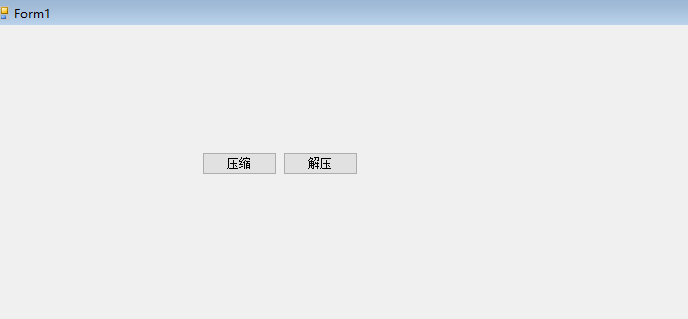
3、具体代码如下
using ICSharpCode.SharpZipLib.Checksums;

using ICSharpCode.SharpZipLib.Zip;

using System;

using System.Collections.Generic;

using System.ComponentModel;

using System.Data;

using System.Drawing;

using System.IO;

using System.Text;

using System.Windows.Forms;

namespace WindowsFormsApp2._0

{

    public partial class Form1 : Form

    {

        public Form1()

        {

            InitializeComponent();

        }

        private void Button12_Click(object sender, EventArgs e)

        {

            ZipFile(@"F:\Person\Longteng\LongtengSln\WindowsFormsApp2.0\bin\Debug\devicelog", @"F:\Person\Longteng\LongtengSln\WindowsFormsApp2.0\bin\Debug\devicelog.zip");

            MessageBox.Show("压缩  成功");

        }

        private void Button13_Click(object sender, EventArgs e)

        {

            UnZipFile(@"F:\Person\Longteng\LongtengSln\WindowsFormsApp2.0\bin\Debug\devicelog.zip", @"F:\Person\Longteng\LongtengSln\WindowsFormsApp2.0\bin\Debug\devicelog11");

            MessageBox.Show("解压   成功");

        }

        public void ZipFile(string strFile, string strZip)

        {

            if (strFile[strFile.Length - ] != Path.DirectorySeparatorChar)

            {

                strFile += Path.DirectorySeparatorChar;

            }

            ZipOutputStream outstream = new ZipOutputStream(File.Create(strZip));

            outstream.SetLevel();

            ZipCompress(strFile, outstream, strFile);

            outstream.Finish();

            outstream.Close();

        }

        public void ZipCompress(string strFile, ZipOutputStream outstream, string staticFile)

        {

            if (strFile[strFile.Length - ] != Path.DirectorySeparatorChar)

            {

                strFile += Path.DirectorySeparatorChar;

            }

            Crc32 crc = new Crc32();

            //获取指定目录下所有文件和子目录文件名称

            string[] filenames = Directory.GetFileSystemEntries(strFile);

            //遍历文件

            foreach (string file in filenames)

            {

                if (Directory.Exists(file))

                {

                    ZipCompress(file, outstream, staticFile);

                }

                //否则,直接压缩文件

                else

                {

                    //打开文件

                    FileStream fs = File.OpenRead(file);

                    //定义缓存区对象

                    byte[] buffer = new byte[fs.Length];

                    //通过字符流,读取文件

                    fs.Read(buffer, , buffer.Length);

                    //得到目录下的文件(比如:D:\Debug1\test),test

                    string tempfile = file.Substring(staticFile.LastIndexOf("\\") + );

                    ZipEntry entry = new ZipEntry(tempfile);

                    entry.DateTime = DateTime.Now;

                    entry.Size = fs.Length;

                    fs.Close();

                    crc.Reset();

                    crc.Update(buffer);

                    entry.Crc = crc.Value;

                    outstream.PutNextEntry(entry);

                    //写文件

                    outstream.Write(buffer, , buffer.Length);

                }

            }

        }

        public string UnZipFile(string TargetFile, string fileDir)

        {

            string rootFile = "";

            try

            {

                if (!Directory.Exists(fileDir))

                {

                    Directory.CreateDirectory(fileDir);

                }

                //读取压缩文件(zip文件),准备解压缩

                ZipInputStream inputstream = new ZipInputStream(File.OpenRead(TargetFile.Trim()));

                ZipEntry entry;

                string path = fileDir;

                //解压出来的文件保存路径

                string rootDir = "";

                //根目录下的第一个子文件夹的名称

                while ((entry = inputstream.GetNextEntry()) != null)

                {

                    rootDir = Path.GetDirectoryName(entry.Name);

                    //得到根目录下的第一级子文件夹的名称

                    if (rootDir.IndexOf("\\") >= )

                    {

                        rootDir = rootDir.Substring(, rootDir.IndexOf("\\") + );

                    }

                    string dir = Path.GetDirectoryName(entry.Name);

                    //得到根目录下的第一级子文件夹下的子文件夹名称

                    string fileName = Path.GetFileName(entry.Name);

                    //根目录下的文件名称

                    if (dir != "")

                    {

                        //创建根目录下的子文件夹,不限制级别

                        if (!Directory.Exists(fileDir + "\\" + dir))

                        {

                            path = fileDir + "\\" + dir;

                            //在指定的路径创建文件夹

                            Directory.CreateDirectory(path);

                        }

                    }

                    else if (dir == "" && fileName != "")

                    {

                        //根目录下的文件

                        path = fileDir;

                        rootFile = fileName;

                    }

                    else if (dir != "" && fileName != "")

                    {

                        //根目录下的第一级子文件夹下的文件

                        if (dir.IndexOf("\\") > )

                        {

                            //指定文件保存路径

                            path = fileDir + "\\" + dir;

                        }

                    }

                    if (dir == rootDir)

                    {

                        //判断是不是需要保存在根目录下的文件

                        path = fileDir + "\\" + rootDir;

                    }

                    //以下为解压zip文件的基本步骤

                    //基本思路:遍历压缩文件里的所有文件,创建一个相同的文件

                    if (fileName != String.Empty)

                    {

                        FileStream fs = File.Create(path + "\\" + fileName);

                        int size = ;

                        byte[] data = new byte[];

                        while (true)

                        {

                            size = inputstream.Read(data, , data.Length);

                            if (size > )

                            {

                                fs.Write(data, , size);

                            }

                            else

                            {

                                break;

                            }

                        }

                        fs.Close();

                    }

                }

                inputstream.Close();

                return rootFile;

            }

            catch (Exception ex)

            {

               return ex.Message;

            }

        }

        /// <summary>

        /// 批量压缩事件

        /// </summary>

        /// <param name="sender"></param>

        /// <param name="e"></param>

        private void btnBatchZipFlo_Click(object sender, EventArgs e)

        {

            string path1 = "D:\\123\\";   //待压缩的目录文件

            string path2 = "D:\\456\\";   //压缩后存放目录文件

            //获取指定目录下所有文件和子文件名称(所有待压缩的文件)

            string[] files = Directory.GetFileSystemEntries(path1);

            //ZipFloClass zc = new ZipFloClass();

            //遍历指定目录下文件路径

            foreach (string file in files)

            {

                //截取文件路径的文件名

                var filename = file.Substring(file.LastIndexOf("\\") + );

                //调用压缩方法(参数1:待压缩的文件目录,参数2:压缩后的文件目录(包含后缀))

                ZipFile(path1 + filename, path2 + filename + ".zip");

            }

        }

        /// <summary>

        /// 批量解压事件

        /// </summary>

        /// <param name="sender"></param>

        /// <param name="e"></param>

        private void btnBatchUnZipFlo_Click(object sender, EventArgs e)

        {

            string msg = "";

            string path2 = "D:\\123\\";

            string path3 = "D:\\456\\";

            //获取指定目录下所有文件和子文件名称(所有待解压的压缩文件)

            string[] files = Directory.GetFileSystemEntries(path2);

            //UnZipFloClass uzc = new UnZipFloClass();

            //遍历所有压缩文件路径

            foreach (string file in files)

            {

                //获取压缩包名称(包括后缀名)

                var filename = file.Substring(file.LastIndexOf("\\") + );

                //得到压缩包名称(没有后缀)

                filename = filename.Substring(, filename.LastIndexOf("."));

                //判断解压的路径是否存在

                if (!Directory.Exists(path3 + filename))

                {

                    //没有,则创建这个路径

                    Directory.CreateDirectory(path3 + filename);

                }

                //调用解压方法(参数1:待解压的压缩文件路径(带后缀名),参数2:解压后存放的文件路径,参数3:返工是否解压成功)

                UnZipFile(file, path3 + filename);

            }

            MessageBox.Show("批量解压成功");

        }

    }

}
原文链接:https://www.cnblogs.com/xielong/p/6165550.html
C#文件或文件夹压缩和解压的更多相关文章
- 【C#公共帮助类】WinRarHelper帮助类,实现文件或文件夹压缩和解压,实战干货
关于本文档的说明 本文档使用WinRAR方式来进行简单的压缩和解压动作,纯干货,实际项目这种压缩方式用的少一点,一般我会使用第三方的压缩dll来实现,就如同我上一个压缩类博客,压缩的是zip文件htt ...
- C#文件或文件夹压缩和解压方法(通过ICSharpCode.SharpZipLib.dll)
我在网上收集一下文件的压缩和解压的方法,是通过ICSharpCode.SharpZipLib.dll 来实现的 一.介绍的目录 第一步:下载压缩和解压的 ICSharpCode.SharpZipLib ...
- .net文件压缩和解压及中文文件夹名称乱码问题
/**************************注释区域内为引用http://www.cnblogs.com/zhaozhan/archive/2012/05/28/2520701.html的博 ...
- java 文件压缩和解压(ZipInputStream, ZipOutputStream)
最近在看java se 的IO 部分 , 看到 java 的文件的压缩和解压比较有意思,主要用到了两个IO流-ZipInputStream, ZipOutputStream,不仅可以对文件进行压缩,还 ...
- Ionic.Zip.dll文件压缩和解压
Ionic.Zip.dll文件压缩和解压 下载地址: http://download.csdn.net/detail/yfz19890410/5578515 1.下载Ionic.Zip.dll组件,添 ...
- 利用c#自带的类对文件进行压缩和解压处理
在做网络传输文件的小例子的时候,当传输的文件比较大的时候,我们通常都是将文件经过压缩之后才进行传输,以前都是利用第三方插件来对文件进行压缩的,但是现在我发现了c#自带的类库也能够实现文件的压缩,实际上 ...
- java实现文件的压缩和解压
java实现文件的压缩和解压 代码压缩实现 package com.hjh.demo.zip; import java.io.BufferedInputStream; import java.io.F ...
- C#压缩和解压文件
这里用两种方法实现C#压缩和解压文件 1.使用System.IO.Compression名称空间下的相关类(需引用 System.IO.Compression.FileSystem和System.IO ...
- linux常用命令:4文件压缩和解压命令
文件压缩和解压命令 压缩命令:gzip.tar[-czf].zip.bzip2 解压缩命令:gunzip.tar[-xzf].unzip.bunzip2 1. 命令名称:gzip 命令英文原意:GNU ...
随机推荐
- python 内建属性
在python中创建一个类,它不仅有我们自定义的属性和方法,还有与生俱来的一些属性和方法,我们叫它内建属性. 下面是类常用内建属性列表. 常用专有属性 说明 触发方式 __init__ 构造初始化函数 ...
- 小米5s plus刷机
1. 先去这里解锁 .http://www.miui.com/unlock/done.html 2.再去开发者选项里面,将手机账号和解锁手机绑定. 3.使用解锁工具解锁 4.下载安装奇兔刷机 http ...
- net 与或非
&& op1 && op2 当op1和op2都是true时,返回true :如果op1的值是false,则不运算右边的操作数 || op1 || op2 当op1和op ...
- javascript_19-DOM初体验
DOM DOM: 文档对象模型(Document Object Model),又称为文档树模型.是一套操作HTML和XML文档的API. DOM可以把HTML和XML描述为一个文档树.树上的每一个分支 ...
- 在LINUX下ORACLE11.2.04的安装脚本及静默安装
首先写好配置环境脚本 cd /opt vi oraclesetup #!/bin/bashecho "back file to filebackup"mkdir -p /opt/f ...
- SUSE 12安装详解
1.部署步骤 1.1.启动安装程序 在启动页面上选择Installation,然后按Enter键,这将载入SUSE Linux服务器安装程序并以普通模式安装. 1.2.选择安装语言 Language和 ...
- Route all trafic for specific ip over specific network interface
15 I have a linux server that needs to get some routing. I'm fairly new at this and i don't find any ...
- P4315 月下“毛景树”[树剖]
题目描述 毛毛虫经过及时的变形,最终逃过的一劫,离开了菜妈的菜园. 毛毛虫经过千山万水,历尽千辛万苦,最后来到了小小的绍兴一中的校园里. 爬啊爬~爬啊爬毛毛虫爬到了一颗小小的"毛景树&quo ...
- Python3中BeautifulSoup的使用方法
BeautifulSoup的使用 我们学习了正则表达式的相关用法,但是一旦正则写的有问题,可能得到的就不是我们想要的结果了,而且对于一个网页来说,都有一定的特殊的结构和层级关系,而且很多标签都有id或 ...
- python - 栈与队列(只有代码)
1. 栈: - 后进先出 class Stack(object): def __init__(self): self.stack = [] def peek(self): return self.st ...