
testNG helloWorld
1. 新建maven工程。File -> New -> Project -> Maven,不选Create from archetype,直接点击“Next”。GroupId和ArtifactId填TestHelloWorld。点击确认,完成新建。
2. src -> main -> java下新建java文件,内容如下:
public class RandomEmailGenerator {

    public String emailGenerator(){

        return "Have generate an email";

    }

}
3. src -> test -> java下新建java文件,内容如下:
import org.testng.Assert;

import org.testng.annotations.Test;

public class TestHelloWorld {

    @Test

    public void testEmailGenerator(){

        RandomEmailGenerator randomEmailGenerator = new RandomEmailGenerator();

        String email = randomEmailGenerator.emailGenerator();

        Assert.assertEquals(email, "Have generate an email");

    }

}
4. pom.xml文件
<?xml version="1.0" encoding="UTF-8"?>

<project xmlns="http://maven.apache.org/POM/4.0.0"

         xmlns:xsi="http://www.w3.org/2001/XMLSchema-instance"

         xsi:schemaLocation="http://maven.apache.org/POM/4.0.0 http://maven.apache.org/xsd/maven-4.0.0.xsd">

    <modelVersion>4.0.0</modelVersion>

    <groupId>TestHelloWorld</groupId>

    <artifactId>TestHelloWorld</artifactId>

    <version>1.0-SNAPSHOT</version>

    <properties>

        <project.build.sourceEncoding>UTF-8</project.build.sourceEncoding>

    </properties>

    <dependencies>

        <dependency>

            <groupId>org.testng</groupId>

            <artifactId>testng</artifactId>

            <version>6.8.7</version>

            <scope>test</scope>

        </dependency>

        <dependency>

            <groupId>junit</groupId>

            <artifactId>junit</artifactId>

            <version>3.8.1</version>

            <scope>test</scope>

        </dependency>

    </dependencies>

</project>
5. 配置工程。
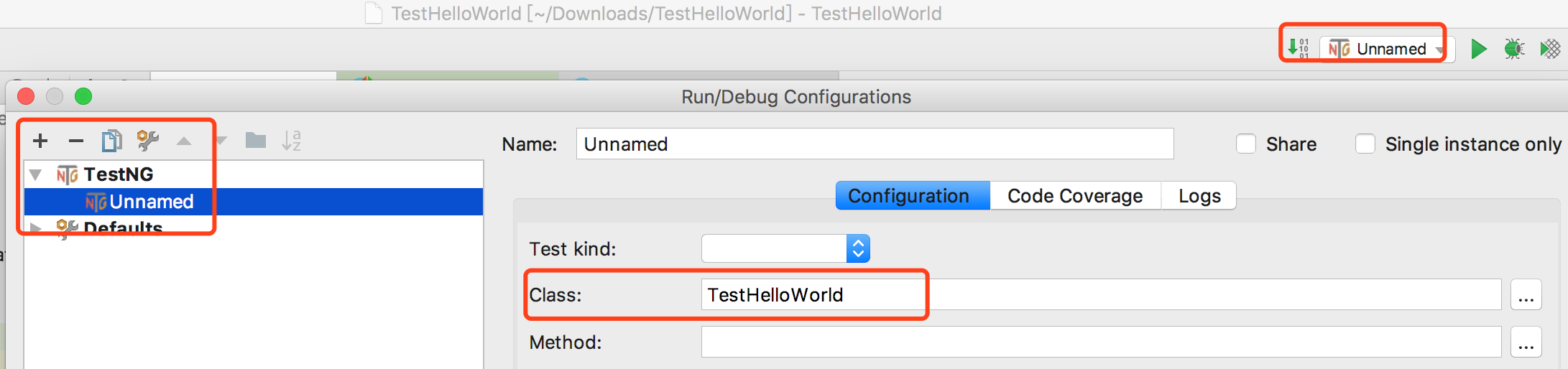
选择TestNG,class里选择TestHellWorld.java文件。
6. 运行
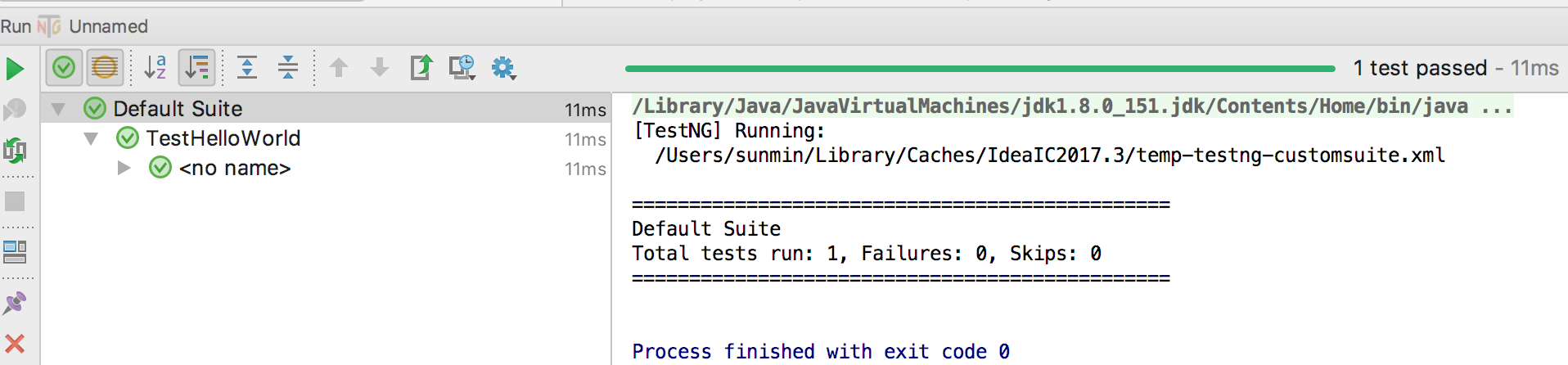
点击unname旁边的三角符号,将运行testNG测试用例。运行结果如下。
testNG helloWorld的更多相关文章
- Self20171218_Eclipse+TestNg HelloWorld
作为一个经典的入门例子,这里展示如何开始使用TestNG单元测试框架. 使用的工具 : TestNG 6.8.7 Maven 3 Eclipse IDE TestNG下载并安装 从这里 http:// ...
- ant+jenkins+testng+selenium集成环境搭建
一.前序工作 下载ant:http://ant.apache.org/bindownload.cgi 下载jenkins:http://jenkins-ci.org/ 下载testng:http:// ...
- Selenium2(webdriver)入门之TestNG的使用
一.在Eclipse中安装TestNG 1.打开eclipse-->help-->Install New Software-->Add,输入Name和Location后,点击OK. ...
- Selenium WebDriver TestNg Maven Eclipse java 简单实例
环境准备 前提条件Eclipse 已经安装过 TestNg ,Maven 插件 新建一个普通的java项目 点击右键 configure->convert to Maven Project 之后 ...
- Spring学习笔记2:Spring HelloWorld
1:IntelliJ新建Maven工程 2:pom文件加入Spring依赖 <project xmlns="http://maven.apache.org/POM/4.0.0" ...
- JAVA+SELENIUM+MAVEN+TESTNG框架(二)新建项目
1.新建maven项目 2.下载selenium的jar包,放入maven依赖库中 3.新增testng依赖库,build path->add libirary->testng 4.查看自 ...
- Selenium2(webdriver)入门之TestNG的安装与简单使用
上一篇已经搭建好了Eclipse+selenium2的环境,这一篇主要记录下TestNG的使用. 一.在Eclipse中安装TestNG 1.打开eclipse-->help-->Inst ...
- testNG断言
https://junit.org/junit4/javadoc/latest/org/junit/Assert.html#assertThat 断言:Hamcrest - Matchers 对象: ...
- TestNG入门到...
目录 一.概述 二.@Test注解常用参数 三.测试中常用的断言(assert) 四.TestNG常用注解及使用 五.配置文件xml常用标签 六.参数传递 七.测试报告 一.概述 1.TestNG是一 ...
随机推荐
- python做上位机
参考文章: https://blog.csdn.net/dgut_guangdian/article/details/78391270 https://www.cnblogs.com/lanceyu/ ...
- ARM 链接脚本分析
分析连接脚本的语法规则 /* ---------------------------------------------------------------------------- * Memory ...
- 闲聊一下百度的Unit
这几天在弄一个闲聊的机器人,想起之前的图灵机器人,捣鼓之后,发现用不了,咨询后得知,以前是可以免费使用,一天1000次,后来降到100次,其实也没有那么多人去闲聊,也无所谓,再后来,需要手持身份证实名 ...
- resources-plugin-2.6.pom.part.lock (没有那个文件或目录)
由于 自定义 maven 仓库没权限 /home/repository 自定义目录 [root@localhost Service]# cat /etc/group|grep jenkins jenk ...
- [整理]如何撤销远程的git提交?
确保你在你想要撤销的分支上. 第一步,本地使用 get reset --hard ,切换到特定的commit. 第二部,使用 --force推送到远程分支. git reset --hard cedc ...
- selenium===使用docker搭建selenium分布式测试环境
准备: #请在此之前先了解,selenium grid :参考:selenium-grid ,下载地址,win-本地部署过程 >>>环境准备: Linux操作系统 >>& ...
- bootstrap datetimepicker 添加清空按钮
<div class="ys-datetimepicker"> <input class="form-control" size=" ...
- Nginx - 根据IP分配不同的访问后端
1. 需求分析 为了在线上环境提供测试分支,规定将某IP转发到测试程序地址.如果是 ngx 直接对外,采用 real_ip 就能够做限制,但是最前端确实一个7层是负载均衡就需要研究一番了. 2. 实践 ...
- SQL中merge into用法
从备份表中更新字段到正式表中,使用 UPDATE 批量更新大量的数据,会出现效率低下,有时候甚至卡死的情况,后面通过使用 MERGE INTO 代替 UPDATE 执行批量更新,会提升执行效率. ME ...
- javascript jssdk微信上传一张图片的方法
javascript jssdk微信上传一张图片的方法 <pre> wx.chooseImage({ count: 1, // 默认9 sizeType: ['original', 'co ...