
QT显示框架嵌入Vs控制台工程
一、一些准备工作:
1.安装Qt for VS 的插件;
安装Qt for VS 的插件
下载地址:http://download.qt.io/official_releases/vsaddin/
安装Qt 4.8.6
2.进行一些设置:
找到菜单项:
Qt——> Qt Option——> 选取版本
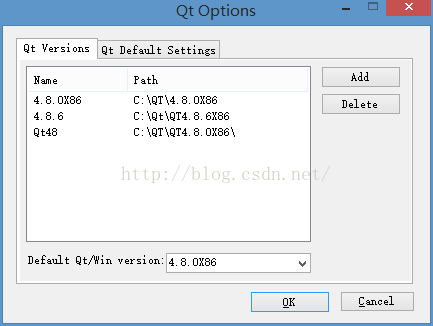
——> ——>
在工程选项中添加必须的包含文件和lib文件
然后可以使用Qt
二、工程和代码:
Vs控制台工程可以直接使用Qt的显示框架,使用类似于Qt-IDE的主函数代码:
int _tmain(int argc, char* argv[])

{

    QApplication a(argc, argv);

    CPlot *objViewer = new CPlot();

    objViewer->show();

    return a.exec();

}
头文件代码:
#pragma once

/*

*/

#include <QApplication>

#include <QMainWindow>

#include <QWidget>

#include <QAction>

#include <QMenu>

#include <QToolBar>

#include <QGLWidget>

#include <gl/glut.h>

#include <QMainWindow>

#include <QWidget>

#include <QAction>

#include <QMenu>

#include <QToolBar>

#include "OpenGLViewer.h"

class QApplication;

class QMainWindow;

class QWidget;

class QAction;

class QMenu;

class QToolBar;

class CPlot: public QMainWindow{

	Q_OBJECT

public:

	CPlot(QWidget *parent = 0);

	//CPlot();

	~CPlot(void);

	//测试OpenGL画图

public:

	static void RenderScene();

	void SetupRC();

	static void ChangeSize( GLsizei w, GLsizei h );

	void drawCircle(int argc, char *argv[]);

	GLfloat boundingRadius;

	GLfloat LightDistanceRatio;

	GLfloat rotationX;

	GLfloat rotationY;

	GLfloat rotationZ;

	GLfloat xscale;

	GLfloat yscale;

	GLfloat zscale;

	GLfloat transX;

	GLfloat transY;

	GLfloat transZ;

	void draw3dAxis();

	void draw3dAxis(int argc, char *argv[]);

	void updatePos(const Mat  &rMat);

private:

	CEkfSlam m_Slamer;

	private slots:

		void openFile();

		//void closeFile();

		void segmentObj();

		void capture();

private:

	OpenGLViewer *openglViewer;

private:

	void initializeGL();

	void setMaterial();

	void GLMaterial(const OpenGL::Material& material);

	void setLight();

	void setAntiAliasing();

	float getBoundingRadius();

	void setTexture(IplImage* img);

	void loadTexture();

	void resetGLLightPosition();

	void loadMeshFile(char* filename);

	void createActions();

	void createMenus();

	void createToolBars();

private:

	QAction *loadFileAction;

	QAction *closeFileAction;

	QAction *segmentObjAction;

	QAction *captureAction;

	QMenu *fileMenu;

	QMenu *toolMenu;

	QToolBar *fileToolBar;

	QToolBar *toolsBar;

	vector<int> faceColors;

	vector<QColor> FaceColorList;

	vector<double>ssdf;

	QPoint lastPos;

	Core::Geometry::MyMesh *mesh;

	int key_type;

	GLuint texName;

	Mat textImage;

public:

	//1.使用 OpenCV Mat画图!用于显示图像和特征点匹配!

	cv::Mat  m_Canvas;

	cv::Mat  m_CanvasSrc;

private:

	//2.使用 VTK画出点云!用于显示地图和方位演化!

	Eigen::MatrixXf  m_FeatureMap;

	//画出十字光标

	int cvDrawCrossCursor(

		cv::Mat &Canvas,cv::Point &PointS,cv::Point &PointE,cv::Scalar &Color,int Width,int CV_A_Type,int Mark);

	//画十字光标,中心点、线长度、色彩、线宽

	int cvDrawCrossCursor(

		cv::Mat &Canvas,cv::Point &Center,int Length,cv::Scalar &Color,int Width,int CV_A_Type,int Mark);

};
源码文件代码:
#include "StdAfx.h"

#include "Plot.h"

#include <iostream>

#include <iomanip>

#include <fstream>

#include <QApplication>

#include <QFileDialog>

#include <QString>

#include <QMenuBar>

#include <QDesktopWidget>

#include <opencv/cv.h>

#include <opencv/highgui.h>

#include <vector>

class QFileDialog;

class QString;

class QMenuBar;

class QDesktopWidget;

using namespace Qt;

using namespace OpenGL;

////此种用法是错误的,使用mainwindow之前必须构建一个Application!

CPlot::CPlot(QWidget *parent) : QMainWindow(parent){

	openglViewer = new OpenGLViewer();

	this->setCentralWidget(openglViewer);

	this->setWindowTitle("Wishchin's PCL Window");

	this->setGeometry((QApplication::desktop()->width()-1.5 *QApplication::desktop()->height())/2,20,640,480);

	this->createActions();

	this->createMenus();

	this->createToolBars();

	//初始化画布

	this->m_Canvas.create(640,480,CV_8UC3);

	this->m_CanvasSrc.create(640,480,CV_8UC3);

	//this->m_FeatureMap.resize(0);

}

//CPlot::CPlot(){

//	//初始化画布

//	this->m_Canvas.create(640,480,CV_8UC3);

//

//	//this->m_FeatureMap.resize(0);

//}

CPlot::~CPlot(void)

{

}

void CPlotMark0022(){}

//画出十字光标

int CPlot::cvDrawCrossCursor(

	cv::Mat &Canvas,cv::Point &PointS,cv::Point &PointE,cv::Scalar &Color,int Width,int CV_A_Type,int Mark)

{

	return 1;

}

//画十字光标,中心点、线长度、色彩、线宽

int CPlot::cvDrawCrossCursor(

	cv::Mat &Canvas,cv::Point &Center,int Length,cv::Scalar &Color,int Width,int CV_A_Type,int Mark)

{

	int H = Length/2;

	cv::Point PointS;cv::Point PointE;

	PointS.x =Center.x ;

	PointS.y =Center.y -H;

	PointE.x =Center.x ;

	PointE.y =Center.y +H;

	cv::line(this->m_Canvas,PointS,PointE,Color,Width,CV_A_Type,Mark);

	PointS.x =Center.x -H;

	PointS.y =Center.y;

	PointE.x =Center.x +H;

	PointE.y =Center.y;

	cv::line(this->m_Canvas,PointS,PointE,Color,Width,CV_A_Type,Mark);

	return 1;

}

void CPlotMark003(){}

void CPlot::draw3dAxis(int argc, char *argv[])

{

	Mat rMat(1,3,CV_32F);

	rMat.at<float>(0,0) = 1;

	if (1<0)

		rMat.at<float>(0,1) = 1;

	else

		rMat.at<float>(0,1) = 1;

	if(1<0)

		rMat.at<float>(0,2) = 1;

	else

		rMat.at<float>(0,2) = 1;

	this->updatePos(rMat);

	openglViewer->updateGL();

	return;

}

void CPlot::updatePos(const Mat& rMat)

{

	Mat rrMat;

	rMat.convertTo(rrMat , CV_32F);

	//rMat.convertTo(rMat , CV_32F);

	rotationX = rrMat.at<float>(0,0);

	rotationY = rrMat.at<float>(0,1);

	rotationZ = rrMat.at<float>(0,2);

}

void CPlot::draw3dAxis()

{

	GLfloat x = GLfloat(640) / 480;

	glMatrixMode(GL_MODELVIEW);

	glLoadIdentity();

	gluLookAt(-2.0 , 6.0, -4.0, 0.0 , 0.0 , 0.0 , 0.0, 1.0 , 0.0);

	float len = 0.2;

	//The world axis /coordinate system!

	//1. Line!

	glColor3f(0.0f,0.0f,1.0f);

	glBegin(GL_LINES);

	glVertex3f(-2.0f,00.0f,0.0f);//X line!

	glVertex3f(2.0f,0.0f,0.0f);

	glVertex3f(0.0f,-2.0f,0.0f); //Y line!

	glVertex3f(0.0f,2.0f,0.0f);

	glVertex3f(0.0f,0.0f,-2.0f); //Z line!

	glVertex3f(0.0f,0.0f,2.0f);

	glEnd();

	//The world axis /coordinate system!

	//2. arrows!

	glColor3f(1.0f,0.0f,0.0f); // x arrows

	glPushMatrix();

	glTranslatef(2.0f,0.0f,0.0f);

	glRotatef(90.0f,0.0f,1.0f,0.0f);

	glutSolidCone(0.1,0.3,10,10);

	glTranslatef(0.0f,0.0f,0.4f);

	glBegin(GL_LINES);

	glVertex3f(-len,len,0.0f);

	glVertex3f(len,-len,0.0f);

	glEnd();

	glBegin(GL_LINES);

	glVertex3f(len,len,0.0f);

	glVertex3f(-len,-len,0.0f);

	glEnd();

	glPopMatrix();

	glColor3f(0.0f,1.0f,0.0f); // y arrows

	glPushMatrix();

	glTranslatef(0.0f,2.0f,0.0f);

	glRotatef(-90.0f,1.0f,0.0f,0.0f);

	glutSolidCone(0.1,0.3,10,10);

	glTranslatef(0.0f,0.0f,0.4f);

	glBegin(GL_LINES);

	glVertex3f(-len,len,0.0f);

	glVertex3f(0,0,0.0f);

	glEnd();

	glBegin(GL_LINES);

	glVertex3f(len,len,0.0f);

	glVertex3f(0,0,0.0f);

	glEnd();

	glBegin(GL_LINES);

	glVertex3f(0,-len,0.0f);

	glVertex3f(0,0,0.0f);

	glEnd();

	glPopMatrix();

	glColor3f(0.0f,0.0f,1.0f); // z  arrows

	glPushMatrix();

	glTranslatef(0.0f,0.0f,2.0f);

	glRotatef(90.0f,0.0f,0.0f,1.0f);

	glutSolidCone(0.1,0.3,10,10);

	glTranslatef(0.0f,0.0f,0.4);

	glTranslatef(0.0f,0.0f,0.4f);

	glBegin(GL_LINES);

	glVertex3f(-len,len,0.0f);

	glVertex3f(len,len,0.0f);

	glEnd();

	glBegin(GL_LINES);

	glVertex3f(len,len,0.0f);

	glVertex3f(-len,-len,0.0f);

	glEnd();

	glBegin(GL_LINES);

	glVertex3f(-len,-len,0.0f);

	glVertex3f(len,-len,0.0f);

	glEnd();

	glPopMatrix();

	glTranslatef(transX,transY,-transZ);

	glRotatef(rotationX , 1.0,0.0,0.0);

	glRotatef(rotationY , 0.0,1.0,0.0);

	glRotatef(rotationZ , 0.0,0.0,1.0);

	glScalef(xscale, yscale, zscale);

	//The Cube aixs / coordinate system!

	//1. The axis line!

	glColor3f(1.0f,1.0f,1.0f);

	glBegin(GL_LINES);

	glVertex3f(-1.2f,00.0f,0.0f);

	glVertex3f(1.2f,0.0f,0.0f);

	glVertex3f(0.0f,-1.2f,0.0f);

	glVertex3f(0.0f,1.2f,0.0f);

	glVertex3f(0.0f,0.0f,-1.2f);

	glVertex3f(0.0f,0.0f,1.2f);

	glEnd();

	//The Cube aixs / coordinate system!

	//2. The axis arrow!

	glColor3f(1.0f,0.0f,0.0f); //x arrow

	glPushMatrix();

	glTranslatef(1.2f,0.0f,0.0f);

	glRotatef(90.0f,0.0f,1.0f,0.0f);

	glutSolidCone(0.05,0.15,10,10);

	glPopMatrix();

	glColor3f(0.0f,1.0f,0.0f); // y

	glPushMatrix();

	glTranslatef(0.0f,1.2f,0.0f);

	glRotatef(-90.0f,1.0f,0.0f,0.0f);

	glutSolidCone(0.05,0.15,10,10);

	glPopMatrix();

	glColor3f(0.0f,0.0f,1.0f); // z

	glPushMatrix();

	glTranslatef(0.0f,0.0f,1.2f);

	glRotatef(90.0f,0.0f,0.0f,1.0f);

	glutSolidCone(0.05,0.15,10,10);

	glPopMatrix();

	////The Cube Model

	//for(int i=0;i<mesh->getFCount();i++){

	//	glLoadName(i);

	//	glBegin(GL_TRIANGLES);

	//	double r,g,b;

	//	FaceColorList[1].getRgbF(&r,&g,&b);

	//	glColor3d(r,g,b);

	//	for(int j=0;j<3;j++){

	//		MyPoint_ p = mesh->getPoint(mesh->getFace(i).getRef(j));

	//		glNormal3d(p.GetNormal()[0],p.GetNormal()[1],p.GetNormal()[2]);

	//		glVertex3f(p.GetPoint()[0], p.GetPoint()[1], p.GetPoint()[2]);

	//	}

	//	glEnd();

	//}

	//glFlush();

}

//测试使用OpenGL画圆!

void CPlot::drawCircle(int argc, char *argv[])

{

	glutInit(&argc, argv);

	glutInitDisplayMode(GLUT_DOUBLE | GLUT_RGB | GLUT_DEPTH);

	glutInitWindowSize (400, 300);

	glutInitWindowPosition (100, 100);

	glutCreateWindow( "Point examples" );

	glutDisplayFunc( this->RenderScene );

	glutReshapeFunc( this->ChangeSize );

	SetupRC();

	glutMainLoop();

	return ;

}

void CPlot::RenderScene()

{

	//清空颜色缓冲区,填充的颜色由 glClearColor( 0, 0.0, 0.0, 1 ); 指定为黑色

	glClear( GL_COLOR_BUFFER_BIT );

	//绘制一个点

	{

		glColor3f( 1.0f, 0.0f, 0.0f );//指定点的颜色,红色

		glPointSize( 9 );//指定点的大小,9个像素单位

		glBegin( GL_POINTS );//开始画点

		{

			glVertex3f(0.0f, 0.0f, 0.0f); // 在坐标为(0,0,0)的地方绘制了一个点

		}

		glEnd();//结束画点

	}

	//绘制一个点圆

	{

		glColor3f( 0.0f, 1.0f, 0.0f );//指定点的颜色,绿色

		glPointSize( 3 );//指定点的大小,3个像素单位

		glBegin( GL_POINTS );

		{

#define PI 3.14159f

#define RADIUS 50.f

			GLfloat x = 0, y = 0, angle = 0.0;

			for ( angle = 0; angle <= 2.0f * PI; angle += 0.1f )

			{

				x = RADIUS * sin( angle );

				y = RADIUS * cos( angle );

				glVertex3f( x, y, 0 );

			}

		}

		glEnd();

	}

	//绘制x、y坐标轴

	{

		glColor3f( 0.0f, 0.0f, 1.0f );//指定线的颜色,蓝色

		glBegin( GL_LINES );

		{

			// x-axis

			glVertex3f( -100.0f, 0.0f, 0.0f);

			glVertex3f( 100.0f, 0.0f, 0.0f);

			// x-axis arrow

			glVertex3f( 100.0f, 0.0f, 0.0f);

			glVertex3f( 93.0f, 3.0f, 0.0f);

			glVertex3f( 100.0f, 0.0f, 0.0f);

			glVertex3f( 93.0f,-3.0f, 0.0f);

			// y-axis

			glVertex3f( 0.0f, -100.0f, 0.0f);

			glVertex3f( 0.0f, 100.0f, 0.0f);

			glVertex3f( 0.0f, 100.0f, 0.0f);

			glVertex3f( 3.0f, 93.0f, 0.0f);

			glVertex3f( 0.0f, 100.0f, 0.0f);

			glVertex3f( -3.0f, 93.0f, 0.0f);

		}

		glEnd();

	}

	glutSwapBuffers();

}

void CPlot::SetupRC()

{

	glClearColor( 0, 0.0, 0.0, 1 );

	glColor3f( 1.0f, 0.0f, 0.0f );

}

void CPlot::ChangeSize( GLsizei w, GLsizei h )

{

	GLfloat nRange = 100.0f;

	// Prevent a divide by zero

	if(h == 0)

		h = 1;

	// Set Viewport to window dimensions

	glViewport(0, 0, w, h);

	// Reset projection matrix stack

	glMatrixMode(GL_PROJECTION);

	glLoadIdentity();

	// Establish clipping volume (left, right, bottom, top, near, far)

	if (w <= h)

		glOrtho (-nRange, nRange, -nRange*h/w, nRange*h/w, -nRange, nRange);

	else

		glOrtho (-nRange*w/h, nRange*w/h, -nRange, nRange, -nRange, nRange);

	// Reset Model view matrix stack

	glMatrixMode(GL_MODELVIEW);

	glLoadIdentity();

}

void CPlotMark004(){}

void CPlot::initializeGL()

{

	//loadTexture();

	loadMeshFile("cub.off");//loadMeshFile("sword.off");//

	//qglClearColor(QColor(204,204,204)/*Qt::white*/);//暂时注销,wishchin!!!

	glShadeModel(GL_SMOOTH);

	glClearDepth(1.0f);

	glEnable(GL_DEPTH_TEST);

	glEnable(GL_NORMALIZE);

	glLineWidth(1.5);

	//glColor3d(100,100,100);

	setMaterial();

	setLight();

}

void CPlot::setLight() {

	GLfloat light_ambient[] = {0.0f, 0.0f, 0.0f, 1.0f};

	GLfloat light_diffuse[] = {1.0f, 1.0f, 1.0f, 1.0f};

	GLfloat light_specular[]= {1.0f, 1.0f, 1.0f, 1.0f};

	glLightfv( GL_LIGHT0, GL_AMBIENT, light_ambient);

	glLightfv( GL_LIGHT0, GL_DIFFUSE, light_diffuse);

	glLightfv( GL_LIGHT0, GL_SPECULAR, light_specular);

	glLightModeli(GL_LIGHT_MODEL_TWO_SIDE, GL_TRUE);

	//glLightModeli(GL_LIGHT_MODEL_COLOR_CONTROL  , GL_RGB);

	//glLightModeli(GL_LIGHT_MODEL_COLOR_CONTROL , GL_SEPARATE_SPECULAR_COLOR);

	glEnable(GL_LIGHTING);

	glEnable(GL_LIGHT0);

	resetGLLightPosition();

}

void CPlot::setMaterial() {

	glEnable(GL_COLOR_MATERIAL);

	GLMaterial(

		OpenGL::Material::GetMaterial(OpenGL::Material::Default));

}

void CPlot::GLMaterial(const OpenGL::Material& material)

{

	glMaterialfv(GL_FRONT, GL_DIFFUSE, material.diffuse);

	glMaterialfv(GL_FRONT, GL_SPECULAR, material.specular);

	glMaterialfv(GL_FRONT, GL_AMBIENT, material.ambient);

	glMaterialf(GL_FRONT, GL_SHININESS, material.shininess);

	glMaterialfv(GL_BACK, GL_DIFFUSE, material.diffuse);

	glMaterialfv(GL_BACK, GL_SPECULAR, material.specular);

	glMaterialfv(GL_BACK, GL_AMBIENT, material.ambient);

	glMaterialf(GL_BACK, GL_SHININESS, material.shininess);

}

void CPlot::setAntiAliasing() {

	glEnable ( GL_POLYGON_SMOOTH );

	glEnable( GL_LINE_SMOOTH );

	glEnable ( GL_POINT_SMOOTH );

	glEnable(GL_BLEND);

	glBlendFunc(GL_SRC_ALPHA,GL_ONE_MINUS_SRC_ALPHA);

	glHint(GL_POLYGON_SMOOTH_HINT, GL_NICEST );

	glHint(GL_LINE_SMOOTH_HINT, GL_NICEST );

	glHint(GL_POINT_SMOOTH_HINT, GL_NICEST );

	glEnable(GL_COLOR_MATERIAL);

}

void CPlot::setTexture(IplImage* img){

	glPixelStorei(GL_UNPACK_ALIGNMENT, 1);

	glGenTextures(1, &texName);

	glBindTexture(GL_TEXTURE_2D, texName);

	glTexParameteri(GL_TEXTURE_2D, GL_TEXTURE_WRAP_S, GL_REPEAT);

	glTexParameteri(GL_TEXTURE_2D, GL_TEXTURE_WRAP_T, GL_REPEAT);

	glTexParameteri(GL_TEXTURE_2D, GL_TEXTURE_MAG_FILTER, GL_NEAREST);

	glTexParameteri(GL_TEXTURE_2D, GL_TEXTURE_MIN_FILTER, GL_NEAREST);

	glTexImage2D(GL_TEXTURE_2D, 0, GL_RGB, img->width, img->height,

		0, GL_RGB, GL_UNSIGNED_BYTE, img->imageData);

	glEnable(GL_TEXTURE_2D);

	glTexEnvf(GL_TEXTURE_ENV, GL_TEXTURE_ENV_MODE, GL_DECAL);

	glBindTexture(GL_TEXTURE_2D, texName);

}

void CPlot::resetGLLightPosition() {

	boundingRadius = getBoundingRadius();

	GLfloat light_position[] = {0.0f, 0.0,

		(float)(LightDistanceRatio*boundingRadius) , 1.0f};

	glLightfv(GL_LIGHT0, GL_POSITION, light_position);

}

float CPlot::getBoundingRadius() {

	//if (meshes.size() == 0) return 0;

	Core::Geometry::Vector3D pmin, pmax;

	//auto it = meshes.begin();

	//do {

	//	MyMesh* last = *it;

	BoundingBox box = mesh->calBoundBox();

	// 		if (it == meshes.begin()) {

	// 			pmin = box.min;

	// 			pmax = box.max;

	// 		} else {

	// 			pmin = min(pmin, box.min);

	// 			pmax = max(pmax, box.max);

	// 		}

	// 	} while ((++it) != meshes.end());

	pmax = box.max ; pmin = box.min;

	return sqrt(

		pow(pmax[0] - pmin[0],2)+

		pow(pmax[1] - pmin[1],2)+

		pow(pmax[2] - pmin[2],2)

		);

}

void CPlot::loadMeshFile(char* filename)

{

	xscale = 1.0; yscale = 1.0; zscale = 1.0;

	transX = 0.0; transY = 0.0;

	faceColors.clear();

	mesh->LoadFromFile(filename);

	mesh->calFaceNormal();

	mesh->calVertexNormal();

	int fCount = mesh->getFCount();

	char buf[255];

	sprintf(buf, "%s", filename);

	int len = strlen(buf);

	buf[len-1] = 'f'; buf[len-2] = 'd'; buf[len-3] = 's';

	FILE *fp = NULL;

}

void CPlotMark005(){}

//初始化坐标系,画出世界坐标系、标志BOX、Box坐标系!

void CPlot::createActions(){

	loadFileAction    = new QAction(tr("&Load"), this);

	closeFileAction   = new QAction(tr("&Close"), this);

	segmentObjAction  = new QAction(tr("&Segment"), this);

	captureAction     = new QAction(tr("Capture") , this);

	connect(loadFileAction, SIGNAL(triggered()), this, SLOT(openFile()));

	connect(closeFileAction, SIGNAL(triggered()), this, SLOT(close()));

	connect(segmentObjAction, SIGNAL(triggered()), this, SLOT(segmentObj()));

	connect(captureAction, SIGNAL(triggered()), this, SLOT(capture()));

}

void CPlot::createMenus(){

	fileMenu = menuBar()->addMenu(tr("&File"));

	fileMenu->addAction(loadFileAction);

	fileMenu->addAction(closeFileAction);

	fileMenu->addAction(captureAction);

	toolMenu = menuBar()->addMenu(tr("&Tool"));

	toolMenu->addAction(segmentObjAction);

	toolMenu->addAction(captureAction);

}

void CPlot::createToolBars(){

	fileToolBar = addToolBar(tr("&File"));

	fileToolBar->addAction(loadFileAction);

	fileToolBar->addAction(closeFileAction);

	toolsBar = addToolBar(tr("Tool"));

	toolsBar->addAction(segmentObjAction);

}

void CPlot::openFile()

{

	QString filename = QFileDialog::getOpenFileName(this, tr("Load a Shape"), ".", tr("Object Model (*.obj *.off)"));

	this->openglViewer->loadMeshFile(filename.toLatin1().data());

	this->openglViewer->updateGL();

}

void CPlot::segmentObj(){

}

//进行数据读入

void CPlot::capture(){

	//////////////////////////////////////////////////////////////////////////

	// Do what you want

	// example

	// you can call openglViewer->updatePos(const Mat& rMat) function to show your Sensorfunsion

	// result, note that once you call this function, you can just call openglViewer->updateGL()

	// the re-paint the GL

	// like:

	char buffer[255];

	//ifstream pfile("/home/hll260/aiglass/proj/firefly-3288/1.txt");

	fstream pfile;

	pfile.open("D://SensorFusionVector//1030.txt");

	fstream outfile,outfile2;

	outfile.open("D://SensorFusionVector//2.txt");

	outfile2.open("D://SensorFusionVector//1103.txt");

	if(!pfile)

	{

		printf("Can not open file!!");

		_exit(1);

	}

	long long sp = pfile.tellg();

	while(sp <= 207)

	{

		pfile.seekg(0,ios::end);

		sp = pfile.tellg();

		cout << sp << endl;

	}

	float ax,ay,az,gx,gy,gz;

	char testgy[10];

	char *gyy="Gyro";

	char testac[10];

	char *acc="Acce";

	SensorFusion sf;

	int bbbb=1;

	vector <float> gyro(3,0);

	vector <float> accel(3,0);

	long long lastsp=0;

	pfile.seekg(lastsp);

	for(int i=1;i<=10;i++)

	{

		pfile.getline(buffer,100);

	}

	lastsp = pfile.tellg();

	char buffer1[50];

	char buffer2[50];

	long linep=0;

	while (1)//!pfile.eof()

	{

		pfile.seekg(0,ios::end);

		pfile.clear();

		sp = pfile.tellg();

		if (linep==0)

			pfile.seekg(lastsp);

		else

			pfile.seekg(linep);

		//cout <<sp<<"  "<<lastsp<<endl;

		if (sp>lastsp)

		{

			lastsp=sp;

			while(linep+144<sp)

			{

				pfile.getline(buffer1,40);

				sscanf (buffer1,"%4s,%f,%f,%f",testac,&ax,&ay,&az);

				pfile.getline(buffer2,40);

				sscanf (buffer2,"%4s,%f,%f,%f",testgy,&gx,&gy,&gz);

				linep = pfile.tellg();

				if(strcmp(testac, acc) == 0&&strcmp(testac, testgy) == 0)

				{

					pfile.getline(buffer2,40);

					sscanf (buffer2,"%4s,%f,%f,%f",testgy,&gx,&gy,&gz);

					linep = pfile.tellg();

					if(strcmp(testac, acc) == 0)

					{

						accel.push_back(ax);

						accel.push_back(ay);

						accel.push_back(az);

						for (int i=0;i<3;i++)

						{

							accel.erase(accel.begin());

						}

					}

					if (strcmp(testgy, gyy) == 0)

					{

						gyro.push_back(gx);

						gyro.push_back(gy);

						gyro.push_back(gz);

						for (int i=0;i<3;i++)

						{

							gyro.erase(gyro.begin());

						}

					}

				}

				else

				{

					if(strcmp(testac, acc) == 0)

					{

						accel.push_back(ax);

						accel.push_back(ay);

						accel.push_back(az);

						for (int i=0;i<3;i++)

						{

							accel.erase(accel.begin());

						}

					}

					if (strcmp(testgy, gyy) == 0)

					{

						gyro.push_back(gx);

						gyro.push_back(gy);

						gyro.push_back(gz);

						for (int i=0;i<3;i++)

						{

							gyro.erase(gyro.begin());

						}

					}

				}

				sf.SensorPretreatment(gyro);

				sf.handlemessage(accel,gyro,0.001);

				Mat rMat(1,3,CV_32F);

				//弧度 转角度

				rMat.at<float>(0,0) = -sf.jiaodu[1]*57.3;

				if (sf.jiaodu[0]<0)

					rMat.at<float>(0,1) = 360-sf.jiaodu[0]*57.3;

				else

					rMat.at<float>(0,1) = sf.jiaodu[0]*57.3;

				if(sf.jiaodu[2]<0)

					rMat.at<float>(0,2) = sf.jiaodu[2]*57.3;

				else

					rMat.at<float>(0,2) = sf.jiaodu[2]*57.3;

				//传入三维坐标参数为绝对位置(相对于原点)

				rMat.at<float>(0,3) = sf.LocX;

				rMat.at<float>(0,4) = sf.LocY;

				rMat.at<float>(0,5) = sf.LocZ;

				openglViewer->updatePos(rMat);

				openglViewer->updateGL();

				outfile<<sf.jiaodu[0]*57.3<<" "<<sf.jiaodu[1]*57.3<<" "<<sf.jiaodu[2]*57.3<<endl;

				cout<<sf.jiaodu[0]*57.3<<" "<<sf.jiaodu[1]*57.3<<" "<<sf.jiaodu[2]*57.3<<" "<<gyro.size()<<endl;

				outfile2<<double(accel[0])<<" "<<double(accel[1])<<" "<<double(accel[2])<<endl;

				outfile2<<double(gyro[0])<<" "<<double(gyro[1])<<" "<<double(gyro[2])<<endl;

				outfile2<<"sp:"<<sp<<"    linep:"<<linep<<endl;

			}

		}

		else

		{

			continue;

		}

	}

	outfile.close();

	outfile2.close();

	pfile.close();

}
还有一些其他的程序段,等整理好之后再进行上传....................
QT显示框架嵌入Vs控制台工程的更多相关文章
- QT皮肤框架-TQUI
本皮肤框架的相关文档,请在附件中下载,包括测试程序源码,帮助文档.相关文档可到我的百度网盘中下载,或者在本贴附件中下载. 百度网盘地址:TQUI-V1.0项目说明及测试程序源码 项目更新说明:---- ...
- Qt显示调用vs中的dll
网上看到很多文章写调用vc的dll,但我尝试了总是出问题,下面结合参考别人的文章,实现了Qt显示调用vs中c接口的dll. 具体直接上代码: vs中的代码: TMax.h: #ifdef TMAX # ...
- QT显示url图片
QT 显示网络图片我目前的办法就是先下载下来 然后显示 如果有好的办法请相互交流一下 需要调用的头文件 #include <QNetworkAccessManager> #include ...
- Qt状态机框架(状态机就开始异步的运行了,也就是说,它成为了我们应用程序事件循环的一部分了)
状态机框架 Qt中的状态机框架为我们提供了很多的API和类,使我们能更容易的在自己的应用程序中集成状态动画.这个框架是和Qt的元对象系统机密结合在一起的.比如,各个状态之间的转换是通过信号触发的,状态 ...
- 基于OpenCV之视频读取,处理和显示框架的搭建(一)
主要包括以下内容: 1.使用的主要函数的说明. 2.两个实例:视频读取和显示.搭建视频读取和处理框架,调用canny函数提取边缘并显示. 3.一些注意事项和代码说明. 一.使用的主要函数 1.延时函数 ...
- 15、USB摄像头图片采集+QT显示
一.Qt的下载和的安装 关于Qt的安装,网络上有很详细的介绍.这里只做简单介绍. 需要的安装包一共有两个:Qt Creator 和QTE. 1)QT Creator 下载地址:qt-sdk-linux ...
- Qt 显示网页的控件
Qt5.6以下的版本,基于QtWebkit控件Qt5.6以上的MSVC版本,基于 Chromium 的浏览器引擎 Qt WebEngineQt5.6以上的mingw 版本,只能采用QAxWidget ...
- Qt 状态机框架学习(没学会)
Qt状态机框架是基于状态图XML(SCXML) 实现的.从Qt4.6开始,它已经是QtCore模块的一部分.尽管它本身是蛮复杂的一套东西,但经过和Qt的事件系统(event system).信号槽(s ...
- QT显示机制(7篇相关文章)
了解QT显示机制,最重要的就是要了解QT是如何管理窗体的显示区域的,这里有个重要的类:QRegion, 在QT中可以通过QRegion定义一个窗体的显示区域,也可以通过QRegion定义窗体的可修改区 ...
随机推荐
- 调度器Quartz的配置文件中的线程池设置
在使用调度器Quartz来进行数据归档的时候,当我们开的定时任务很多的时候,就会出现一些定时任务不会被触发的现象,这就是线程阻塞.那到底什么叫线程阻塞呢? 线程阻塞,顾名思义就是说线程被阻塞了,没有按 ...
- CODEVS2144 砝码称重2 (哈希表)
由于m很大,所以不能使用DP. 注意到n≤30,直接暴力2^n会TLE. 所以,将砝码平均分成两份,对一份进行一次暴力,用哈希表存下可能的结果. 对下一份再进行一次暴力,在哈希表中搜索剩余的砝码重量是 ...
- nyoj_114_某种序列_201403161700
某种序列 时间限制:3000 ms | 内存限制:65535 KB 难度:4 描述 数列A满足An = An-1 + An-2 + An-3, n >= 3 编写程序,给定A0, A1 ...
- [poj1363]Rails_模拟_栈
Rails poj-1363 题目大意:判断一个序列是否是1~n的合法出栈序列. 注释:$1\le n\le 10^4$. 想法:开始想到一种想法. 对于一段序列来讲,显然从首元素开始的连续小于尾元素 ...
- 从头认识java-15.6 队列(Queue)
这一章节我们来讨论一下队列(Queue). 1.什么是队列? 队列是一种特殊的线性表,特殊之处在于它仅仅同意在表的前端(front)进行删除操作,而在表的后端(rear)进行插入操作,和栈一样.队列是 ...
- 【Unity3D】 KeyCode 键码
Key codes returned by Event.keyCode. These map directly to a physical key on the keyboard. KeyCode是由 ...
- spring mvc文件上传,request对象转换异常
spring 文件上传有现成的工具用起来也挺简单.就是在还不是非常熟悉的时候可能会出一些错. 近期碰到了 org.apache.catalina.connector.RequestFacade can ...
- leetcode第一刷_Same Tree
回来更博客的时候才发现.这道题不是跟推断树是不是对称的很相像吗.这个也是用了两个指针同一时候递归啊,有时候思维的局限真可笑. class Solution { public: bool isSameT ...
- inux内核模块编程入门
linux内核模块编程入门 2013-07-06 23:59:54 分类: LINUX 原文地址:linux内核模块编程入门 作者:s270768095 模块编程属于内核编程,因此,除了对内核相关知识 ...
- ElasticSearch源码解析(五):排序(评分公式)
ElasticSearch源码解析(五):排序(评分公式) 转载自:http://blog.csdn.net/molong1208/article/details/50623948 一.目的 一个 ...