
Fragment的创建以及与activity的参数传递
点击下面不同的TextView变化不同的Fragment
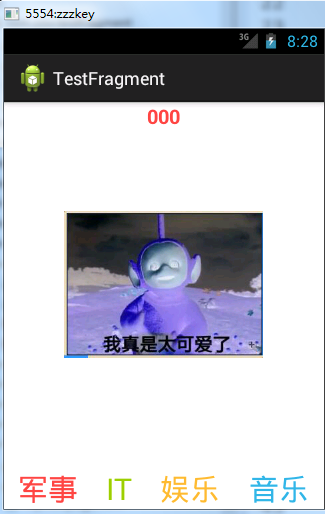
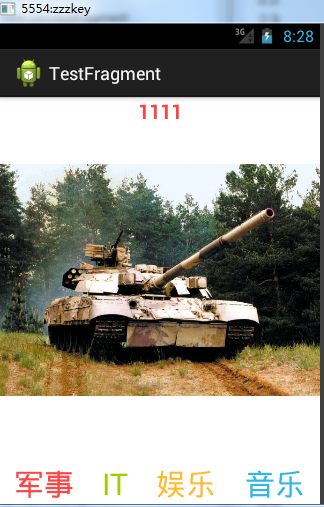
avtivity与Fragment之间传递消息不能使用构造器传递,用bunder传递
首先写一个含有FrameLayout(这个布局最佳),里面最好没有其他的控件的xml:
 <LinearLayout xmlns:android="http://schemas.android.com/apk/res/android"

     xmlns:tools="http://schemas.android.com/tools"

     android:layout_width="match_parent"

     android:layout_height="match_parent"

     android:orientation="vertical"

     tools:context="com.zzw.testfragment.MainActivity" >

     <FrameLayout

         android:id="@+id/framelayout"

         android:layout_width="match_parent"

         android:layout_height="wrap_content"

         android:layout_weight="1" >

     </FrameLayout>

     <LinearLayout

         android:layout_width="match_parent"

         android:layout_height="wrap_content"

         android:orientation="horizontal" >

         <TextView

             android:id="@+id/weixin"

             android:layout_width="wrap_content"

             android:layout_height="match_parent"

             android:layout_weight="1"

             android:gravity="center"

             android:text="军事"

             android:textColor="@android:color/holo_red_light"

             android:textSize="30sp" />

         <TextView

             android:id="@+id/tongxinlu"

             android:layout_width="wrap_content"

             android:layout_height="match_parent"

             android:layout_weight="1"

             android:gravity="center"

             android:text="IT"

             android:textColor="@android:color/holo_green_light"

             android:textSize="30sp" />

         <TextView

             android:id="@+id/faxian"

             android:layout_width="wrap_content"

             android:layout_height="match_parent"

             android:layout_weight="1"

             android:gravity="center"

             android:text="娱乐"

             android:textColor="@android:color/holo_orange_light"

             android:textSize="30sp" />

         <TextView

             android:id="@+id/me"

             android:layout_width="wrap_content"

             android:layout_height="match_parent"

             android:layout_weight="1"

             android:gravity="center"

             android:text="音乐"

             android:textColor="@android:color/holo_blue_light"

             android:textSize="30sp" />

     </LinearLayout>

 </LinearLayout>
写一个每一个界面要显示item.xml:
 <?xml version="1.0" encoding="utf-8"?>

 <RelativeLayout xmlns:android="http://schemas.android.com/apk/res/android"

     android:layout_width="match_parent"

     android:layout_height="match_parent" >

     <ImageView

         android:id="@+id/image"

         android:layout_width="wrap_content"

         android:layout_height="wrap_content"

         android:layout_centerInParent="true" />

     <TextView

         android:id="@+id/textView"

         android:layout_width="wrap_content"

         android:layout_height="wrap_content"

         android:layout_alignParentTop="true"

         android:layout_centerHorizontal="true"

         android:textColor="@android:color/holo_red_light"

         android:textSize="20sp"

         android:textStyle="bold" />

 </RelativeLayout>
写一个继承Fragment的类:
 package com.zzw.testfragment;

 import android.app.Fragment;

 import android.os.Bundle;

 import android.util.Log;

 import android.view.LayoutInflater;

 import android.view.View;

 import android.view.ViewGroup;

 import android.widget.ImageView;

 import android.widget.TextView;

 public class TestFragment extends Fragment {

     private static final String TAG = "TestFragment";

     int image_id;

     String content;

     @Override

     public void onCreate(Bundle savedInstanceState) {

         super.onCreate(savedInstanceState);

         Bundle b = this.getArguments();

         image_id = b.getInt("IMAGE");

         content = b.getString("CONTENT");

         Log.d(TAG, image_id+"--"+content);

     }

     @Override

     public View onCreateView(LayoutInflater inflater, ViewGroup container, Bundle savedInstanceState) {

         View view = inflater.inflate(R.layout.item_start, null);

         return view;

     }

     @Override

     public void onViewCreated(View view, Bundle savedInstanceState) {

         ImageView image = (ImageView) view.findViewById(R.id.image);

         image.setImageResource(image_id);

         TextView textView = (TextView) view.findViewById(R.id.textView);

         textView.setText(content);

     }

 }
MainActivity:
 package com.zzw.testfragment;

 import android.app.Activity;

 import android.app.Fragment;

 import android.app.FragmentManager;

 import android.app.FragmentTransaction;

 import android.os.Bundle;

 import android.view.View;

 import android.view.View.OnClickListener;

 import junit.framework.Test;

 import junit.framework.TestResult;

 public class MainActivity extends Activity implements OnClickListener {

     @Override

     protected void onCreate(Bundle savedInstanceState) {

         super.onCreate(savedInstanceState);

         setContentView(R.layout.activity_main);

         load(setFragmentData(R.drawable.a, "000"));

         findViewById(R.id.weixin).setOnClickListener(this);

         findViewById(R.id.tongxinlu).setOnClickListener(this);

         findViewById(R.id.faxian).setOnClickListener(this);

         findViewById(R.id.me).setOnClickListener(this);

     }

     @Override

     public void onClick(View v) {

         switch (v.getId()) {

         case R.id.weixin:

             load(setFragmentData(R.drawable.a, "000"));

             break;

         case R.id.tongxinlu:

             load(setFragmentData(R.drawable.d, "1111"));

             break;

         case R.id.faxian:

             load(setFragmentData(R.drawable.zzzz, "222"));

             break;

         case R.id.me:

             load(setFragmentData(R.drawable.ic_launcher, "333"));

             break;

         }

     }

     // 加载Fragment

     private void load(Fragment fragment) {

         FragmentManager fm = this.getFragmentManager();

         FragmentTransaction ft = fm.beginTransaction();

         ft.replace(R.id.framelayout, fragment);

         // addToBackStack添加到回退栈,addToBackStack与ft.add(R.id.fragment, new

         // MyFragment())效果相当

         // ft.addToBackStack("test");

         ft.commit();

     }

     // 设置要传递给Fragment的参数

     private Fragment setFragmentData(int image_id, String content) {

         Fragment f = new TestFragment();

         Bundle b = new Bundle();

         b.putInt("IMAGE", image_id);

         b.putString("CONTENT", content);

         f.setArguments(b);

         return f;

     }

 }
Fragment的创建以及与activity的参数传递的更多相关文章
- Fragment基础----创建
1,Fragment的目的及应用场景 fragment 是3.0后引入的类,其字面翻译为“碎片”. 目的是将activity划分成许多单元再进行组合,可以根据不同分辨率屏幕,在不同状态下,灵活创建优化 ...
- android studio 2.2.2下fragment的创建和跳转
一,首先,Fragment是android应用中十分重要的一个功能,十分轻量化,也类似于activity一样,是一个个布局,可以相互跳转和传递参数.但是,它运行起来十分流畅,而且易于管理,下面是在学习 ...
- android fragment 的用法以及与activity的交互和保存数据的方法,包括屏幕切换(转载)!
转载请标明出处:http://blog.csdn.net/lmj623565791/article/details/37992017 1.管理Fragment回退栈 类似与Android系统为Acti ...
- Android成长日记-Fragment的生命周期与Activity通信
1. public void onAttach(Activity activity) 当Fragment被添加到Activity时候会回调这个方法,并且这个方法只会被回调一次 2. public vo ...
- android开发之Fragment加载到一个Activity中
Fragments 是android3.0以后添加的.主要是为了方便android平板端的开发.方便适应不同大小的屏幕.此代码是为了最简单的Fragment的使用,往一个Activity中添加Frag ...
- Fragment的生命周期和Activity之间的通信以及使用
Fragment通俗来讲就是碎片,不能单独存在,意思就是说必须依附于Activity,一般来说有两种方式把Fragment加到Activity,分为静态,动态. 静态即为右键单击,建立一个Fragme ...
- Android为TV端助力 fragment 的用法以及与activity的交互和保存数据的方法,包括屏幕切换(转载)!
转载请标明出处:http://blog.csdn.net/lmj623565791/article/details/37992017 1.管理Fragment回退栈 类似与Android系统为Acti ...
- android开发(2):多页面的实现 | Fragment的创建与使用
APP中出现多个页面再常见不过了.使用activity与fragment都能实现多页面,这里使用fragment来实现.延续“知音”这个APP的开发,之前已经创建了底部导航条与mainactivity ...
- Fragment的创建与通信
由于这里涉及到接口回调的问题,所以先来看一看什么是接口回调: 这就好比老板和员工的微妙关系,老板需要员工去工作,员工挣钱了以后还要告诉老板自己挣了多少钱,然后由老板来处理这些钱. 首先创建一个接口: ...
随机推荐
- 菜鸟-手把手教你把Acegi应用到实际项目中(3)
这一节我们将要了解的是AnonymousProcessingFilter.RememberMeProcessingFilter和LogoutFilter三个过滤器. 1.AnonymousProces ...
- XMLHttpRequest的五步使用方法
<html> <head> <title>Demo</title> <style> body,input,button,select,h1{ ...
- 寻找最合适的view
*:first-child { margin-top: 0 !important; } body > *:last-child { margin-bottom: 0 !important; } ...
- Spark History Server配置使用
Spark history Server产生背景 以standalone运行模式为例,在运行Spark Application的时候,Spark会提供一个WEBUI列出应用程序的运行时信息:但该WEB ...
- (转)直接拿来用!最火的iOS开源项目(二)
“每一次的改变总意味着新的开始.”这句话用在iOS上可谓是再合适不过的了.GitHub上的iOS开源项目数不胜数,iOS每一次的改变,总会引发iOS开源项目的演变,从iOS 1.x到如今的iOS 7, ...
- gulp - connect
Gulp plugin to run a webserver (with LiveReload) Install npm can help us to install the plugin. PS C ...
- Android开发-API指南-Android简介
Introduction to Android 英文原文:http://developer.android.com/intl/zh-cn/guide/index.html 采集日期:2014-4-16 ...
- c# 读取XML数据
1.首先调用接口,要有一个post数据到指定url并返回数据的函数: protected string PostXmlToUrl(string url, string postData) { stri ...
- linux内核学习(一步一步走)——内核概述
一.用户空间与内核空间: 用户通过用户空间与操作系统打交道,程序员开发或使用的应用程序位于用户空间.用户空间不能直接访问内核,从而不能访问硬件资源,但是可以通过内核定义的最外层例程——系统调用来访问. ...
- Android多线程异步处理:AsyncTask 的实现原理
AsyncTask主要用来更新UI线程,比较耗时的操作可以在AsyncTask中使用. AsyncTask是个抽象类,使用时需要继承这个类,然后调用execute()方法.注意继承时需要设定三个泛型P ...