
CUDA-GPU编程
参考:http://blog.csdn.net/augusdi/article/details/12833235 第二节
新建NVIDIA项目:
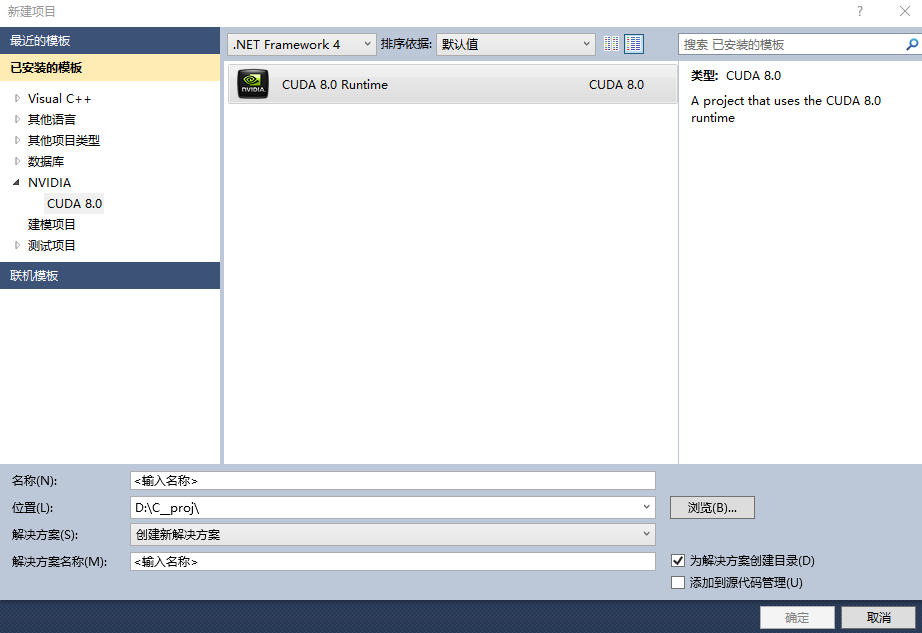
新建项目及会生成一个简单的代码demo,计算矩阵的加法,如下(main中加了一些显示显卡性能的打印):
#include "cuda_runtime.h"

#include "device_launch_parameters.h"

#include <stdio.h>

cudaError_t addWithCuda(int *c, const int *a, const int *b, unsigned int size);

__global__ void addKernel(int *c, const int *a, const int *b)

{

    int i = threadIdx.x;

    c[i] = a[i] + b[i];

}

int main()

{

    const int arraySize = ;

    const int a[arraySize] = { , , , ,  };

    const int b[arraySize] = { , , , ,  };

    int c[arraySize] = {  };

    // Add vectors in parallel.

    cudaError_t cudaStatus = addWithCuda(c, a, b, arraySize);

    if (cudaStatus != cudaSuccess) {

        fprintf(stderr, "addWithCuda failed!");

        return ;

    }

    printf("{1,2,3,4,5} + {10,20,30,40,50} = {%d,%d,%d,%d,%d}\n",

        c[], c[], c[], c[], c[]);

    // cudaDeviceReset must be called before exiting in order for profiling and

    // tracing tools such as Nsight and Visual Profiler to show complete traces.

    cudaStatus = cudaDeviceReset();

    if (cudaStatus != cudaSuccess) {

        fprintf(stderr, "cudaDeviceReset failed!");

        return ;

    }

    int deviceCount;

    cudaGetDeviceCount(&deviceCount);

    int dev;

    for (dev = ; dev < deviceCount; dev++)

    {

        cudaDeviceProp deviceProp;

        cudaGetDeviceProperties(&deviceProp, dev);

        if (dev == )

        {

            if (/*deviceProp.major==9999 && */deviceProp.minor = &&deviceProp.major==)

                printf("\n");

        }

        printf("\nDevice%d:\"%s\"\n", dev, deviceProp.name);

        printf("Total amount of global memory                   %u bytes\n", deviceProp.totalGlobalMem);

        printf("Number of mltiprocessors                        %d\n", deviceProp.multiProcessorCount);

        printf("Total amount of constant memory:                %u bytes\n", deviceProp.totalConstMem);

        printf("Total amount of shared memory per block         %u bytes\n", deviceProp.sharedMemPerBlock);

        printf("Total number of registers available per block:  %d\n", deviceProp.regsPerBlock);

        printf("Warp size                                       %d\n", deviceProp.warpSize);

        printf("Maximum number of threada per block:            %d\n", deviceProp.maxThreadsPerBlock);

        printf("Maximum sizes of each dimension of a block:     %d x %d x %d\n", deviceProp.maxThreadsDim[],

            deviceProp.maxThreadsDim[],

            deviceProp.maxThreadsDim[]);

        printf("Maximum size of each dimension of a grid:       %d x %d x %d\n", deviceProp.maxGridSize[], deviceProp.maxGridSize[], deviceProp.maxGridSize[]);

        printf("Maximum memory pitch :                          %u bytes\n", deviceProp.memPitch);

        printf("Texture alignmemt                               %u bytes\n", deviceProp.texturePitchAlignment);

        printf("Clock rate                                      %.2f GHz\n", deviceProp.clockRate*1e-6f);

    }

    printf("\nTest PASSED\n");

    getchar();

    return ;

}

// Helper function for using CUDA to add vectors in parallel.

cudaError_t addWithCuda(int *c, const int *a, const int *b, unsigned int size)

{

    int *dev_a = ;

    int *dev_b = ;

    int *dev_c = ;

    cudaError_t cudaStatus;

    // Choose which GPU to run on, change this on a multi-GPU system.

    cudaStatus = cudaSetDevice();

    if (cudaStatus != cudaSuccess) {

        fprintf(stderr, "cudaSetDevice failed!  Do you have a CUDA-capable GPU installed?");

        goto Error;

    }

    // Allocate GPU buffers for three vectors (two input, one output)    .

    cudaStatus = cudaMalloc((void**)&dev_c, size * sizeof(int));

    if (cudaStatus != cudaSuccess) {

        fprintf(stderr, "cudaMalloc failed!");

        goto Error;

    }

    cudaStatus = cudaMalloc((void**)&dev_a, size * sizeof(int));

    if (cudaStatus != cudaSuccess) {

        fprintf(stderr, "cudaMalloc failed!");

        goto Error;

    }

    cudaStatus = cudaMalloc((void**)&dev_b, size * sizeof(int));

    if (cudaStatus != cudaSuccess) {

        fprintf(stderr, "cudaMalloc failed!");

        goto Error;

    }

    // Copy input vectors from host memory to GPU buffers.

    cudaStatus = cudaMemcpy(dev_a, a, size * sizeof(int), cudaMemcpyHostToDevice);

    if (cudaStatus != cudaSuccess) {

        fprintf(stderr, "cudaMemcpy failed!");

        goto Error;

    }

    cudaStatus = cudaMemcpy(dev_b, b, size * sizeof(int), cudaMemcpyHostToDevice);

    if (cudaStatus != cudaSuccess) {

        fprintf(stderr, "cudaMemcpy failed!");

        goto Error;

    }

    // Launch a kernel on the GPU with one thread for each element.

    addKernel<<<, size>>>(dev_c, dev_a, dev_b);

    // Check for any errors launching the kernel

    cudaStatus = cudaGetLastError();

    if (cudaStatus != cudaSuccess) {

        fprintf(stderr, "addKernel launch failed: %s\n", cudaGetErrorString(cudaStatus));

        goto Error;

    }

    // cudaDeviceSynchronize waits for the kernel to finish, and returns

    // any errors encountered during the launch.

    cudaStatus = cudaDeviceSynchronize();

    if (cudaStatus != cudaSuccess) {

        fprintf(stderr, "cudaDeviceSynchronize returned error code %d after launching addKernel!\n", cudaStatus);

        goto Error;

    }

    // Copy output vector from GPU buffer to host memory.

    cudaStatus = cudaMemcpy(c, dev_c, size * sizeof(int), cudaMemcpyDeviceToHost);

    if (cudaStatus != cudaSuccess) {

        fprintf(stderr, "cudaMemcpy failed!");

        goto Error;

    }

Error:

    cudaFree(dev_c);

    cudaFree(dev_a);

    cudaFree(dev_b);

    return cudaStatus;

}
CUDA-GPU编程的更多相关文章
- 《CUDA并行程序设计:GPU编程指南》
<CUDA并行程序设计:GPU编程指南> 基本信息 原书名:CUDA Programming:A Developer’s Guide to Parallel Computing with ...
- GPU编程自学4 —— CUDA核函数运行参数
深度学习的兴起,使得多线程以及GPU编程逐渐成为算法工程师无法规避的问题.这里主要记录自己的GPU自学历程. 目录 <GPU编程自学1 -- 引言> <GPU编程自学2 -- CUD ...
- GPU编程自学3 —— CUDA程序初探
深度学习的兴起,使得多线程以及GPU编程逐渐成为算法工程师无法规避的问题.这里主要记录自己的GPU自学历程. 目录 <GPU编程自学1 -- 引言> <GPU编程自学2 -- CUD ...
- GPU编程自学2 —— CUDA环境配置
深度学习的兴起,使得多线程以及GPU编程逐渐成为算法工程师无法规避的问题.这里主要记录自己的GPU自学历程. 目录 <GPU编程自学1 -- 引言> <GPU编程自学2 -- CUD ...
- 【OpenCV & CUDA】OpenCV和Cuda结合编程
一.利用OpenCV中提供的GPU模块 目前,OpenCV中已提供了许多GPU函数,直接使用OpenCV提供的GPU模块,可以完成大部分图像处理的加速操作. 基本使用方法,请参考:http://www ...
- CUDA 标准编程模式
前言 本文将介绍 CUDA 编程的基本模式,所有 CUDA 程序都基于此模式编写,即使是调用库,库的底层也是这个模式实现的. 模式描述 1. 定义需要在 device 端执行的核函数.( 函数声明前加 ...
- 第一篇:GPU 编程技术的发展历程及现状
前言 本文通过介绍 GPU 编程技术的发展历程,让大家初步地了解 GPU 编程,走进 GPU 编程的世界. 冯诺依曼计算机架构的瓶颈 曾经,几乎所有的处理器都是以冯诺依曼计算机架构为基础的.该系统架构 ...
- GPU 编程入门到精通(五)之 GPU 程序优化进阶
博主因为工作其中的须要,開始学习 GPU 上面的编程,主要涉及到的是基于 GPU 的深度学习方面的知识.鉴于之前没有接触过 GPU 编程.因此在这里特地学习一下 GPU 上面的编程. 有志同道合的小伙 ...
- mpi和cuda混合编程的正确编译
针对大数据的计算,很多程序通过搭建mpi集群进行加速,并取得了很好的效果.算法内部的加速,当前的并行化趋势是利用GPU显卡进行算法加速.针对并行性非常好的算法,GPU加速效果将远大于集群带来的加速效果 ...
- GPU编程--宏观理解篇(1)
GPU编程与CPU编程最大的不同可以概括为以下两点: "The same program is executed on many data elements in parallel" ...
随机推荐
- spark之scala快速入门
scala和java都是在jvm之上的语言,相对来讲,scala热度比较低,其实并不是一个特别好的语言选择. 原因倒不是因为scala本身的缺点,而是使用人群不够多,论坛和社区不够活跃.这就跟社交软件 ...
- 建立DJANGO的自定义TAG
DJANGO的TAG分为三类: • simple_tag : Processes the data and returns a string• inclusion_tag : Processes th ...
- Ubuntu 16.04安装搜索拼音输入法
Linux下唯一一款大厂出的输入法 1.下载 http://pinyin.sogou.com/linux/?r=pinyin 2.安装 sudo dpkg -i sogoupinyin_2.1.0.0 ...
- Waiting For Debugger
在eclipse中进行调试时常常出现以下这种提示:Application (app名称) is waiting for the debugger to attach 正常情况下.会非常快进入应用调 ...
- golang 的GOPATH设置的问题
go run footer.go 的时候呢, go会依次去GOPATH 和GOROOT设置的对应路径下面找对应的包(目录和文件) 找的时候呢, 会在GoPATH 和GOROOT对应的目录后面再加一层路 ...
- 第8章 处理ISDN故障
第8章 处理ISDN故障 一.ISDN基本原理 二.常见ISDN故障 ISDN问题分成3类:配置不当的路由器.物理线缆和ISDN协议.配置不当的交换机. 1.配置不当的路由器 配置不当由于不同原因:t ...
- 【ora10,4】oracle后台进程介绍:
一.SMON(System MONitor) 系统监控进程: 在数据库启动过程中,SMON排在CKPT进程之后,在Oracle9i中排在第六号的位置: PMON started with p ...
- I/O虚拟化
note:这里主要记录我对IO虚拟化的理解,希望这篇文章对想了解虚拟化IO的同学有点帮助.这是我在看论文[vale,a switched ethernet for virtual machines]的 ...
- luogu1641 [SDOI2010]生成字符串
题目大意 把$n$个$1$和$m$个$0$组成字符串,在任意的前$k$个字符中,$1$的个数不能少于$0$的个数.求这样的字符串的个数.$1\leq m\leq n\leq 1000000$. 原始模 ...
- samba访问其他服务器文件权限设置
chown lynn.feng:lynn.feng nelson/ 我们知道档案权限对于一个系统的安全重要性,也知道档案的权限对于使用者与群组的相关性, 那如何修改一个档案的属性与权限呢? 我们这里介 ...