
centos7上单机安装fastdfs6.0.9
1、背景
最近由于某些原因接触到了分布式存储,而像阿里云的OSS等都是需要付费的,那么有没有免费的呢?fastdfs就是一个免费的,此处记录一下如何搭建一个单机版的 fastdfs 环境。
2、fastdfs的一些知识
2.1 fastdfs的特点
- 分组存储,灵活简洁
- 对等结构,不存在单点
- 文件ID由FastDFS生成,作为文件访问凭证。FastDFS不需要传统的name server
- 和流行的web server无缝衔接,FastDFS已提供apache和nginx扩展模块
- 大、中、小文件均可以很好支持,支持海量小文件存储
- 支持多块磁盘,支持单盘数据恢复
- 支持相同文件内容只保存一份,节省存储空间
- 存储服务器上可以保存文件附加属性
- 下载文件支持多线程方式,支持断点续传
2.2 架构图
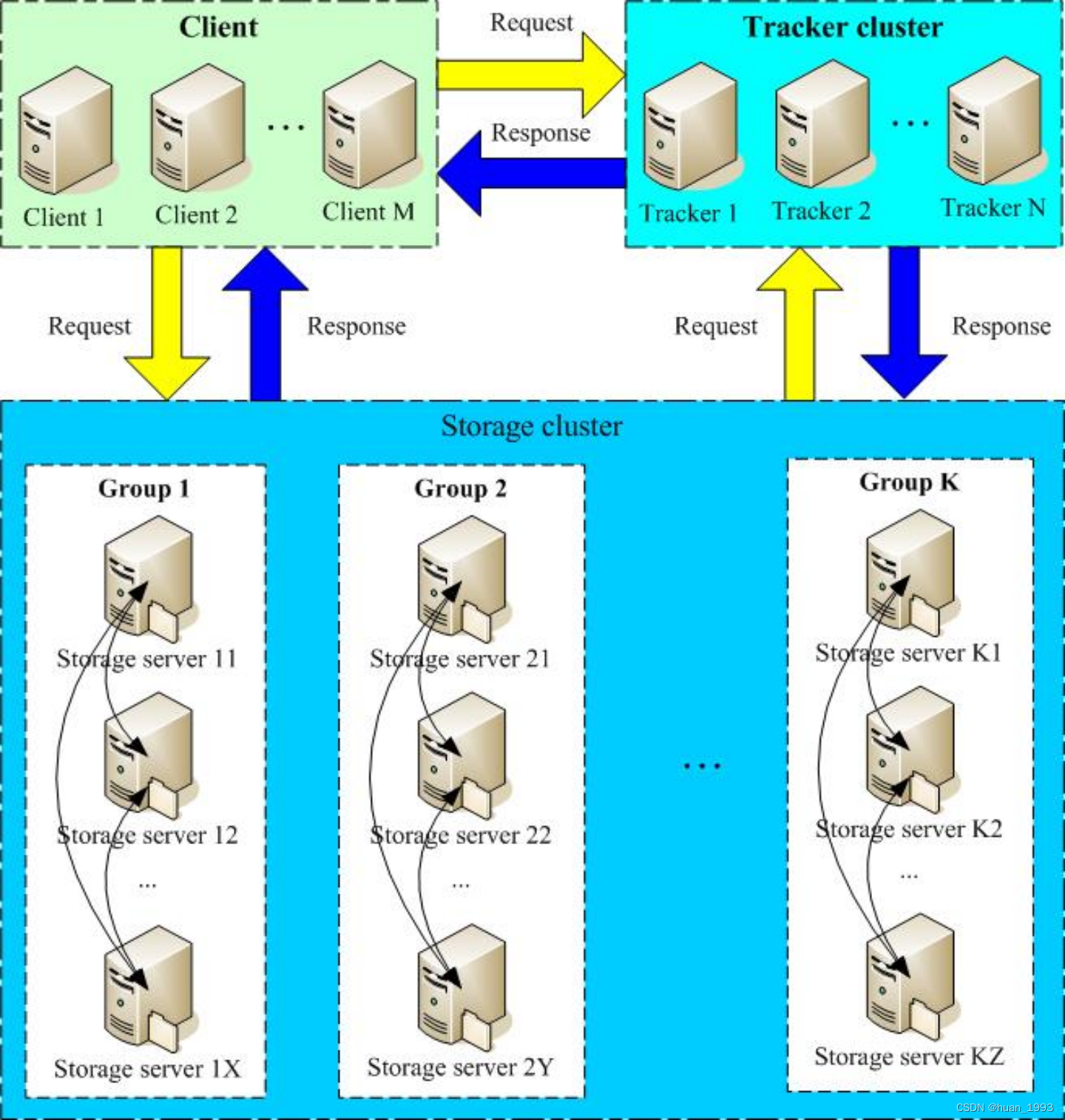
2.2.1 client 介绍
客户端,即文件上传或下载的服务器,也就是我们自己项目部署的服务器。
2.2.2 tracker-server 介绍
tracker-server是跟踪服务器,主要起调度作用。负责管理所有storage server的元数据信息,比如:storage ip、port、group等信息。每个storage server在启动的时候,会向tracker server连接,上报自己的元数据信息,并与之保持周期性的心跳。tracker-server之间通常不会相互通讯
2.2.3 storage-server 介绍
storage-server是存储服务器,主要用来存储各种文件。storage-server是以Group为单位,每个Group内可以有多台storage server,同一个组内多个storage server为互为备份关系。- 每个
Group中的机器的存储建议配置成一样大,否则以这个Group内容量最小的storage为准。 - 由
storage server主动向tracker server报告状态信息
2.3 fastdfs需要安装的软件
| 依赖库 | 备注 |
|---|---|
| libfatscommon | 基础库-fastdfs分离出来的公共函数 |
| libserverframe | 基础库-网络框架库 |
| FastDFS | fastdfs本地 |
| fastdfs-nginx-module | fastdfs与nginx整合模块 |
| nginx | nginx |
2.4 为什么需要fastdfs-nginx-module
其实这个主要是因为,同一个group中存在多个storage server,而多个storage server之间会存在文件同步,那么可能就会出现 同步延迟 问题。
比如:
我们存在2台storage server,分别是 storageA 和 storageB。
FastDFS通过Tracker服务器,将文件放入到了storageA服务器存储。上传成功后将 文件ID 返回给客户端。此时FastDFS存储集群机制会将这个文件同步到同组存储storageB,在文件还没有复制完成的情况下,客户端如果用这个文件ID在storageB上取文件,就会出现文件无法访问的错误。而fastdfs-nginx-module可以重定向文件连接到源服务器取文件,避免客户端由于同步延迟导致的文件无法访问错误。
2.5 fastdfs的一些资料
- fastdfs 源码地址 https://github.com/happyfish100/
- fastdfs官方论坛 http://bbs.chinaunix.net/forum.php?mod=forumdisplay&fid=240&filter=typeid&typeid=424
- fastdfs 配置文件解释 http://bbs.chinaunix.net/thread-1941456-1-1.html
- fastdfs ppt介绍 http://bbs.chinaunix.net/thread-1958475-1-1.html
- fastdfs faq http://bbs.chinaunix.net/thread-1920470-1-1.html
3、fastdfs软件安装
3.1 前置条件
3.1.1 依赖库安装
yum install git gcc gcc-c++ make automake autoconf libtool pcre pcre-devel zlib zlib-devel openssl-devel -y
3.1.2 fastdfs源码所在目录
[root@fastdfs fastdfs]# pwd

/opt/fastdfs

[root@fastdfs fastdfs]# ls

fastdfs-6.09.tar.gz  fastdfs-nginx-module-1.23.tar.gz  libfastcommon-1.0.61.tar.gz  libserverframe-1.1.20.tar.gz  nginx-1.22.0.tar.gz

[root@fastdfs fastdfs]#
3.1.3 tracker 和 storage server
此处因为是fastdfs单机安装,因此 tracker server 和 storage server 安装到同一台机器上。
3.2 安装基础库-libfatscommon
[root@fastdfs fastdfs]# cd /opt/fastdfs

[root@fastdfs fastdfs]# tar -zxvf libfastcommon-1.0.61.tar.gz

[root@fastdfs fastdfs]# cd libfastcommon-1.0.61

[root@fastdfs libfastcommon-1.0.61]# ./make.sh && ./make.sh install

[root@fastdfs fdfs]# ls /usr/lib64 | grep libfastcommon.so

libfastcommon.so

[root@fastdfs fdfs]# ls /usr/lib | grep libfastcommon.so

libfastcommon.so
3.3 安装基础库-libserverframe
[root@fastdfs fastdfs]# cd /opt/fastdfs

[root@fastdfs fastdfs]# tar -zxvf libserverframe-1.1.20.tar.gz

[root@fastdfs fastdfs]# cd libserverframe-1.1.20

[root@fastdfs libfastcommon-1.0.61]# ./make.sh && ./make.sh install

[root@fastdfs fdfs]# ls /usr/lib | grep libserverframe.so

libserverframe.so

[root@fastdfs fdfs]# ls /usr/lib64 | grep libserverframe.so

libserverframe.so
3.4 安装fastdfs
[root@fastdfs fastdfs]# cd /opt/fastdfs

[root@fastdfs fastdfs]# tar -zxvf fastdfs-6.09.tar.gz

[root@fastdfs fastdfs]# cd fastdfs-6.09

[root@fastdfs fastdfs-6.09]# ./make.sh && ./make.sh install
3.4.1 默认配置文件位置
[root@fastdfs fdfs]# cd /etc/fdfs/

[root@fastdfs fdfs]# ll

total 32

-rw-r--r--. 1 root root  1909 Oct  6 22:30 client.conf

-rw-r--r--. 1 root root 10246 Oct  6 22:30 storage.conf

-rw-r--r--. 1 root root   620 Oct  6 22:30 storage_ids.conf

-rw-r--r--. 1 root root  9138 Oct  6 22:30 tracker.conf

[root@fastdfs fdfs]#
3.4.2 默认命令工具
[root@fastdfs bin]# cd /usr/bin/ && ll | grep fdfs

-rwxr-xr-x.   1 root root    438264 Oct  6 22:30 fdfs_appender_test

-rwxr-xr-x.   1 root root    438048 Oct  6 22:30 fdfs_appender_test1

-rwxr-xr-x.   1 root root    429064 Oct  6 22:30 fdfs_append_file

-rwxr-xr-x.   1 root root    427736 Oct  6 22:30 fdfs_crc32

-rwxr-xr-x.   1 root root    429088 Oct  6 22:30 fdfs_delete_file

-rwxr-xr-x.   1 root root    429816 Oct  6 22:30 fdfs_download_file

-rwxr-xr-x.   1 root root    429848 Oct  6 22:30 fdfs_file_info

-rwxr-xr-x.   1 root root    440816 Oct  6 22:30 fdfs_monitor

-rwxr-xr-x.   1 root root    429344 Oct  6 22:30 fdfs_regenerate_filename

-rwxr-xr-x.   1 root root   1364800 Oct  6 22:30 fdfs_storaged

-rwxr-xr-x.   1 root root    444152 Oct  6 22:30 fdfs_test

-rwxr-xr-x.   1 root root    443336 Oct  6 22:30 fdfs_test1

-rwxr-xr-x.   1 root root    571736 Oct  6 22:30 fdfs_trackerd

-rwxr-xr-x.   1 root root    430048 Oct  6 22:30 fdfs_upload_appender

-rwxr-xr-x.   1 root root    431080 Oct  6 22:30 fdfs_upload_file

[root@fastdfs bin]#
3.4.3 fastdfs默认启动脚本
[root@fastdfs init.d]# cd /opt/fastdfs/fastdfs-6.09/init.d/ && ll

total 8

-rwxrwxr-x. 1 root root 961 Sep 14 16:33 fdfs_storaged

-rwxrwxr-x. 1 root root 963 Sep 14 16:33 fdfs_trackerd

[root@fastdfs init.d]#
3.5 创建fastdfs数据根目录
mkdir -p /data/fastdfs

mkdir -p /data/fastdfs/tracker

mkdir -p /data/fastdfs/storage

mkdir -p /data/fastdfs/client
3.6 配置tracker server
3.6.1 修改配置文件
vim /etc/fdfs/tracker.conf
# 配置文件是否不生效 false为生效

disabled = false

# tracker 服务的端口

port = 22122

# tracker 存储数据和日志文件的根目录,根目录需要提前创建好

base_path = /data/fastdfs/tracker
3.6.2 防火墙放行端口
[root@fastdfs fdfs]# firewall-cmd --zone=public --add-port=22122/tcp --permanent

success

[root@fastdfs fdfs]# firewall-cmd --reload

success

[root@fastdfs fdfs]#
3.6.3 启动tracker server
1、复制启动脚本
[root@fastdfs logs]# cp /opt/fastdfs/fastdfs-6.09/init.d/fdfs_trackerd /etc/init.d/
2、启动tracker server
[root@fastdfs logs]# systemctl start fdfs_trackerd
3、检测tracker server 是否启动
[root@fastdfs logs]# ps aux | grep fd

root      6686  0.0  0.3  79556  5900 ?        Sl   05:38   0:00 /usr/bin/fdfs_trackerd /etc/fdfs/tracker.conf start

root      6694  0.0  0.1 106180  1892 pts/0    R+   05:39   0:00 grep --color=auto fd
4、检测22122端口是否被监听
[root@fastdfs logs]# netstat -anp | grep 22122

tcp        0      0 0.0.0.0:22122           0.0.0.0:*               LISTEN      6686/fdfs_trackerd
5、关闭tracker server
[root@fastdfs logs]# /etc/init.d/fdfs_trackerd stop

Stopping fdfs_trackerd (via systemctl):            [  OK  ]
3.7 配置storage server
3.7.1 修改配置文件
/etc/fdfs/storage.conf
# 配置文件是否不生效,false 为生效

disabled=false

# 指定此 storage server 所在 组

group_name=group1

# storage server 服务的端口

port=23000

# Storage 数据和日志目录地址,根目录必须提前创建好

base_path=/data/fastdfs/storage

# 文件存储路径的个数。

store_path_count=1

# 配置 store_path_count 个路径,索引号从 0 开始。

# 如果不配置 store_path0,那它就和 base_path 的路径一样。

store_path0=/data/fastdfs/storage

# FastDFS 存储文件时,采用了两级目录。这里配置存放文件的目录个数。

# tracker_server 的列表 ,会主动连接 tracker_server

# 当存在多个 tracker server 时,每个 tracker server 写一行

tracker_server=192.168.121.137:22122

# 此存储服务器上web服务器的端口

http.server_port=8888
3.6.2 防火墙放行端口
[root@fastdfs fdfs]# firewall-cmd --zone=public --add-port=23000/tcp --permanent

success

[root@fastdfs fdfs]# firewall-cmd --zone=public --add-port=8888/tcp --permanent

success

[root@fastdfs fdfs]# firewall-cmd --reload

success

[root@fastdfs fdfs]#
3.6.3 启动storage server
1、复制启动脚本
[root@fastdfs logs]# cp /opt/fastdfs/fastdfs-6.09/init.d/fdfs_storaged /etc/init.d/
2、启动storage server
[root@fastdfs logs]# systemctl start fdfs_storaged
3、检测storage server 是否启动
[root@fastdfs logs]# ps aux | grep fd

ps aux | grep fd

root      6723  0.0  0.6 145092  8980 ?        Sl   05:55   0:00 /usr/bin/fdfs_trackerd /etc/fdfs/tracker.conf start

root      6774  1.8  4.5 139948 68364 ?        Sl   06:12   0:00 /usr/bin/fdfs_storaged /etc/fdfs/storage.conf start

root      6785  0.0  0.1 106180  1864 pts/0    R+   06:12   0:00 grep --color=auto fd
4、检测23000端口是否被监听
[root@fastdfs logs]# netstat -anp | grep 23000

tcp        0      0 0.0.0.0:22122           0.0.0.0:*               LISTEN      6686/fdfs_trackerd
5、关闭storage server
[root@fastdfs logs]# /etc/init.d/fdfs_storaged stop

Stopping fdfs_trackerd (via systemctl):            [  OK  ]
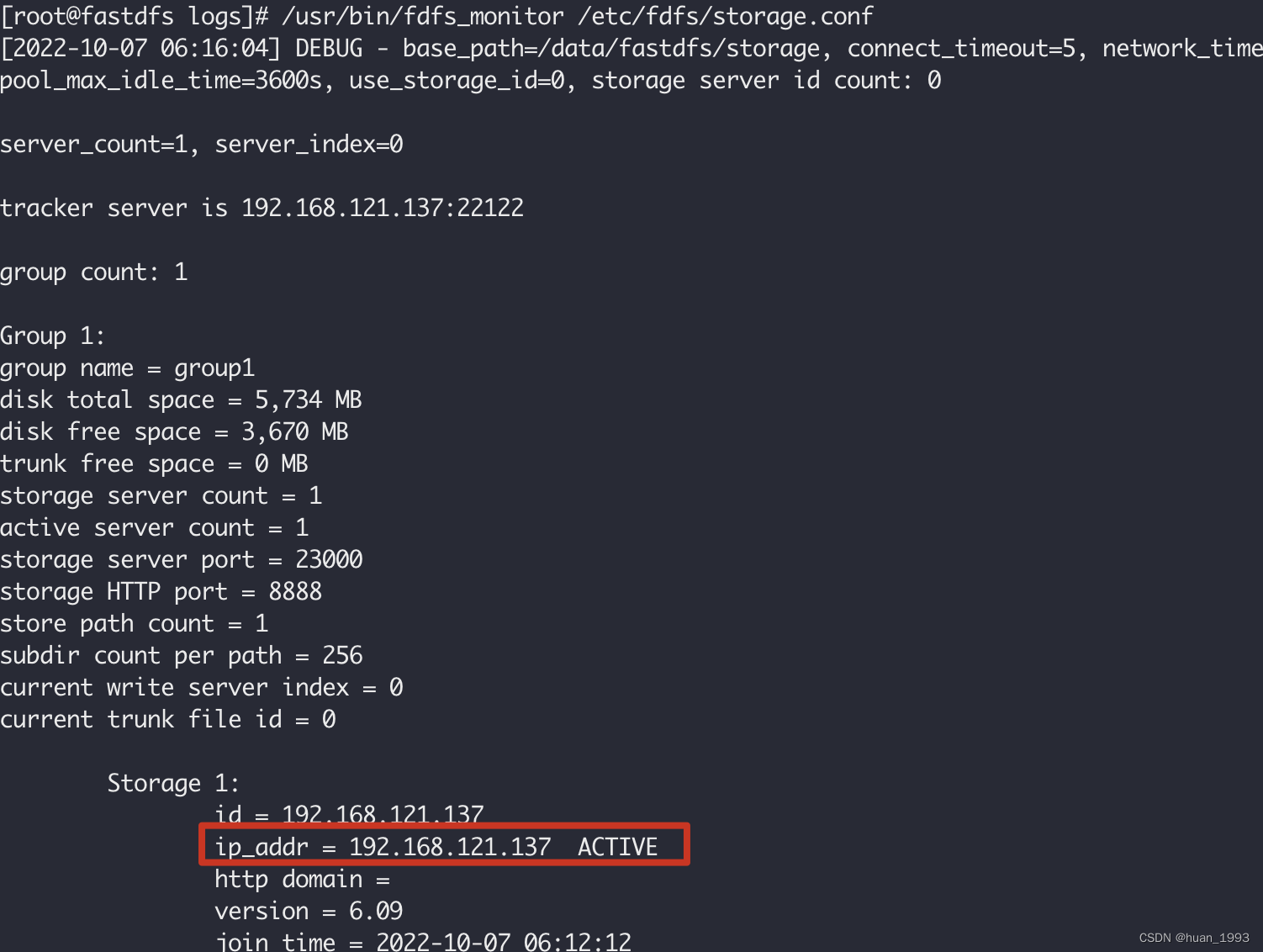
3.8 查看storage和tracker是否在通讯
/usr/bin/fdfs_monitor /etc/fdfs/storage.conf
3.9 文件上传测试
3.9.1 修改配置文件
vim /etc/fdfs/client.conf
# 存储client的日志文件

base_path = /data/fastdfs/client

# tracker服务器的地址,多个写多行

tracker_server = 192.168.121.137:22122
3.9.2 上传文件
[root@fastdfs fastdfs]# /usr/bin/fdfs_upload_file /etc/fdfs/client.conf /opt/fastdfs/小红帽.jpg

group1/M00/00/00/wKh5iWM_VlCAUwAtAAAwWD4VeAg204.jpg

[root@fastdfs fastdfs]#

[root@fastdfs 00]# pwd

/data/fastdfs/storage/data/00/00

[root@fastdfs 00]# ls

wKh5iWM_VlCAUwAtAAAwWD4VeAg204.jpg

[root@fastdfs 00]#
文件id解释

3.10 storage服务安装nginx
[root@fastdfs fastdfs]# tar -zxf nginx-1.22.0.tar.gz

[root@fastdfs fastdfs]# cd nginx-1.22.0

[root@fastdfs fastdfs]# ./configure

[root@fastdfs fastdfs]# make

[root@fastdfs fastdfs]# make install

[root@fastdfs sbin]# /usr/local/nginx/sbin/nginx -v

nginx version: nginx/1.22.0
1、启动nginx
[root@fastdfs sbin]# /usr/local/nginx/sbin/nginx

[root@fastdfs sbin]# ps aux | grep nginx

root      9460  0.0  0.1   4436  1528 ?        Ss   06:40   0:00 nginx: master process /usr/local/nginx/sbin/nginx

nobody    9461  0.0  0.1   4880  2260 ?        S    06:40   0:00 nginx: worker process

root      9463  0.0  0.1 106180  1884 pts/0    R+   06:40   0:00 grep --color=auto nginx
2、停止nginx
[root@fastdfs sbin]# /usr/local/nginx/sbin/nginx -s stop

[root@fastdfs sbin]# ps aux | grep nginx

root      9466  0.0  0.1 106180  1860 pts/0    R+   06:41   0:00 grep --color=auto nginx
3.11 安装fastdfs-nginx-module
3.11.1 安装
[root@fastdfs sbin]# /usr/local/nginx/sbin/nginx -s stop

[root@fastdfs sbin]# cd /opt/fastdfs/

[root@fastdfs sbin]# tar -zxf fastdfs-nginx-module-1.23.tar.gz

[root@fastdfs sbin]# cd /opt/fastdfs/nginx-1.22.0

[root@fastdfs sbin]# ./configure --add-module=../fastdfs-nginx-module-1.23/src/

[root@fastdfs sbin]# make && make install

[root@fastdfs nginx-1.22.0]# /usr/local/nginx/sbin/nginx -V

nginx version: nginx/1.22.0

built by gcc 4.8.5 20150623 (Red Hat 4.8.5-44) (GCC)

configure arguments: --add-module=../fastdfs-nginx-module-1.23/src/
3.11.2 复制mod_fastdfs.conf文件
复制 fastdfs-nginx-module-1.23 源码中的配置文件到/etc/fdfs 目录
cp /opt/fastdfs/fastdfs-nginx-module-1.23/src/mod_fastdfs.conf /etc/fdfs/
3.11.3 编辑mod_fastdfs.conf文件
vim /etc/fdfs/mod_fastdfs.conf
# tracker server 的地址,多个写多行

tracker_server=192.168.121.137:22122

# storage server的端口

storage_server_port=23000

# storage server的组名

group_name=group1

# url上是否有组名

url_have_group_name = true

# 和 storage.conf配置文件中配置的一样

store_path_count=1

# 和 storage.conf配置文件中配置的一样

store_path0=/data/fastdfs/storage
3.11.5 拷贝mime.types和http.conf文件
[root@fastdfs nginx-1.22.0]# cp /opt/fastdfs/fastdfs-6.09/conf/mime.types /etc/fdfs/

[root@fastdfs nginx-1.22.0]# cp /opt/fastdfs/fastdfs-6.09/conf/http.conf /etc/fdfs/
不拷贝的话,可能文件不能访问
3.11.4 编辑nginx配置文件
vim /usr/local/nginx/conf/nginx.conf
server {

        listen       8888;

        server_name  192.168.121.137;

        location ~/group([0-9])/ {

                ngx_fastdfs_module;

        }

 }
此处的8888和/etc/fdfs/storage.conf中的http.server_port=8888 值要一致。
3.11.5 启动nginx
[root@fastdfs nginx-1.22.0]# /usr/local/nginx/sbin/nginx

ngx_http_fastdfs_set pid=12113
3.11.6 访问之前上传的文件

centos7上单机安装fastdfs6.0.9的更多相关文章
- 【运维技术】CentOS7上从零开始安装阿里RocketMQ版本:release-4.0.1【亲测哈哈】
CentOS7上从零开始安装阿里RocketMQ版本:release-4.0.1[亲测哈哈] 安装git # 更新包 $ yum update # 安装git $ yum install git # ...
- 分布式文件系统FastDFS在CentOS7上的安装及与Springboot的整合
1. 概述 FastDFS 是目前比较流行的分布式文件系统,可以很容易的实现横向扩展.动态扩容.灾备.高可用和负载均衡. FastDFS 的服务分为 tracker 服务 和 storage 服务, ...
- Linux(CentOS7)下rpm安装MySQL8.0.16
记录一下自己在 CentOS7 下 rpm 安装 MySQL8.0.16 的过程. 一.准备工作 1. 下载MySQL所需要的安装包 从 MySQL官网 下载,上传至 CentOS 系统 /usr/l ...
- CentOS7下编译安装redis-5.0.9
CentOS7下编译安装redis-5.0.9 本文地址http://yangjianyong.cn/?p=171转载无需经过作者本人授权 下载redis #code start wget https ...
- centos7下编译安装php-7.0.15(PHP-FPM)
centos7下编译安装php-7.0.15(PHP-FPM) 一.下载php7源码包 http://php.net/downloads.php 如:php-7.0.15.tar.gz 二.安装所需依 ...
- Linux Centos7.2 编译安装PHP7.0.2
操作环境: 1.系统:Centos7.2 2.服务:Nginx 1.下载PHP7.0.2的安装包解压,编译,安装: $ cd /usr/src/ $ wget http://cn2.php.net/d ...
- jumpserver V0.4.0 在CentOs7上的安装
基于 CentOS 7 一步一步安装 Jumpserver 0.4.0 环境 系统: CentOS 7 IP: 192.168.226.128 一. 准备Python3和Python虚拟环境 1.1 ...
- solr7.3.1在CentOS7上的安装
1 solr的下载 从Solr官方网站(http://archive.apache.org/dist/lucene/solr/7.3.1/ )下载Solr最新版本, 根据Solr的运行环境,Linux ...
- centos7上docker安装和使用教程
Docker 是一个创建和管理 Linux 容器的开源工具.容器就像是轻量级的虚拟机,并且可以以毫秒级的速度来启动或停止.Docker 帮助系统管理员和程序员在容器中开发应用程序,并且可以扩展到成千上 ...
- Gitlab在Centos7上的安装
一 官网说明 安装步骤:https://about.gitlab.com/install/#centos-7 安装说明:本文只是用来给微服务当配置中心,只是较浅的记录一下安装步骤,后面会详细讲解及在d ...
随机推荐
- Spring Boot 加载外部配置文件
Spring Boot 允许你从外部加载配置,这样的话,就可以在不同的环境中使用相同的代码.支持的外部配置源包括:Java属性文件.YAML文件.环境变量.命令行参数. 用@Value注解可以将属性值 ...
- oracle 游标变量ref cursor详解
一 介绍 像游标cursor一样,游标变量ref cursor指向指定查询结果集当前行.游标变量显得更加灵活因为其声明并不绑定指定查询. 其主要运用于PLSQL函数或存储过程以及其他编程语言 ...
- React18 之 Suspense
我们是袋鼠云数栈 UED 团队,致力于打造优秀的一站式数据中台产品.我们始终保持工匠精神,探索前端道路,为社区积累并传播经验价值. 本文作者:佳岚 Suspense Suspense 组件我们并不陌生 ...
- js结合canvas画任意多边形
实现六边形 // html <canvas></canvas> // js const canvas = document.querySelector("canvas ...
- JSON排除指定字段的4种方法
转自:https://blog.csdn.net/Sn_Keys/article/details/122443407
- os.path.relpath和os.path.basename,返回文件路径中的文件名
from os import path print(path.relpath("/home/hpcadmin/lw/demo.py", start="/home/hpca ...
- 【系统选型】OA需求分析,OA系统选型及各供应商对比。
去年公司内部做OA信息化升级,需要更新换代一下OA系统,当时OA选型整理下来的资料分享一下. 需求调研整理后如下: 一共四个模块需要更新&升级 : OA模块(包括行政) + 合同模块 + 费 ...
- 【LeetCode数组#1二分法】二分查找、搜索插入、在排序数组中查找元素的第一个和最后一个位置
二分查找 题目 力扣704题目链接 给定一个 n 个元素有序的(升序)整型数组 nums 和一个目标值 target ,写一个函数搜索 nums 中的 target,如果目标值存在返回下标,否则返回 ...
- C++ 多线程笔记1 线程的创建
C++ 多线程笔记1 线程的创建 里面代码会用到的头文件 #include <iostream> #include <string> #include <memory&g ...
- C++ 函数指针,指针函数,左值右值
C++ 函数指针,指针函数,左值右值 1.函数指针 是一个指针类型的变量,存放的内容都是函数的指针,用来间接调用函数,格式如下: int add( int a, int b) { return a+b ...