
UI自动化打开游览器失败 elenium.common.exceptions.SessionNotCreatedException: Message: session not created: This version of ChromeDriver only supports Chrome version 90
原因是:
驱动和当前游览器版本不一致
查看游览器版本:
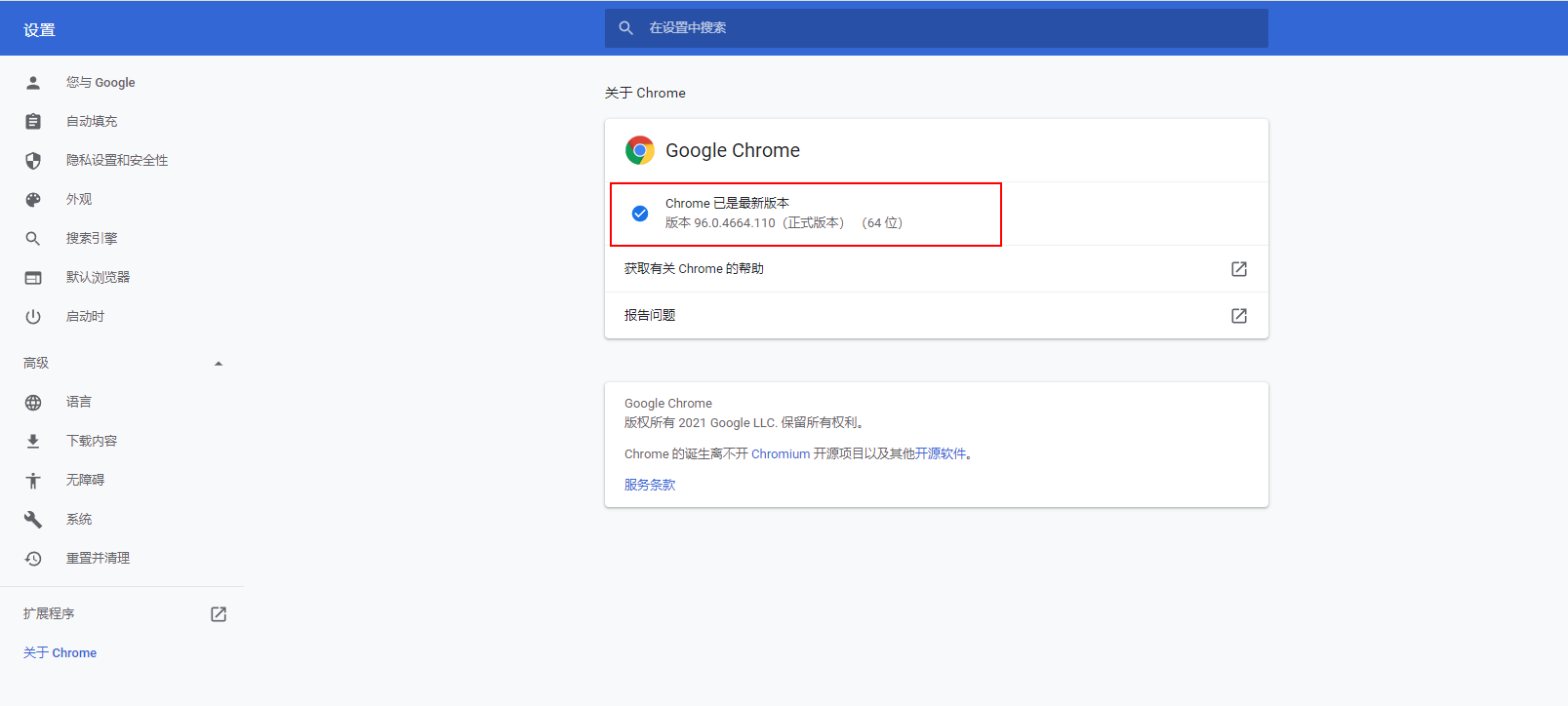
下载对应驱动:
http://npm.taobao.org/mirrors/chromedriver/
在自己电脑上 找到原来驱动的存放位置

将下载的新驱动 替换即可 (避免每次麻烦 建议关闭游览器自动更新功能)
UI自动化打开游览器失败 elenium.common.exceptions.SessionNotCreatedException: Message: session not created: This version of ChromeDriver only supports Chrome version 90的更多相关文章
- 运行python脚本报错:selenium.common.exceptions.SessionNotCreatedException: Message: session not created
运行python脚本报错:selenium.common.exceptions.SessionNotCreatedException: Message: session not created 原因: ...
- UI自动化执行时报Parent suite setup failed: SessionNotCreatedException: Message: session not created: This version of ChromeDriver only supports Chrome version 81报错的问题解决
持续集成在执行UI时报错:Parent suite setup failed: SessionNotCreatedException: Message: session not created: Th ...
- “selenium.common.exceptions.SessionNotCreatedException: Message: Unable to find a matching set of capabilities“解决办法
问题: 原因:firefox浏览器版本和浏览器驱动版本不匹配 解决办法:卸载高版本浏览器,安装低版本浏览器 下载地址:http://ftp.mozilla.org/pub/firefox/releas ...
- 错误:selenium.common.exceptions.SessionNotCreatedException: Message: Unable to find a matching set of capabilities
错误再现 原因:firefox浏览器版本和浏览器驱动版本不匹配 解决办法:卸载高版本浏览器,安装低版本浏览器
- 如何解决错误【selenium.common.exceptions.SessionNotCreatedException】
如何解决错误[selenium.common.exceptions.SessionNotCreatedException] [问题起因] 2018年12月26日晚,启动我的pycharm准备学习s ...
- python+selenium,打开浏览器时报selenium.common.exceptions.WebDriverException: Message: 'chromedriver' executable needs to be in PATH
有一年多没写web自动化了,今天搭建环境的时候报了一个常见错误,但是处理过程有点闹心,报错就是常见的找不到驱动<selenium.common.exceptions.WebDriverExcep ...
- python + web自动化,点击不生效,提示“selenium.common.exceptions.ElementClickInterceptedException: Message: element click intercepted: Element is not clickable at point (117, 674)”
前言: 在做web自动化时,遇到一个缩放了浏览器比例的操作,从100%缩小到80%,再进行点击的时候,弹出报错信息,无法点击 selenium.common.exceptions.ElementCli ...
- selenium.common.exceptions.ElementNotVisibleException: Message: element not visible处理方法:selenium针对下拉菜单事件的处理
使用Selenium爬虫时,可能会遇到一些下拉菜单,动态加载,如果直接使用find_element_by_函数会报错,显示selenium.common.exceptions.ElementNotVi ...
- 【Python + Selenium】初次用IE浏览器之报错:selenium.common.exceptions.WebDriverException: Message: Unexpected error launching Internet Explorer. Protected Mode settings are not the same for all zones.
初次用IE浏览器运行自动化程序时,报错:selenium.common.exceptions.WebDriverException: Message: Unexpected error launchi ...
- Python3+selenium 报错处理:“selenium.common.exceptions.NoAlertPresentException: Message: No alert is active”
一.说明 在使用python3+selenium写自动升级程序的时侯,碰到一个弹出对话框需要点击确认的场景.弹出的对话框如下图所示. 对于弹框各种资料都说通过switch_to.alert属性获取对话 ...
随机推荐
- Redis 数据类型 Stream
Redis 数据类型 Stream Redis 常用命令,思维导图 >>> Redis Stream 是 Redis 5.0 版本新增加的数据结构. Redis Stream 主要用 ...
- spring boot过滤器实现项目内接口过滤
spring boot过滤器实现项目内接口过滤 业务 由于业务需求,存在两套项目,一套是路由中心,一套是业务系统. 现在存在问题是,路由中心集成了微信公众号与小程序模块功能,业务系统部署了多套服务. ...
- 【Qt6】QWindow类可以做什么
原来的水文标题是"用 VS Code 搞 Qt6",想想还是直接改为"Qt6",反正这个用不用 VS Code 也能搞.虽然我知道大伙伴们都很讨厌 CMake, ...
- 海思码率控制相关参数调优(CBR/VBR)
1.CBR 海思相关参数调整(在Hisi板,cat /proc/umap/rc 可查看相关参数变化) 1.1 RC参数 1.2 VENC参数 VENC_PARAM_H264_CBR_S/VENC_PA ...
- 关于Mybatis
一:Mybatis的优缺点 优点: 1.与JDBC相比,减少了百分之五十的代码量. 2.Mybatis是最简单的持久层框架,简单易学. 3.Mybatis灵活,不会对应用程序和现数据库设计强加任何影响 ...
- selenium配置远程测试环境
开头 因为测试的时候需要不断打开浏览器,这样效率感觉不高,于是想着能不能开启一个浏览器,然后通过代码直接链接来调试就好了. 前提 要先安装好selenium 和 会查看配置自己的google版本和路径 ...
- 2020-11-07:已知一个正整数数组,两个数相加等于N并且一定存在,如何找到两个数相乘最小的两个数?
福哥答案2020-11-07: 1.哈希法.2.排序+双指针夹逼. golang代码如下: package main import ( "fmt" "sort" ...
- 2021-02-28:给定一个整型数组arr,和一个整数num。某个arr中的子数组sub,如果想达标,必须满足:sub中最大值 – sub中最小值 <= num,返回arr中达标子数组的数量。
2021-02-28:给定一个整型数组arr,和一个整数num.某个arr中的子数组sub,如果想达标,必须满足:sub中最大值 – sub中最小值 <= num,返回arr中达标子数组的数量. ...
- 2021-11-04:计算右侧小于当前元素的个数。给你`一个整数数组 nums ,按要求返回一个新数组 counts 。数组 counts 有该性质: counts[i] 的值是 nums[i] 右
2021-11-04:计算右侧小于当前元素的个数.给你`一个整数数组 nums ,按要求返回一个新数组 counts .数组 counts 有该性质: counts[i] 的值是 nums[i] 右侧 ...
- Module not found: Error: Can't resolve 'axios' in 'D:\BaiduSyncdisk\vue-cli-project\dc_vue3\src\utils'
Module not found: Error: Can't resolve 'axios' in 'D:\BaiduSyncdisk\vue-cli-project\dc_vue3\src\util ...