
React 入门学习笔记整理(八)—— todoList
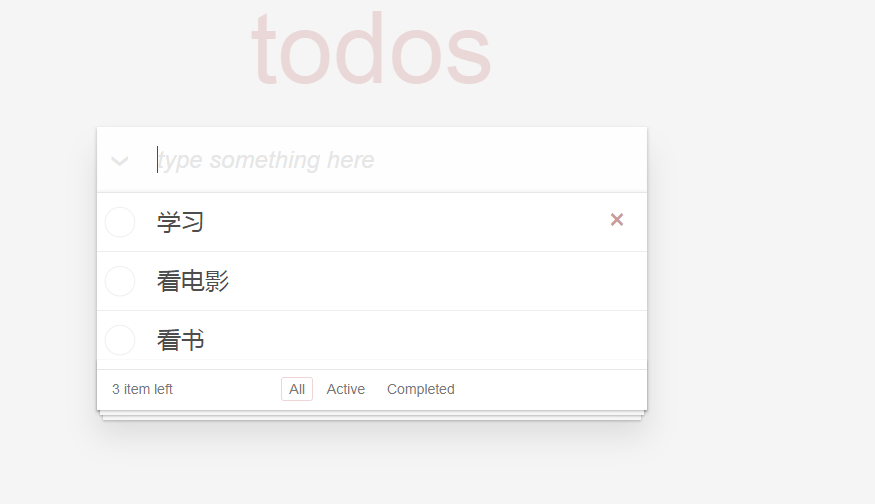
APP.js
import React, { Component,createRef,Fragment} from 'react';

import Todos from './components/todos';

import Footer from './components/footer';

import './main.css';

class App extends Component {

    constructor(props){

        super(props);

        this.state ={

            todoList:[],

            view:'all'

        };

        this.todoInput = createRef();

    }

    //添加todoList

    addTodo = (ev) => {

        let {value} = this.todoInput.current;

        if (ev.keyCode !== 13 || !value) return;

        let {todoList} = this.state;

        this.setState({

            todoList:[

                {

                    id:Math.random(),

                    content:value,

                    hasCompleted:false

                },

                ...todoList

            ]

        },()=>{

            this.todoInput.current.value = '';

        })

    };

    deleteTodo = (id)=>{

        let {todoList} = this.state;

        todoList = todoList.filter((item)=>{

            return item.id !== id;

        });

        this.setState({

            todoList:todoList

        })

    };

    toggleTodo = (id)=>{

        let {todoList} = this.state;

        todoList = todoList.map((item)=>{

            if(item.id === id){

                item.hasCompleted = !item.hasCompleted;

            }

            return item;

        });

        this.setState({

            todoList:todoList

        })

    };

    toggleAll =(ev)=>{

        let {todoList} = this.state;

        todoList = todoList.map((item)=>{

            item.hasCompleted = ev.target.checked;

            return item;

        });

        this.setState({

            todoList:todoList

        })

    };

  changeTodoContent = (id,content) =>{

      let {todoList} = this.state;

      todoList = todoList.map((item)=>{

          if(item.id === id){

              item.content =content;

          }

          return item;

      });

      this.setState({

          todoList:todoList

      })

  };

  clearComponent = ()=>{

      let {todoList} = this.state;

      todoList = todoList.filter((item)=>{

          return !item.hasCompleted;

      });

      this.setState({

          todoList:todoList

      })

  };

   changeView = (view) =>{

        this.setState({

            view:view

        })

   };

  render() {

        let {todoList ,view} = this.state;

        let selectAll = todoList.find((item)=>item.hasCompleted === false);

        let clearComponented = todoList.find((item)=>item.hasCompleted);

        let leftTodoNum = 0; //剩下未完成的条数

        let showTodoList = todoList.filter((item)=>{

            if(!item.hasCompleted) leftTodoNum++;

            switch(view){

                case 'active':

                    return !item.hasCompleted;

                case 'completed':

                    return item.hasCompleted;

                case 'all':

                default:

                    return true;

            }

        });

        let todos = showTodoList.map((item)=>{

            return (

                <Todos key={item.id}

                       {...{

                           id:item.id,

                           content:item.content,

                           deleteTodo:this.deleteTodo,

                           hasCompleted:item.hasCompleted,

                           toggleTodo:this.toggleTodo,

                           changeTodoContent:this.changeTodoContent

                     }}

                 />

            )

        });

    return (

      <div>

          <header className="header">

              <h1>todos</h1>

              {/*输入框*/}

              <input type="text"

                     className="new-todo"

                     placeholder="type something here"

                     onKeyDown={this.addTodo}

                     ref={this.todoInput}

              />

          </header>

          { todoList.length>0 && (

              <Fragment>

                  <section className="main">

                      {/*全选按钮*/}

                      <input type="checkbox"

                             className="toggle-all"

                             checked = {!selectAll && todoList.length}

                             onChange={this.toggleAll}

                      />

                      <ul className="todo-list">

                          {todos}

                      </ul>

                  </section>

                  <Footer

                      {...{

                        showClearBtn:clearComponented,

                        clearComponent:this.clearComponent,

                        view,

                        changeView:this.changeView,

                        leftTodoNum

                      }}

                  />

              </Fragment>)

          }

      </div>

    );

  }

}

export default App;
todos.js
import React, { Component,createRef } from 'react';

export default class extends Component{

    constructor(props){

        super(props);

        this.state = {

            inEdit:false

        }

        this.editInput = createRef();

    }

    inEdit = () =>{

        this.setState({

            inEdit:true

        },()=>{

            this.editInput.current.focus();

            this.editInput.current.value = this.props.content;

        })

    };

    commitContent = () =>{

        let id = this.props.id;

        let content = this.editInput.current.value;

        if(content){

            this.props.changeTodoContent(id,content);

        }else{

            this.props.deleteTodo(id);

        }

        this.editInput.current.value = '';

    };

    //失去焦点时,将input框输入的值,传给标签

    onBlur = () =>{

        //如果已经不处于编辑状态,就不需要继续执行了

        if(!this.state.inEdit) return;

        this.setState({

            inEdit:false

        },()=>{

            this.commitContent();

        })

    };

    onKeyDown = (ev) =>{

        if(ev.keyCode === 27 || ev.keyCode === 13) {

            this.setState({

                inEdit:false

            })

        }

        if(ev.keyCode === 13) this.commitContent();

    };

    render(){

        let {

            content,

            deleteTodo,

            id,

            hasCompleted,

            toggleTodo

        } = this.props;

        let className =  this.state.inEdit ? 'editing':'';

        className = hasCompleted? className +' completed':className;

        return (

            <li className={className}>

                <div className="view">

                    {/*勾选按钮*/}

                    <input type="checkbox"

                           className="toggle"

                           checked={hasCompleted}

                           onChange={()=>toggleTodo(id)}

                    />

                    {/*todo内容*/}

                    <label onDoubleClick={this.inEdit}>{content}</label>

                    {/*删除按钮*/}

                    <button className="destroy" onClick={()=>deleteTodo(id)}></button>

                </div>

                {/*编辑按钮*/}

                <input type="text"

                       className="edit"

                       ref = {this.editInput}

                       onBlur={this.onBlur}

                       onKeyDown={this.onKeyDown}

                />

            </li>

        )

    }

}
footer.js
import React from 'react';

export default function(props){

  let {

    clearCompleted,

    showClearButton,

    changeView

  } = props;

  return (

    <footer className="footer">

      <span className="todo-count">

        <strong> 8 </strong>

        <span>item left</span>

      </span>

      <ul className="filters">

        <li>

          <a

            className="selected"

          >All</a>

        </li>

        <li>

          <a

            className="selected"

          >Active</a>

        </li>

        <li>

          <a

          >Completed</a>

        </li>

      </ul>

      {/* 清除完成按钮 */}

      {showClearButton && (

        <button

          className="clear-completed"

          onClick={clearCompleted}

        >

          clear all completed

        </button>

      )}

    </footer>

  )

}
main.css
html,

body {

    margin: 0;

    padding: 0;

}

button {

    margin: 0;

    padding: 0;

    border: 0;

    background: none;

    font-size: 100%;

    vertical-align: baseline;

    font-family: inherit;

    font-weight: inherit;

    color: inherit;

    -webkit-appearance: none;

    appearance: none;

    -webkit-font-smoothing: antialiased;

    -moz-font-smoothing: antialiased;

    font-smoothing: antialiased;

}

body {

    font: 14px 'Helvetica Neue', Helvetica, Arial, sans-serif;

    line-height: 1.4em;

    background: #f5f5f5;

    color: #4d4d4d;

    min-width: 230px;

    max-width: 550px;

    margin: 0 auto;

    -webkit-font-smoothing: antialiased;

    -moz-font-smoothing: antialiased;

    font-smoothing: antialiased;

    font-weight: 300;

}

button,

input[type="checkbox"] {

    outline: none;

}

.hidden {

    display: none;

}

.todoapp {

    background: #fff;

    margin: 130px 0 40px 0;

    position: relative;

    box-shadow: 0 2px 4px 0 rgba(0, 0, 0, 0.2),

    0 25px 50px 0 rgba(0, 0, 0, 0.1);

}

.todoapp input::-webkit-input-placeholder {

    font-style: italic;

    font-weight: 300;

    color: #e6e6e6;

}

.todoapp input::-moz-placeholder {

    font-style: italic;

    font-weight: 300;

    color: #e6e6e6;

}

.todoapp input::input-placeholder {

    font-style: italic;

    font-weight: 300;

    color: #e6e6e6;

}

.todoapp h1 {

    position: absolute;

    top: -155px;

    width: 100%;

    font-size: 100px;

    font-weight: 100;

    text-align: center;

    color: rgba(175, 47, 47, 0.15);

    -webkit-text-rendering: optimizeLegibility;

    -moz-text-rendering: optimizeLegibility;

    text-rendering: optimizeLegibility;

}

.new-todo,

.edit {

    position: relative;

    margin: 0;

    width: 100%;

    font-size: 24px;

    font-family: inherit;

    font-weight: inherit;

    line-height: 1.4em;

    border: 0;

    outline: none;

    color: inherit;

    padding: 6px;

    border: 1px solid #999;

    box-shadow: inset 0 -1px 5px 0 rgba(0, 0, 0, 0.2);

    box-sizing: border-box;

    -webkit-font-smoothing: antialiased;

    -moz-font-smoothing: antialiased;

    font-smoothing: antialiased;

}

.new-todo {

    padding: 16px 16px 16px 60px;

    border: none;

    background: rgba(0, 0, 0, 0.003);

    box-shadow: inset 0 -2px 1px rgba(0,0,0,0.03);

}

.main {

    position: relative;

    z-index: 2;

    border-top: 1px solid #e6e6e6;

}

label[for='toggle-all'] {

    display: none;

}

.toggle-all {

    position: absolute;

    top: -55px;

    left: -12px;

    width: 60px;

    height: 34px;

    text-align: center;

    border: none; /* Mobile Safari */

}

.toggle-all:before {

    content: '❯';

    font-size: 22px;

    color: #e6e6e6;

    padding: 10px 27px 10px 27px;

}

.toggle-all:checked:before {

    color: #737373;

}

.todo-list {

    margin: 0;

    padding: 0;

    list-style: none;

}

.todo-list li {

    position: relative;

    font-size: 24px;

    border-bottom: 1px solid #ededed;

}

.todo-list li:last-child {

    border-bottom: none;

}

.todo-list li.editing {

    border-bottom: none;

    padding: 0;

}

.todo-list li.editing .edit {

    display: block;

    width: 506px;

    padding: 13px 17px 12px 17px;

    margin: 0 0 0 43px;

}

.todo-list li.editing .view {

    display: none;

}

.todo-list li .toggle {

    text-align: center;

    width: 40px;

    /* auto, since non-WebKit browsers doesn't support input styling */

    height: auto;

    position: absolute;

    top: 0;

    bottom: 0;

    margin: auto 0;

    border: none; /* Mobile Safari */

    -webkit-appearance: none;

    appearance: none;

}

.todo-list li .toggle:after {

    content: url('data:image/svg+xml;utf8,<svg xmlns="http://www.w3.org/2000/svg" width="40" height="40" viewBox="-10 -18 100 135"><circle cx="50" cy="50" r="50" fill="none" stroke="#ededed" stroke-width="3"/></svg>');

}

.todo-list li .toggle:checked:after {

    content: url('data:image/svg+xml;utf8,<svg xmlns="http://www.w3.org/2000/svg" width="40" height="40" viewBox="-10 -18 100 135"><circle cx="50" cy="50" r="50" fill="none" stroke="#bddad5" stroke-width="3"/><path fill="#5dc2af" d="M72 25L42 71 27 56l-4 4 20 20 34-52z"/></svg>');

}

.todo-list li label {

    white-space: pre-line;

    word-break: break-all;

    padding: 15px 60px 15px 15px;

    margin-left: 45px;

    display: block;

    line-height: 1.2;

    transition: color 0.4s;

}

.todo-list li.completed label {

    color: #d9d9d9;

    text-decoration: line-through;

}

.todo-list li .destroy {

    display: none;

    position: absolute;

    top: 0;

    right: 10px;

    bottom: 0;

    width: 40px;

    height: 40px;

    margin: auto 0;

    font-size: 30px;

    color: #cc9a9a;

    margin-bottom: 11px;

    transition: color 0.2s ease-out;

}

.todo-list li .destroy:hover {

    color: #af5b5e;

}

.todo-list li .destroy:after {

    content: '×';

}

.todo-list li:hover .destroy {

    display: block;

}

.todo-list li .edit {

    display: none;

}

.todo-list li.editing:last-child {

    margin-bottom: -1px;

}

.footer {

    color: #777;

    padding: 10px 15px;

    height: 20px;

    text-align: center;

    border-top: 1px solid #e6e6e6;

}

.footer:before {

    content: '';

    position: absolute;

    right: 0;

    bottom: 0;

    left: 0;

    height: 50px;

    overflow: hidden;

    box-shadow: 0 1px 1px rgba(0, 0, 0, 0.2),

    0 8px 0 -3px #f6f6f6,

    0 9px 1px -3px rgba(0, 0, 0, 0.2),

    0 16px 0 -6px #f6f6f6,

    0 17px 2px -6px rgba(0, 0, 0, 0.2);

}

.todo-count {

    float: left;

    text-align: left;

}

.todo-count strong {

    font-weight: 300;

}

.filters {

    margin: 0;

    padding: 0;

    list-style: none;

    position: absolute;

    right: 0;

    left: 0;

}

.filters li {

    display: inline;

}

.filters li a {

    color: inherit;

    margin: 3px;

    padding: 3px 7px;

    text-decoration: none;

    border: 1px solid transparent;

    border-radius: 3px;

}

.filters li a.selected,

.filters li a:hover {

    border-color: rgba(175, 47, 47, 0.1);

}

.filters li a.selected {

    border-color: rgba(175, 47, 47, 0.2);

}

.clear-completed,

html .clear-completed:active {

    float: right;

    position: relative;

    line-height: 20px;

    text-decoration: none;

    cursor: pointer;

    position: relative;

}

.clear-completed:hover {

    text-decoration: underline;

}

.info {

    margin: 65px auto 0;

    color: #bfbfbf;

    font-size: 10px;

    text-shadow: 0 1px 0 rgba(255, 255, 255, 0.5);

    text-align: center;

}

.info p {

    line-height: 1;

}

.info a {

    color: inherit;

    text-decoration: none;

    font-weight: 400;

}

.info a:hover {

    text-decoration: underline;

}

/*

	Hack to remove background from Mobile Safari.

	Can't use it globally since it destroys checkboxes in Firefox

*/

@media screen and (-webkit-min-device-pixel-ratio:0) {

    .toggle-all,

    .todo-list li .toggle {

        background: none;

    }

    .todo-list li .toggle {

        height: 40px;

    }

    .toggle-all {

        -webkit-transform: rotate(90deg);

        transform: rotate(90deg);

        -webkit-appearance: none;

        appearance: none;

    }

}

@media (max-width: 430px) {

    .footer {

        height: 50px;

    }

    .filters {

        bottom: 10px;

    }

}
用路由实现跳转
App.js
   let {location:{pathname}} = this.props;

  switch(pathname){

                case '/active':

                    return !item.hasCompleted;

                case '/completed':

                    return item.hasCompleted;

                case '/':

                default:

                    return true;

            }

 <Link to="/active" className={pathname === '/active'?"selected":''}>Active</Link>
React 入门学习笔记整理(八)—— todoList的更多相关文章
- React 入门学习笔记整理目录
React 入门学习笔记整理(一)--搭建环境 React 入门学习笔记整理(二)-- JSX简介与语法 React 入门学习笔记整理(三)-- 组件 React 入门学习笔记整理(四)-- 事件 R ...
- React 入门学习笔记整理(一)——搭建环境
使用create-react-app脚手架搭建环境 1.安装node .软件下载地址:https://nodejs.org/en/,我下的推荐的版本. 安装之后测试是否安装成功.windows系统下, ...
- React 入门学习笔记整理(二)—— JSX简介与语法
先看下这段代码: import React from 'react'; //最终渲染需要调用ReactDOM库,将jsx渲染都页面中 import ReactDOM from 'react-dom'; ...
- React 入门学习笔记整理(三)—— 组件
1.定义组件 1)函数组件 function GreateH(props){ return <div> <h2>hello,{props.name}</h2> &l ...
- React 入门学习笔记整理(四)—— 事件
1.事件定义 React事件绑定属性的命名采用驼峰式写法,而不是小写. 如果采用 JSX 的语法你需要传入一个函数作为事件处理函数,而不是一个字符串(DOM元素的写法) 在类组件中定义函数,通过thi ...
- React 入门学习笔记整理(五)—— state
1.state 1)组件本省也是有状态的,定义在组件内部的state中,state的状态只能由组件自身改变,任何其他组件都不能改变. 当需要改变state时,通过调用setState方法来改变,set ...
- React 入门学习笔记整理(六)—— 组件通信
1.父子组件通信 1)父组件与子组件通信,使用Props 父组件将name传递给子组件 <GreateH name="kitty"/> 子组件通过props接收父组件的 ...
- React 入门学习笔记整理(七)—— 生命周期
(1)react 生命周期 只有类组件有生命周期,函数组件没有生命周期 1.挂载阶段:这些方法会在组件实例被创建和插入DOM中时被调用: 1)constructor(props) 初始化组件的状态.绑 ...
- React 入门学习笔记整理(九)——路由
(1)安装路由 React-router React-router提供了一些router的核心api,包括Router, Route, Switch等,但是它没有提供dom操作进行跳转的api. Re ...
随机推荐
- 3.html基础标签:表格
<!DOCTYPE html> <html lang="en"> <head> <meta charset="UTF-8&quo ...
- 仿B站项目——(2)环境配置,文件目录
环境配置 主要参考入门Webpack,看这篇就够了,webpack入门和webpack实用配置. 实用开发环境 利用下面的webpack.json和webpack.config.js可以搭建一个使用e ...
- Mybatis框架二:增删改查
这里是搭建框架和准备数据: http://www.cnblogs.com/xuyiqing/p/8600888.html 实现增删改查功能: 测试类: package junit; import ja ...
- OpenStack-Ocata版+CentOS7.6 云平台环境搭建 —9.块存储服务(cinder)部署配置
块存储服务部署相关块存储服务(cinder)为实例提供块存储.存储的分配和消耗是由块存储驱动器,或者多后端配置的驱动器决定的.还有很多驱动程序可用:NAS/SAN,NFS,ISCSI,Ceph等.典型 ...
- [git] 常用配置
基本配置 对git进行配置时使用 git config 命令进行操作 1. git config 的作用域,缺省等于 local git config --local #只针对某个仓库有效 git ...
- oracle对sum出来的数字进行非空补0处理
oracle在使用函数计算式会遇到这样的情况:例如sum函数 如果计算的sum值为null,则用0替代 方法1(便于理解): select when sum(c.num) is null then ...
- 初识Telerik for AJAX
由于项目需要,本人又刚入门.net开发,项目经理介绍了一个.net流行的开发框架telerik.于是我开始慢慢学习了,发现这个控件还是不错的,学习到的内容和初学者一起探讨一下. 1:第一步 什么是te ...
- centos7防火墙管理的变化
当我们在centos7中输入service iptables status 查看系统的防火墙状态,会出现如下错误: 网上查阅才知道centos7的防火墙管理工具变了,原来的iptables已经不用了, ...
- Spring.Net封闭业务类为WebService注意点和问题
最近遇到的一个项目中用到了标题所说的方法,用Spring.Net将业务类封闭成WebService供其它地方调用使用,感觉还是蛮新鲜的,于是在园子中搜了一篇园友写的文章(这里)自己也尝试着搭了一个环境 ...
- tf.nn.in_top_k原理探究
import tensorflow as tf; A = [[0.8,0.6,0.3], [0.1,0.6,0.4],[0.5,0.1,0.9]] B = [0,2,1] out = tf.nn.in ...